
Introduction
The RENPHO Smart Body Measuring Tape is an innovative device designed to help you accurately track your body measurements and progress towards your fitness goals. Compatible with the Renpho Health App, it allows for easy recording, analysis, and tracking of various body areas. This manual provides detailed instructions on setting up, operating, and maintaining your smart tape measure.

The RENPHO Smart Body Measuring Tape and its accompanying mobile application.
What's in the Box
- 1 x Smart measuring tape
- 1 x CR2032 battery
- 1 x User manual
Setup Guide
Step 1: Install the battery
Locate the battery compartment on the back of the device. Twist the battery cover counter-clockwise to open. Insert the included CR2032 battery with the positive (+) side facing up. Close the cover by twisting clockwise until secure.

Illustration of battery installation.
Step 2: Download the RENPHO Health App
Download the 'RENPHO Health' app from the Apple App Store or Google Play Store. You can scan the QR code provided in the product packaging or search for 'RENPHO Health' directly.
Step 3: Activate Bluetooth and Open the App
Ensure Bluetooth is enabled on your smartphone. Open the RENPHO Health App and follow the on-screen instructions to pair your smart tape measure. The device will automatically connect when the app is open and the tape is activated.

Phone screen showing Bluetooth settings and the tape measure.
Step 4: Measure and Sync in the App
Once paired, you can begin taking measurements. The measurements will automatically sync to the app, allowing you to track your progress over time.

User measuring waist with the tape measure and app displaying data.
Operating Instructions
Taking a Measurement
- Pull out the tape to the desired length.
- Wrap the tape around the body part you wish to measure.
- Insert the locking pin into the tape receptacle until a "click" is heard. This secures the tape for easy single-handed measurement.
- Press the Retract Button to tighten the tape gently around the body part for an accurate reading.
- Read the measurement on the large LCD screen.
- Press the 'Confirm' button (check mark icon) on the device to save the measurement to the app. The app will automatically move to the next suggested body part for measurement.

The upgraded lock hook design allows for easy self-measurement.
Switching Units
The RENPHO Smart Body Measuring Tape supports both inches and centimeters. To switch between units, press the 'M' button on the device. The display will show the current unit (in or cm).

Easily switch between inches and centimeters on the digital display.
Using the RENPHO Health App
The app is central to tracking your progress. It allows you to:
- Record measurements for 12 key body areas and 6 customized parts.
- View your waist-to-hip ratio.
- See data presented in easy-to-read graphs for trend analysis.
- Accommodate an unlimited number of users, making it suitable for families.
- Utilize 'Baby Mode' to document a baby's growth journey.

The RENPHO Health App provides comprehensive measurement tracking and analysis.
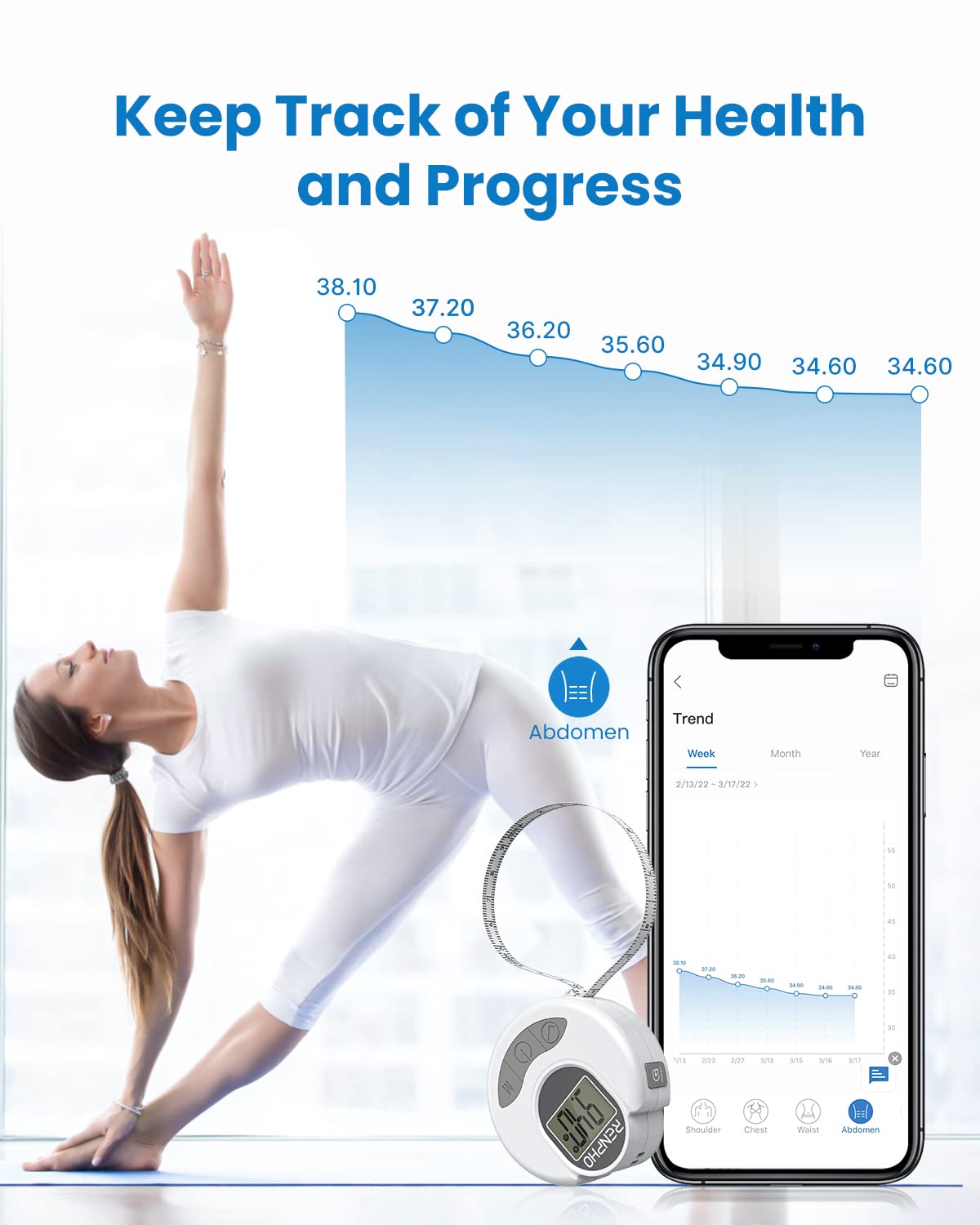
Track your health and progress with detailed trend graphs in the app.

Baby Mode allows for documenting a baby's growth journey.
Key Features
- Accurate & Consistent Measurements: The tape provides precise readings with a large, clear LCD display, minimizing errors common with traditional tapes.
- Seamless Bluetooth Connectivity: Pairs effortlessly with the RENPHO Health App for automatic data logging and tracking over time.
- Retractable Easy-lock Hook: Innovative design allows for convenient single-handed measurement of various body parts without assistance.
- Compact and Portable: Lightweight and small, making it easy to carry for on-the-go tracking. Measures up to 60 inches (150 cm).
- Unlimited Users: The RENPHO Health App supports an unlimited number of user profiles, ideal for families or multiple individuals tracking their progress.
- Wide Application: Suitable for tracking measurements of biceps, calves, hips, thighs, waist, shoulders, bust, neck, and abdomen, catering to professional trainers, fitness enthusiasts, and those on weight loss journeys.
- Integration with RENPHO Ecosystem: Works seamlessly with other RENPHO devices like smart scales within the same app for a holistic health overview.

Detailed diagram of the smart body tape measure components.
Specifications
| Feature | Detail |
|---|---|
| Product Dimensions | 2.76 x 2.76 x 0.04 inches (7 x 7 x 0.1 cm) |
| Item Model Number | R-Y001 |
| Batteries | 1 C battery required (included) |
| Item Weight | 0.06 Kilograms (2.12 ounces) |
| Blade Length | 60 Inches (150 cm) |
| Brand | RENPHO |
Maintenance
- Keep the device clean and dry. Wipe with a soft, damp cloth if necessary.
- Avoid exposing the device to extreme temperatures or direct sunlight.
- Do not attempt to disassemble the device, as this will void the warranty.
- Replace the battery when the display becomes dim or unresponsive.
Troubleshooting
- Device not turning on: Check if the battery is installed correctly and has sufficient charge. Replace the battery if needed.
- Bluetooth connection issues: Ensure Bluetooth is enabled on your smartphone and the RENPHO Health App is open. Try restarting both the device and your phone.
- Inaccurate readings: Ensure the tape is pulled taut and flat against the body part being measured. Avoid twisting the tape.
- App not saving measurements: Ensure the device is properly connected to the app and you are pressing the 'Confirm' button on the tape measure after each reading.
Warranty and Support
RENPHO products come with a standard manufacturer's warranty. For detailed warranty information, product support, or to report any issues, please visit the official RENPHO website or contact their customer service directly. Keep your purchase receipt for warranty claims.