
1. Introduction
Welcome to the Pinetree 93B True Wireless Earbuds user manual. This guide provides detailed instructions for the proper setup, operation, and maintenance of your new earbuds. Please read this manual thoroughly before use to ensure optimal performance and longevity of your device.
Package Contents
- Pinetree 93B True Wireless Earbuds (Left and Right)
- Charging Case
- USB Type-C Charging Cable
- Multiple Sizes of Ear Tips (S, L)
- User Manual
2. Product Overview
The Pinetree 93B True Wireless Earbuds offer a seamless audio experience with advanced features. Familiarize yourself with the components below.

Image: Pinetree 93B True Wireless Earbuds securely placed within their charging case, illustrating the compact design and digital battery display on the case.
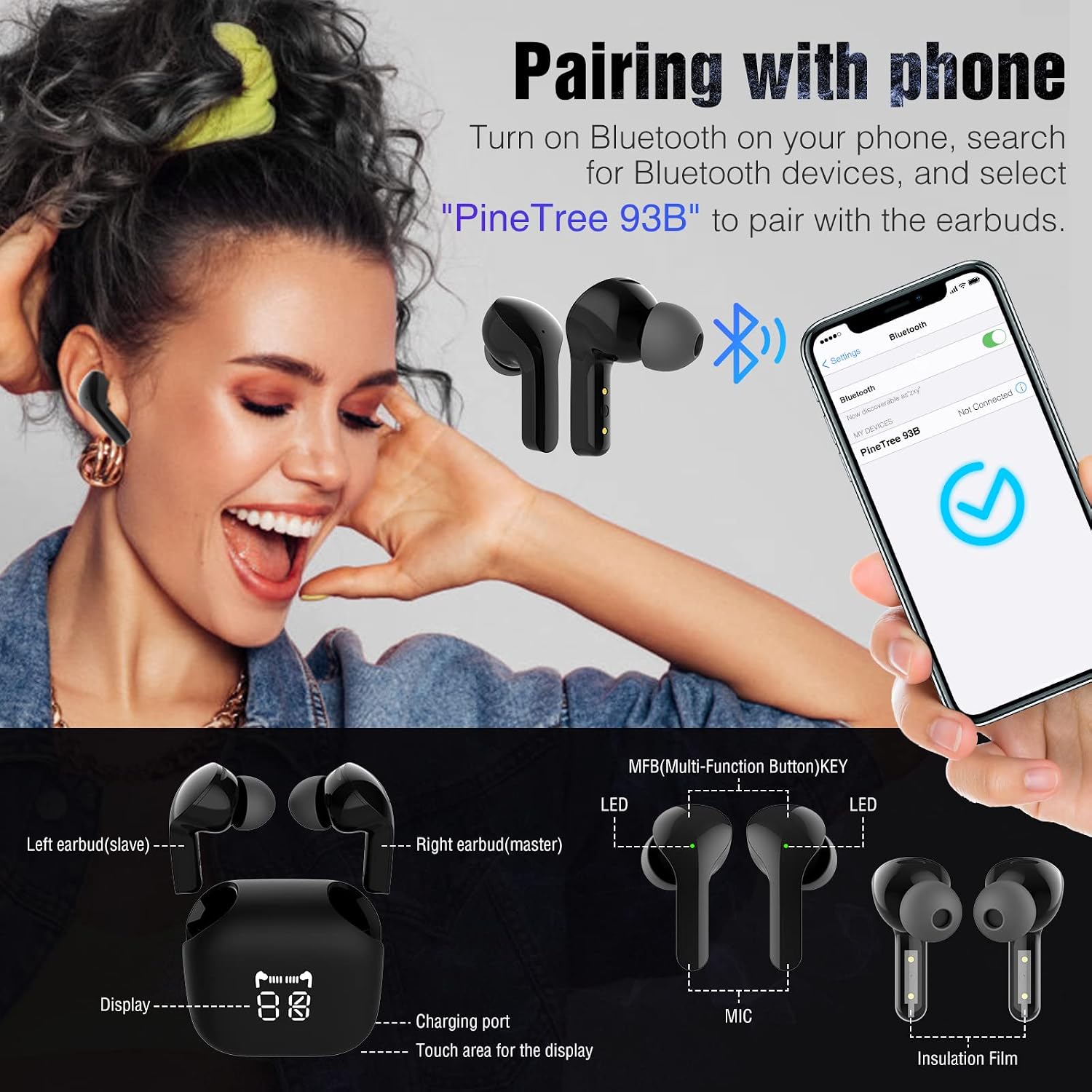
Image: Detailed diagram labeling key components of the Pinetree 93B earbuds and charging case, including the MFB (Multi-Function Button) key, LED indicators, microphone, display, charging port, and insulation film.
Component Identification
- MFB (Multi-Function Button) Key: Touch-sensitive area for controlling music, calls, and voice assistant.
- LED Indicator: Displays pairing status, charging status, and low battery warnings.
- Microphone: Built-in for clear voice calls.
- Charging Port: USB Type-C port on the charging case.
- Digital Display: On the charging case, shows battery levels for the case and individual earbuds.
- Insulation Film: Must be removed from new earbuds before first use.
3. Setup
3.1 Initial Charging
Before first use, ensure both the earbuds and the charging case are fully charged.
- Remove the protective insulation film from the charging contacts on the earbuds.
- Place the earbuds into the charging case.
- Connect the USB Type-C charging cable to the charging port on the case and a power source.
- The digital display on the charging case will show the current battery level. Allow approximately 2 hours for a full charge of the case.

Image: The Pinetree 93B charging case connected to a smartphone via a USB-C cable, demonstrating its capability to act as a backup power source.

Image: A visual representation highlighting the 2000mAh capacity of the Pinetree 93B charging case, indicating its ability to provide extended power for the earbuds and potentially other devices.
3.2 Bluetooth Pairing
Follow these steps to pair your Pinetree 93B earbuds with your device:
- Ensure the earbuds are charged and removed from the charging case. They will automatically enter pairing mode.
- On your smartphone or Bluetooth-enabled device, go to the Bluetooth settings.
- Turn on Bluetooth.
- Search for available devices. Select "PineTree 93B" from the list.
- Once connected, you will hear a "pairing successful" voice prompt, and the LED indicators on the earbuds will blink white every 5 seconds.
Image: A visual guide demonstrating the process of pairing the Pinetree 93B earbuds with a smartphone, showing the Bluetooth settings menu and the "PineTree 93B" device selected for connection.
4. Operating Instructions
4.1 Wearing the Earbuds
The Pinetree 93B earbuds are designed for comfort and a secure fit. Choose the ear tips that best suit your ears for optimal sound quality and stability.

Image: Illustrates the ergonomic design of the Pinetree 93B earbuds, showing how they fit comfortably in the ear, along with diagrams for Single Ear, Binaural, and Share modes.

Image: A person wearing Pinetree 93B earbuds during exercise, emphasizing their suitability for sports. Inset shows available ear tip sizes (L and S) for a customized fit.
4.2 Power On/Off
- Power On: The earbuds automatically power on when removed from the charging case.
- Power Off: The earbuds automatically power off and begin charging when placed back into the charging case.
4.3 Touch Controls (MFB Button)
The MFB (Multi-Function Button) on each earbud allows for easy control of various functions:

Image: A diagram illustrating the simple touch control functions of the Pinetree 93B earbuds, showing various tap gestures and their corresponding actions for music and calls.
| Action | Function |
|---|---|
| Single Tap (Left/Right Earbud) | Play/Pause Music, Answer/End Call |
| Double Tap (Right Earbud) | Next Track |
| Double Tap (Left Earbud) | Previous Track |
| Long Press (Left/Right Earbud) | Reject Call, Activate Voice Assistant |
4.4 Battery Status and Warnings
- Digital Display: The charging case features an LED digital display to show the battery percentage of the case and the charging status of each earbud.
- Low Battery Warning: When the earbuds are not in the charging case and their battery level drops below 20%, you will hear an audible prompt 4 times, repeated every 60 seconds. The earbud LEDs will also blink red every 10 seconds.

Image: Infographic detailing the battery life of the Pinetree 93B earbuds: 55mAh per bud for 6 hours playtime, and the 2000mAh charging case providing 65 hours of additional playtime after 2 hours of charging.
5. Maintenance
5.1 Cleaning
- Regularly clean the earbuds and charging case with a soft, dry, lint-free cloth.
- Do not use harsh chemicals, cleaning solvents, or strong detergents.
- Clean the charging contacts on both the earbuds and the case to ensure proper charging.
5.2 Storage
- When not in use, store the earbuds in their charging case to protect them and keep them charged.
- Store in a cool, dry place away from extreme temperatures and direct sunlight.
6. Troubleshooting
If you encounter any issues with your Pinetree 93B earbuds, please refer to the following common solutions:
| Problem | Possible Solution |
|---|---|
| Earbuds do not connect or pair. |
|
| Only one earbud has sound. |
|
| Earbuds are not charging. |
|
| Poor sound quality. |
|
7. Specifications
| Feature | Detail |
|---|---|
| Model | Pinetree 93B |
| Bluetooth Version | 5.0 |
| Connectivity Technology | Wireless (Bluetooth) |
| Earbud Battery Life | Up to 6 hours (per charge) |
| Charging Case Battery Capacity | 2000mAh |
| Total Playtime (with case) | Up to 100 hours |
| Charging Port | USB Type-C |
| Control Type | Touch Control, Voice Control |
| Microphone | Built-In |
| Material | 20% Copper, 45% Board, 35% PC |
| Item Weight | 154 Grams |
| Product Dimensions | 5.08 x 5.08 x 2.54 cm |
| Compatible Devices | IOS, Android (Smartphone) |
| Special Features | Lightweight, Microphone Included, Sports & Exercise, Universal Phone Control |
8. Safety Information
Please read and follow these safety guidelines to prevent damage to your device or personal injury:
- Do not disassemble, repair, or modify the earbuds or charging case.
- Keep the device away from extreme temperatures, direct sunlight, and moisture.
- Avoid dropping or subjecting the device to strong impacts.
- Do not use the earbuds at excessively high volumes for prolonged periods, as this may cause hearing damage.
- Keep out of reach of children and pets.
- Dispose of the device and its battery responsibly according to local regulations.
9. Warranty and Support
For warranty information or technical support, please refer to the documentation provided with your purchase or contact the retailer. Keep your proof of purchase for any warranty claims.