
1. Introduction
This manual provides instructions for the XCRFID EM4100 TK4100 Chip Proximity ID Keychains. These key fobs are designed for use in various access control and time attendance systems. Each fob contains an EM4100 chip with a 64-bit read-only memory, pre-programmed with a unique identification number. It is important to note that these key fobs are read-only and cannot be written to or reprogrammed.
The package includes 10 blue EM4100 proximity ID tags, each equipped with a key ring for convenient attachment.
2. Setup
The EM4100 TK4100 key fobs are pre-programmed with unique ID numbers. No initial programming is required for the fobs themselves. Integration into an access control system involves the following steps:
- System Compatibility: Ensure your existing access control system or RFID reader is compatible with EM4100 (125kHz) proximity cards/fobs.
- ID Registration: Each key fob has a unique ID number laser-printed on its surface. This ID number must be manually entered or scanned into your access control system's database. Refer to your access control system's manual for specific instructions on how to add new user IDs.
- Assignment: Assign the registered ID to a specific user or access privilege within your system.

Once the ID is registered and assigned in your access control system, the key fob is ready for use.
3. Operating Instructions
To operate the EM4100 TK4100 key fob:
- Present the Fob: Hold the key fob within the reading range of a compatible RFID reader. The typical reading distance is 2-10 cm (approximately 0.8 to 4 inches).
- Confirmation: The RFID reader will typically provide an audible beep or visual indicator (e.g., an LED light) to confirm a successful read.
- Access Granted: If the ID is recognized and authorized by the access control system, the associated action (e.g., door unlock) will occur.
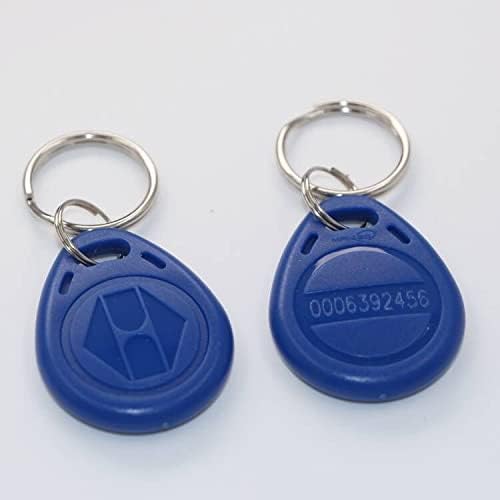
Each key fob is pre-programmed with a unique ID, which is laser-printed on its surface for easy identification and registration.
4. Maintenance
The XCRFID EM4100 TK4100 key fobs are designed for durability and require minimal maintenance.
- Water Resistance: The fobs feature a waterproof construction, making them suitable for various environments.
- Temperature Range: They are designed to operate within a temperature range of -20°C to +60°C (-4°F to +140°F) and can be stored between -20°C to +65°C (-4°F to +149°F).
- Data Retention: The stored ID data has a minimum retention period of 10 years.
- Cleaning: Clean the fobs with a soft, damp cloth if necessary. Avoid harsh chemicals or abrasive materials.
- Physical Damage: While durable, avoid subjecting the fobs to excessive force, bending, or impact, which could damage the internal chip.
5. Troubleshooting
If you encounter issues with your EM4100 TK4100 key fobs, consider the following troubleshooting steps:
- Fob Not Recognized by Reader:
- Ensure the fob is held within the optimal reading distance (2-10 cm) of the RFID reader.
- Verify that the RFID reader is powered on and functioning correctly.
- Confirm that the access control system is configured to accept EM4100 (125kHz) fobs.
- Fob Recognized but Access Denied:
- Check the access control system's database to ensure the fob's unique ID is correctly registered and associated with the appropriate access permissions.
- Verify that the user associated with the fob has active access privileges for the specific door or area.
- Attempting to Write Data to Fob:
- The EM4100 TK4100 key fobs are read-only. They cannot be written to or reprogrammed. If you require writable RFID tags, you will need to acquire T5577 RFID tags or similar writable alternatives.
6. Specifications
| Feature | Specification |
|---|---|
| Chip Type | EM4100 |
| Function | Read Only |
| Memory Size | 64 bits Read Only Memory (10HEX serial number) |
| Material | ABS |
| Reading Distance | 2-10 cm |
| Data Storage Time | Minimum 10 years |
| Operating Temperature | -20°C to +60°C (-4°F to +140°F) |
| Storage Temperature | -20°C to +65°C (-4°F to +149°F) |
| Color | Blue |
| Unit Count | 10 pieces |
| Compatible Devices | RFID Reader |
| Connectivity Technology | Wireless |
| Item Model Number | XC4100RFIDTAGS |
| UPC | 612289282185 |

7. Warranty Information
Specific warranty details for the XCRFID EM4100 TK4100 Chip Proximity ID Keychains are not provided in this manual. For information regarding product warranty, please contact the seller or manufacturer directly at the point of purchase.
8. Support
For technical assistance, product inquiries, or further support, please reach out to the XCRFID customer service or the retailer from whom the product was purchased. Please have your product model number (XC4100RFIDTAGS) and purchase details available when contacting support.