
1. Introduction
Thank you for choosing the SAFUEL 10000mAh Magnetic Wireless Power Bank. This compact yet powerful external battery is designed to provide convenient and fast charging for your compatible devices, especially the iPhone 12, 13, and 14 series, through both magnetic wireless charging and high-speed wired USB-C Power Delivery (PD) 20W.
This manual provides essential information on how to set up, operate, maintain, and troubleshoot your power bank to ensure optimal performance and longevity.
2. Safety Information
Please read all safety warnings and instructions before using this product to prevent injury or damage.
- Do not expose the power bank to extreme temperatures (above 45°C or below 0°C).
- Do not disassemble, modify, or repair the device yourself.
- Keep away from water, moisture, and flammable materials.
- Avoid dropping or subjecting the power bank to strong impacts.
- Dispose of the power bank according to local regulations; do not dispose of it with household waste.
3. Product Overview
Package Contents:
- SAFUEL 10000mAh Magnetic Wireless Power Bank
- USB-C Charging Cable
- User Manual
Device Layout:
- Magnetic Charging Surface: For wireless charging compatible devices.
- USB-C Port: For charging the power bank and wired charging other devices (input/output).
- LED Indicators: Display battery level and charging status.

Figure 3.1: SAFUEL 10000mAh Magnetic Wireless Power Bank in use, demonstrating its wireless charging capability with a smartphone.
4. Setup and Initial Use
4.1 Charging the Power Bank
Before first use, fully charge your SAFUEL power bank. Connect the provided USB-C cable to the power bank's USB-C port and the other end to a USB wall charger (not included). The LED indicators will illuminate to show the charging progress.
- Charging Time: Varies depending on the power adapter used. For fastest charging, use a PD compatible charger.
- LED Indicators: The blue LEDs will light up progressively as the power bank charges. All four LEDs will be solid blue when fully charged.
5. Operating Instructions
5.1 Wireless Magnetic Charging (for iPhone 12/13/14 Series)
The power bank features strong built-in magnets for secure attachment and efficient wireless charging.
- Ensure your iPhone is compatible with MagSafe (iPhone 12, 13, or 14 series). For optimal magnetic adhesion, use your iPhone without a case or with a MagSafe-compatible case.
- Align the power bank with the back of your iPhone. The magnets will automatically snap it into place.
- Wireless charging will begin automatically. The LED indicators on the power bank will show its remaining charge.

Figure 5.1: The strong magnetic connection of the SAFUEL power bank to a smartphone, highlighting the internal magnetic coil for secure wireless charging.
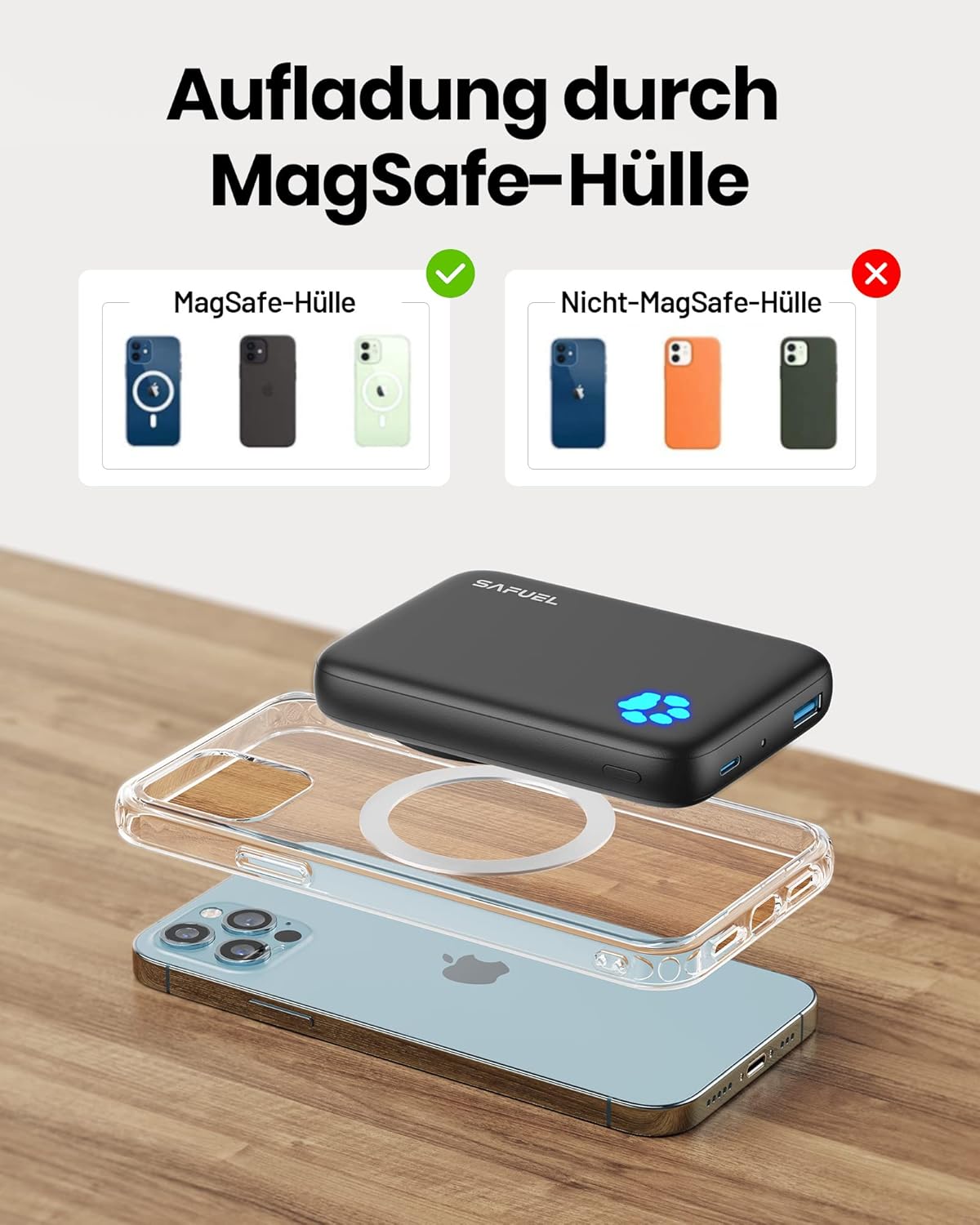
Figure 5.2: Compatibility guide showing that magnetic charging is effective with MagSafe cases but not with standard non-MagSafe cases.
5.2 Wired USB-C Charging (PD 20W)
The USB-C port supports Power Delivery (PD) 20W output for fast wired charging of compatible devices.
- Connect one end of the USB-C cable to the power bank's USB-C port.
- Connect the other end of the USB-C cable to your device's charging port.
- Charging will begin automatically. The power bank's LEDs will indicate its remaining charge.

Figure 5.3: The SAFUEL power bank providing 20W Power Delivery fast charging to an iPhone via a USB-C cable.
5.3 Checking Battery Level
The blue LED indicators on the power bank show the current battery level:
- 4 LEDs Solid: 75% - 100% charged
- 3 LEDs Solid: 50% - 75% charged
- 2 LEDs Solid: 25% - 50% charged
- 1 LED Solid: 0% - 25% charged (recharge soon)
6. Care and Maintenance
- Cleaning: Use a soft, dry cloth to clean the power bank. Do not use harsh chemicals or abrasive materials.
- Storage: Store the power bank in a cool, dry place away from direct sunlight and extreme temperatures. If storing for extended periods, charge the power bank to about 50% every 3 months to preserve battery health.
- Avoid Over-Discharge: Do not allow the power bank to completely drain its battery frequently, as this can reduce its lifespan.
7. Troubleshooting
| Problem | Possible Cause | Solution |
|---|---|---|
| Power bank not charging | Charging cable or adapter faulty; power bank fully discharged. | Try a different USB-C cable and wall adapter. Ensure the power bank is connected to a working power source. |
| Device not charging wirelessly | Device not MagSafe compatible; misaligned; non-MagSafe case. | Ensure your device is an iPhone 12/13/14 series. Realign the power bank. Remove non-MagSafe cases or use a MagSafe-compatible case. |
| Slow charging | Using a non-PD charger for wired charging; device not optimized for fast wireless charging. | For wired charging, use a PD 20W compatible wall adapter. Ensure no foreign objects are between the power bank and your device during wireless charging. |
| Power bank gets warm during use | Normal operation during high-speed charging. | This is normal. If it becomes excessively hot, disconnect and allow it to cool down. Contact support if overheating persists. |
8. Specifications
| Feature | Detail |
|---|---|
| Brand | SAFUEL |
| Model | 10000mAh Magnetic Wireless Power Bank |
| Battery Capacity | 10000mAh |
| Battery Composition | Lithium-Polymer |
| Connector Type | USB Type C (Input & Output) |
| Special Feature | Fast Charging (PD 20W wired, Magnetic Wireless) |
| Voltage | 5 Volts (Output) |
| Power Source | Cable Electric |
| Number of Ports | 1 (USB-C) |
| Compatible Devices | Smartphones (specifically iPhone 12, 13, 14 series for magnetic charging) |

Figure 8.1: Capacity comparison illustrating the extended video playback time provided by the 10000mAh SAFUEL power bank.
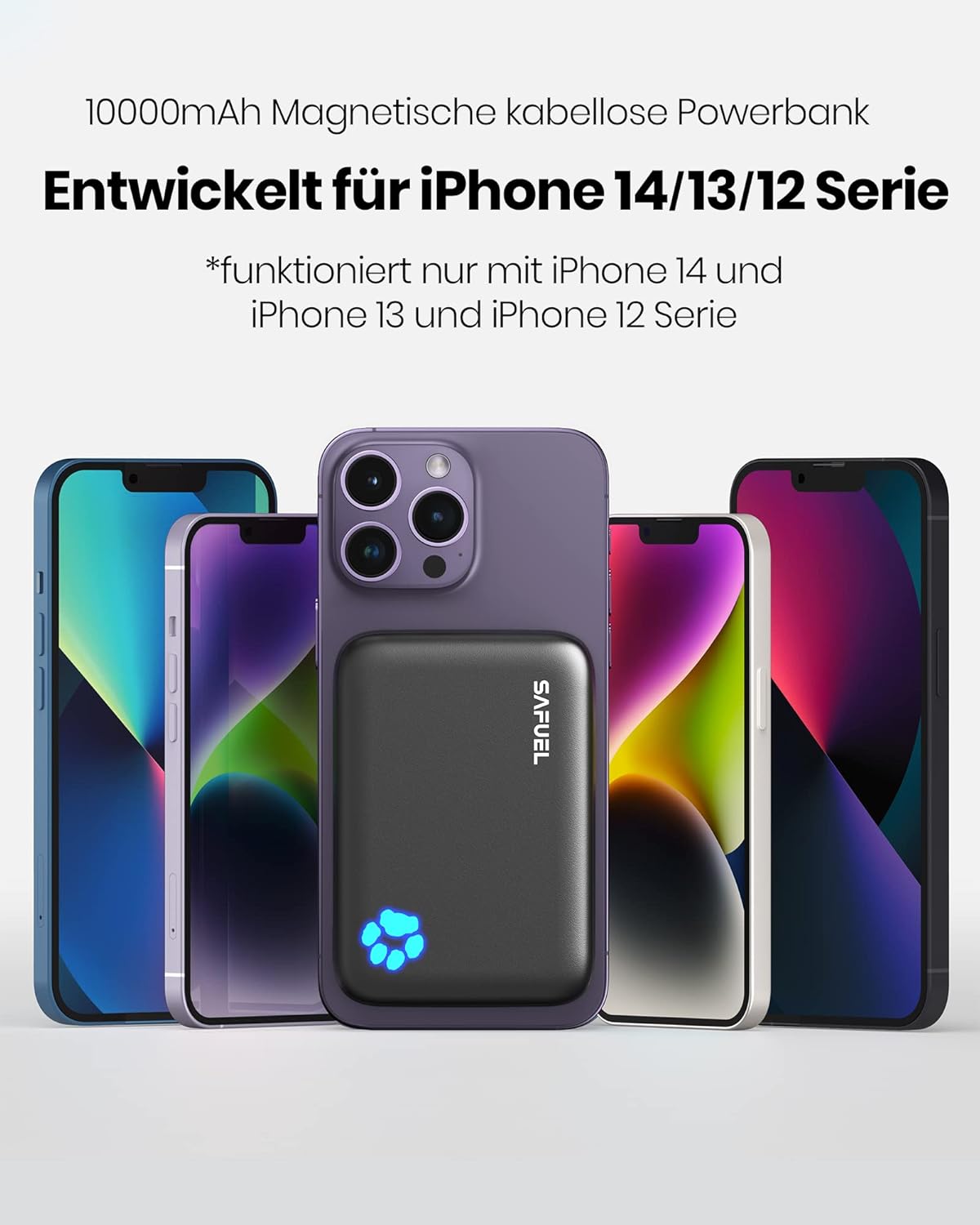
Figure 8.2: The SAFUEL power bank demonstrating magnetic compatibility with various iPhone 12, 13, and 14 series models.
9. Warranty and Support
The SAFUEL 10000mAh Magnetic Wireless Power Bank comes with a 3-year warranty from the date of purchase. This warranty covers manufacturing defects and malfunctions under normal use.

Figure 9.1: The SAFUEL power bank in a real-world usage scenario, highlighting its portability and the included 3-year warranty.
For warranty claims, technical support, or any questions regarding your product, please contact SAFUEL customer service through the retailer's platform or the contact information provided on the product packaging.


