
Introduction
The Philips Sonicare 3100 Rechargeable Electric Toothbrush is designed to provide an effective and gentle cleaning experience. Utilizing advanced Sonicare technology, it helps remove plaque and promotes gum health. This manual provides essential information for the proper setup, operation, maintenance, and troubleshooting of your device.

Image: The Philips Sonicare 3100 electric toothbrush, showcasing its sleek design and brush head.
What's in the Box
Your Philips Sonicare 3100 package includes the following components:
- 1 Philips Sonicare 3100 Electric Toothbrush Handle
- 1 SimplyClean (C1) Brush Head
- 1 USB Charger (wall adapter not included)
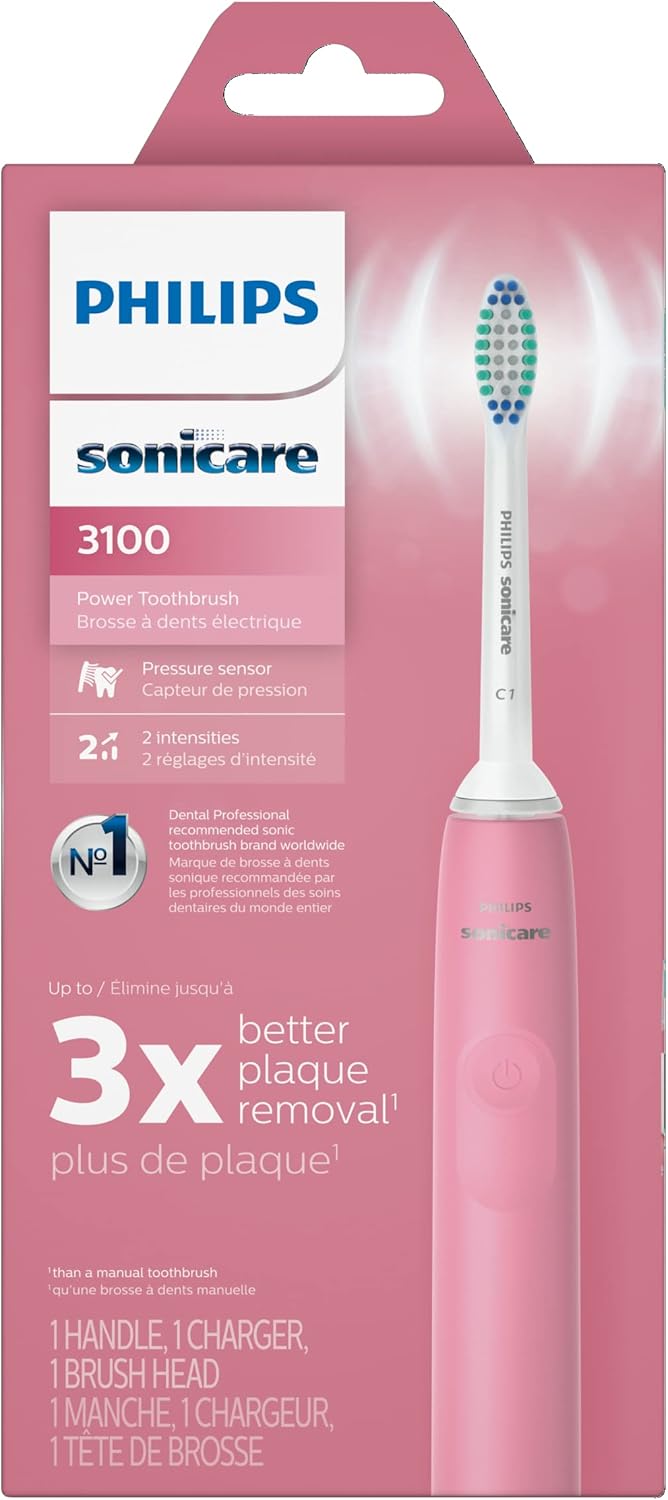
Image: The Philips Sonicare 3100 product box, illustrating the included components.
Setup
1. Charging the Toothbrush
- Connect the USB charging cable to the charging base.
- Plug the USB cable into a compatible USB wall adapter (not included) or a USB port.
- Place the toothbrush handle onto the charging base. The battery indicator light will show the charging status. A full charge provides approximately 14 days of regular use.

Image: The Philips Sonicare 3100 toothbrush handle resting on its charging base, with the battery indicator light visible.

Image: The Philips Sonicare 3100 toothbrush with its USB charging cable and base, highlighting the USB connection.
2. Attaching the Brush Head
- Align the brush head with the metal shaft on the toothbrush handle.
- Push the brush head down firmly until it clicks into place.

Image: A hand demonstrating how to attach a Philips Sonicare click-on brush head to the toothbrush handle.
Operating Instructions
1. Brushing Your Teeth
- Wet the brush head and apply a small amount of toothpaste.
- Place the brush head against your teeth at a slight angle towards the gumline.
- Press the power button to turn on the toothbrush.
- Gently move the brush head slowly across each tooth, allowing the Sonicare technology to clean effectively. Do not scrub.
- The SmarTimer will automatically turn off the toothbrush after 2 minutes, indicating the dentist-recommended brushing time.
- The QuadPacer feature will beep and pause briefly every 30 seconds, signaling you to move to the next quadrant of your mouth.

Image: A person using the Philips Sonicare 3100 toothbrush, demonstrating proper brushing technique and the 2-minute timer feature.

Image: A close-up of the Philips Sonicare brush head on teeth, illustrating its plaque removal capabilities.

Image: A magnified view of the Philips Sonicare brush head, depicting the sonic vibrations that help prevent plaque buildup.
2. Pressure Sensor
The Philips Sonicare 3100 features a built-in pressure sensor. If you apply too much pressure while brushing, the handle will vibrate and the light ring at the bottom will flash red to alert you. Reduce pressure to protect your gums and teeth from damage.

Image: A person using the Philips Sonicare 3100, with an overlay indicating the pressure sensor's function in protecting gums.
3. Intensity Settings
Your toothbrush has two intensity settings: low and high. To change the intensity, press the power button again after turning the brush on. The brush will cycle between the two settings. Select the intensity that feels most comfortable and effective for you.

Image: The Philips Sonicare 3100 toothbrush handle, illustrating the two available intensity settings.
Maintenance
1. Cleaning the Toothbrush
- After each use, rinse the brush head thoroughly under running water.
- Wipe the handle with a damp cloth. Do not immerse the handle in water.
- Clean the charging base periodically with a damp cloth. Ensure it is unplugged before cleaning.
2. Replacing the Brush Head
For optimal performance and hygiene, replace your brush head every 3 months, or sooner if the bristles appear worn or frayed. The toothbrush features a brush head replacement reminder light to assist you.

Image: The Philips Sonicare 3100 toothbrush handle displaying the brush head replacement reminder icon.
3. Battery Care
To maintain battery life, ensure the toothbrush is fully charged before its first use. Recharge the toothbrush when the battery indicator light signals low power. Avoid completely depleting the battery frequently.
Troubleshooting
| Problem | Possible Cause / Solution |
|---|---|
| Toothbrush does not turn on. | Battery may be depleted. Place on charger for at least 24 hours. |
| Toothbrush does not charge. | Ensure the USB cable and adapter are properly connected and functioning. Check for debris on the charging contacts. |
| Reduced brushing effectiveness. | Brush head may be worn. Replace with a new Philips Sonicare brush head. |
| Pressure sensor light flashes frequently. | You may be applying too much pressure. Reduce the force applied while brushing. |
Specifications
- Model Name: Philips Sonicare 3100
- Model Number: HX3681/06
- Power Source: Corded Electric (USB charging)
- Battery Life: Up to 14 days
- Intensity Settings: 2
- Special Features: Pressure Sensor, Brushing Timer (SmarTimer), QuadPacer
- Bristle Material: Nylon
- Handle Material: Plastic
- Dimensions: 2.48 x 4.29 x 8.66 inches
- Weight: 8.64 ounces
- UPC: 075020100382
Warranty and Support
Philips Sonicare products are designed for durability and performance. This product typically comes with a 2-year warranty. For detailed warranty information, product registration, or technical support, please refer to the official Philips Sonicare website or contact their customer service. Keep your purchase receipt as proof of purchase.
Important: Avoid applying excessive pressure while brushing to prevent gum damage. Statements regarding dietary supplements have not been evaluated by the FDA and are not intended to diagnose, treat, cure, or prevent any disease or health condition.


