
vidaXL 336232
vidaXL Industrial Style TV Stand Instruction Manual
Model: 336232
1. Introduction
This manual provides detailed instructions for the assembly, operation, and maintenance of your vidaXL Industrial Style TV Stand. Please read this manual thoroughly before beginning assembly or use to ensure safe and proper functionality of the product.

The vidaXL Industrial Style TV Stand, designed to complement modern living spaces.
1.1 Safety Information
Your safety and the safety of others are very important. Please observe all safety warnings and instructions provided. Failure to do so may result in serious injury or property damage.

WARNING: Children have died from furniture tip-over. To prevent tip-over:
- NEVER allow children to stand, climb or hang on drawers, doors, or shelves.
- ALWAYS secure your television with an anchor device or mount the television on a wall.
2. Components Included
Please check the package contents against the list below to ensure all parts are present before beginning assembly. If any parts are missing or damaged, please contact vidaXL customer support.
- 1 x TV Cabinet (main body)
- Assembly Instructions
- Necessary Tools (e.g., Allen key, screws, etc.)
3. Assembly Instructions
3.1 Before You Begin
- Clear a spacious area for assembly.
- Lay out all components on a soft, clean surface to prevent scratches.
- Identify all parts and hardware using the provided assembly instructions.
- Ensure you have a Phillips head screwdriver (not always included) in addition to the provided tools.
3.2 Step-by-Step Assembly
- Attach the Legs: Carefully attach the four metal legs to the base of the TV cabinet using the provided screws. Ensure they are securely tightened.
- Assemble the Cabinet Body: Follow the specific diagrams in your included assembly instructions to connect the side panels, top, and bottom panels. The steel construction is designed for a sturdy fit.
- Install the Interior Shelf: Place the interior shelf into the designated slots or supports within the cabinet. Ensure it is level and secure.
- Attach the Doors: Mount the two steel doors to the front of the cabinet using the hinges and screws. Adjust hinges as needed to ensure the doors close properly and are aligned.
- Install Door Handles: Attach the handles to the front of each door.
- Position and Level: Move the assembled TV stand to its desired location. Adjust the leveling feet at the bottom of the legs to ensure the stand is stable and level on uneven floors.
- Secure to Wall (Recommended): For added safety, especially in homes with children, secure the TV stand to the wall using an anti-tip kit (often sold separately or included with the TV).

Front view of the TV stand after assembly.

Side view illustrating the depth and leg height.
4. Operation
4.1 Spacious Storage
The TV stand features two compartments behind steel doors, providing ample storage space. Utilize this area for organizing DVDs, magazines, remote controls, gaming accessories, and other media essentials. The interior shelf helps to further organize items within the cabinet.
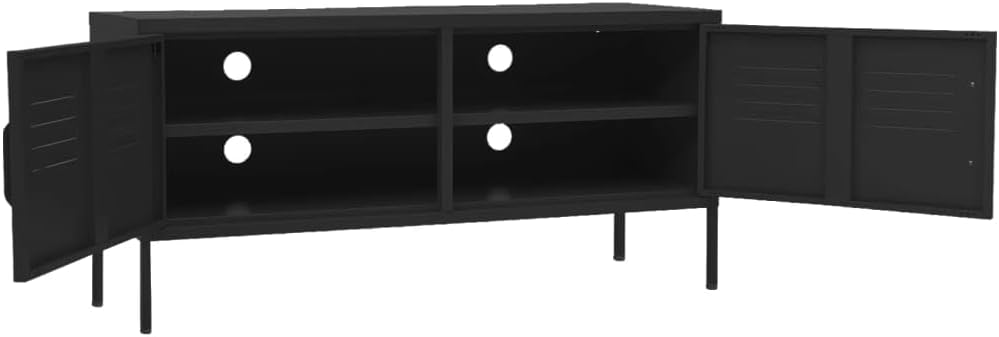
Interior view showcasing the storage compartments and cable management openings.
4.2 Cable Management System
The back panel of the TV stand is equipped with multiple cable management holes. These holes allow you to neatly route and conceal power cords and audio/video cables from your television and media devices, reducing clutter and maintaining a tidy appearance.

Rear view highlighting the integrated cable management holes.
4.3 Adjustable Feet
The TV unit is designed with adjustable leveling feet at the bottom of each leg. These feet can be rotated to fine-tune the height and ensure the stand remains stable and level, even on slightly uneven floor surfaces. Adjust them as needed to eliminate any wobbling.
5. Care and Maintenance
Proper care will extend the life and appearance of your vidaXL Industrial Style TV Stand.
- Cleaning: Wipe the steel surfaces with a soft, damp cloth. For stubborn marks, a mild soap solution can be used, followed by drying with a clean, dry cloth. Avoid abrasive cleaners or harsh chemicals, as they can damage the finish.
- Dusting: Regularly dust with a dry, soft cloth to prevent buildup.
- Spills: Clean up spills immediately to prevent staining or damage to the finish.
- Inspection: Periodically check all screws and connections to ensure they remain tight. Retighten if necessary.
- Placement: Avoid placing the TV stand in direct sunlight or near heat sources, which can affect the material over time.
6. Troubleshooting
If you encounter any issues with your TV stand, refer to the following common problems and solutions:
| Problem | Possible Cause | Solution |
|---|---|---|
| Stand is wobbly or unstable. | Uneven floor; loose connections. | Adjust the leveling feet on the bottom of the legs. Check and tighten all assembly screws. |
| Doors do not close properly or are misaligned. | Hinges are loose or improperly adjusted. | Check hinge screws and tighten. Adjust hinge screws to align doors. |
| Difficulty routing cables. | Cables are too thick or numerous for existing holes. | Ensure cables are bundled neatly. Use cable ties to manage excess length. |
| Scratches on the surface. | Rough handling or abrasive cleaning. | Use a soft cloth for cleaning. For minor scratches, consider a touch-up paint pen suitable for metal. |
7. Product Specifications
Detailed specifications for the vidaXL Industrial Style TV Stand:
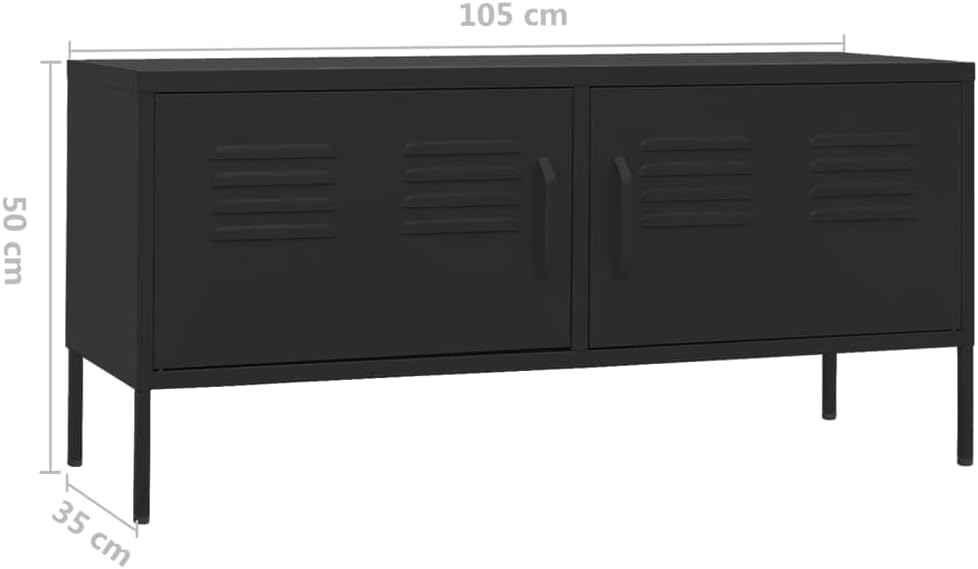
Key dimensions of the TV stand.
| Feature | Detail |
|---|---|
| Brand | vidaXL |
| Model Name | TV Cabinet Black Steel Medium Adjustable Feet TV Cabinet vidaXL |
| Item Model Number | 336232 |
| Color | Black |
| Material | Metal Steel (Frame Material: Wood - likely internal support or packaging description) |
| Product Dimensions (L x W x H) | 41.34 x 13.78 x 19.69 inches (105 x 35 x 50 cm) |
| Item Weight | 27.3 pounds (12.4 Kilograms) |
| Weight Limit | 220.5 Pounds |
| Number of Doors | 2 |
| Number of Shelves | 1 (interior) |
| Mounting Type | Floor Mount |
| Room Type | Bedroom, Living Room |
| Assembly Required | Yes |
| Special Feature | Adjustable Feet, Cable Management Holes |
8. Warranty and Support
For specific warranty information regarding your vidaXL Industrial Style TV Stand, please refer to the documentation included with your purchase or visit the official vidaXL website. Warranty terms typically cover manufacturing defects for a specified period from the date of purchase.
If you require technical assistance, have questions about assembly, or need to report missing/damaged parts, please contact vidaXL customer support through their official channels or the retailer from whom you purchased the product.
You can find more information and contact details by visiting the vidaXL Store on Amazon.
Ask a question about this manual
Ask about setup, troubleshooting, compatibility, parts, safety, or missing instructions. Manuals+ will review the question and use this page’s manual context to help answer it.