
karma door bell
Karma Premium Musical Door Bell - Kolors (64 Tones) User Manual
Introduction
Thank you for choosing the Karma Premium Musical Door Bell - Kolors. This device is designed to provide a pleasant and customizable alert system for your home or office. Featuring 64 selectable tones and a sleek design, it offers both functionality and aesthetic appeal. Please read this manual carefully to ensure proper installation, operation, and maintenance of your new door bell.
Safety Information
- Ensure the power source matches the device's requirements before installation.
- Do not expose the device to water or excessive moisture.
- Avoid placing the device near heat sources or in direct sunlight.
- Do not attempt to open or repair the device yourself. Refer all servicing to qualified personnel.
- Keep out of reach of children.
Package Contents
- 1 x Karma Premium Musical Door Bell - Kolors Main Unit
Note: No additional components are included with this product.
Features
- Sleek & Elegant Design: Modern aesthetic suitable for various interiors.
- 64 Different Selectable Tunes: Wide range of melodies to choose from.
- Push Button for Tune Selection: Easy navigation through available tones.
- Seamless Speaker Design: Engineered for superior sound quality.
Product Overview
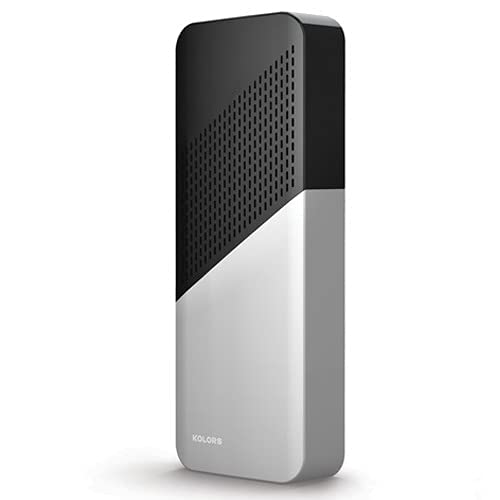
Figure 1: The Karma Premium Musical Door Bell, featuring a modern, rectangular design. The upper portion is black with a perforated speaker grille, while the lower portion is white. The word 'KOLORS' is subtly visible on the white section.
Setup
Follow these steps to set up your Karma Premium Musical Door Bell:
- Unpack the Device: Carefully remove the door bell unit from its packaging.
- Choose a Location: Select a suitable indoor location for the door bell unit, ensuring it is within range of your door push button (if applicable, and not included).
- Power Connection: Connect the door bell unit to a power source according to the manufacturer's instructions (e.g., plug into a standard wall outlet).
- Pairing (if applicable): If your door bell system includes a separate push button, follow its specific instructions for pairing with the main unit. This manual covers the main unit's features.
Operation
Operating your door bell is straightforward:
- Power On: Once connected to power, the door bell unit will power on automatically.
- Select a Tune: Locate the tune selection push button on the device. Press this button repeatedly to cycle through the 64 available melodies. Stop pressing when you hear your desired tune.
- Volume Adjustment: (Information not provided in product details. Assume fixed volume or user-intuitive control if present.) If a volume control is present, adjust it to your preferred level.
- Testing: Have someone press the external door push button (if applicable) to confirm the selected tune plays correctly.
Maintenance
- Cleaning: Wipe the exterior of the door bell unit with a soft, dry cloth. Do not use abrasive cleaners or solvents.
- Storage: If storing the device for an extended period, disconnect it from power and keep it in a cool, dry place.
- Inspection: Periodically check the power cord and connections for any signs of damage.
Troubleshooting
- No Sound:
- Ensure the unit is properly connected to a power source.
- Verify that the external push button (if applicable) is functioning and paired correctly.
- Check if the volume is set to an audible level (if adjustable).
- Intermittent Sound:
- Check for any obstructions or interference between the push button and the main unit.
- Ensure the unit is within the recommended operating range of the push button.
- Device Not Responding:
- Disconnect from power, wait a few seconds, and then reconnect.
Specifications
| Model Number | karma door bell |
| Brand | Generic |
| Manufacturer | kolors |
| Country of Origin | India |
| Product Dimensions (LxWxH) | 10 x 6 x 2 Centimeters |
| ASIN | B09QL8ZGXP |
| Number of Tones | 64 |
Warranty and Support
Please note that there is no warranty provided with this product, as stated in the product features.
For any technical assistance or inquiries, please refer to the retailer or point of purchase for support options.
Ask a question about this manual
Ask about setup, troubleshooting, compatibility, parts, safety, or missing instructions. Manuals+ will review the question and use this page’s manual context to help answer it.