
1. Introduction
Thank you for choosing the YUNCHI CS-02 Physical Therapy Massage Device. This device is designed to provide drug-free personal care for muscle and joint pain relief. It is intended for use on areas such as the neck, back, legs, and feet to alleviate pain, muscle spasms, and joint contractures.
Please read this manual thoroughly before operating the device to ensure safe and effective use. Keep this manual for future reference.
2. Important Safety Information
- This device is not a vibrating or heating massager. It does not produce vibration or significant heat. The absence of these sensations does not indicate a malfunction.
- Always apply transmission gel to the treatment area before using the device.
- Avoid keeping the probe in the same area for too long during use to prevent discomfort.
- Do not use the device on broken skin, open wounds, or areas with active infections.
- Consult a healthcare professional before use if you have any underlying medical conditions, are pregnant, or have implanted electronic devices.
- Keep the device out of reach of children.
- Do not immerse the device or probe in water. Clean with a damp cloth only.
3. Package Contents
Verify that all items are present in your package:
- YUNCHI CS-02 Main Unit
- Ultrasound Probe
- Power Adapter
- Transmission Gel (60ml)
- Portable Case

This image illustrates the side of the YUNCHI CS-02 main unit, highlighting the Power Input port and the Ultrasound Output port where the probe connects. The included power adapter and the handheld ultrasound probe are also shown.
4. Device Overview
Main Unit Controls

This image displays the control panel of the YUNCHI CS-02 device. It features a touch-sensitive intensity adjustment with Low, Medium, and High levels, an Intensity Switch, a Pause/Start button, and a Timer with settings for 10, 20, or 30 minutes.
- Intensity Adjustment: Touch control for Low (L), Medium (M), and High (H) intensity levels.
- Intensity Switch: Button to cycle through intensity levels.
- Pause / Start: Button to begin or temporarily stop the therapy session.
- Timer: Button to set the treatment duration to 10, 20, or 30 minutes.
Ultrasound Probe

A detailed close-up of the ultrasound probe's metal conductive head, which comes into contact with the skin during therapy. This is the surface where transmission gel should be applied.
The handheld probe delivers the ultrasound waves to the target area. It connects to the Ultrasound Output port on the main unit.
5. Setup
- Place the main unit on a stable, flat surface.
- Connect the ultrasound probe cable to the Ultrasound Output port on the main unit.
- Connect the power adapter to the Power Input port on the main unit, then plug the adapter into a suitable electrical outlet.
- Ensure your skin is clean and dry in the area you intend to treat.
- Apply a generous amount of the provided transmission gel to the metal conductive head of the probe or directly to the skin area to be treated. The gel is essential for effective ultrasound transmission.
6. Operating Instructions

This image demonstrates the YUNCHI CS-02 device in use, with a person applying the ultrasound probe to their forearm for therapy. The main unit is placed on a surface nearby.
- Power On: Once connected to power, the device will be in standby mode.
- Set Timer: Press the 'Timer' button to select your desired treatment duration: 10, 20, or 30 minutes.
- Select Intensity: Press the 'Intensity Switch' button to cycle through the three intensity levels: Low (L), Medium (M), and High (H). Start with the lowest intensity and gradually increase if comfortable.
- Start Treatment: Press the 'Pause / Start' button to begin the ultrasound therapy.
- Apply Probe: Gently place the probe, with gel applied, onto the skin of the treatment area. Move the probe in slow, circular motions over the target area. Do not hold the probe stationary in one spot for extended periods.
- Pause/Resume: You can press the 'Pause / Start' button at any time to pause or resume the treatment.
- End Treatment: The device will automatically stop when the set timer expires. You can also manually stop the treatment by pressing and holding the 'Pause / Start' button or by disconnecting the power.
Verifying Device Operation
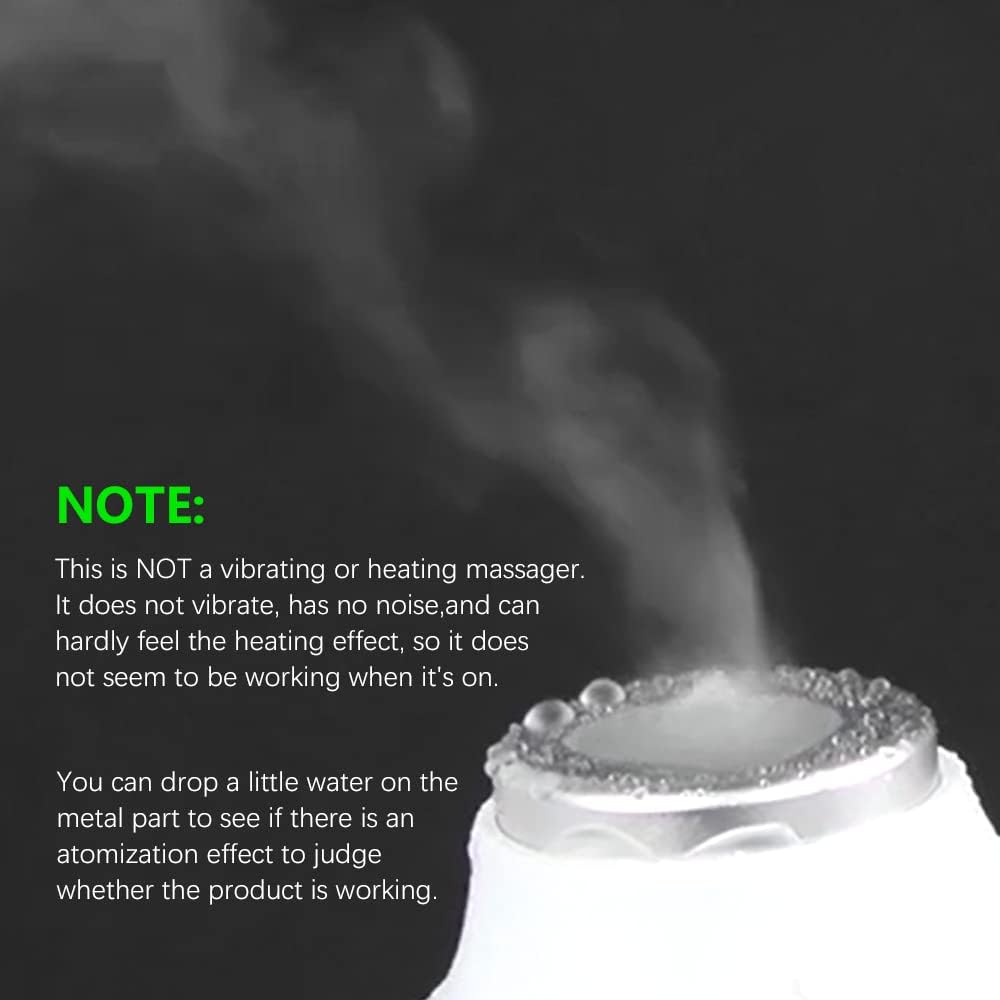
This image highlights a crucial note: the device is not a vibrating or heating massager. It shows how to verify operation by dropping water on the metal part of the probe; if it's working, an atomization effect (steam) will be visible.
Since this device does not vibrate or produce noticeable heat, it may not feel like it is working. To verify operation, drop a small amount of water onto the metal conductive head of the probe. If the device is functioning correctly, you should observe an atomization effect (fine mist or steam) from the water.
7. Maintenance
- Cleaning the Probe: After each use, wipe the metal conductive head of the probe with a soft, damp cloth to remove any residual gel. Do not use abrasive cleaners or immerse the probe in water.
- Cleaning the Main Unit: Wipe the main unit with a soft, dry, or slightly damp cloth. Ensure no liquid enters the device.
- Storage: Store the device and its components in the portable case in a cool, dry place, away from direct sunlight and extreme temperatures.
8. Troubleshooting
- Device does not seem to be working (no vibration/heat): This is normal. The device is not designed to vibrate or produce significant heat. Perform the water atomization test described in Section 6 to confirm functionality.
- No power: Ensure the power adapter is securely plugged into both the device and a working electrical outlet.
- No ultrasound sensation: Ensure sufficient transmission gel is applied to the skin and probe head. The device relies on the gel for effective contact and transmission.
- Display not lighting up: Check power connection. If the issue persists, contact customer support.
9. Specifications

This image shows the YUNCHI CS-02 device with its dimensions and a table detailing its technical specifications.
| Specification | Detail |
|---|---|
| Product Name | Ultrasound equipment |
| Model | AK-CS-02 |
| Rated Voltage and Current | DC 15V/2A |
| Operating Mode | 3 touch buttons |
| Product Dimension | 240*240*110mm (9.45 x 9.45 x 4.33 inches) |
| Frequency | 1MHz |
| Power | 25W |
| Display Screen | High brightness Green LED light |
| Box Size | 426*122*292mm |
10. Potential Applications of Ultrasound Therapy

This diagram outlines common applications for ultrasound therapy, such as relief for arthritis, neck pain, shoulder pain, lower back pain, knee pain, ankle pain, hand pain, chronic pain, joint pain, nerve pain, muscle pain, muscle strains, neurites, impingement nerve pain, and frozen shoulder.
Ultrasonic therapy can be used to assist in relieving muscle soreness, joint pain, and may contribute to accelerating wound healing. Common conditions for which ultrasound therapy is applied include:
- Arthritis pain relief
- Neck pain
- Shoulder pain
- Lower back pain
- Knee pain
- Ankle pain
- Hand pain
- Chronic pain
- Joint pain relief
- Nerve pain
- Muscle pain relief
- Muscle strains
- Neurites
- Impingement nerve pain
- Frozen shoulder
11. Warranty and Support
For warranty information and customer support, please refer to the documentation provided with your purchase or contact the seller directly. Keep your proof of purchase for any warranty claims.
