
1. Important Safety Instructions
Please read all safety instructions carefully before using this product. Keep this manual for future reference.
- This appliance can be used by children aged 8 years and above and persons with reduced physical, sensory or mental capabilities or lack of experience and knowledge if they have been given supervision or instruction concerning use of the appliance in a safe way and understand the hazards involved.
- Children shall not play with the appliance. Cleaning and user maintenance shall not be made by children without supervision.
- Only use the original power adapter provided by the manufacturer.
- Do not operate the robot in environments with open flames or explosive materials.
- Ensure the robot is placed on a stable surface to prevent falls.
- Do not immerse the robot or its charging base in water.
- Turn off the robot and unplug the charging base before cleaning or performing maintenance.
2. Package Contents
Verify that all components are present in the package:
- IMASS Robot Vacuum
- Dustbin
- User Manual
- Remote Control
- Water Tank
- AC Adapter
- Side Brushes (set)
- Charging Base
- Cleaning Brush
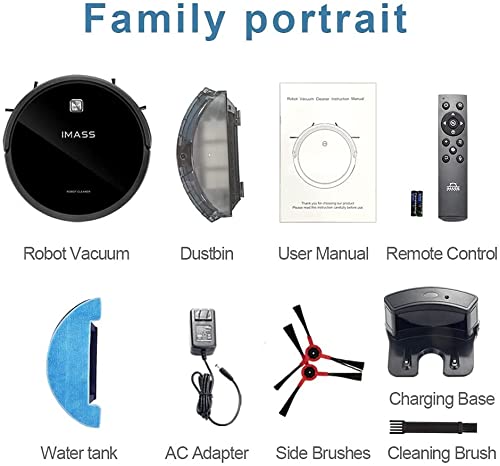
Image: All components included in the IMASS Robot Vacuum S2 package. This includes the main robot unit, dustbin, user manual, remote control, water tank, AC adapter, a set of side brushes, the charging base, and a small cleaning brush.
3. Product Overview
The IMASS S2 Robot Vacuum and Mop is designed for efficient floor cleaning with smart navigation and powerful suction.

Image: A comprehensive view of the IMASS Robot Vacuum S2, showcasing its sleek black design, the 'CLEAN' button, and the IMASS logo. The image also displays the underside with brushes and wheels, the charging base, and a smartphone screen illustrating the robot's cleaning map and control interface.
Key Features:
- High Suction Power: 2600Pa for effective debris removal.
- Ultra-Thin Design: 3.1-inch body allows cleaning under furniture.
- 2-in-1 Vacuum and Mop: Integrated dust collection and water tank for comprehensive cleaning.
- Smart Navigation: Advanced path planning for efficient coverage.
- Multiple Control Methods: Remote control, mobile app, and voice control (Alexa, Google Assistant).
- Self-Charging: Automatically returns to the charging base when battery is low.
4. Setup
4.1 Initial Charging
- Place the charging base against a wall in an open area, ensuring there are no obstacles within 1 meter (3 feet) to the sides and 2 meters (6 feet) in front.
- Connect the AC adapter to the charging base and plug it into a power outlet.
- Place the robot onto the charging base. Ensure the charging contacts on the robot align with those on the base. The indicator light on the robot will illuminate to confirm charging.
- Allow the robot to fully charge before its first use (approximately 4-5 hours).
4.2 App and Voice Control Setup
The IMASS S2 can be controlled via a mobile application and voice assistants.
- Download the IMASS app from your smartphone's app store.
- Follow the in-app instructions to connect your robot to your home Wi-Fi network.
- To enable voice control, link your IMASS account with Amazon Alexa or Google Assistant through their respective apps.
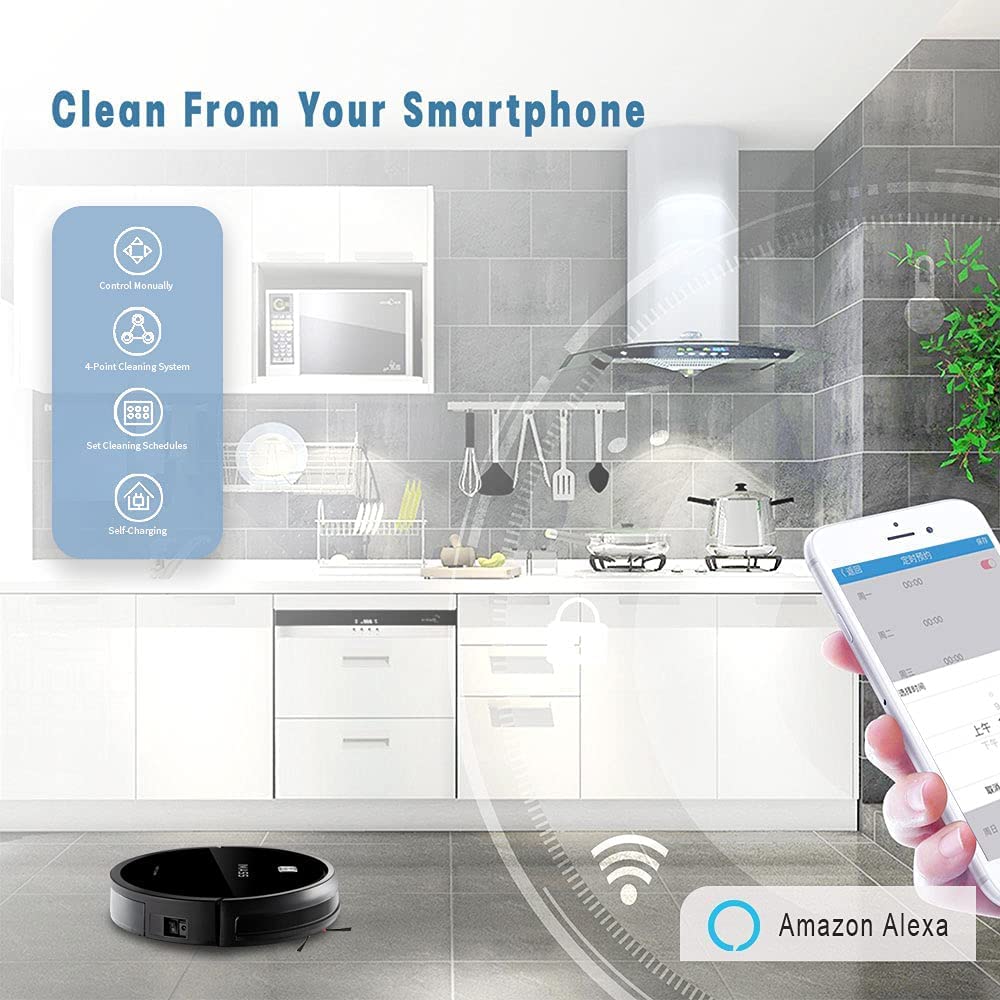
Image: A smartphone screen showing the IMASS robot vacuum control application. The app interface includes icons for manual control, a 4-point cleaning system, setting cleaning schedules, and self-charging, demonstrating remote management capabilities.
5. Operating Instructions
5.1 Starting and Stopping Cleaning
- Start: Press the 'CLEAN' button on the robot, the remote control, or use the mobile app/voice command.
- Pause: Press the 'CLEAN' button again or use the remote/app.
- Return to Charge: Press the home button on the remote or use the app/voice command.
5.2 Cleaning Modes
The IMASS S2 offers multiple cleaning modes to suit different needs:

Image: A collage demonstrating the four primary cleaning modes. Top-left shows the robot performing edge cleaning along a wall. Top-right depicts the robot in a general deep cleaning pattern. Bottom-left illustrates spot cleaning focused on a specific area. Bottom-right shows the robot operating in a kitchen environment, indicating scheduled cleaning.
- Scheduled Cleaning: Set specific times for the robot to clean automatically via the app.
- Deep Cleaning: The robot covers the entire area in a systematic pattern for thorough cleaning.
- Spot Cleaning: Focuses on a small, concentrated area for intensive cleaning of spills or dirt.
- Edge Cleaning: The robot cleans along walls and furniture edges to remove accumulated dust.

Image: The IMASS robot vacuum actively cleaning a hard floor, demonstrating its 2600 Pa super suction power by collecting various debris such as crumbs and small particles. The image highlights the comprehensive cleaning capability of the device.
5.3 Vacuum and Mop Function
The IMASS S2 combines vacuuming and mopping for a complete clean.
- To mop, fill the water tank with clean water and attach it to the robot.
- Ensure the mopping cloth is properly attached to the water tank.
- The robot will vacuum and then mop simultaneously or sequentially, depending on the selected mode.

Image: A visual representation of the 2-in-1 vacuum and mop function. One half of the image shows a dirty, stained floor with the robot's vacuum side, while the other half displays a clean, sparkling hard floor with the mop attachment visible, illustrating the before-and-after effect of the cleaning process.
6. Maintenance
Regular maintenance ensures optimal performance of your IMASS S2.
6.1 Emptying the Dustbin
- Press the dustbin release button and pull out the dustbin.
- Open the dustbin cover and empty its contents into a trash bin.
- Clean the filter with the provided cleaning brush or rinse it with water (ensure it's completely dry before reinserting).
- Reinsert the dustbin into the robot until it clicks into place.
6.2 Cleaning the Water Tank and Mop Cloth
- Remove the water tank from the robot.
- Empty any remaining water and rinse the tank.
- Remove the mop cloth and wash it by hand or machine. Allow it to air dry completely.
- Reattach the clean mop cloth and water tank.
6.3 Cleaning Brushes and Sensors
- Regularly check the main brush and side brushes for tangled hair or debris. Use the cleaning brush to remove them.
- Wipe the cliff sensors and charging contacts with a clean, dry cloth to ensure proper function.
7. Troubleshooting
If you encounter issues with your IMASS S2, refer to the following common solutions:
| Problem | Possible Cause | Solution |
|---|---|---|
| Robot does not start | Low battery; Power switch off; Obstruction | Charge the robot; Turn on the power switch; Remove any obstructions. |
| Robot gets stuck frequently | Cables or small objects on floor; Uneven surfaces | Clear the cleaning area; Use virtual walls if available. |
| Poor cleaning performance | Full dustbin; Clogged filter; Worn brushes | Empty dustbin; Clean/replace filter; Clean/replace brushes. |
| Robot does not charge | Charging contacts dirty; Charging base unplugged | Clean charging contacts; Ensure charging base is powered. |
| App connection issues | Incorrect Wi-Fi password; Router too far; 5GHz Wi-Fi | Verify Wi-Fi details; Move robot closer to router; Ensure 2.4GHz Wi-Fi is used. |
8. Specifications
| Feature | Specification |
|---|---|
| Brand | IMASS |
| Model Name | S2 |
| Suction Power | 2600 Pa |
| Dust Box Capacity | 510 ml |
| Water Tank Capacity | 350 ml |
| Noise Level | ≤65 dB (Silent mode ≤60dB) |
| Battery Capacity | 2600 mAh |
| Working Time | Up to 90 Minutes |
| Charging Time | 4-5 Hours |
| Control Methods | App, Remote, Voice (Alexa, Google Assistant) |
| Form Factor | Robotic |
| Item Weight | 4 kg 540 g |

Image: The IMASS robot vacuum cleaner operating in a quiet environment, indicated by a sleeping baby and a cat silhouette in the background. The text overlay states that the working sound in silent mode is ≤60dB, highlighting its low-noise operation.
9. Warranty and Support
IMASS provides a 12-month warranty for this product. Additionally, lifetime customer service is available to assist with any questions or issues you may encounter.
For technical support, warranty claims, or any other inquiries, please refer to the contact information provided on the product packaging or the official IMASS website.