
1. Introduction
The IT Cosmetics CC+ Nude Glow SPF 40 is a lightweight, medium coverage skin tint designed to deliver an instant healthy glow. This product visibly brightens bare skin within 4 weeks of use. It is formulated with SPF 40 for broad-spectrum sun protection.

Image: IT Cosmetics CC+ Nude Glow SPF 40 Skin Tint in its packaging.
2. Key Features and Benefits
This skin tint addresses various skin concerns by visibly improving dark spots, uneven skin tone, and texture. It provides up to 24 hours of hydration.
- Medium Coverage: Provides natural-looking coverage while allowing your skin to show through.
- Healthy Glow Finish: Imparts a radiant, dewy look.
- Color Correcting: Helps to even out skin tone.
- SPF 40 Broad Spectrum: Offers protection against UVA/UVB rays.
- Brightening Glow Serum: Infused with a serum to enhance skin's luminosity.
Skin-Loving Ingredients:
- 2% Niacinamide: Known to brighten skin and refine texture.
- Hyaluronic Acid: Known to hydrate and plump the look of skin.
- Green Tea Extract: Known to protect skin from environmental aggressors.

Image: Visual representation of the key benefits of IT Cosmetics CC+ Nude Glow.

Image: Illustration of the key ingredients and their benefits for the skin.
3. Setup
Before applying the CC+ Nude Glow Skin Tint, ensure your skin is clean and adequately moisturized. This provides a smooth canvas for application and helps the product blend seamlessly.
4. Operating Instructions (Application Guide)
Application Steps:
- Prepare Skin: Start with clean, moisturized skin.
- Dispense Product: Apply 1-2 pumps of CC+ Nude Glow to the back of your hand or directly onto your face.
- Apply Evenly: Using a makeup brush, sponge, or your fingertips, blend an even layer onto your face, neck, and décolleté. For best results, ensure thorough blending for a natural, no-makeup makeup look.
Image: A visual comparison of skin before and after applying IT Cosmetics CC+ Nude Glow, highlighting enhanced radiance and evenness.
Shade Matching Guide:
To find your perfect shade, follow these steps:
- Determine Your Undertone:
- Warm (W): Your skin has yellow or peach tones. Gold jewelry looks best on you.
- Cool (C): Your skin has pink or red tones. Silver jewelry looks best on you.
- Neutral (N): Your skin has a balance of pink and yellow tones. Both gold and silver jewelry work well.
- Pick Your Shade Family: Based on your undertone and desired depth, select from Fair, Light, Medium, Tan, Rich, or Deep families.
- Swatch Shades: Apply small swatches of potential shades from the center of your face down to below the jawline. The shade that disappears into your skin is your best match.
Image: Visual guide for identifying skin undertones using jewelry as a reference.
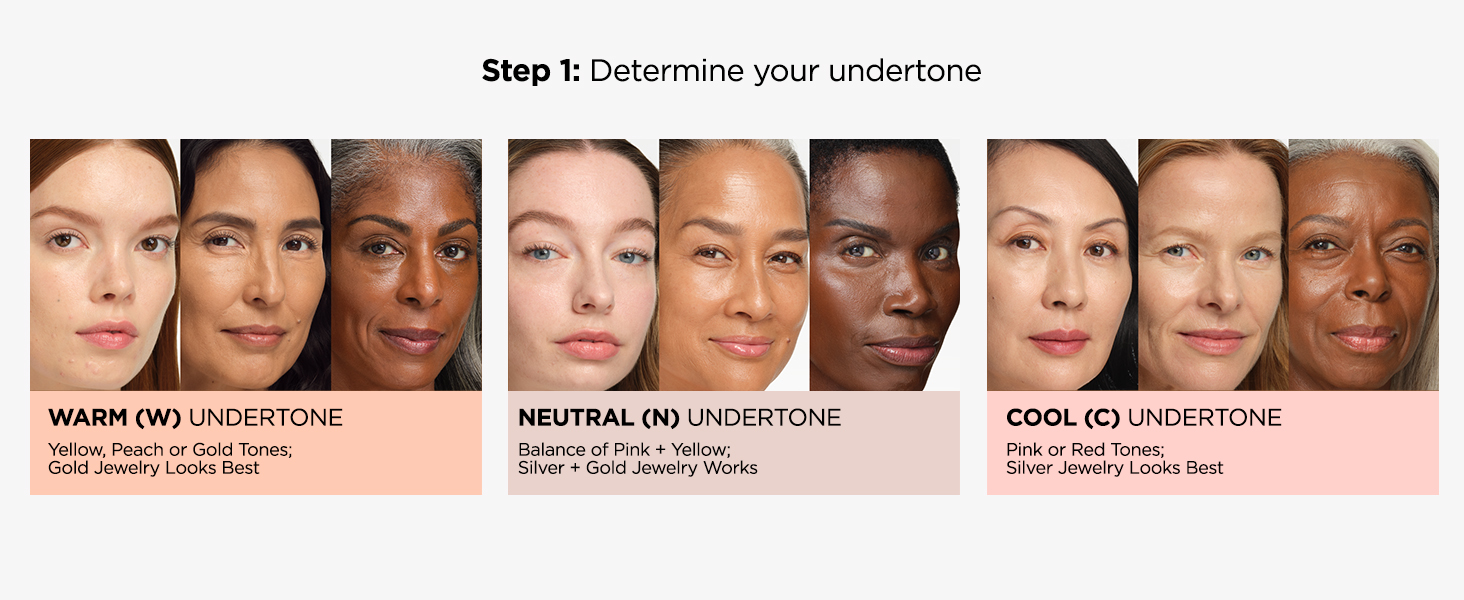
Image: Shade family guide for Fair complexions, illustrating different undertones.

Image: Shade family guide for Light-Medium complexions, illustrating different undertones.

Image: Shade family guide for Tan complexions, illustrating different undertones.

Image: Shade family guide for Rich complexions, illustrating different undertones.

Image: Shade family guide for Deep complexions, illustrating different undertones.
Official Product Video:
Video: An official IT Cosmetics video demonstrating how to find your correct CC+ Cream shade.
5. Maintenance
- Storage: Store the product in a cool, dry place away from direct sunlight to maintain its efficacy and texture.
- Applicator Care: If using brushes or sponges for application, clean them regularly with a gentle cleanser to prevent product buildup and bacterial growth.
6. Troubleshooting
- Uneven Application: Ensure your skin is well-prepped with moisturizer. Apply the product in thin layers and blend thoroughly using tapping or circular motions.
- Shade Doesn't Match: Refer to the