
1. Introduction
This manual provides comprehensive instructions for the installation, operation, and maintenance of your SCS Sentinel gate motorization system (SCS1 Standard-MVE0038) and the accompanying wireless CODEGATE keypad. Please read this manual thoroughly before installation and use to ensure safe and efficient operation.
2. Safety Instructions
Important: Failure to follow these safety instructions may result in serious injury or damage to the product.
- Ensure all electrical connections are made by a qualified professional and comply with local regulations.
- Disconnect power before performing any maintenance or installation procedures.
- Keep children and pets away from the gate area during operation.
- Do not attempt to repair or modify the system yourself. Contact qualified service personnel.
- Ensure the gate operates freely without obstruction before and after motorization.
- The system is designed for swing gates up to 3 meters wide and 300 kg total weight (1.5 meters and 150 kg per leaf). Do not exceed these limits.
3. Package Contents
Verify that all components are present in your package:
- 2 x Gate Motor Actuators
- 1 x Control Box
- 2 x Remote Controls
- 1 x CODEGATE Wireless Keypad
- Mounting Hardware (brackets, screws, etc.)
- User Manual (this document)
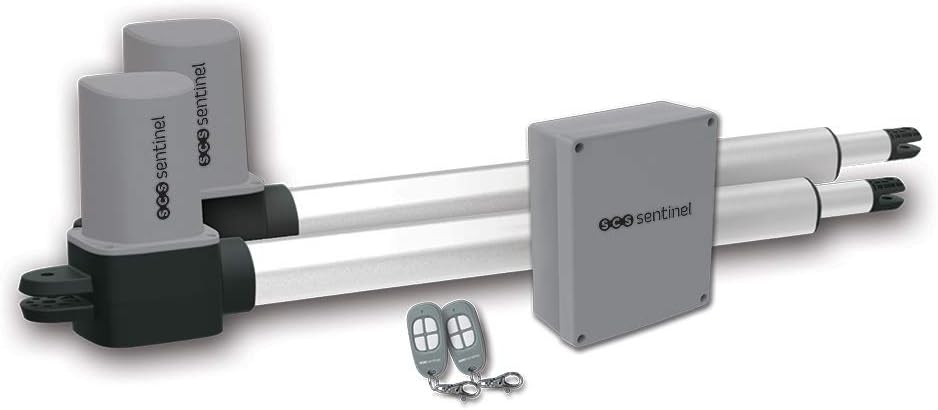
Image: SCS Sentinel gate motorization system components including two actuators, a central control box, and two remote controls.

Image: Close-up view of the SCS Sentinel CODEGATE wireless keypad, showing its numeric buttons (0-9), 'C' (clear), and 'OK' buttons.

Image: Two SCS Sentinel remote controls, each featuring four distinct buttons for gate operation.
4. Setup and Installation
The installation process is designed for simplicity and involves three main steps: mechanical installation, electrical connection, and programming/synchronization.
4.1 Mechanical Installation of Gate Motors
Mount the gate motor actuators securely to your swing gate and posts according to the provided mechanical diagrams (not included in this digital manual, refer to physical manual). Ensure proper alignment and smooth movement of the gate leaves before proceeding.
4.2 Electrical Connection
Connect the gate motor system to your electrical supply. This step requires careful attention to wiring diagrams and should ideally be performed by a qualified electrician to ensure safety and compliance with electrical standards.
4.3 Wireless Keypad Installation (CODEGATE)
The CODEGATE keypad is entirely wireless and easy to install. It is powered by 2 x LR03 AAA 1.5V batteries (not included). Install the batteries before mounting.
- Choose a suitable location for the keypad, within 30 meters of the gate control unit.
- Mount the keypad directly onto a flat surface using appropriate screws (surface mounting).
- Ensure the keypad is accessible but protected from direct heavy rain if possible.

Image: The SCS Sentinel CodeGate wireless keypad shown in its packaging, emphasizing its wireless installation and 30-meter range capabilities.
4.4 System Programming and Synchronization
After mechanical and electrical setup, program the control unit and synchronize the remote controls and keypad. This typically involves:
- Learning Gate Travel: The system will "learn" the full opening and closing travel of your gate.
- Remote Control Pairing: Follow instructions in the control unit manual to pair your remote controls.
- Keypad Code Setting: Set your personal access code(s) on the CODEGATE keypad.
Refer to the detailed programming guide included with your control unit for specific steps.
5. Operating Instructions
Your SCS Sentinel gate motorization system offers various functionalities for convenient gate access.
5.1 Using Remote Controls
Press the designated button on your remote control to initiate gate operation (open/close). The system supports full opening and partial (pedestrian) opening, depending on configuration.
5.2 Using the CODEGATE Wireless Keypad
The keypad allows access by entering a personal code. Its sensitive keys require only a light press.
- Full Opening: Enter your personal code followed by the 'OK' button. This will open both gate leaves for vehicle access.
- Pedestrian Opening (Partial): The keypad also supports partial opening for pedestrian access (e.g., for a person on foot, bicycle, or scooter). The specific code or sequence for this function will be set during programming.
The keypad has a range of up to 30 meters, allowing convenient operation from a distance.
5.3 Advanced Features
The system includes several advanced features for enhanced safety and convenience:
- Opening Direction: Configurable for inward or outward opening.
- End-of-Travel Slowdown: Reduces speed at the end of the opening/closing cycle for smoother operation.
- Obstacle Detection: The gate will stop if an obstacle is detected during operation.
- Automatic Closing: Can be configured to close automatically after a set delay.
- Manual Release: In case of power failure, the gate can be manually unlocked and operated.
- Course Learning: The system automatically learns the gate's travel path for optimal performance.
6. Maintenance
Regular maintenance ensures the longevity and reliable operation of your gate motorization system.
- Monthly: Check the gate's mechanical components for any signs of wear, rust, or loose fittings. Lubricate hinges and moving parts if necessary.
- Quarterly: Inspect electrical wiring for damage. Clean the keypad surface with a soft, damp cloth.
- Annually: Have a qualified technician inspect the entire system, including motor performance and safety features.
- Keypad Batteries: Replace the 2 x LR03 AAA 1.5V batteries in the CODEGATE keypad when the low battery indicator appears or operation becomes unreliable.
7. Troubleshooting
Here are some common issues and their potential solutions:
| Problem | Possible Cause | Solution |
|---|---|---|
| Gate does not open/close. | No power; remote/keypad not paired; obstacle detected; manual release engaged. | Check power supply; re-pair remote/keypad; remove obstacles; disengage manual release. |
| Keypad not responding. | Low batteries; out of range; incorrect code. | Replace batteries; move closer to gate; re-enter correct code. |
| Gate stops mid-operation. | Obstacle detected; motor overheating. | Remove obstacle; allow motor to cool down. |
| Gate operates slowly or erratically. | Mechanical friction; low voltage; motor issue. | Lubricate hinges; check power supply; contact support. |
If problems persist, please contact SCS Sentinel customer support.
8. Specifications
| Feature | Specification |
|---|---|
| Model | SCS1 Standard-MVE0038 |
| Max Gate Length | 3 meters (1.5 meters per leaf) |
| Max Gate Weight | 300 kg (150 kg per leaf) |
| Keypad Type | CODEGATE Wireless Keypad |
| Keypad Power Supply | 2 x LR03 AAA 1.5V batteries (not included) |
| Keypad Range | Up to 30 meters |
| ASIN | B09QGPBPLC |
| Date First Available | June 18, 2024 |
9. Warranty and Support
Your SCS Sentinel gate motorization system comes with a 2-year warranty from the date of purchase, covering manufacturing defects.
For technical support, troubleshooting assistance, or warranty claims, please visit the official SCS Sentinel website or contact their customer service department.
Official Website: http://scs-laboutique.com/


