
1. Introduction
Thank you for choosing ZSHINE Motorized Roller Blinds. This manual provides essential information for the safe and efficient installation, operation, and maintenance of your new motorized window shades. Please read these instructions thoroughly before beginning installation or operation to ensure proper function and longevity of your product.
2. Product Overview
The ZSHINE Motorized Roller Blinds are designed to offer convenience and style for your home or office. Featuring a light-filtering sunshine fabric (approximately 60-70% shading), these blinds are waterproof and easily washable. They come with options for TUYA Smart or normal hard-wired motors, offering automatic operation via remote control and smart home integration.
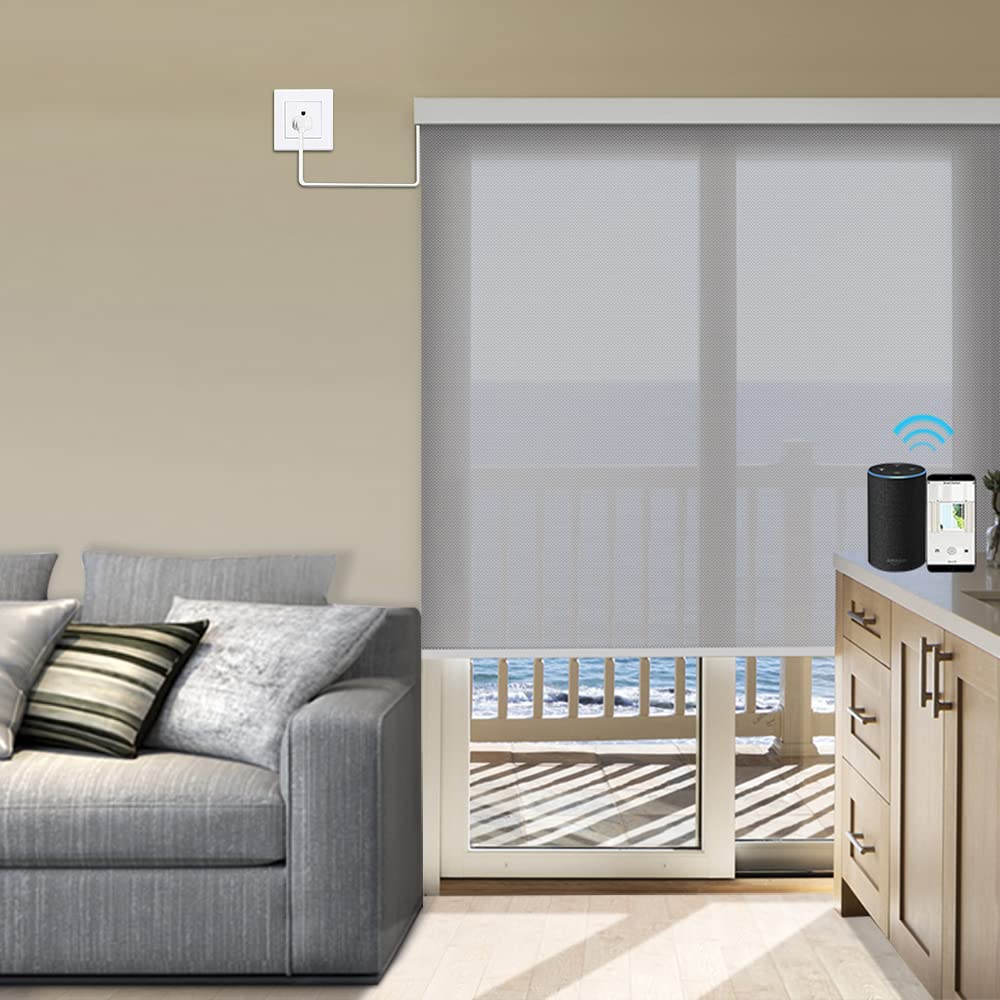
Image 2.1: ZSHINE Motorized Roller Blind in Grey with Remote Control. This image displays the grey roller blind in its rolled-up state, with the white remote control resting on top of the fabric.
Key Features:
- Material: Light-filtering sunshine fabric (60-70% shading), waterproof, and washable.
- Motorization: Automatic operation with hard-wired or TUYA Smart motor options.
- Control: Includes 2-channel or 6-channel remote controller. Compatible with Broadlink RM Pro+ or Bond's hub for Alexa and Google Home integration (for hard-wired motors).
- Customization: Available in customized widths (23-95 inches).
- Additional Features: UV Protection.
3. Safety Information
- Keep children and pets away from the blinds during operation.
- Do not attempt to manually force the blinds up or down when the motor is engaged.
- Ensure all wiring for hard-wired motors is installed by a qualified electrician, following local electrical codes.
- Do not expose the motor or electrical components to water or excessive moisture.
- Regularly inspect the blinds for any signs of wear or damage. Discontinue use if damage is found and contact support.
4. Package Contents
Verify that all components are present before beginning installation:
- Motorized Roller Blind (pre-assembled)
- Remote Control (2-channel or 6-channel)
- Mounting Brackets
- Mounting Hardware (screws, anchors)
- User Manual (this document)
- Optional: Valance Cover, Smart Key (for TUYA integration)

Image 4.1: ZSHINE Roller Blind Accessories Diagram. This diagram illustrates various components such as brackets, bearings, bottom rail, and an optional valance cover, along with their dimensions.
5. Installation
Proper measurement and installation are crucial for optimal performance. Refer to the following guidelines and the installation video.
5.1. Measuring for Custom Roller Shades
Accurate measurements ensure a perfect fit. Follow the instructions below for inside or outside mount.

Image 5.1.1: ZSHINE Roller Shade Measurement Guide for Inside and Outside Mount. This graphic provides detailed instructions and diagrams for measuring window dimensions for both inside and outside mount installations.
Inside Mount (Install Inside the Window Frame):
- Width: Measure at the top, middle, and bottom of the window frame. Use the smallest measurement.
- Height: Measure at the left, middle, and right. Use the smallest measurement.
- Note: Do not deduct any width and height. Adjustments for proper fit will be made during manufacturing. Minimum depth required: 2 1/2 inches.
Outside Mount (Install Above the Window Frame):
- Width: Measure the window width and add at least 6 inches total for better coverage.
- Height: Measure the window height and add at least 8 inches total for better coverage.
5.2. Mounting the Brackets
The brackets can be installed on the ceiling or on the wall. Rotate the brackets 90 degrees to switch between wall-mounted and ceiling-mounted configurations. Ensure the brackets are aligned and approximately 3-10cm away from the window glass.
Video 5.2.1: ZSHINE Roller Blind Installation Instructions. This video provides step-by-step instructions for installing ZSHINE Roller Blinds, including measuring, marking bracket positions, and mounting the blinds.
5.3. Installing the Roller Blind
Once the brackets are securely installed, carefully attach the roller blind to the brackets. Ensure it clicks into place. The fabric width will be approximately 1 1/8 inches narrower than the total order width due to the brackets and hardware.

Image 5.3.1: Installed ZSHINE Motorized Roller Blinds in a Living Room. This image shows multiple ZSHINE motorized roller blinds installed in a modern living space, demonstrating their appearance when in use.
6. Operation
Your ZSHINE Motorized Roller Blinds can be operated via the included remote control or integrated into a smart home system.
6.1. Remote Control Functions
The remote control allows for precise movement and stopping positions.
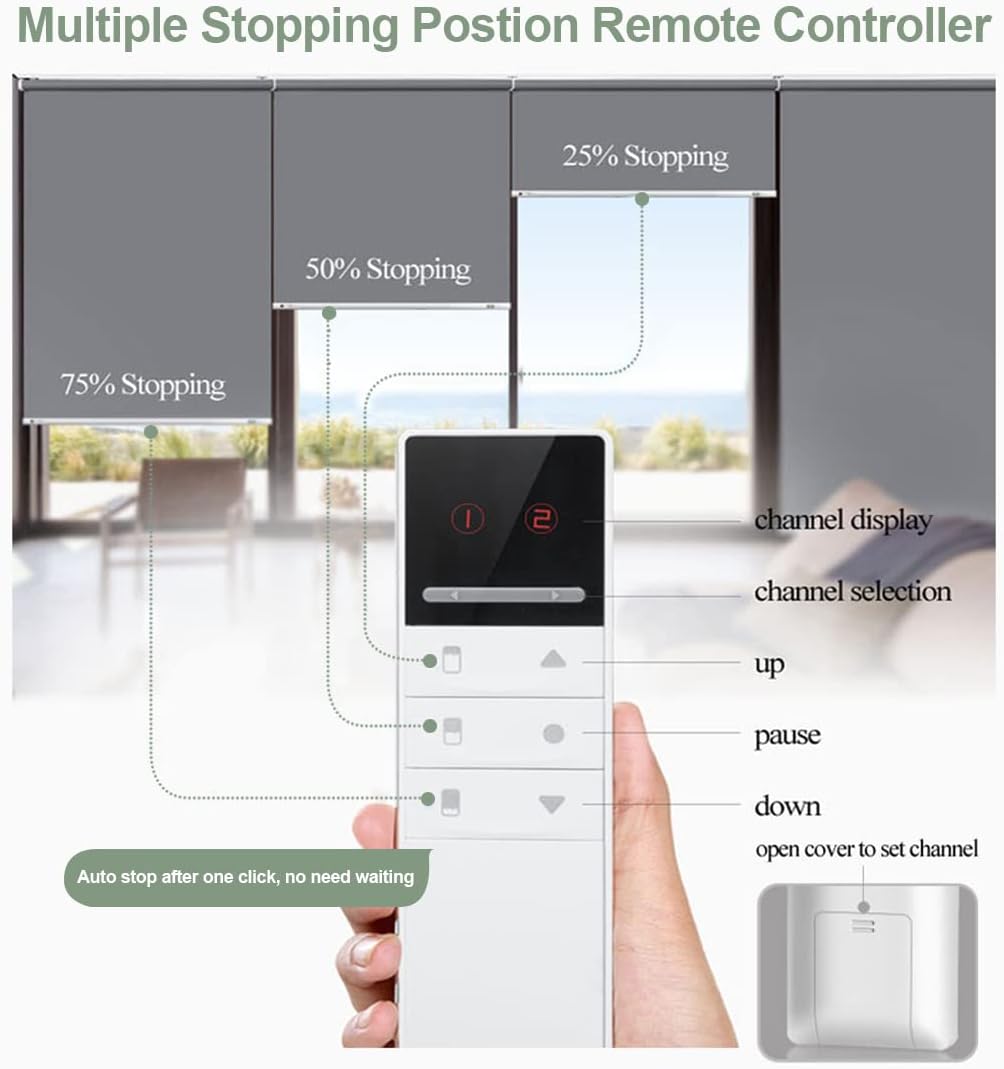
Image 6.1.1: ZSHINE Remote Control for Roller Blinds with Multiple Stopping Positions. This image illustrates the remote control with labels for channel display, channel selection, up, pause, and down buttons, demonstrating how to set multiple stopping positions (75%, 50%, 25%).
- Channel Display: Shows the currently selected channel.
- Channel Selection: Allows you to select individual blinds or groups of blinds.
- Up Button: Raises the blind.
- Down Button: Lowers the blind.
- Pause Button: Stops the blind at its current position.
- Multiple Stopping Positions: The remote allows setting predefined stopping points (e.g., 25%, 50%, 75% open) for quick adjustments.
6.2. Motor Programming
Initial programming of the motor's travel limits is typically factory set. If adjustments are needed, refer to the programming video.
Video 6.2.1: How to program TQL25 motor. This video guides users through the process of programming the TQL25 motor for ZSHINE Motorized Roller Blinds, covering initial setup and travel limit adjustments.
6.3. Smart Home Integration (TUYA Smart Motor)
For TUYA Smart motors, you can integrate your blinds with smart home systems like Alexa and Google Home using a compatible hub (e.g., Broadlink RM Pro+ or Bond's hub).
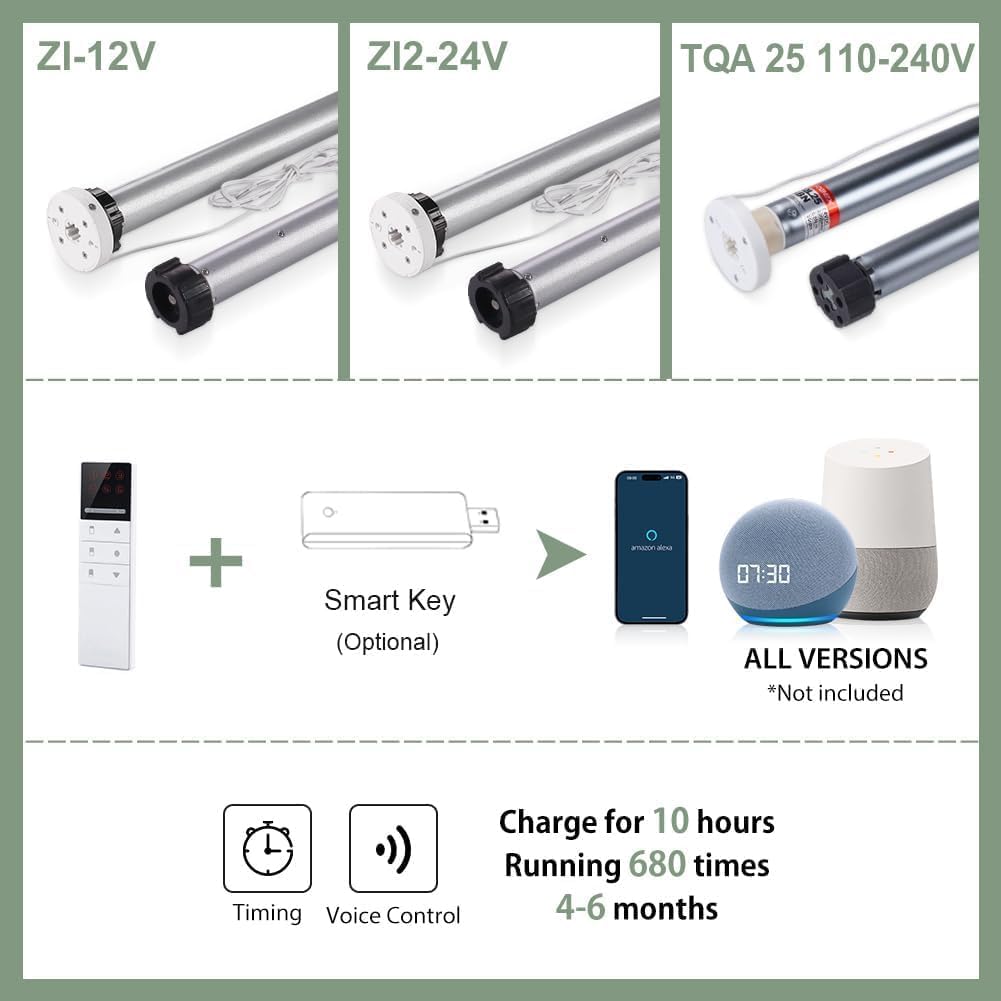
Image 6.3.1: ZSHINE Motorized Roller Blind Motor Types and Smart Home Compatibility Diagram. This diagram illustrates different motor types (ZI-12V, ZI2-24V, TQA 25 110-240V) and shows how an optional Smart Key can enable voice control and timing features with Amazon Alexa and Google Home devices.
Video 6.3.2: TUYA Smart Roller Shades. This video demonstrates the setup and integration of ZSHINE TUYA Smart Roller Shades with a smartphone application, showcasing how to connect and control the blinds for smart home automation.
6.4. Rechargeable Motor Charging
If your blinds are equipped with a rechargeable smart motor, it features a Type-C port for charging. A full charge can last approximately 4-6 months, supporting about 680 operations. Charging options include USB charging, power bank backup, and optional solar charging.

Image 6.4.1: ZSHINE Rechargeable Smart Motor with Type-C Port and Charging Options. This image details the rechargeable smart motor, highlighting its Type-C charging port and illustrating options for solar charging, USB charging, and power bank backup.
7. Maintenance
To maintain the appearance and functionality of your ZSHINE Motorized Roller Blinds, follow these simple care instructions:
- Cleaning: Spot clean only. Use a soft, damp cloth with mild soap and water to gently wipe any soiled areas. Avoid harsh chemicals or abrasive cleaners.
- Dusting: Regularly dust the fabric and hardware with a soft cloth or a vacuum cleaner with a brush attachment.
- Inspection: Periodically check the mounting hardware and motor for any loose connections or signs of wear.
8. Troubleshooting
If you encounter issues with your motorized roller blinds, refer to the following common troubleshooting steps:
| Problem | Possible Cause | Solution |
|---|---|---|
| Blind does not move with remote. | Dead remote batteries, remote not paired, power issue to motor. | Replace remote batteries. Re-pair remote (refer to motor programming video). Check power connection to the motor. |
| Blind stops unexpectedly. | Obstruction, motor overheating, low battery (rechargeable motor). | Check for obstructions. Allow motor to cool down. Recharge the motor. |
| Blind does not stop at desired position. | Travel limits need adjustment. | Refer to the motor programming video to adjust upper and lower travel limits. |
| Smart home integration not working. | Incorrect hub setup, network issues, motor not in pairing mode. | Ensure your smart hub is correctly configured and connected to your network. Follow TUYA app instructions for pairing. |
9. Specifications
| Feature | Detail |
|---|---|
| Brand | ZSHINE |
| Model Number | B09QG63593 |
| Material | Polyester (Light-filtering sunshine fabric) |
| Color | Grey |
| Product Dimensions | Customized Width (23-95 inches), 95"L x 5"W (example for a specific size) |
| Shading Opacity | 60-70% (Light Filtering) |
| Operation Mode | Automatic (Motorized) |
| Control Type | Electric (Remote Control, Smartphone via compatible hub) |
| Compatible Devices | Smartphone (via TUYA Smart), Alexa, Google Home (via compatible hub) |
| Mounting Type | Inside Mount, Outside Mount |
| Water Resistance Level | Waterproof |
| Additional Features | UV Protection |
| Included Components | Mounting Hardware, User Manual, Remote Control |
| Manufacturer | HEIBULUO |
| UPC | 728070668684 |
10. Warranty
ZSHINE offers a 2-year warranty on motors and controls from the date of purchase. This warranty covers defects in materials and workmanship under normal use. It does not cover damage caused by improper installation, misuse, accidents, or unauthorized modifications. Please retain your proof of purchase for warranty claims.
11. Support
Should you have any questions, concerns, or require assistance with your ZSHINE Motorized Roller Blinds, please do not hesitate to contact our customer service team. We are committed to providing support before and after your purchase.
For further assistance, please refer to the contact information provided with your purchase documentation or visit the official ZSHINE store on Amazon.
Video 11.1: Our solar shades. This video showcases ZSHINE solar shades in various room settings, highlighting their light-filtering properties and aesthetic appeal.

