
1. Introduction
This manual provides essential information for the proper setup, operation, and maintenance of your Leica M11 Digital Rangefinder Camera. Please read this manual thoroughly before using your camera to ensure optimal performance and longevity. Keep this manual for future reference.
2. Product Overview
The Leica M11 is a high-performance digital rangefinder camera designed for discerning photographers. It features a full-frame BSI CMOS sensor with Triple Resolution Technology, allowing for versatile image capture at 60, 36, or 18 megapixels. The camera incorporates a special IR + UV cut filter for effective light correction and offers an ISO sensitivity range of 64 to 50,000.
Key Features:
- High-performing Processor: Full-frame BSI CMOS sensor with Triple Resolution Technology for 60, 36, or 18-megapixel DNG and JPEG files.
- Advanced Filtration: Special IR + UV cut filter for effective correction of incident light.
- Ergonomic Controls: Intuitive layout next to a 2.3 million pixel high-resolution touchscreen.
- Wide ISO Range: ISO 64 to 50,000, with 14-bit color depth and up to 15 stops dynamic range.
- Durable and Lightweight: Silver finish model features a brass top plate and high-quality aluminum construction with a scratch-resistant coating, weighing approximately 640 grams.
Camera Views:
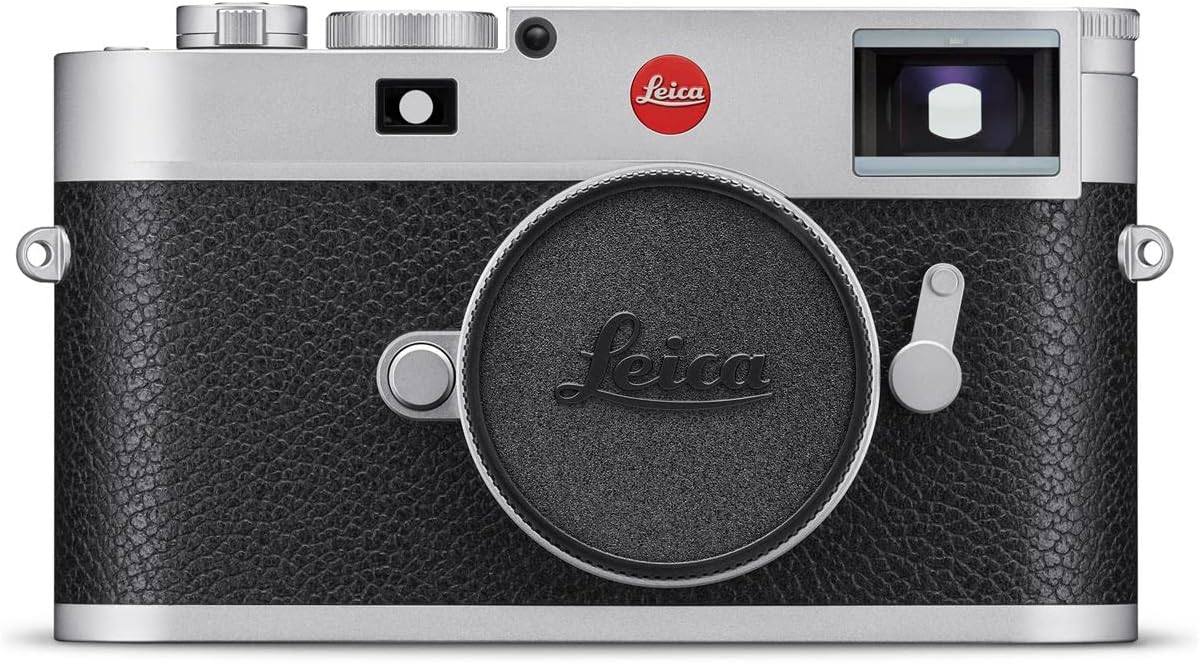
Front view of the Leica M11 camera, showcasing its classic rangefinder design with the lens cap attached, protecting the lens mount.

Rear view of the Leica M11 camera, displaying the high-resolution touchscreen, and control buttons for playback, function, and menu access.

Top view of the Leica M11 camera, featuring the shutter speed dial, ISO dial, hot shoe, and shutter release button, highlighting its ergonomic controls.

Front view of the Leica M11 camera with a Leica M-mount lens attached, illustrating the camera's compact form factor and lens compatibility.
3. Setup
3.1. Battery Installation
- Ensure the camera is powered off.
- Locate the battery compartment on the bottom of the camera.
- Open the compartment cover.
- Insert the supplied Lithium Ion battery, ensuring correct orientation according to the markings.
- Close the battery compartment cover securely.
3.2. Memory Card Insertion
- The Leica M11 has 64GB of internal flash memory. For additional storage, insert a compatible SD card (UHS-II recommended) into the SD card slot.
- Ensure the camera is powered off.
- Open the memory card slot cover.
- Insert the SD card with the contacts facing the correct direction until it clicks into place.
- Close the memory card slot cover.
3.3. Lens Attachment
- Align the red dot on the Leica M-mount lens with the red dot on the camera's lens mount.
- Gently insert the lens into the mount.
- Rotate the lens clockwise until it locks into position.
4. Operating Instructions
4.1. Power On/Off
To power on the camera, rotate the power switch located on the top plate. To power off, rotate the switch back to the 'OFF' position.
4.2. Shooting Modes
The Leica M11 supports the following shooting modes:
- Aperture Priority (A): The camera automatically sets the shutter speed based on your chosen aperture.
- Manual (M): You have full control over both aperture and shutter speed settings.
4.3. Exposure Control
The camera features automatic exposure control. Metering methods include Center-Weighted Average, Multi-Zone, and Spot metering to ensure accurate exposure in various lighting conditions.
4.4. ISO Sensitivity
Adjust the ISO sensitivity from 64 to 50,000 using the dedicated ISO dial or through the camera's menu system. Lower ISO values are suitable for bright conditions and minimal noise, while higher values are for low-light environments.
4.5. Focusing
The Leica M11 utilizes manual focus (MF). Use the rangefinder mechanism in the viewfinder to achieve precise focus. The camera also features contrast detection for focus assistance.
4.6. Image Capture
Images can be captured in DNG (raw) and JPEG formats. The Triple Resolution Technology allows you to select between 60, 36, or 18-megapixel resolutions, utilizing the entire sensor area for each setting.
4.7. Display and Navigation
The camera is equipped with a 2.3 million pixel high-resolution AMOLED touchscreen. Use the touchscreen for menu navigation, image review, and adjusting settings. Physical buttons for PLAY, FN (Function), and MENU are also provided for quick access to common operations.
4.8. Connectivity
The Leica M11 offers Bluetooth connectivity for wireless communication with compatible devices. It also features a USB Type-C (USB 3.1) port for data transfer and charging.
5. Maintenance
5.1. Cleaning
- Use a soft, lint-free cloth to clean the camera body.
- For the lens and sensor, use specialized cleaning tools and solutions designed for optical surfaces. Avoid touching the sensor directly.
- Keep the touchscreen clean with a microfiber cloth.
5.2. Battery Care
- Charge the battery fully before first use.
- Store batteries in a cool, dry place when not in use.
- Avoid exposing the battery to extreme temperatures.
5.3. Storage
When not in use, store the camera in a dry, dust-free environment, preferably in a camera bag or case to protect it from impacts and environmental elements.
6. Troubleshooting
If you encounter issues with your Leica M11, consider the following general troubleshooting steps:
- Camera not powering on: Check if the battery is charged and correctly inserted.
- Image quality issues: Ensure the lens is clean, focus is accurate, and appropriate ISO and exposure settings are used for the lighting conditions.
- Memory card errors: Reformat the memory card (this will erase all data) or try a different compatible SD card.
- Connectivity problems: Ensure Bluetooth is enabled on both devices and that the USB cable is securely connected.
For persistent issues, please refer to the official Leica support resources or contact customer service.
7. Specifications
| Feature | Detail |
|---|---|
| Sensor Type | Full-frame BSI CMOS |
| Photo Sensor Resolution | 60 Megapixels (with Triple Resolution Technology: 60, 36, 18 MP) |
| ISO Range | 64 - 50,000 |
| Image Stabilization | Digital, Dynamic |
| Supported File Formats | DNG, JPEG |
| Display Type | AMOLED Touchscreen |
| Display Resolution | 2.3 million pixels |
| Internal Memory | 64 GB |
| External Memory | SD Card (UHS-II compatible) |
| Connectivity | Bluetooth, USB Type-C (USB 3.1) |
| Lens Mount | Leica M |
| Weight | Approximately 640 grams (16 ounces) |
| Minimum Shutter Speed | 1/16000 seconds |
| Battery Type | Lithium Ion |
| Shooting Modes | Aperture Priority, Manual |
| Focus Type | Manual Focus (MF) |
| Metering Methods | Center-Weighted Average, Multi-Zone, Spot |
8. Warranty and Support
8.1. Warranty Information
The Leica M11 Digital Rangefinder Camera is covered by a manufacturer's warranty. Please refer to the warranty documentation included with your product for specific terms and conditions.
8.2. Customer Support
For technical assistance, service, or further information, please visit the official Leica website or contact Leica customer support. You can also find additional resources and accessories at the Leica Store on Amazon.


