
1. Introduction
The Valeton GP-200 is a powerful HD modeling multi-effects processor designed for guitar, bass, and acoustic instruments. It integrates a comprehensive suite of effects, amplifier models, IR simulations, and a USB audio interface, providing a versatile solution for musicians in various settings, from practice to performance and recording.
This manual provides detailed instructions for setting up, operating, maintaining, and troubleshooting your GP-200 unit. Please read it thoroughly to ensure proper use and to maximize the potential of your device.
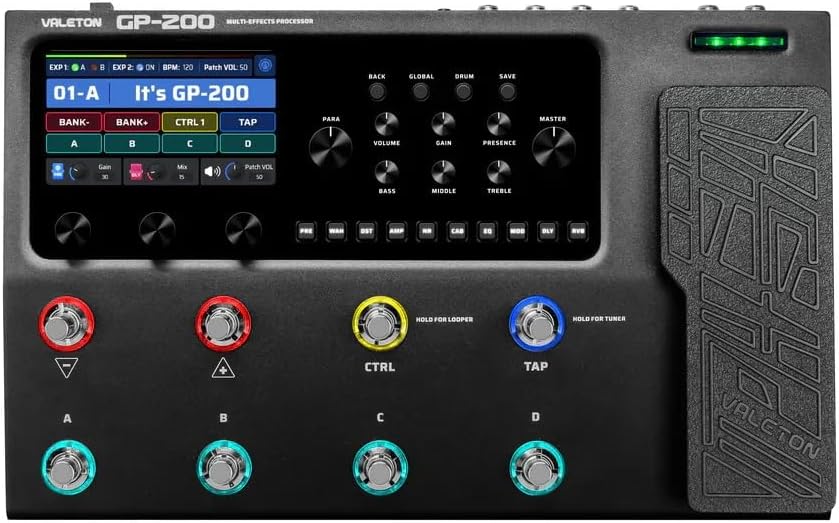
Image 1.1: Front view of the Valeton GP-200 Multi-Effects Processor, showcasing its display, control knobs, and footswitches.
2. Key Features
- Extensive Effects Library: 140 built-in effects for guitar, bass, and acoustic instruments.
- HD Modeling Technology: Features 45 legendary amplifier models and 40 carefully selected IR cabinet simulations.
- Customizable Signal Chain: Adjustable signal chain with up to 9 simultaneous effect blocks.
- Integrated Tools: Includes 100 drum rhythms, a 90-second looper, and a tuner.
- USB Audio Interface: Supports stereo audio streaming and OTG function for direct connection to mobile devices (iOS/Android).
- Third-Party IR Support: 20 user slots for custom Impulse Responses.
- User-Friendly Interface: Multi-language hardware interface with free Mac/Windows software for editing and preset management.

Image 2.1: Diagram illustrating the "All-In-One" capabilities of the Valeton GP-200, showing various input/output connections and integrated features like tuner, drum machine, looper, and USB audio interface.
3. Setup Guide
3.1 Unpacking and Inspection
Carefully remove the GP-200 from its packaging. Inspect the unit for any signs of damage during transit. Ensure all components listed below are present:
- Valeton GP-200 Multi-Effects Processor
- Power Adapter (9V DC, 300mA, center negative)
- USB Cable
- User Manual (this document)
Image 3.1: The retail packaging box for the Valeton GP-200, indicating the product model and brand.
3.2 Power Connection
Connect the supplied 9V DC power adapter to the "DC 9V" input jack on the rear panel of the GP-200. Plug the adapter into a suitable power outlet. The unit will power on automatically.
3.3 Audio Connections
The GP-200 offers various audio input and output options:
- Instrument Input (IN): Connect your guitar, bass, or acoustic instrument to this 1/4" mono jack.
- AUX IN: Connect external audio sources (e.g., MP3 player, phone) for practice.
- FX LOOP (SEND/RETURN): For integrating external effects pedals into your signal chain.
- Unbalanced Outputs (L/MONO, R): Connect to guitar amplifiers, mixers, or audio interfaces using 1/4" TS cables.
- Balanced Outputs (L/MONO, R): Connect to PA systems or studio equipment using XLR cables for a balanced signal.
- PHONES: Connect headphones for silent practice.

Image 3.2: Close-up view of the Valeton GP-200's rear panel, showing various input and output jacks including instrument input, FX loop, unbalanced and balanced outputs, MIDI, USB, and power input.
3.4 USB Connection (Audio Interface & Editor Software)
Connect the GP-200 to your computer using the supplied USB cable. The unit functions as a 24-bit 44.1kHz USB audio interface. Drivers may be required for some operating systems (check Valeton's official website for downloads). The USB connection also allows access to the free Mac/Windows editor software for deeper editing and preset management.
4. Operating Instructions
4.1 Navigating the User Interface
The GP-200 features a clear color display and intuitive controls. Use the navigation buttons (BACK, GLOBAL, DRUM, SAVE) and rotary encoders to browse presets, adjust parameters, and access system settings.

Image 4.1: Angled view of the Valeton GP-200, highlighting its large color display and the layout of control knobs and footswitches, designed for an organic tone experience.
4.2 Preset Management
The GP-200 comes with 198 presets. You can navigate through banks and individual presets using the footswitches and display. To save your custom settings, press the SAVE button and follow the on-screen prompts.
4.3 Effect Chain Customization
The unit allows for a flexible signal chain with up to 9 simultaneous effect blocks. You can reorder, add, or remove modules to create unique tones. This can be done directly on the unit or more easily via the editor software.

Image 4.2: A hand interacting with the Valeton GP-200's controls, demonstrating the ability to customize the effect chain with up to 11 freely movable modules working simultaneously.
4.4 Using the Looper and Drum Machine
Activate the 90-second looper by holding the designated footswitch (usually CTRL or TAP, depending on configuration). The drum machine offers 100 rhythms for practice; access it via the DRUM button.
4.5 Expression Pedal and Footswitches
The integrated expression pedal can be assigned to control various parameters (e.g., volume, wah, pitch). The footswitches (A, B, C, D) can be configured for patch changes, effect on/off, looper control, or tuner activation.

Image 4.3: A foot operating the expression pedal of the Valeton GP-200, illustrating the improved operating experience with larger and more responsive pedals.
5. Maintenance
5.1 Cleaning
To clean the unit, use a soft, dry cloth. For stubborn dirt, a slightly damp cloth can be used, but ensure no liquid enters the unit. Do not use abrasive cleaners, waxes, or solvents.
5.2 Storage
When not in use for extended periods, store the GP-200 in a cool, dry place, away from direct sunlight and extreme temperatures. It is recommended to keep it in its original packaging or a protective case.
5.3 Firmware Updates
Valeton periodically releases firmware updates to improve performance and add new features. Check the official Valeton website for the latest firmware and instructions on how to update your GP-200.
6. Troubleshooting
| Problem | Possible Cause | Solution |
|---|---|---|
| No power | Incorrect power adapter; Loose connection; Faulty outlet | Ensure correct 9V DC, 300mA, center negative adapter is used. Check all connections. Try a different power outlet. |
| No sound output | Incorrect cable connections; Volume levels too low; Muted preset/effect; Faulty cables | Verify all audio cables are correctly connected. Check master volume and individual effect/patch volumes. Ensure no effects are muted. Test with different cables. |
| Noise/Hum | Ground loop; Interference from other electronics; Faulty power supply | Use a power conditioner or isolated power supply. Move unit away from other electronic devices. Ensure all cables are shielded. |
| USB connection issues | Missing drivers; Incorrect USB port; Faulty USB cable | Install necessary drivers from Valeton website. Try a different USB port on your computer. Use a different USB cable. |
7. Specifications
| Feature | Detail |
|---|---|
| Model Number | GP-200 |
| Effects | 140 (Guitar/Bass/Acoustic) |
| Amp Models | 45 |
| IR Cab Simulations | 40 (plus 20 user IR slots) |
| Presets | 198 |
| Simultaneous Effect Blocks | Up to 9 |
| Looper Time | 90 seconds |
| Drum Rhythms | 100 |
| Audio Processing | 24-bit 44.1kHz |
| Power Requirement | 9V DC, 300mA, center negative |
| Weight | 454 g (approx. 1 lb) |
| Connectivity | 1/4" IN, AUX IN, FX LOOP (SEND/RETURN), 1/4" Unbalanced OUT (L/R), XLR Balanced OUT (L/R), PHONES, MIDI IN/OUT/THRU, USB |
| Operating System Compatibility | Windows, macOS, iOS, Android (via OTG) |
8. Support and Warranty
For technical support, firmware updates, and additional resources, please visit the official Valeton website. Information regarding product warranty can typically be found on the manufacturer's website or within the product packaging.
Note: Keep your purchase receipt as proof of purchase for warranty claims.


