
MediaRange MRGS102
MediaRange Gaming Keyboard and Mouse Set User Manual
Model: MRGS102
Product Overview
The MediaRange Gaming Keyboard and Mouse Set is designed for an immersive gaming experience, offering fast, robust, and reliable performance. The set includes a 104-key membrane keyboard with anti-ghosting and 6-key rollover, featuring a switchable rainbow backlight. The accompanying 6-button gaming mouse boasts a high-precision sensor with adjustable DPI settings and RGB backlight, ensuring accuracy and comfort during intense gameplay.
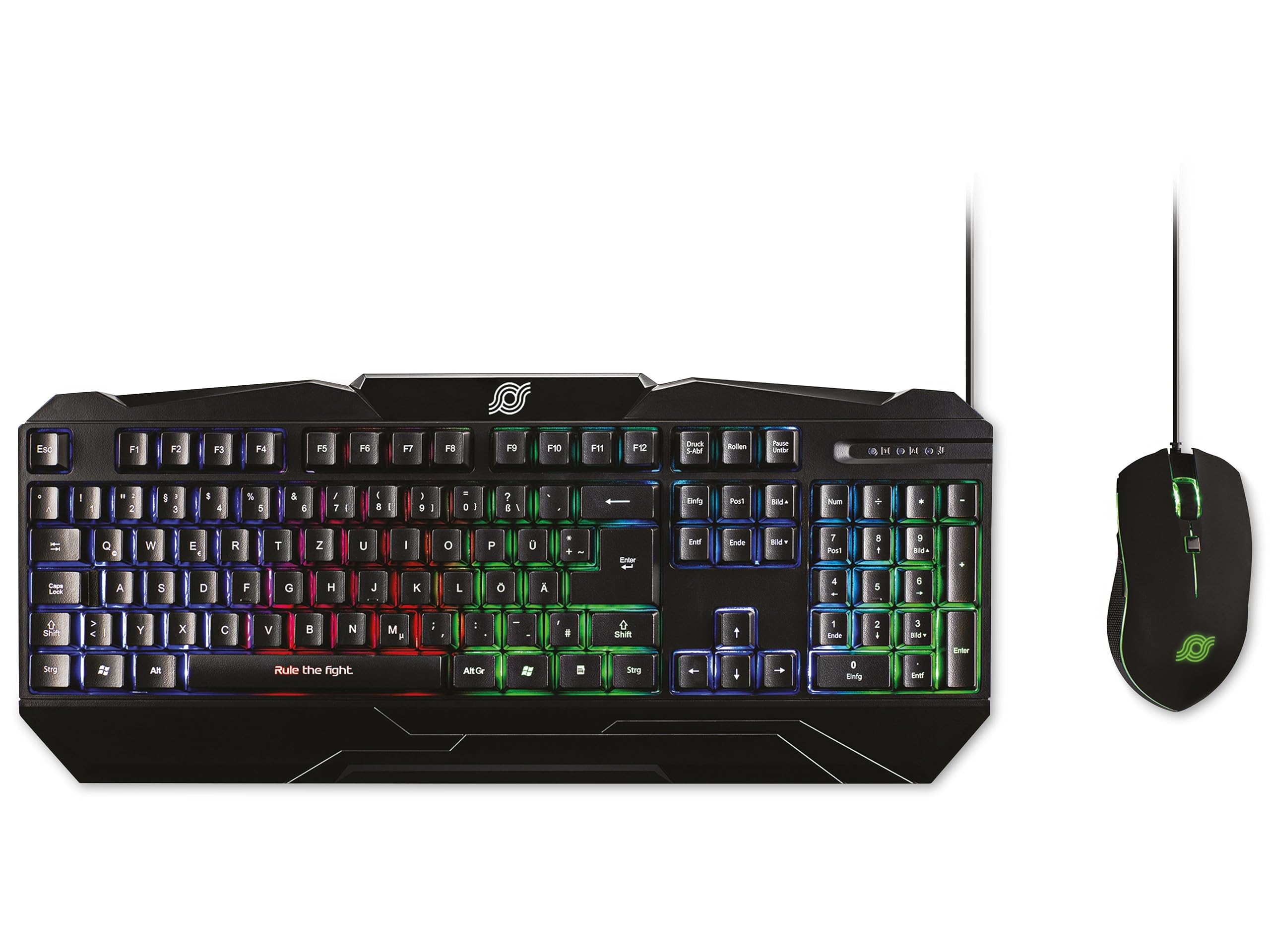
Figure 1: MediaRange Gaming Keyboard and Mouse Set. This image displays the black gaming keyboard with its QWERTZ layout and vibrant rainbow backlight, positioned next to the matching black 6-button gaming mouse, which features green RGB lighting.
Setup
The MediaRange Gaming Keyboard and Mouse Set is designed for simple plug-and-play installation.
- Connect the Keyboard: Locate an available USB 1.1 port on your computer or gaming console. Insert the USB connector of the keyboard's 1.5-meter cable into the USB port.
- Connect the Mouse: Locate an available USB 2.0 port on your computer or gaming console. Insert the USB connector of the mouse's 1.8-meter cable into the USB port.
- Automatic Installation: Your operating system (Windows, Mac, Linux) or gaming console (Playstation*, XBOX*) should automatically detect and install the necessary drivers. No additional software is required for basic functionality.
- Adjust Keyboard Height: For improved comfort, you can adjust the height of the keyboard using the practical height adjustment feet located on the underside.
Note: Ensure USB ports are functioning correctly if devices are not immediately recognized.
Operating Instructions
Keyboard Features
- 104-Key Layout: Standard QWERTZ (DE/AT/CH) layout for comprehensive input.
- Anti-Ghosting with 6-Key Rollover: Ensures that up to 6 simultaneous key presses are registered accurately, preventing missed commands during fast-paced gaming.
- Rainbow Backlight: The keyboard features a vibrant rainbow backlight. To toggle the backlight on or off, locate the dedicated backlight control key (often indicated by a light bulb icon or similar) or a function key combination (e.g., Fn + Scroll Lock).
- Splash-Proof Design: Provides protection against accidental spills, enhancing durability.
- Non-Slip Rubber Feet: Ensures stability during intense gaming sessions.
Mouse Features
- 6-Button Design: Includes standard left/right click, scroll wheel, and additional front and back buttons for enhanced functionality.
- Adjustable DPI: The mouse offers four adjustable DPI (Dots Per Inch) settings: 800, 1000, 1600, and 2400 dpi. To switch between DPI settings, press the dedicated DPI button, usually located behind the scroll wheel. Each press cycles through the available sensitivities.
- RGB Backlight: The mouse features an RGB backlight that enhances its aesthetic appeal. This lighting is typically static or cycles automatically and is not user-configurable for patterns.
- Ergonomic Fit & Ribbed Side Surface: Designed for comfortable use over extended periods, with a ribbed side surface for excellent grip.
- Sliding Teflon Feet: Ensures smooth and precise movement across various surfaces.
Maintenance
Proper maintenance ensures the longevity and optimal performance of your MediaRange Gaming Set.
- Cleaning the Keyboard:
- As the keyboard is splash-proof, minor spills can be wiped away immediately with a dry, soft cloth.
- For general cleaning, use a soft, slightly damp cloth to wipe down the keys and surface. Avoid excessive moisture.
- Do not use harsh chemicals, abrasive cleaners, or solvents, as these can damage the surface and key legends.
- Use compressed air to remove dust and debris from between the keys.
- Cleaning the Mouse:
- Wipe the mouse surface with a soft, dry, or slightly damp cloth.
- Clean the optical sensor area on the underside with a cotton swab lightly dampened with rubbing alcohol to ensure accurate tracking.
- Ensure no liquid enters the mouse's internal components.
- Cable Care: Avoid sharp bends or kinks in the USB cables to prevent internal damage.
- Storage: When not in use for extended periods, store the set in a clean, dry environment away from extreme temperatures.
Troubleshooting
If you encounter issues with your MediaRange Gaming Set, try the following troubleshooting steps:
| Problem | Possible Cause / Solution |
|---|---|
| Keyboard/Mouse not recognized or not working. |
|
| Keyboard backlight is off or not changing. |
|
| Mouse cursor movement is erratic or unresponsive. |
|
| Keys are not responding or "ghosting" occurs. |
|
Specifications
| Feature | Detail |
|---|---|
| Product Name | Gaming-Set Tastatur 104 Tasten + Maus 6-Tasten |
| Model Number | MRGS102 |
| Brand | MediaRange |
| Keyboard Type | Membrane Gaming Keyboard |
| Keyboard Layout | QWERTZ (DE/AT/CH), 104 Keys |
| Anti-Ghosting | N-Key Rollover (6 buttons) |
| Keyboard Backlight | Switchable Rainbow Design |
| Keyboard Durability | Over 10,000,000 keystrokes, Splash-proof |
| Keyboard Connection | USB 1.1 connection cable, 1.5 m cable length |
| Keyboard Power Supply | DC 5 V - 500 mA (max.); USB bus powered |
| Keyboard Dimensions (L x W x H) | 443 x 189 x 32 mm (17.44 x 7.44 x 1.26 inches approx.) |
| Keyboard Weight | ± 670 g (1.48 lbs approx.) |
| Mouse Type | 6-Button Gaming Mouse |
| Mouse DPI Settings | 800, 1000, 1600, 2400 dpi (adjustable) |
| Mouse Backlight | RGB Backlight |
| Mouse Sensor Speed | 48 IPS (Inches Per Second) |
| Mouse Acceleration | 10 G |
| Mouse Key Life | Over 20,000,000 clicks (left/right buttons) |
| Mouse Connection | USB 2.0 connection cable, 1.8 m cable length |
| Mouse Power Supply | DC 5 V |
| Compatibility | Windows, Mac, Linux, Playstation*, XBOX* |
| Product Dimensions (Overall) | 20.47 x 8.27 x 1.97 inches |
| Item Weight (Overall) | 2.29 pounds |
*Compatibility with Playstation and XBOX may vary depending on specific console model and game support for keyboard/mouse input.
Warranty and Support
For detailed warranty information and technical support, please refer to the official MediaRange website or contact MediaRange customer service directly. Warranty terms and conditions may vary by region and retailer.
Keep your purchase receipt as proof of purchase for any warranty claims.
Ask a question about this manual
Ask about setup, troubleshooting, compatibility, parts, safety, or missing instructions. Manuals+ will review the question and use this page’s manual context to help answer it.