
1. Introduction
1.1 Product Overview
The NSKI JPS-10A is a 2-liter stainless steel ultrasonic cleaning machine designed for efficient and thorough cleaning of various items. It features digital control for precise time and temperature settings, making it suitable for a wide range of applications.
1.2 Main Applications
This ultrasonic cleaner is ideal for specialized departments such as labs, hospital dentistry, and electronic workshops. It is suitable for cleaning circuit boards, printer nozzles, electronic products, machinery and hardware accessories. For personal use, it can clean items like golf clubs, necklaces, earrings, bracelets, razor heads, pen nibs, coins, and badges.
1.3 Key Features
- Digital time setting: 0-30 minutes.
- Digital temperature setting: 20-80℃.
- High-quality stainless steel construction for both inner container and outer shell (SUS304).
- Seamless cleaning trough formed by stamping for aesthetic appeal.
- Equipped with imported high-quality ultrasonic components.
2. Safety Information
Please read all safety instructions carefully before operating the ultrasonic cleaner to prevent injury or damage to the unit.
- Do not operate the unit without liquid in the tank.
- Ensure the unit is placed on a stable, level surface.
- Do not immerse the main unit in water or other liquids.
- Keep out of reach of children.
- Unplug the unit from the power outlet when not in use or before cleaning.
- Avoid using flammable, explosive, or corrosive cleaning solutions.
- Do not touch the tank or solution during operation, especially when heating is active, as it may be hot.
3. Setup
3.1 Unboxing and Component Check
Carefully remove the ultrasonic cleaner and all accessories from the packaging. Verify that all components are present:
- Ultrasonic Cleaning Machine (Main Unit)
- Stainless Steel Basket
- Lid
- Power Cord
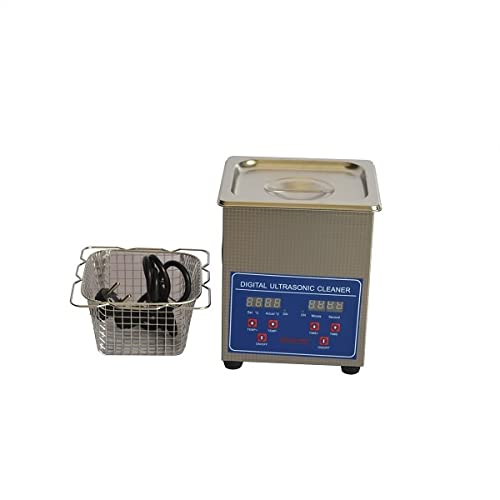
Image: The NSKI JPS-10A ultrasonic cleaner shown with its included stainless steel basket and power cord.
3.2 Placement
Place the ultrasonic cleaner on a firm, flat, and dry surface. Ensure there is adequate ventilation around the unit and that it is not near any heat sources or flammable materials. Keep a safe distance from water splashes.
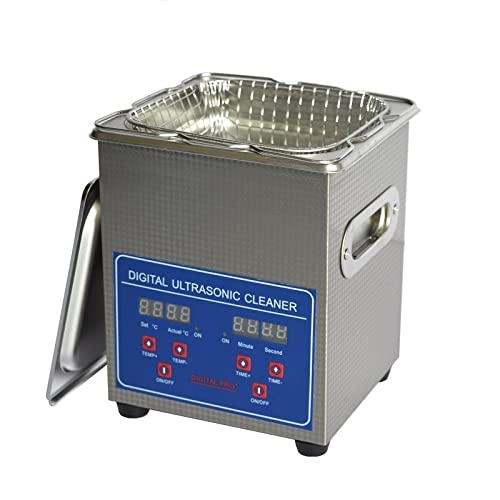
Image: Front view of the NSKI JPS-10A ultrasonic cleaner with the stainless steel basket placed inside the tank.
4. Operating Instructions
4.1 Filling the Tank
Open the lid and fill the stainless steel tank with an appropriate cleaning solution. Ensure the liquid level is between the MIN and MAX marks. Do not overfill or underfill.
4.2 Placing Items for Cleaning
Place the items to be cleaned into the stainless steel basket. Lower the basket carefully into the cleaning solution. Ensure items are fully submerged but not touching the bottom of the tank directly. Close the lid.
4.3 Control Panel Overview
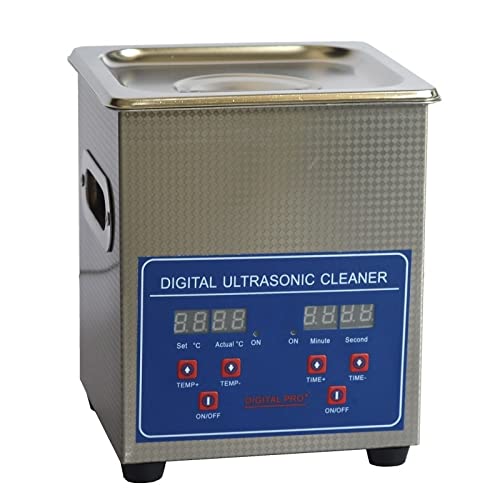
Image: Front view of the NSKI JPS-10A ultrasonic cleaner, showing the digital control panel with temperature and time displays.
The control panel features an LCD display for both temperature and time settings, along with corresponding control buttons.
4.4 Setting Temperature and Time
- Temperature Setting: Use the "TEMP+" and "TEMP-" buttons to set the desired cleaning temperature between 20℃ and 80℃. The display will show the set temperature and actual temperature. Press "ON/OFF" under TEMP to activate heating.
- Time Setting: Use the "TIME+" and "TIME-" buttons to set the cleaning duration from 0 to 30 minutes. The display shows minutes and seconds. Press "ON/OFF" under TIME to start the ultrasonic cleaning cycle.
4.5 Starting and Stopping Operation
Once temperature and time are set, press the respective "ON/OFF" buttons to start heating and ultrasonic cleaning. The unit will automatically stop the ultrasonic cycle when the set time expires. To stop manually, press the "ON/OFF" button again.
5. Maintenance
5.1 Draining and Cleaning the Tank
After each use, especially if the solution is dirty, unplug the unit and allow it to cool. Carefully drain the cleaning solution from the tank. Wipe the inside of the tank with a soft cloth. Do not use abrasive cleaners or scourers.
5.2 Exterior Cleaning
Wipe the exterior of the unit with a damp cloth. Do not spray water directly onto the control panel or electrical components.
5.3 Storage
Store the ultrasonic cleaner in a cool, dry place, away from direct sunlight and moisture. Ensure the tank is completely dry before storage.
6. Troubleshooting
| Problem | Possible Cause | Solution |
|---|---|---|
| Unit does not power on. | No power supply; power cord not connected; power switch off. | Check power outlet; ensure power cord is securely plugged in; turn on the main power switch (located at the back). |
| Ultrasonic function not working. | Time not set or not started; insufficient water level. | Set cleaning time and press ON/OFF for TIME; ensure liquid level is adequate. |
| Heating function not working. | Temperature not set or not started. | Set desired temperature and press ON/OFF for TEMP. |
| Poor cleaning results. | Incorrect cleaning solution; insufficient cleaning time/temperature; items too crowded. | Use appropriate cleaning solution for items; increase time/temperature; clean items in smaller batches. |
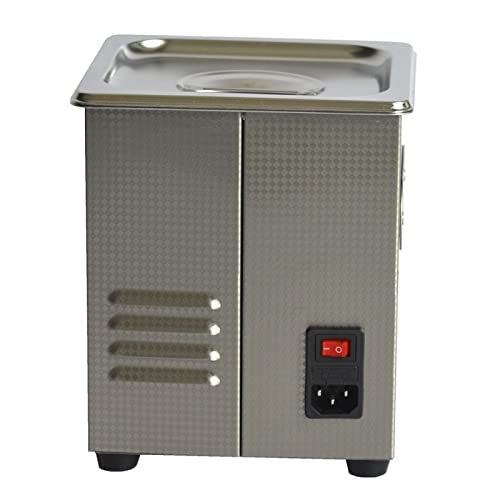
Image: Rear view of the NSKI JPS-10A ultrasonic cleaner, highlighting the power input and main power switch.
7. Specifications
| Parameter | Value |
|---|---|
| Model | JPS-10A |
| Ultrasonic Frequency | 40KHZ |
| Main Material | Stainless Steel SUS304 |
| Capacity | 2L |
| Time Control | Digital Control LCD (1-30 minutes) |
| Power Supply | AC100-120V, 50/60HZ or AC220-240V, 50/60HZ |
| Ultrasonic Power | 80W |
| Heating Power | 50W (NC heating) |
| Outline Dimension | 180mm x 180mm x 210mm (L*W*H) |
| Tank Size | 150mm x 135mm x 100mm (L*W*H) |
| Net Weight | 2.5KG (5.5 lbs) |
| Gross Weight | 3KG (6.6 lbs) |
| Item Weight (Amazon) | 6.28 Pounds |
8. Warranty and Support
8.1 Warranty Information
This product comes with a standard manufacturer's warranty. Please refer to the product packaging or original purchase documentation for specific warranty terms and duration. Keep your proof of purchase for warranty claims.
8.2 Customer Support
For technical assistance, troubleshooting beyond this manual, or warranty inquiries, please contact your retailer or the manufacturer's customer support. Contact details are typically found on the product packaging or the manufacturer's official website.