
VOYZ VZ-PA3500
VOYZ VZ-PA3500 Hybrid Digital Receiver Amplifier User Manual
Model: VZ-PA3500
Introduction
This manual provides detailed instructions for the setup, operation, and maintenance of your VOYZ VZ-PA3500 Wireless Bluetooth Digital Home Stereo Amplifier. Please read this manual thoroughly before using the device to ensure proper functionality and safety.
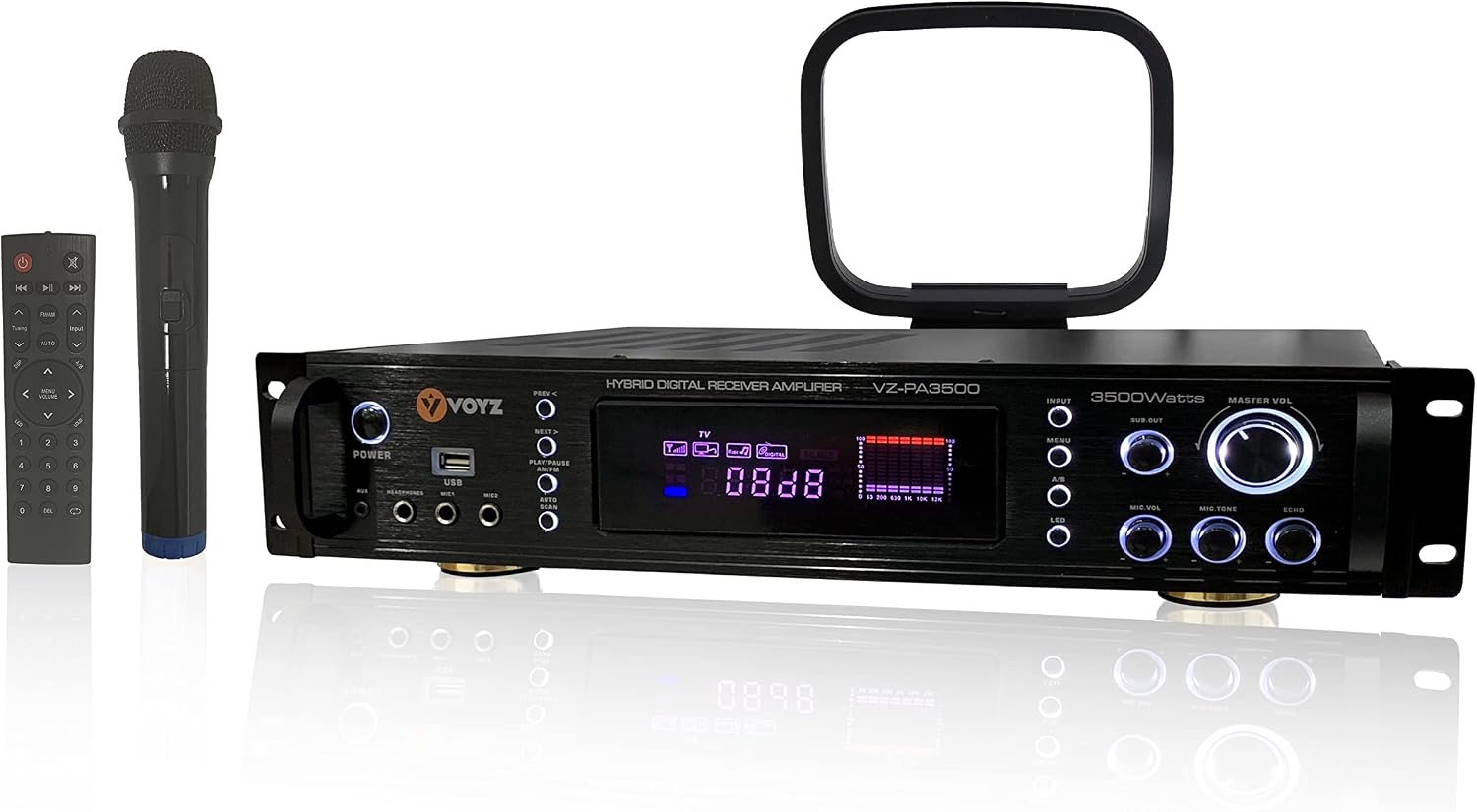
Figure 1: VOYZ VZ-PA3500 Hybrid Digital Receiver Amplifier with accessories.
Safety Precautions
- Ensure proper ventilation around the amplifier. Do not block ventilation openings.
- Do not expose the unit to rain, moisture, dripping, or splashing.
- Avoid placing the unit near heat sources such as radiators, heat registers, stoves, or other apparatus (including amplifiers) that produce heat.
- Use only attachments/accessories specified by the manufacturer.
- Unplug the unit during lightning storms or when unused for long periods.
- Refer all servicing to qualified service personnel.
- WARNING: This product can expose you to lead, which is known to the State of California to cause birth defects or other reproductive harm. For more information, go to the official Proposition 65 Warnings Website.
Product Overview
The VOYZ VZ-PA3500 is a versatile hybrid digital receiver amplifier designed for home audio and theater systems. It features multiple input options, Bluetooth connectivity, and powerful audio output.
Front Panel Controls and Inputs

Figure 2: Front Panel Layout with labeled controls.
- Power Button: Turns the unit on/off.
- AUX Input: 3.5mm auxiliary input jack.
- Headphones Output: 3.5mm headphone jack.
- USB Port: For MP3/USB playback.
- Mic 1 & Mic 2 Inputs: 1/4" microphone input jacks.
- Navigation Buttons (PREV, NEXT): For track selection or radio tuning.
- Play/Pause/AM/FM Button: Controls playback and switches between AM/FM radio.
- Auto Scan Button: Automatically scans and saves radio stations.
- Digital LCD Display: Shows current mode, frequency, and settings.
- Input Selector: Cycles through available audio inputs (Bluetooth, AUX, USB, RCA, AM/FM).
- Menu Button: Accesses EQ settings and other menu options.
- A/B Speaker Selector: Selects speaker output A, B, or A+B.
- LED Button: Controls LED lighting.
- Sub Out Control: Adjusts subwoofer output level.
- Master Volume Knob: Controls overall audio volume.
- Mic Volume Knob: Adjusts microphone volume.
- Mic Tone Knob: Adjusts microphone tone (pitch).
- Echo Knob: Adjusts microphone echo effect.
Rear Panel Connections

Figure 3: Rear Panel Layout with labeled connections.
- Audio Input (RCA): AUX, DVD/CD inputs for external audio sources.
- Audio Output (RCA): REC Line Out, Pre Out, Sub Out for connecting to other audio equipment.
- Speaker Output (A & B): Connects to passive speakers. Supports two sets of speakers.
- Power Cord Input: Connects to AC power supply.
- FM/AM Antenna Terminals: Connects to FM and AM antennas.
- Mic Antenna: Connects to the wireless microphone antenna.
- Cooling Fan: Ensures proper ventilation and prevents overheating.
- Voltage Selector: Switch for 115V/230V power input.
Setup Instructions
1. Unpacking and Placement
- Carefully remove the amplifier and all accessories from the packaging.
- Place the amplifier on a stable, flat surface with adequate ventilation. Ensure there is enough space around the unit for airflow, especially around the cooling fan at the rear.
- Verify the voltage selector on the rear panel matches your local power supply (115V or 230V).
2. Connecting Speakers
- Connect your passive speakers to the Speaker Output (A & B) terminals on the rear panel. Ensure correct polarity (+ to + and - to -) for each speaker.
- The amplifier supports two sets of speakers (A and B). You can use either set individually or both simultaneously via the A/B speaker selector on the front panel.
3. Connecting Audio Sources
- RCA Devices (CD/DVD Player, etc.): Connect the RCA output cables from your audio source to the Audio Input (AUX, DVD/CD) terminals on the rear panel.
- Auxiliary Devices (MP3 Player, Phone): Connect devices using a 3.5mm audio cable to the AUX Input jack on the front panel.
- USB Devices: Insert a USB drive with MP3 audio files into the USB Port on the front panel.
- Microphones: Connect 1/4" microphones to the Mic 1 or Mic 2 input jacks on the front panel.
- Antennas: Connect the included AM and FM antennas to their respective terminals on the rear panel for radio reception. Connect the wireless microphone antenna to the Mic Antenna input.
4. Power Connection
- Once all audio and speaker connections are made, connect the power cord to the Power Cord Input on the rear panel and then to a suitable AC power outlet.
Operating Instructions
1. Powering On/Off
- Press the Power Button on the front panel to turn the unit on or off. The digital display will illuminate.
2. Selecting Audio Input
- Press the Input Selector button on the front panel to cycle through available audio sources: Bluetooth, AUX, USB, RCA (DVD/CD), AM, or FM. The selected input will be shown on the LCD display.
3. Bluetooth Connectivity
The VZ-PA3500 features Bluetooth 5.0 for wireless audio streaming from compatible devices.

Figure 4: Bluetooth 5.0 system connectivity diagram.
- Select "Bluetooth" as the input source using the Input Selector button.
- On your mobile device (smartphone, tablet, laptop), enable Bluetooth and search for available devices.
- Select "VOYZ VZ-PA3500" (or similar name) from the list to pair.
- Once paired, you can stream audio wirelessly to the amplifier from your device. The wireless range is approximately 50+ feet.
4. USB/MP3 Playback
- Insert a USB flash drive containing MP3 audio files into the USB Port.
- The amplifier will automatically switch to USB input and begin playback.
- Use the PREV and NEXT buttons to navigate tracks. Use the Play/Pause button to control playback.
5. AM/FM Radio Operation
- Select "AM" or "FM" as the input source.
- Press the Auto Scan button to automatically scan and save available radio stations. The amplifier has 100 station memory presets.
- Use the PREV and NEXT buttons to manually tune or select saved stations.
6. Adjusting Audio Levels and Effects
- Master Volume: Rotate the large Master Volume Knob to adjust the overall output volume.
- Subwoofer Output: Use the Sub Out Control knob to adjust the level of the subwoofer output.
- Speaker Selection: Press the A/B Speaker Selector button to choose between Speaker A, Speaker B, or both A+B outputs.
- Microphone Controls:
- Mic Volume: Adjusts the volume of connected microphones.
- Mic Tone: Adjusts the tonal quality (pitch) of the microphone input.
- Echo: Adds an echo effect to the microphone input, suitable for karaoke.
- EQ Settings: Press the Menu Button and use the Master Volume Knob to navigate and adjust equalizer settings for bass, treble, and balance.
7. Using the Remote Control
The included remote control allows for convenient adjustment of various functions from a distance, including input selection, volume control, and playback controls.
Maintenance
- Cleaning: Use a soft, dry cloth to clean the exterior of the amplifier. Do not use liquid cleaners or aerosol sprays.
- Ventilation: Regularly check that the ventilation openings and cooling fan are free from dust and obstructions to ensure proper airflow.
- Storage: If storing the unit for an extended period, disconnect it from power and store it in a cool, dry place.
Troubleshooting
| Problem | Possible Cause | Solution |
|---|---|---|
| No power | Power cord not connected; Power outlet not active; Power button off; Incorrect voltage selector setting. | Ensure power cord is securely connected. Check power outlet. Press power button. Verify voltage selector (115V/230V) matches local supply. |
| No sound output | Incorrect input selected; Volume too low; Speakers not connected or faulty; A/B speaker selector incorrect. | Select correct input source. Increase Master Volume. Check speaker connections and ensure speakers are functional. Ensure A/B selector is set to the correct speaker output (A, B, or A+B). |
| Bluetooth not connecting | Bluetooth not selected as input; Device not in pairing mode; Device too far; Interference. | Select Bluetooth input. Ensure Bluetooth is enabled on your device and it's searching for devices. Move device closer to the amplifier. Reduce interference from other wireless devices. |
| Microphone not working | Microphone not connected properly; Mic volume too low; Microphone faulty. | Ensure microphone is securely plugged into Mic 1 or Mic 2. Increase Mic Volume knob. Test with another microphone if available. |
| Poor radio reception | Antenna not connected or positioned poorly; Weak signal. | Connect AM/FM antennas securely. Adjust antenna position for better reception. |
Specifications
- Model: VZ-PA3500
- Power Output: 3500 Watts (Peak)
- Connectivity: Bluetooth, USB, AUX (3.5mm), RCA (Audio Input/Output), AM/FM Radio
- Microphone Inputs: 2 x 1/4" (with Volume, Tone, Echo control)
- Speaker Outputs: A/B Speaker Selector (supports 2 sets of speakers)
- Headphone Jack: Yes (3.5mm)
- Radio Presets: 100 stations
- Dimensions (L x W x H): 19 x 15.9 x 3.5 inches
- Weight: 16.57 pounds
- Color: Black
- Surround Sound Channel Configuration: 5.1

Figure 5: VZ-PA3500 Amplifier Dimensions.
Official Product Video
Video: VZ-PA5000 Demo Video. This video provides a visual overview of the amplifier's features and connections, noting that the video refers to a VZ-PA5000 model.
Warranty and Support
For warranty information and technical support, please refer to the contact details provided with your product packaging or visit the official VOYZ website. Keep your purchase receipt for warranty claims.
Manufacturer: VOYZ
Model Number: VZ-PA3500
Ask a question about this manual
Ask about setup, troubleshooting, compatibility, parts, safety, or missing instructions. Manuals+ will review the question and use this page’s manual context to help answer it.