
Sonew Sonew3wabr985xe448
Sonew Intelligent Door Lock Cylinder User Manual
Model: Sonew3wabr985xe448
1. Introduction
Thank you for choosing the Sonew Intelligent Door Lock Cylinder. This smart lock offers advanced security features and multiple convenient unlocking methods, including fingerprint, password, and traditional key. This manual provides detailed instructions for installation, setup, operation, and maintenance to ensure optimal performance and security.
Package Contents
Please verify that all items listed below are included in your package:
- 1 x Smart Lock Cylinder
- 2 x Keys
- 1 x Screwdriver
- 1 x Silicone Suction Cup
- 1 x User Manual (this document)

Figure 1.1: Sonew Smart Lock Cylinder and its accessories.
2. Specifications
The following table outlines the technical specifications of the Sonew Intelligent Door Lock Cylinder:
| Feature | Specification |
|---|---|
| Item Type | Smart Lock Cylinder |
| Material | Zinc Alloy |
| Security Level | Top |
| Adaptable Door Types | Security Doors, Doors, Wooden Doors, Glass Doors |
| Adaptable Door Thickness | Approx. 40mm-100mm (1.57-3.94in) |
| Lock Cylinder Size | 70mm (2.76in), with hole in middle (35mm/1.38in, 35mm) |
| Password Capacity | 30 Groups (First group is management password) |
| Password Length | 6-12 Digits |
| Initial Password | 123456 |
| Fingerprint Capacity | 100 Pieces |
| Electrostatic Discharge (ESD) | 15KV |
| Power Input | 3.6-5V |
| Current (Working) | <135mA |
| Current (Standby) | <10uA |
| Working Temperature | -20℃ to 70℃ (-4°F to 158°F) |
| Compression Cycles | 100,000 Times |
| Battery Type | 3 x AAA Batteries (not included) |
| Unlock Methods | Fingerprint, Password, Key |

Figure 2.1: Door thickness and lock cylinder size compatibility.
3. Installation
Follow these steps to install your Sonew Intelligent Door Lock Cylinder. Ensure your door thickness is between 40mm and 100mm.
- Prepare the Door: Ensure your door has a standard lock cylinder hole. If replacing an existing lock, remove the old cylinder.
- Insert the Lock Cylinder: Insert the main lock cylinder body into the door's lock hole. Ensure the central part aligns correctly.
- Secure the Cylinder: Use the provided screwdriver to tighten the fixed core screw, securing the cylinder in place.
- Attach Handles: Connect the front handle (with keypad) and the rear handle to the lock cylinder. Ensure they are oriented correctly for inside and outside.
- Final Tightening: Secure the handles with the fixed screw bolts.

Figure 3.1: Installation diagram of the smart lock cylinder.
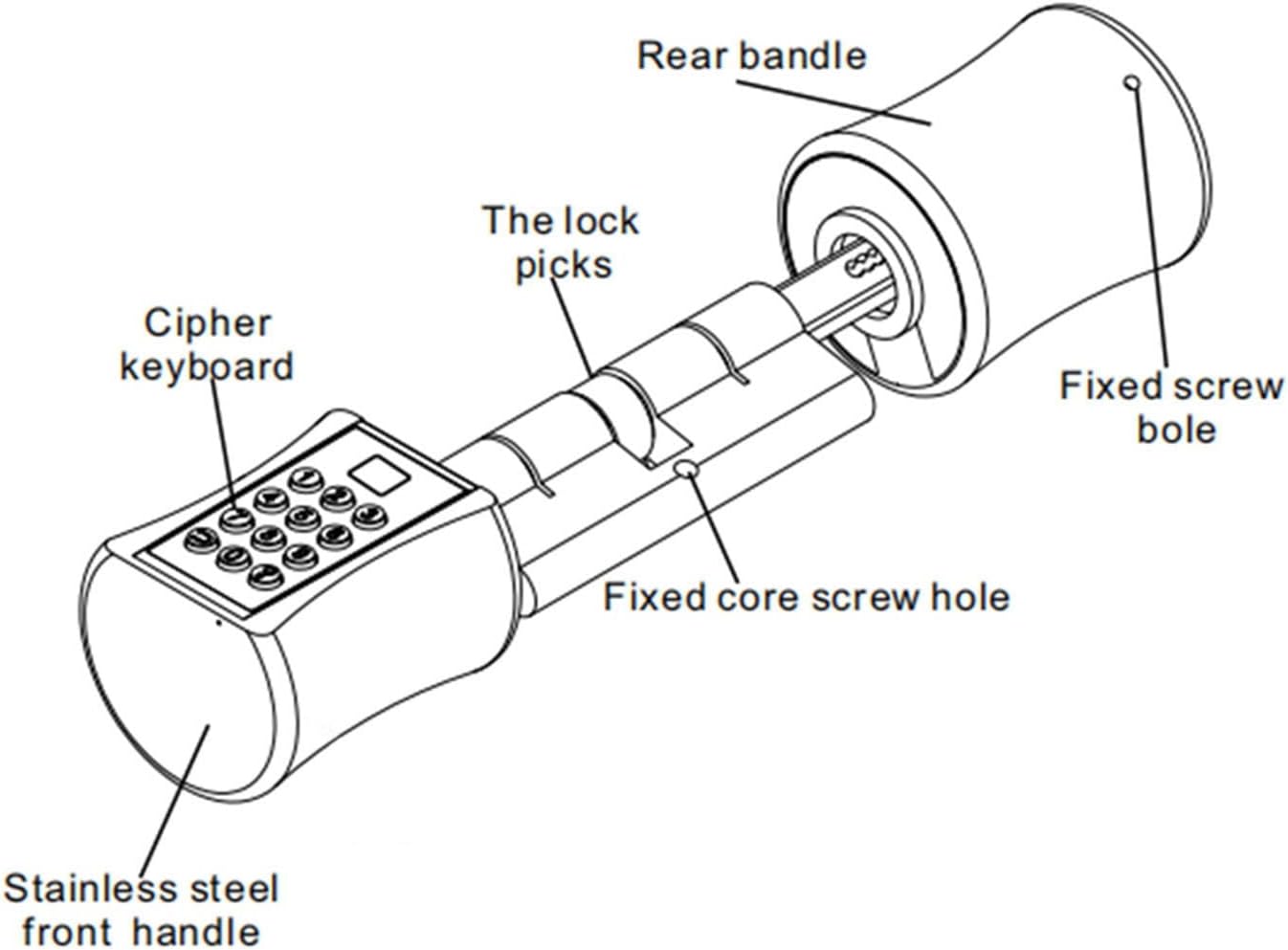
Figure 3.2: Exploded view of lock components.
4. Initial Setup and Programming
Before first use, you need to install batteries and set up the management password and user fingerprints.
4.1 Battery Installation
The lock requires 3 AAA batteries (not included). Locate the battery compartment, typically on the inside handle, and insert the batteries according to the polarity indicators.
4.2 Setting the Management Password
The initial password is 123456. It is highly recommended to change this immediately.
- Press the * key.
- Enter the current management password (default: 123456) followed by #.
- Press 1 to enter password management mode.
- Press 1 again to add a new management password.
- Enter your new 6-12 digit management password followed by #.
- Re-enter the new management password followed by # to confirm.
- A confirmation tone indicates success.
4.3 Registering Fingerprints
The lock can store up to 100 fingerprints. For optimal recognition, ensure your finger is clean and dry.
- Press the * key.
- Enter the management password followed by #.
- Press 2 to enter fingerprint management mode.
- Press 1 to add a new fingerprint.
- Place your finger on the fingerprint sensor. Lift and place it again several times (typically 4-5 times) from different angles until the lock confirms successful registration.
- A confirmation tone indicates success. Repeat for additional fingerprints.

Figure 4.1: Using the fingerprint sensor for registration and unlocking.
5. Operation
The Sonew Smart Lock offers multiple ways to unlock your door.
5.1 Unlocking with Fingerprint
Place your registered finger on the fingerprint sensor. The lock will unlock in approximately 0.02 seconds if the fingerprint is recognized.
5.2 Unlocking with Password
Enter your registered password on the keypad followed by the # key. The lock will unlock.
5.3 Virtual Password Function (Enhanced Security)
To prevent others from peeking at your password, you can enter random digits before and after your actual password. Only the correct sequence of your password needs to be present within the entered digits.
Example: If your password is 123456, you can enter 987123456012 and the lock will still open.
5.4 Unlocking with Key
In case of battery depletion or electronic malfunction, you can always use the provided physical keys to unlock the door manually.

Figure 5.1: Keypad and fingerprint sensor for unlocking.

Figure 5.2: Physical keys for manual unlocking.
6. Maintenance
6.1 Battery Replacement and Emergency Power
The lock will issue a low battery alarm when the voltage is too low. Replace the 3 AAA batteries promptly to ensure continuous operation.
In an emergency, if the batteries are completely depleted, there is a power interface near the keyhole. You can connect a 5V power source (e.g., a power bank) to temporarily power the lock and unlock it.
6.2 Cleaning
Wipe the lock surface with a soft, dry cloth. Do not use abrasive cleaners or solvents, as they may damage the finish or electronic components. Keep the fingerprint sensor clean for optimal performance.
6.3 General Care
Avoid exposing the lock to extreme temperatures or direct water spray. The lock is designed for indoor use or protected outdoor environments.
7. Troubleshooting
If you encounter issues with your Sonew Smart Lock, refer to the following common problems and solutions:
| Problem | Possible Cause / Solution |
|---|---|
| Lock does not respond. |
|
| Fingerprint not recognized. |
|
| Password not working. |
|
| Lock cylinder feels loose after installation. |
|
8. Warranty and Support
For any product inquiries, technical support, or warranty claims, please contact Sonew customer service through the retailer where you purchased the product or visit the official Sonew brand store on Amazon.
Sonew Brand Store: https://www.amazon.com/stores/Sonew/page/331933A2-EC71-47F9-8BF4-25DD5775CEBD
Please retain your proof of purchase for warranty purposes.
Ask a question about this manual
Ask about setup, troubleshooting, compatibility, parts, safety, or missing instructions. Manuals+ will review the question and use this page’s manual context to help answer it.