
1. Introduction
This manual provides detailed instructions for the JOSTART mic04 Professional Wireless Lavalier Microphone system. Designed for iPhone and iPad users, this 4-channel wireless microphone system offers high-quality audio recording for various applications, including interviews, video podcasts, vlogging, YouTube content creation, and livestreaming. It features advanced noise reduction technology and a convenient plug-and-play setup.
2. What's in the Box
Verify that all components are present in your package:
- 4 x Lavalier Microphones (Transmitters)
- 1 x Audio Receiver (Lightning Connector)
- 1 x Charging Case
- 1 x USB Charging Cable
- 1 x User Manual
- 4 x Windproof Wool (Noise-reducing)
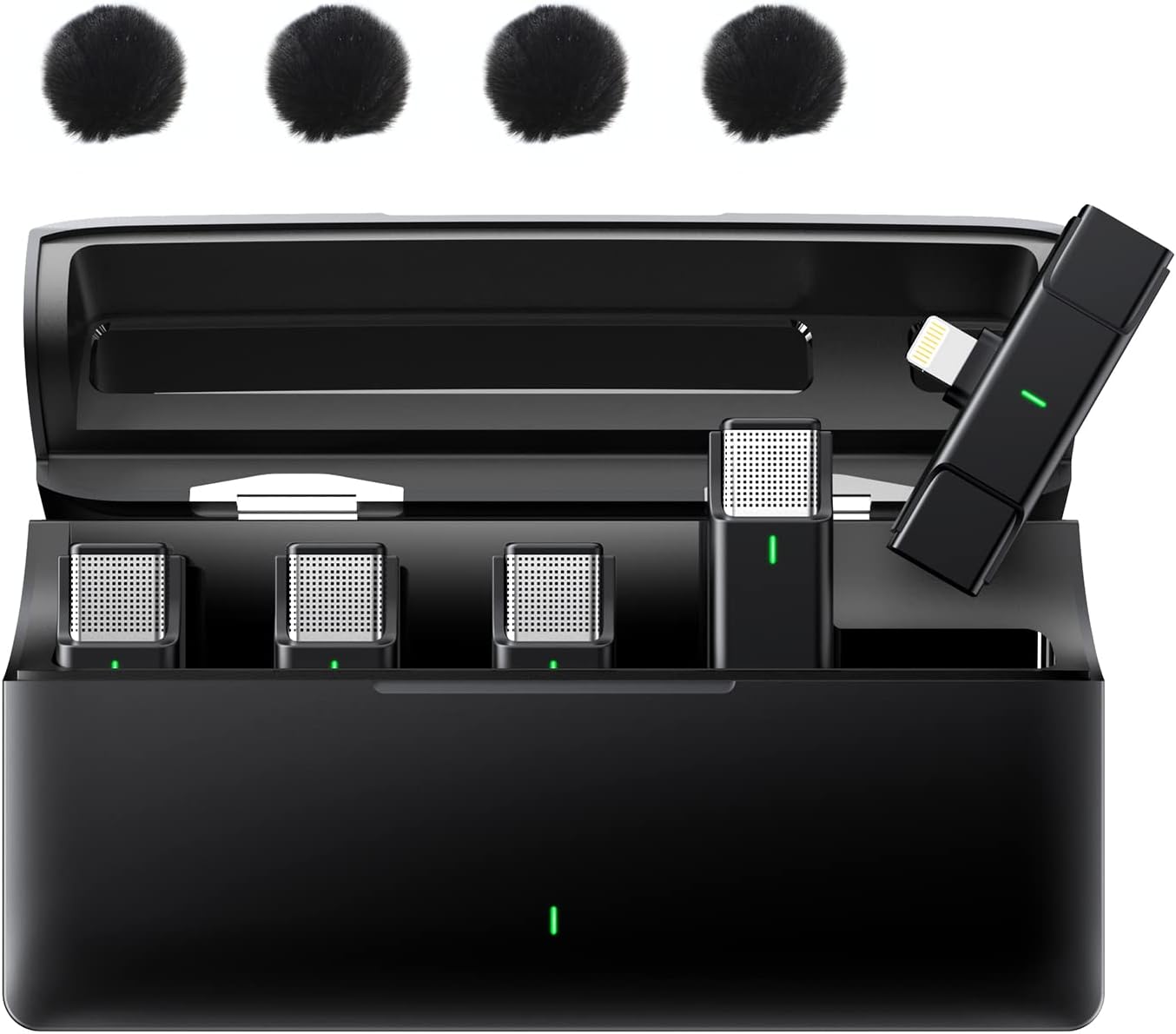
Image: The complete JOSTART mic04 package, including four lavalier microphones, the lightning receiver, the charging case, and four windproof wool covers.
3. Product Features
- One-Click Noise Cancellation: Equipped with a cutting-edge DSP noise cancellation chip, the mic04 effectively reduces environmental noise, ensuring clear and clean audio. It delivers a 48kHz sampling rate and 24-bit depth for professional-grade sound.
- Plug-and-Play Operation: Enjoy a hassle-free setup. Simply remove the wireless lavalier microphone from the charging case and plug the receiver into your device. No adapters, Bluetooth pairing, or apps are required.
- Extended Battery Life: Each wireless clip-on microphone provides up to 6 hours of working time on a full charge. The compact charging case can recharge the entire set up to 3 times, offering a total working time of approximately 24 hours. Each full charge takes about 1.5 hours.
- Long Wireless Transmission Range: The mic04 supports a stable and reliable high-fidelity audio receiving working distance of up to 656 feet (200 meters) in open spaces, allowing flexibility in various recording environments.
- 4-in-1 Wireless Microphone System: This system includes four transmitters and one receiver, enabling simultaneous recording from up to four individual microphones. This is ideal for scenarios requiring multiple speakers or audio sources.

Image: An overview of the product's key features, highlighting HD sound quality, automatic pairing, lavalier design, contact charging, 2.4G band chip, and transmission range.

Image: Illustration of the microphone's extensive wireless transmission range and high-quality audio capabilities.
4. Setup
The JOSTART mic04 system is designed for quick and easy setup:
- Charge the System: Before first use, ensure the charging case and microphones are fully charged using the provided USB-C cable. The charging case has an indicator light.
- Connect the Receiver: Plug the Lightning connector receiver directly into your iPhone or iPad's Lightning port.
- Activate Microphones: Remove the desired number of lavalier microphones from the charging case. They will automatically power on and pair with the receiver within seconds. A green indicator light on the microphone signifies a successful connection.
- Attach Microphones: Clip the lavalier microphones to the collar or clothing of the speaker, ensuring the microphone head is facing towards the sound source for optimal audio capture.

Image: Visual guide to the plug-and-play setup, demonstrating how the receiver connects to a device and microphones automatically pair.

Image: Step-by-step illustration of the connection process, from removing the microphone to plugging in the receiver and achieving a connected state.
5. Operating Instructions
- Recording: Once the microphones are paired and the receiver is connected to your device, open your preferred recording application (e.g., Camera app, voice recorder, livestreaming app) and begin recording. The system will automatically capture audio from the active microphones.
- Noise Cancellation: The mic04 features automatic noise cancellation. No manual activation is typically required. The DSP chip continuously works to filter out environmental noise for clearer sound.
- Multi-Channel Use: With four transmitters, you can record up to four distinct audio sources simultaneously. Ensure each speaker has a microphone clipped on.
- Monitoring Audio: To monitor audio during recording or playback, you may need to use headphones connected to your mobile phone or unplug the receiver to hear the recorded sound directly from your device's speakers.

Image: Examples of multi-scene application, demonstrating the versatility of the microphone system for different content creation needs.

Image: The microphone's smart and mini design, illustrating its portability and how it can be easily clipped onto clothing for discreet use.
6. Maintenance
- Charging: Always store the microphones in the charging case when not in use to keep them charged and protected. Recharge the case regularly using the provided USB-C cable.
- Cleaning: Use a soft, dry cloth to wipe the microphones and charging case. Do not use liquid cleaners or abrasive materials.
- Storage: Store the system in a cool, dry place away from direct sunlight and extreme temperatures.
- Windproof Wool: Regularly check and clean the windproof wool covers. Replace them if they become damaged or excessively dirty to maintain optimal noise reduction performance.

Image: The smart charging case, detailing its dimensions and battery life capabilities for both individual microphones and the case itself.
7. Troubleshooting
- Playback Video Without Sound: If you record a video and there is no sound during playback, please unplug the receiver from your iPhone/iPad. Alternatively, use headphones connected to your mobile phone to listen to the recorded video. This is a common behavior for devices when an external audio input device is connected.
- Microphones Not Pairing: Ensure the receiver is securely plugged into your device and the microphones are fully charged. Place the microphones back into the charging case for a few seconds, then remove them to re-initiate the auto-pairing process.
- Poor Audio Quality/Interference: Check the distance between the microphones and the receiver; try to stay within the recommended operating range. Ensure there are no major obstructions or strong electromagnetic interference sources nearby. Verify the windproof wool covers are properly installed.
- Battery Drains Quickly: Ensure the microphones are fully charged before use. If battery life is significantly shorter than expected, ensure the charging contacts are clean and the microphones are properly seated in the charging case.
8. Specifications
| Feature | Detail |
|---|---|
| Model Name | Wireless Lavalier Microphone for iPhone/iPad |
| Microphone Form Factor | Lavalier |
| Number of Channels | 4 |
| Polar Pattern | Omnidirectional |
| Connectivity Technology | Bluetooth (for pairing, not direct audio transmission) |
| Connector Type | Lightning |
| Compatible Devices | iPhone, iPad |
| Signal-to-Noise Ratio | 77 dB |
| Item Weight | 13.7 ounces (approx. 388 grams) |
| Material | Acrylonitrile Butadiene Styrene (ABS) |
| Power Source | Corded Electric (via USB-C charging case) |
| Item Model Number | mic04 |
| UPC | 769282979182 |
9. Warranty and Support
For warranty information, technical support, or any product-related inquiries, please refer to the contact information provided with your purchase or visit the official JOSTART website. Keep your purchase receipt as proof of purchase for warranty claims.