
257 TWENTYFIVESEVEN SW600
257 TWENTYFIVESEVEN SW600 Smartwatch Fitness Tracker User Manual
Model: SW600
Introduction
Thank you for choosing the 257 TWENTYFIVESEVEN SW600 Smartwatch Fitness Tracker. This device is designed to help you monitor your health and fitness activities, providing convenient smart functions directly from your wrist. This manual provides essential information on how to set up, operate, maintain, and troubleshoot your new smartwatch to ensure optimal performance and longevity.
What's in the Box
Upon opening your product packaging, please verify that all the following items are included:
- 1 x SW600 Smartwatch
- 1 x User Guide
- 1 x Power Cable

Image: The retail packaging for the SW600 Smartwatch, displaying the product and key features.
Product Overview
The SW600 Smartwatch features a square display and a comfortable silicone strap. It integrates various sensors on its rear for health monitoring.

Image: Front view of the SW600 Smartwatch, showing the digital display with time, step count, and day of the week.
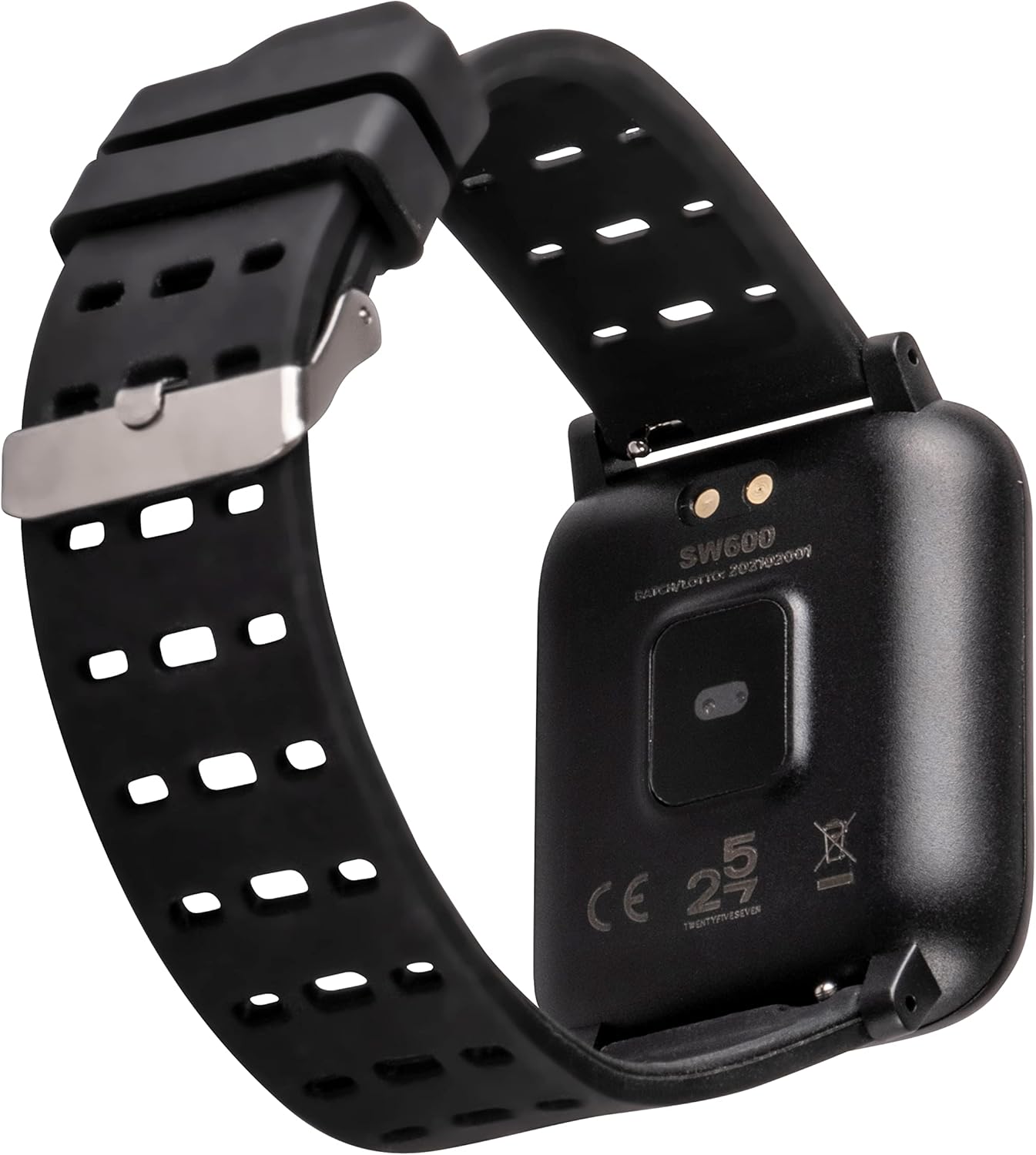
Image: Back view of the SW600 Smartwatch, highlighting the optical heart rate sensor and magnetic charging contacts.
Setup Guide
1. Charging the Device
Before first use, fully charge your smartwatch. The device features an integrated USB port for convenient charging. Alternatively, use the provided magnetic charging cable. A full charge takes approximately 90 minutes.
2. App Installation
The SW600 Smartwatch operates with the WearFit 2.0 or gowear.it applications. These applications are compatible with both Android and iOS devices. Please download the appropriate app from your device's app store.
- For Android devices: Search for "WearFit 2.0" or "gowear.it" on the Google Play Store.
- For iOS devices: Search for "WearFit 2.0" or "gowear.it" on the Apple App Store.
3. Device Pairing
After installing the app, open it and follow the on-screen instructions to pair your smartwatch via Bluetooth 4.0. Ensure Bluetooth is enabled on your smartphone.
Operating Instructions
Basic Navigation
Navigate through the smartwatch interface by swiping on the touch screen. The specific gestures and button functions (if any) will be detailed within the WearFit 2.0 or gowear.it app's help section.
Smart Functions
The SW600 Smartwatch offers a range of smart features to enhance your daily life:
- Notifications: Receive alerts for calls, messages, and app notifications directly on your wrist (compatible with iOS and Android).
- Multimedia Playback Controller: Control music playback on your connected smartphone.
- Phone Finder: Locate your misplaced smartphone by triggering an alert from your smartwatch.
- Alarm Clock: Set alarms to wake you up or remind you of important events.
- Remote Shutter: Use your smartwatch as a remote control for your smartphone's camera.
- Sedentary and Hydration Reminders: Receive alerts to move or drink water at regular intervals.
- Do Not Disturb Mode: Silence notifications during specific times.
- Wrist Wake-up: The screen automatically turns on when you raise your wrist.
Sport and Health Monitoring
The SW600 is equipped with sensors to track various health and fitness metrics:
- Activity Tracking: Records steps taken, calories burned, and distance covered throughout the day.
- Heart Rate Monitoring: Continuously monitors your heart rate.
- Blood Pressure Monitoring: Provides estimates of your blood pressure.
- Blood Oxygen Monitoring: Measures your blood oxygen saturation (SpO2).
- Sleep Monitoring: Tracks your sleep patterns and quality.
- Multisport Mode: Supports tracking for various sports activities.

Image: The SW600 Smartwatch worn on a wrist, demonstrating its practical use during daily activities.
Maintenance
Cleaning
To maintain the cleanliness and functionality of your smartwatch, regularly wipe the screen and strap with a soft, damp cloth. Avoid using harsh chemicals or abrasive materials.
Water Resistance (IP67)
The SW600 Smartwatch is rated IP67 water-resistant. This means it is protected from dust and can withstand immersion in water up to 1 meter for up to 30 minutes. It is suitable for daily use, such as hand washing or light rain. However, it is not recommended for swimming, showering, or diving.
Battery Care
To prolong battery life, avoid exposing the device to extreme temperatures. Charge the device fully before long periods of inactivity. The 180 mAh battery provides up to 14 days of standby time.
Troubleshooting
If you encounter issues with your SW600 Smartwatch, please refer to the table below for common problems and their solutions.
| Problem | Possible Cause | Solution |
|---|---|---|
| Device does not turn on | Low battery; device not charged. | Charge the device for at least 30 minutes using the provided cable. |
| Cannot pair with smartphone | Bluetooth is off; app not open; device too far. | Ensure Bluetooth is enabled on your phone. Open the WearFit 2.0/gowear.it app. Keep the smartwatch close to your phone. Restart both devices. |
| Inaccurate health data | Improper fit; sensor obstruction; movement during measurement. | Ensure the watch is snug on your wrist. Clean the sensor area. Remain still during measurements. Note that these are not medical devices. |
| Notifications not received | App permissions not granted; Do Not Disturb mode active; app not running in background. | Check app permissions in your phone settings. Disable Do Not Disturb mode on the watch. Ensure the app is running in the background. |
Specifications
Detailed technical specifications for the 257 TWENTYFIVESEVEN SW600 Smartwatch:
| Feature | Detail |
|---|---|
| Product Dimensions | 17 x 3 x 9 cm; 30 Grams |
| Model Number | SW600 |
| Operating System | Android, iOS |
| Special Features | Alarm Clock, Time Display, Pedometer |
| Battery Capacity | 180 Milliamperestunden (mAh) |
| Connectivity Technology | Bluetooth |
| Wireless Communication Standard | Bluetooth |
| GPS | Integrated GPS |
| Shape | Square |
| Style | Modern |
| Water Resistance | IP67 |
| Charging Time | 90 minutes |
| Standby Time | Up to 14 days |
Warranty and Support
The 257 TWENTYFIVESEVEN SW600 Smartwatch comes with a commitment to 100% reliability and is certified with CE/RoHS/Reach standards, ensuring product quality and safety.
For any support or after-sales service inquiries, please refer to the contact information provided with your purchase or visit the official 257 TWENTYFIVESEVEN website. Support and after-sales service are available in Italian.
Ask a question about this manual
Ask about setup, troubleshooting, compatibility, parts, safety, or missing instructions. Manuals+ will review the question and use this page’s manual context to help answer it.