
1. Introduction
This manual provides essential information for the proper use and maintenance of your RS232 Autronic ECU Serial PC Program Cable. This cable is designed to facilitate communication between your PC/Laptop and various Autronic ECU models, including SM2, SM3, SM4, and EV09 (Plug-in) units, for setup and configuration purposes.
The cable features a D-sub 9-pin female connector for PC/Laptop connection and a 3.5mm jack male connector for ECU connection.
2. Product Features
- Connector Type: D-sub 9-pin female (PC/Laptop) to 3.5mm jack male (ECU).
- Compatibility: Autronic ECU models SM2, SM3, SM4, EV09, and other compatible units.
- Function: Enables serial communication for ECU setup and configuration.
- Cable Type: AUX cable.
- Special Feature: Braided cable for enhanced durability.
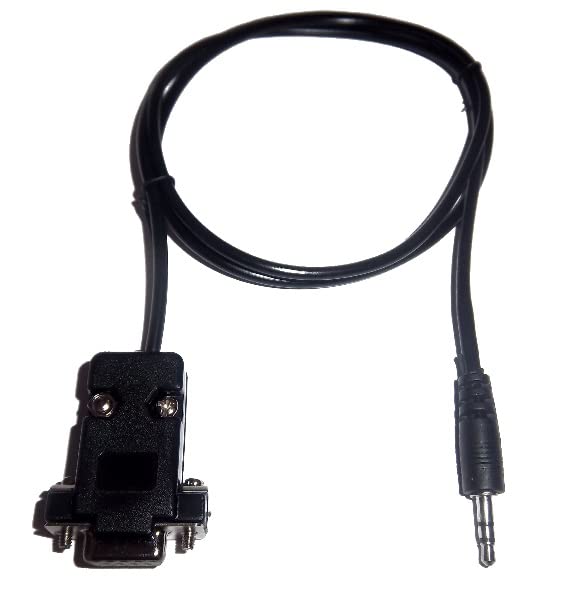
Figure 2.1: Overview of the RS232 Autronic ECU Serial PC Program Cable, showing both the D-sub 9-pin connector and the 3.5mm jack.
3. Setup
- Install Necessary Drivers: Before connecting the cable, ensure that any required USB-to-Serial drivers are installed on your PC/Laptop. Refer to your PC/Laptop's operating system documentation or the ECU software provider for specific driver requirements.
- Connect to PC/Laptop: Insert the D-sub 9-pin female connector of the cable into the serial port (COM port) of your PC or Laptop. If your PC/Laptop does not have a serial port, a USB-to-Serial adapter (not included) will be required.
- Connect to ECU: Insert the 3.5mm jack male connector into the designated communication port on your Autronic ECU unit. Ensure a secure connection.
- Launch ECU Software: Open the Autronic ECU tuning or configuration software on your PC/Laptop.

Figure 3.1: Detailed view of the D-sub 9-pin connector (left) and the 3.5mm jack connector (right), illustrating the connection points.
4. Operating Instructions
Once the cable is physically connected and the ECU software is launched, follow these steps to establish communication and perform operations:
- Select COM Port: Within the Autronic ECU software, navigate to the communication settings or preferences. Select the correct COM port that corresponds to your connected serial cable. This is typically identified by the operating system after driver installation.
- Establish Connection: Initiate the connection process within the software. The software should indicate a successful connection to the ECU.
- Perform Operations: You can now proceed with reading data from the ECU, uploading new maps, adjusting parameters, or performing diagnostics as supported by your Autronic ECU software.
- Disconnect Safely: Before disconnecting the cable, ensure that all operations are complete and the software indicates that it is safe to disconnect. Close the ECU software before physically removing the cable.

Figure 4.1: Close-up view of the 3.5mm jack connector, which connects to the Autronic ECU.
5. Maintenance
To ensure the longevity and reliable performance of your serial program cable, follow these maintenance guidelines:
- Storage: Store the cable in a cool, dry place away from direct sunlight and extreme temperatures. Avoid kinking or tightly coiling the cable.
- Cleaning: Use a soft, dry cloth to wipe the cable and connectors. Do not use liquid cleaners or solvents.
- Handling: Always grasp the connectors when plugging or unplugging the cable. Avoid pulling on the cable itself, as this can damage the internal wiring.
- Inspection: Periodically inspect the cable for any signs of wear, fraying, or damage to the connectors. Do not use a damaged cable.
6. Troubleshooting
| Problem | Possible Cause | Solution |
|---|---|---|
| No communication with ECU. | Incorrect COM port selected in software. | Verify and select the correct COM port in your ECU software settings. |
| No communication with ECU. | Missing or incorrect serial port drivers. | Install or update the necessary USB-to-Serial drivers for your operating system. |
| No communication with ECU. | Cable not securely connected. | Ensure both the D-sub 9-pin and 3.5mm jack connectors are fully inserted. |
| Cable appears damaged. | Physical wear or damage. | Discontinue use and replace the cable. |
7. Specifications
- Product Name: RS232 AUTRONIC ECU SERIAL PC PROGRAM CABLE
- Model Compatibility: Autronic SM2, SM3, SM4, EV09 (Plug-in)
- Connector 1: D-sub 9-pin Female
- Connector 2: 3.5mm Jack Male
- Cable Type: AUX
- Compatible Devices: Laptop, Personal Computer
- Special Feature: Braided
- Manufacturer: Generic
8. Warranty and Support
Information regarding specific warranty terms for this product is not provided in the available documentation. For warranty claims or technical support, please contact the retailer or manufacturer directly.
It is recommended to retain your proof of purchase for any warranty-related inquiries.