
Lunderg UPC-LUN-CHAIR-BEDALARM
Lunderg Wireless Early-Alert Bed and Chair Alarm System
Model: UPC-LUN-CHAIR-BEDALARM
Welcome
This manual provides comprehensive instructions for the Lunderg Wireless Early-Alert Bed and Chair Alarm System. This system is designed to assist caregivers in preventing falls for elderly adults and individuals with dementia by providing timely alerts when a person attempts to leave their bed or chair.
Important Safety Information
- This device is intended as an aid for fall prevention and does not replace direct supervision.
- Ensure all components are installed correctly and functioning before relying on the system.
- Keep the pager within hearing range at all times.
- Regularly check battery levels and replace them as needed to ensure continuous operation.
- Do not immerse sensor pads in liquid. Clean with a damp cloth.
- Keep out of reach of children.
- Statements regarding dietary supplements have not been evaluated by the FDA and are not intended to diagnose, treat, cure, or prevent any disease or health condition.
Package Contents
Verify that all the following items are included in your package:
- 1 x Wireless Pager/Monitor
- 1 x Bed Sensor Pad (10 x 33 inches)
- 1 x Chair Sensor Pad (10 x 15 inches)
- 1 x Wall Mount Bracket
- 4 x Bed Clips
- 4 x Bands
- 2 x AA Batteries (for pager)
- 1 x User Manual

Description: This detailed diagram outlines all the components included in the Lunderg Bed and Chair Alarm Set, including the bed sensor pad (10x33 inches), chair sensor pad (10x15 inches), monitor (pager), wall mount bracket, AA batteries, bed clips, and bands. It also shows the location of the user manual.
Product Overview
Wireless Pager/Monitor
The pager is the central unit that receives signals from the sensor pads and emits an alarm. It features:
- Status Indicators: Lights to show connection and alarm status.
- Volume Button: Adjusts alarm volume (High, Low, Vibration Only).
- Pair Button: Used to connect sensor pads to the pager.
- Stop Button: Silences the alarm.
- On/Off Switch: Located on the side.
- Pocket Clip: For portability.
Bed Sensor Pad
The bed sensor pad is placed under the mattress or fitted sheet to detect movement. Key features include:
- Dimensions: 10 x 33 inches.
- Early-Alert Zone: Designed to detect the process of standing up.
- Low False Alarm Zone: Helps reduce nuisance alarms.
- Incontinence resistant and easy to wipe clean.
Chair Sensor Pad
The chair sensor pad is placed on a chair, wheelchair, or recliner seat. Key features include:
- Dimensions: 10 x 15 inches.
- Triggers immediately after the patient stands up.
- Incontinence resistant and easy to wipe clean.
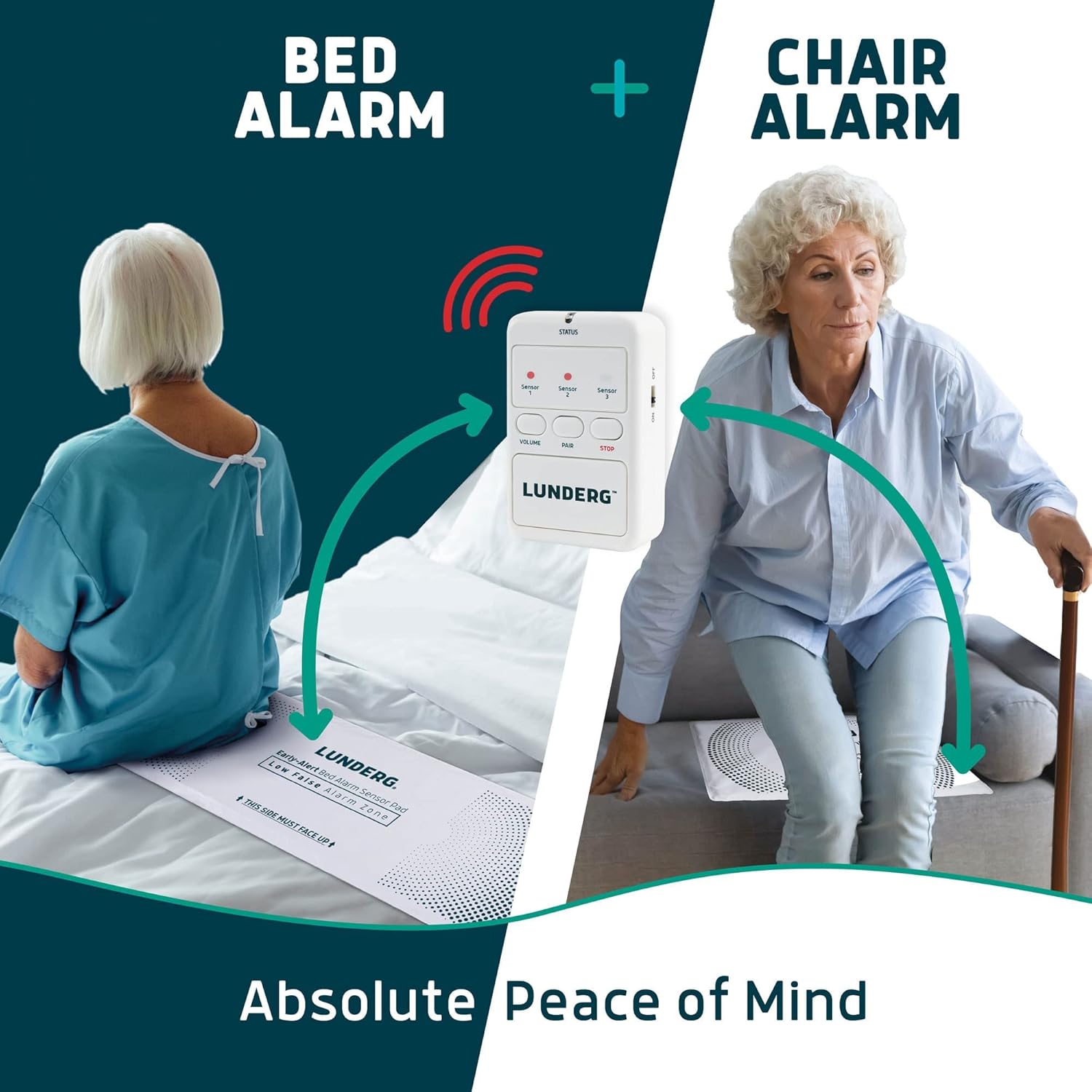
Description: This diagram illustrates the Lunderg Bed Alarm and Chair Alarm system in action. The bed sensor pad is placed under a patient in bed, and the chair sensor pad is under a patient in a chair, both wirelessly connected to the central pager unit.
Setup Instructions
1. Pager Battery Installation
- Locate the battery compartment on the back of the pager.
- Open the compartment and insert the two AA batteries, ensuring correct polarity (+/-).
- Close the battery compartment securely.
- Turn the pager ON using the side switch.
2. Bed Sensor Pad Placement and Securing
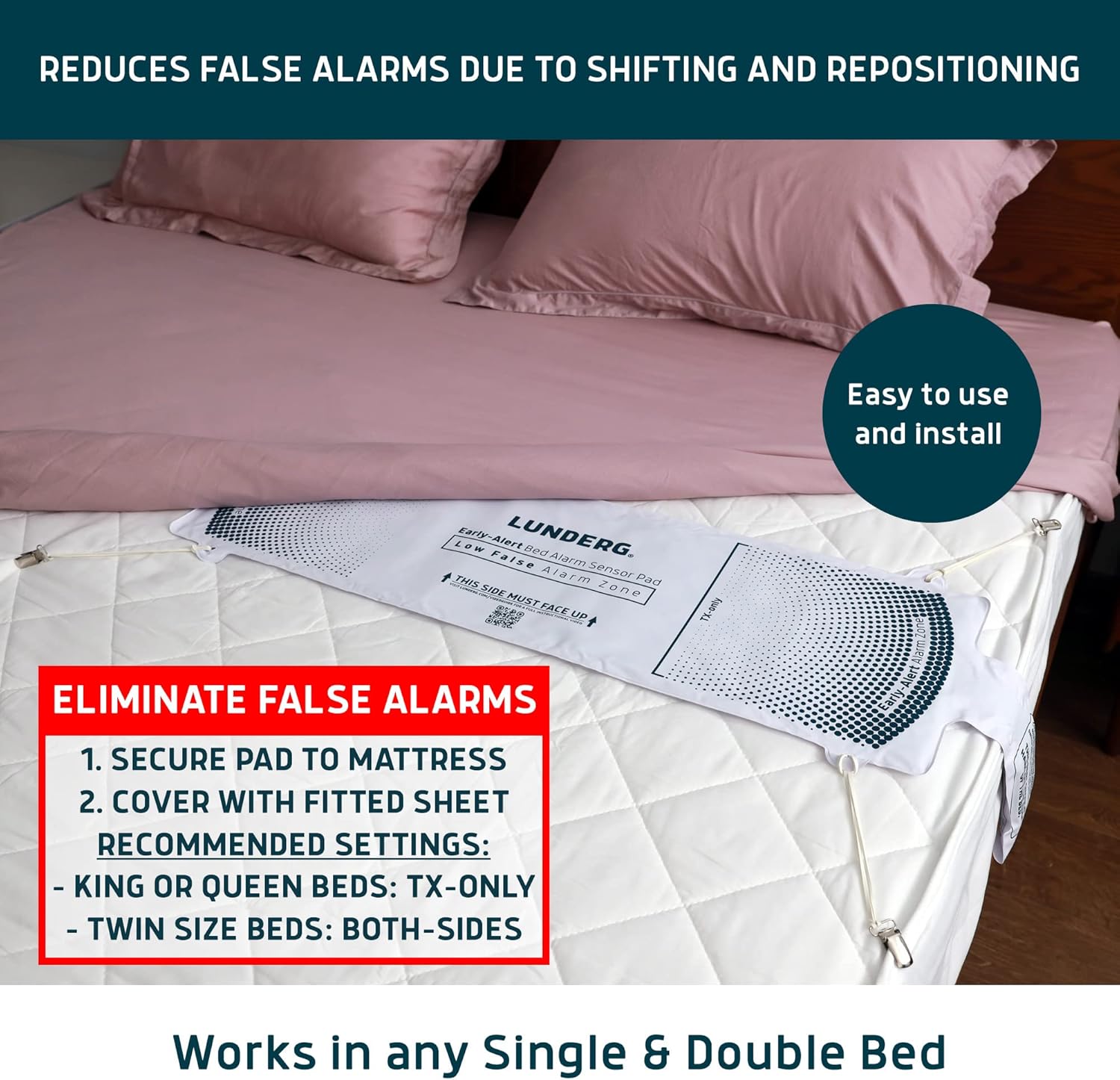
- Place the bed sensor pad directly on the mattress, under the fitted sheet. Ensure the side labeled "THIS SIDE MUST FACE UP" is visible.
- Position the pad so that the patient's torso will be centered over the pad when they are lying in bed. The end of the pad with the cable should hang slightly off the edge of the bed.
- Use the provided bed clips and bands to secure the pad to the mattress. This prevents shifting and helps reduce false alarms.
- For King or Queen beds, use the 'TX-only' setting on the pad. For Twin size beds, use 'Both-sides' if applicable (refer to pad markings).

Description: This image demonstrates the correct installation of the Lunderg bed sensor pad. It shows the pad secured to the mattress with anti-slip stickers and bands, then covered by a fitted sheet, which is crucial for preventing false alarms due to shifting or repositioning.
3. Chair Sensor Pad Placement
- Place the chair sensor pad on the seat of the chair, wheelchair, or recliner. Ensure the side labeled "THIS SIDE MUST FACE UP" is visible.
- Position the pad so that the patient's weight will be directly on the pad when seated.
Description: This image depicts an elderly man in the process of standing up from a couch, with the Lunderg chair sensor pad positioned on the seat cushion. This illustrates the use of the chair alarm system for fall prevention.
4. Pairing Sensor Pads with Pager
The bed and chair sensor pads connect wirelessly to the pager. Follow the instructions provided with your specific sensor pads for pairing. Generally, this involves:
- Ensure the pager is turned on and within range of the sensor pad.
- Press and hold the 'PAIR' button on the pager until the indicator light flashes.
- Activate the sensor pad (e.g., by pressing a button on the pad's transmitter or by applying/releasing pressure).
- The pager will indicate successful pairing (e.g., a solid light or beep).
- Repeat for the second sensor pad if using both bed and chair alarms.
For detailed video guides on setup, please visit: lunderg.com/videoguide (general guide) and lunderg.com/chairvideo (chair alarm specific).
Operating the System
Understanding Alarm Triggers
- Bed Alarm: The Early-Alert system detects the process of standing up, notifying you before the individual is fully out of bed.
- Chair Alarm: The system notifies you immediately after the patient stands up from the chair.
Adjusting Pager Settings
The pager offers adjustable settings to suit your environment:
- Volume: Press the 'VOLUME' button to cycle through High, Low, or Vibration Only modes.
- Choose the setting that ensures you are alerted effectively, whether during the day or to wake you from sleep.
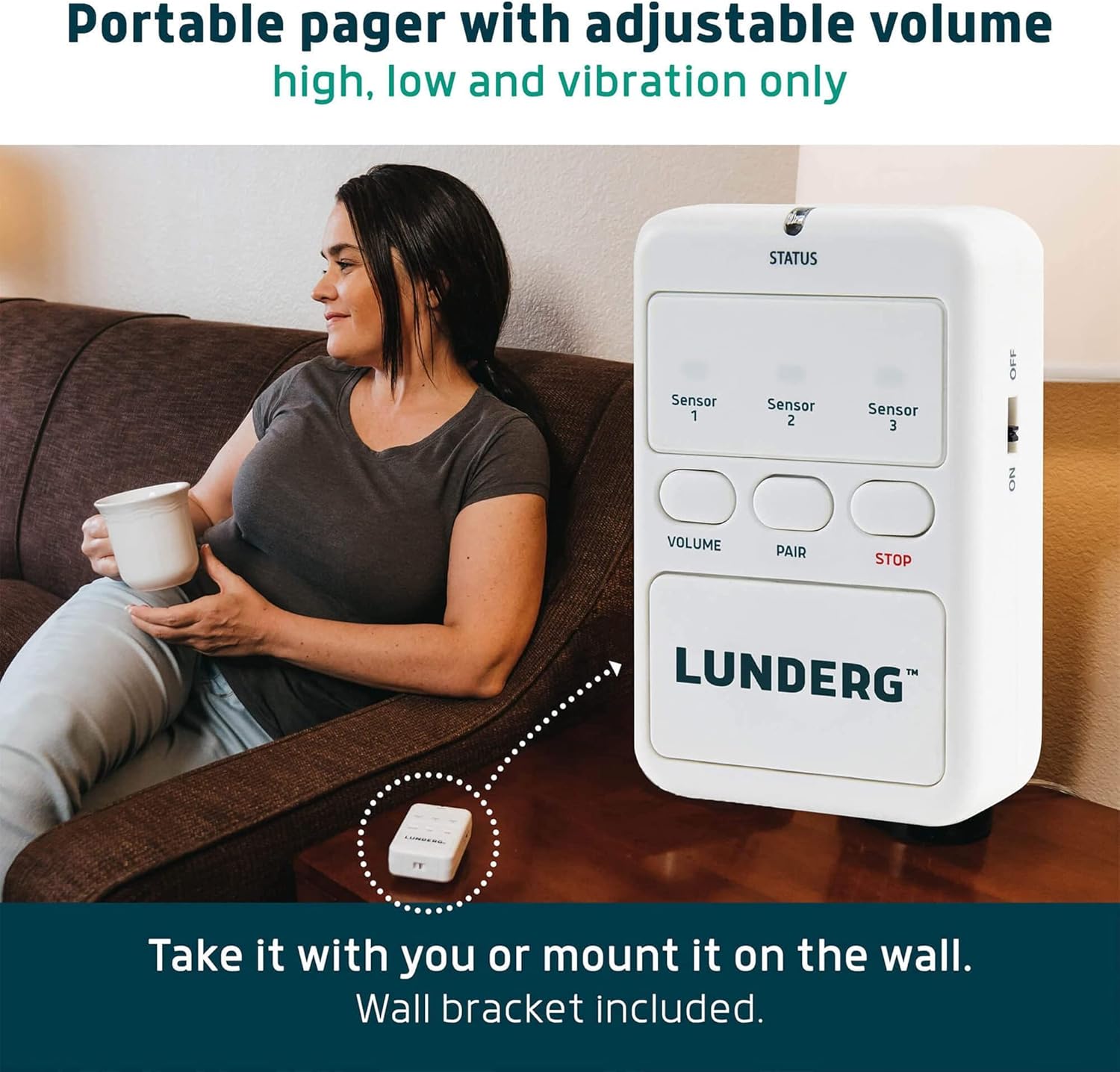
Description: This image shows the compact Lunderg wireless pager placed on a side table next to a person on a couch, demonstrating its portability. It also highlights that the pager can be mounted on a wall using the included bracket.
Responding to an Alarm
When an alarm sounds or vibrates, immediately check on the individual to provide assistance and prevent falls. Press the 'STOP' button on the pager to silence the alarm.
Preventing False Alarms
- Ensure the bed pad is securely fastened to the mattress using the provided clips and bands.
- Place the bed pad under a fitted sheet to prevent movement.
- Verify the patient is centered on the pad, not on the very edge.
- When making the bed, ensure the pad has not shifted from its correct position.
Care and Maintenance
- Cleaning Sensor Pads: The sensor pads are incontinence resistant and can be wiped clean with a damp cloth and mild detergent. Do not submerge in water.
- Pager Battery Replacement: Replace the AA batteries in the pager when the low battery indicator appears or if the pager's performance diminishes.
- Sensor Pad Lifespan: The chair pads have an estimated lifespan of 15 months. Replace sensor pads as needed to ensure optimal performance.
Troubleshooting
| Problem | Possible Cause | Solution |
|---|---|---|
| No alarm when patient leaves bed/chair. | Pager is off, batteries are low/dead, sensor pad not paired, sensor pad faulty, pager out of range. | Ensure pager is ON. Replace pager batteries. Re-pair sensor pad(s) with pager. Move pager closer to sensor pad. Test sensor pad functionality. |
| Frequent false alarms. | Bed pad shifting, patient not centered, incorrect pad placement. | Secure bed pad firmly with clips/bands. Ensure pad is under a fitted sheet. Verify patient is centered on the pad. Check pad orientation ("THIS SIDE MUST FACE UP"). |
| Sensor pad becomes unpaired. | Temporary signal interference, battery issue. | Re-pair the sensor pad with the pager following the pairing instructions. Check sensor pad battery (if applicable, though typically sealed for lifespan). |
| Pager volume too low/high or no vibration. | Incorrect volume setting. | Press the 'VOLUME' button on the pager to cycle through available settings (High, Low, Vibration Only). |
Product Specifications
- Model Number: UPC-LUN-CHAIR-BEDALARM
- Bed Sensor Pad Dimensions: 10 x 33 inches
- Chair Sensor Pad Dimensions: 10 x 15 inches
- Pager Power Source: 2 x AA batteries (included)
- Battery Type: Alkaline
- Manufacturer: Lunderg
- Product Dimensions (Packaged): 1.99 x 27.17 x 9.06 inches; 2 Pounds
Warranty and Support
For warranty information and customer support, please refer to the contact details provided with your product packaging or visit the official Lunderg website. It is important to note that warranty terms may vary based on the point of purchase.
For additional assistance and video tutorials, please visit: lunderg.com/videoguide and lunderg.com/chairvideo.
Ask a question about this manual
Ask about setup, troubleshooting, compatibility, parts, safety, or missing instructions. Manuals+ will review the question and use this page’s manual context to help answer it.