
1. Product Overview
The Foxin FoxFit Bold Smartwatch is a versatile wearable device designed to enhance your daily life with smart features and health monitoring capabilities. It includes Bluetooth calling, a vibrant HD round display, and comprehensive health tracking.
Foxin FoxFit Bold Smartwatch displaying a call interface.
2. What's in the Box
Upon unboxing your Foxin FoxFit Bold Smartwatch, please ensure all the following items are present:
- Foxin FoxFit Bold Smartwatch
- Charging Cable
- User Manual
- Extra Blue Strap (for specific variants)
Official product video showcasing the Foxin FoxFit Bold Smartwatch features including Bluetooth calling, display, health monitoring, and design.
3. Getting Started
3.1 Charging the Smartwatch
Before first use, fully charge your smartwatch. Use the provided charging cable and connect it to a standard USB power adapter.
- Connect the magnetic end of the charging cable to the charging points on the back of the smartwatch.
- Plug the USB end of the cable into a power source.
- The watch display will indicate charging status.
- A full charge typically takes approximately 2 hours.

Foxin FoxFit Bold Smartwatch displaying 15 days battery life, indicating charging status.
3.2 Powering On/Off
- To Power On: Press and hold the side button until the screen lights up.
- To Power Off: Press and hold the side button, then select 'Power Off' on the screen.
3.3 App Installation and Pairing
To unlock the full potential of your smartwatch, download the compatible app on your smartphone.
- Scan the QR code in the manual or search for the app name (usually mentioned in the packaging or quick start guide) in your smartphone's app store.
- Install the app and create an account.
- Enable Bluetooth on your smartphone.
- Open the app, navigate to 'Device' or 'Add Device', and select your smartwatch from the list.
- Confirm the pairing request on both your phone and smartwatch.
4. Features and Functions
4.1 Bluetooth Calling
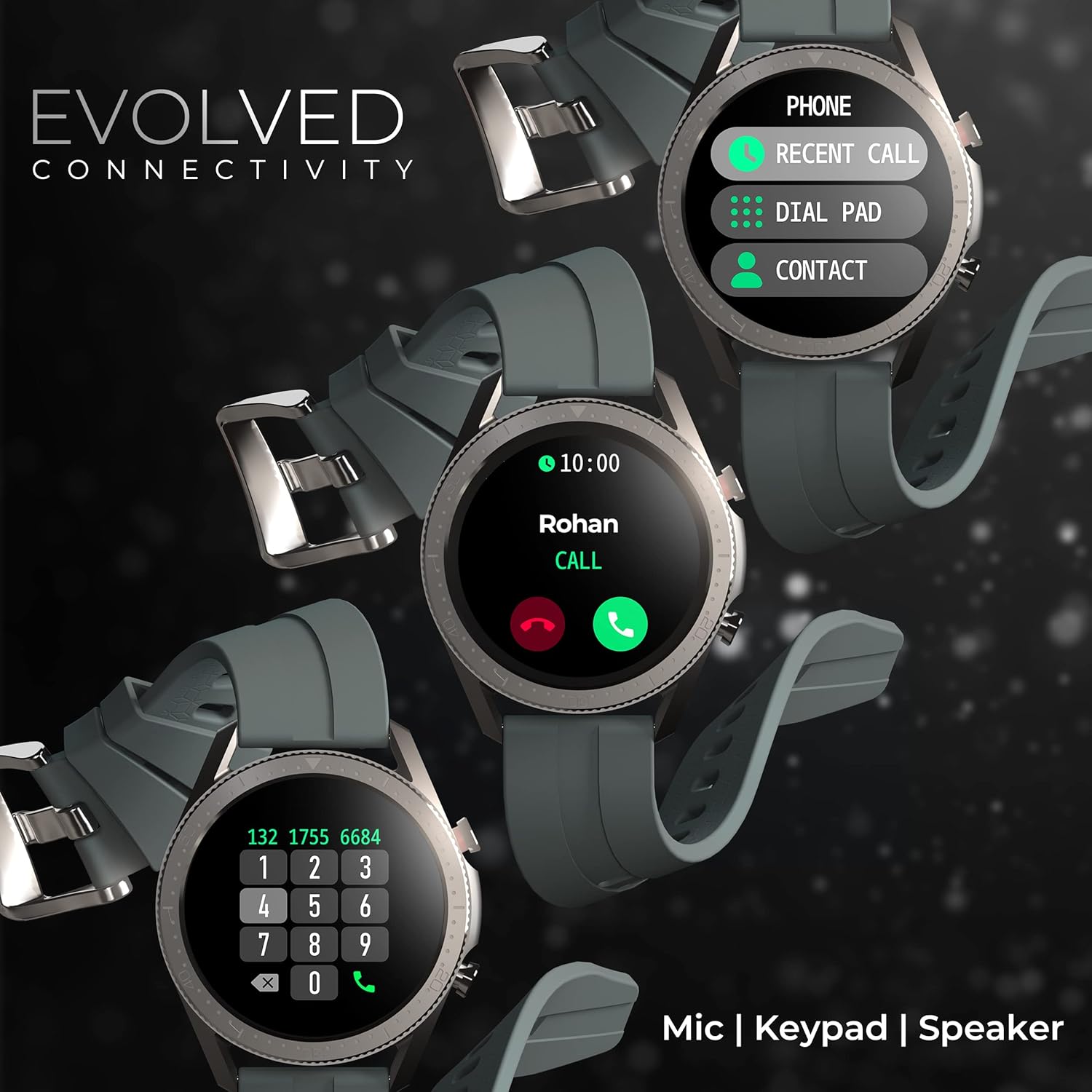
The FoxFit Bold features a built-in speaker and microphone, allowing you to make and receive calls directly from your wrist when connected to your smartphone via Bluetooth.
- Making Calls: Access the dial pad or contacts from the watch interface to initiate a call.
- Receiving Calls: Answer or reject incoming calls directly on the watch.
- Recent Calls: View your call history on the smartwatch.

Multiple Foxin FoxFit Bold Smartwatches showcasing the Bluetooth calling feature with dial pad and contact options.
4.2 HD Round Display
Experience clear visuals on the 1.3-inch HD round display with a resolution of 240x240 pixels. Customize your watch face from over 100 available options.

Foxin FoxFit Bold Smartwatch with a 1.3-inch HD round display showing date and time.
4.3 Health Monitoring
The smartwatch provides continuous health monitoring to help you stay informed about your well-being.
- Heart Rate Monitor: Continuous heart rate detection throughout the day.
- SpO2 Monitoring: Measures blood oxygen saturation levels.
- Blood Pressure (BP) Monitoring: Tracks your blood pressure.
- Sleep Monitoring: Analyzes your sleep patterns to help improve sleep quality.
- Physiological Cycle Reminder: Specifically designed for women to track menstrual cycles.

Foxin FoxFit Bold Smartwatch displaying SpO2 and heart rate monitoring data.
4.4 Sports Modes and Fitness Tracking
Track your workouts with 7 built-in sports modes and monitor your fitness progress.
- 7 Sports Modes: Includes various activities for accurate tracking.
- Fitness Tracking: Records steps, distance, and calories burned.

Foxin FoxFit Bold Smartwatch in training mode, showing water resistance.
4.5 Other Smart Controls
The smartwatch offers convenient controls for various smartphone functions.
- Weather Forecast: Get real-time weather updates.
- Alarm: Set alarms directly from your wrist.
- Music Player Control: Manage music playback on your phone.
- Remote Control Camera: Use your watch as a remote shutter for your phone's camera.

Foxin FoxFit Bold Smartwatch showing music and camera control interfaces.
5. Compatibility
The Foxin FoxFit Bold Smartwatch is compatible with most smartphones running modern operating systems. Ensure your smartphone has Bluetooth enabled and the companion app is installed for full functionality.
6. Maintenance
6.1 Water and Dust Resistance (IP67)
The FoxFit Bold Smartwatch is IP67 rated, meaning it is resistant to dust and can withstand immersion in water up to 1 meter for 30 minutes. It is suitable for daily use and light water activities, but not recommended for swimming or diving.
- Avoid exposing the watch to hot water, steam, or strong detergents.
- Wipe the watch dry after exposure to water.

Foxin FoxFit Bold Smartwatch in training mode, demonstrating its water resistance.
6.2 Cleaning and Care
- Clean the watch and strap regularly with a soft, dry cloth.
- Avoid using abrasive cleaners or solvents.
- Ensure the charging contacts are clean and dry before charging.
7. Troubleshooting
| Issue | Possible Solution |
|---|---|
| Watch not turning on | Ensure the watch is fully charged. Press and hold the side button for at least 10 seconds. |
| Cannot pair with smartphone | Ensure Bluetooth is enabled on your phone. Restart both the watch and phone. Check if the app is updated. |
| Inaccurate health data | Ensure the watch is worn snugly on your wrist. Clean the sensor on the back of the watch. Avoid excessive movement during measurements. |
| Short battery life | Reduce screen brightness. Turn off unnecessary notifications. Limit continuous heart rate monitoring if not needed. |
8. Specifications
| Feature | Detail |
|---|---|
| Model | FoxFit Bold |
| Display Type | LCD, Round |
| Resolution | 240 x 240 pixels |
| Connectivity | Bluetooth |
| Special Features | Phone Call (Built-in Speaker & Mic), SpO2, Continuous Heart Rate Monitor, BP, 100+ Watch Faces |
| Water Resistance | IP67 (1 Meter depth) |
| Battery Life | Up to 15 Days (Average) |
| Band Material | Silicone |
| Supported Applications | Alarm, Camera, Contacts, Heart Rate Monitor, Music Player, Phone, Sleep Monitor, Social Media, Weather |
| Controller Type | Touch Control |
9. Warranty and Support
Your Foxin FoxFit Bold Smartwatch comes with a standard brand warranty. For detailed warranty information, terms, and conditions, please refer to the warranty card included in your product packaging or visit the official Foxin website.
For technical support, troubleshooting assistance, or any product-related queries, please contact Foxin customer service through the contact details provided on the official website or your purchase documentation.