
1. Introduction
The XOLORspace TW23 is a high-performance 4K 2x3 HDMI Video Wall Controller and Media Player designed to distribute a single HDMI input across up to six HDMI displays, creating a seamless video wall. It supports various splicing modes and includes an integrated USB media player for versatile content playback. This manual provides detailed instructions for setup, operation, and maintenance of your device.
Key Features:
- Supports HDMI input resolutions up to 3840x2160/60Hz.
- Supports HDMI output resolutions up to 1920x1080/60Hz.
- Features 1 HDMI input, 6 HDMI outputs, and 1 HDMI loop output.
- Integrated USB media player for direct content playback.
- Supports multiple splicing modes: 2x3, 1x4, 1x2.
- Cascading two units enables 3x3 splicing mode.
- Audio extraction via digital optical fiber and 3.5mm analog audio output.
- Control via front panel buttons, infrared remote control, or RS232.
- Supports WIFI player and DLAN connection.
Package Contents:
- XOLORspace TW23 Video Wall Controller x 1
- Remote Control x 1
- 12V Power Supply x 1
- Antenna x 1
2. Safety Information
Please read and follow these safety instructions carefully to prevent damage to the device and ensure safe operation:
- Do not expose this device to water, moisture, or excessive humidity.
- Ensure proper ventilation around the device to prevent overheating.
- Use only the provided 12V/2A power adapter. Using an incorrect power supply may damage the device and void the warranty.
- Do not attempt to open or modify the device. Refer all servicing to qualified personnel.
- Keep the device away from direct sunlight, heat sources, and strong electromagnetic fields.
3. Setup
Follow these steps to set up your XOLORspace TW23 video wall controller:
3.1 Physical Connections
- Connect HDMI Input: Connect your HDMI source device (e.g., PC, media player) to the 'INPUT' port on the TW23 using a high-quality HDMI cable. For 4K/60Hz signals, use a V2.0 HDMI cable within 3 meters. For 4K/30Hz, an AWG26 standard HDMI cable up to 8 meters is suitable.
- Connect HDMI Outputs: Connect up to six HDMI displays to the 'OUTPUT 1' through 'OUTPUT 6' ports on the TW23 using HDMI cables. Ensure each display is powered on.
- Connect HDMI Loop Output (Optional): If you need to pass the input signal to another device or display, connect an HDMI cable from the 'LOOP OUT' port.
- Connect USB Devices (Optional): Insert USB storage devices into the 'USB1' or 'USB2' ports for media playback.
- Connect Audio Output (Optional): For external audio, connect an optical cable to the 'Optical' port or a 3.5mm audio cable to the 'Audio' port.
- Connect Power: Connect the provided 12V power adapter to the 'DC/12V' port on the TW23, then plug the adapter into a power outlet.
- Power On: Toggle the 'ON/OFF' switch to the 'ON' position. The device will power on, and indicators will illuminate.

Figure 3.1: Connection Diagram. This image illustrates the typical setup, showing an HDMI source connected to the input, multiple displays connected to the outputs, and optional USB and audio connections.
4. Operating Instructions
4.1 Front Panel Controls

Figure 4.1: Front Panel Layout. This image displays the front of the device, highlighting the power switch, RS232 port, IR receiver, HDMI input, two USB ports, Ethernet port, SD card slot, and buttons for mode selection and reset.
The front panel includes buttons for 'Mode', 'Select', and 'Reset' to configure splicing modes and other settings directly on the device.
4.2 Remote Control Operation
Use the included infrared remote control to access and adjust various settings, including splicing modes, input selection, and media player functions. Point the remote directly at the IR receiver on the front panel of the TW23.
4.3 Splicing Modes
The TW23 supports several video wall configurations:
- 2x3 Mode: Divides the input signal across six displays arranged in a 2-row by 3-column grid.
- 1x4 Mode: Divides the input signal across four displays arranged in a single row.
- 1x2 Mode: Divides the input signal across two displays arranged in a single row.
- 3x3 Mode (Cascading): By connecting two TW23 units, a 3x3 video wall can be created. Refer to the advanced setup guide for cascading instructions.
Use the 'Mode' and 'Select' buttons on the front panel or the remote control to cycle through and select the desired splicing mode.
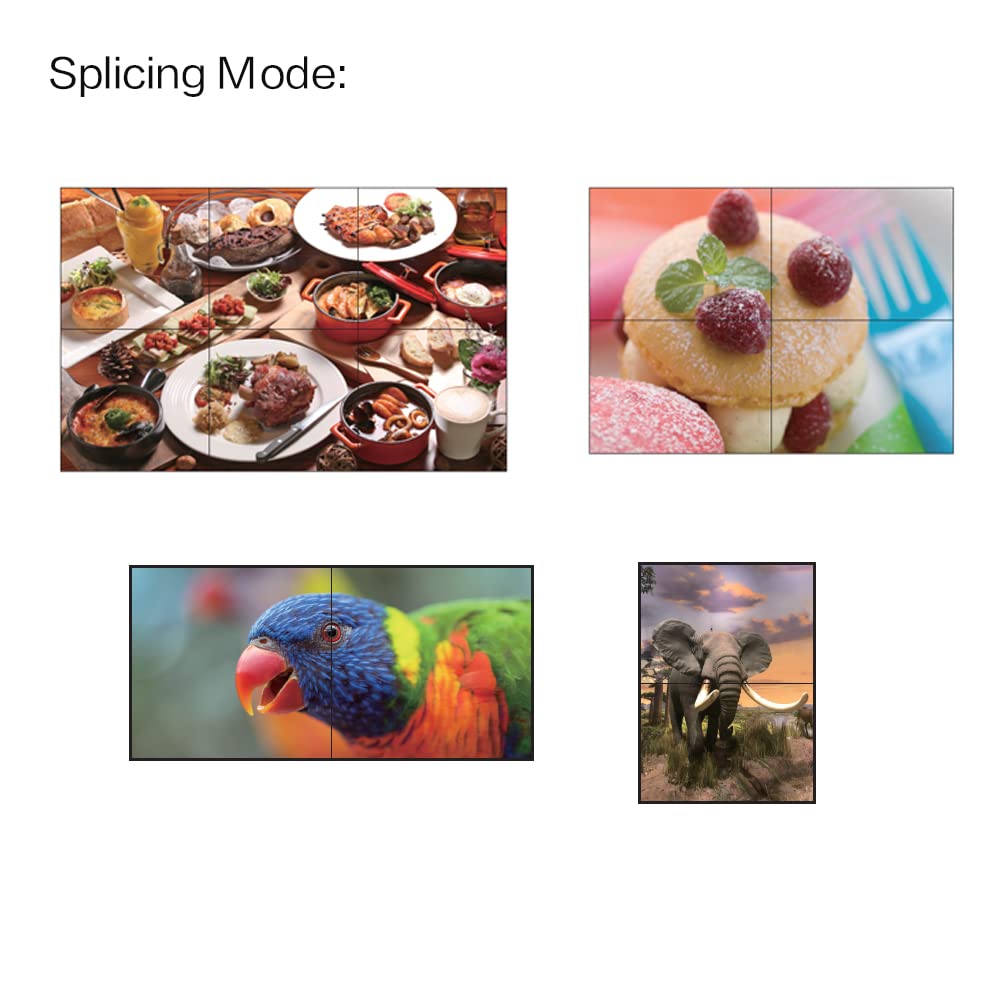
Figure 4.2: Splicing Mode Examples. This image illustrates various ways the video signal can be split and displayed across multiple screens, demonstrating different video wall configurations.
4.4 USB Media Player
Insert a USB storage device (flash drive or external hard drive) containing media files (videos, images, audio) into one of the USB 2.0 ports. Use the remote control or front panel buttons to navigate the media player interface and select files for playback.
4.5 Audio Extraction
The TW23 can extract audio from the HDMI input signal. Connect an external audio system to the 'Optical' port for digital audio or the 'Audio' (3.5mm) port for analog audio. Supported audio formats include DTS-HD, DTS, Dolby-AC3, and PCM.
4.6 RS232 Control
For advanced control and integration into professional AV systems, the TW23 supports RS232 serial control. Connect a control system to the RS232 port. Refer to the separate RS232 command set documentation for detailed protocols.
4.7 WIFI and DLAN Connection
The device supports WIFI and DLAN connectivity for network-based media playback and control. Connect the included antenna to the 'Antenna' port for wireless functionality. Refer to the on-screen menu for network configuration.
5. Maintenance
To ensure the longevity and optimal performance of your XOLORspace TW23, follow these maintenance guidelines:
- Cleaning: Disconnect the power before cleaning. Use a soft, dry cloth to wipe the exterior of the device. Do not use liquid cleaners or abrasive materials.
- Ventilation: Ensure that the ventilation openings are not blocked. Do not place the device in an enclosed space without adequate airflow.
- Storage: If storing the device for an extended period, disconnect it from power and store it in a cool, dry place away from direct sunlight and extreme temperatures.
6. Troubleshooting
If you encounter issues with your TW23, refer to the following common problems and solutions:
| Problem | Possible Cause | Solution |
|---|---|---|
| No video output on displays. | Loose HDMI cables, incorrect input selection, power issue. | Check all HDMI cable connections. Ensure the TW23 is powered on. Verify the input source is active. Try a different HDMI cable. |
| Video quality is poor or flickering. | Long or low-quality HDMI cables, resolution mismatch. | Use shorter, high-quality HDMI 2.0 cables, especially for 4K/60Hz. Ensure input and output resolutions are compatible. |
| Remote control not working. | Dead batteries, obstructed IR sensor. | Replace remote control batteries. Ensure no obstructions between the remote and the TW23's IR sensor. |
| USB media player not detecting files. | Unsupported file format, corrupted USB drive, drive not properly inserted. | Ensure media files are in supported formats. Try reformatting the USB drive or using a different one. Reinsert the USB drive. |
| No audio output from optical/3.5mm ports. | Incorrect audio settings, cable issue, external audio device problem. | Check audio cable connections. Verify the external audio device is powered on and set to the correct input. Ensure the HDMI source is sending an audio signal. |
7. Specifications
| Feature | Specification |
|---|---|
| HDMI Input Resolution | Up to 3840x2160/60Hz |
| HDMI Output Resolution | Up to 1920x1080/60Hz |
| HDMI Ports | 1 Input, 6 Outputs, 1 Loop Output |
| USB Ports | 2 x USB 2.0 (for media player) |
| Audio Output | Digital Optical, 3.5mm Analog |
| Supported Audio Formats | DTS-HD/DTS/Dolby-AC3/PCM, etc. |
| Splicing Modes | 2x3, 1x4, 1x2 (3x3 with cascading) |
| Control Methods | Front Panel, IR Remote, RS232 |
| Max Working Current | 1.6 A |
| Power Adapter | Input: AC 100V-240V (50/60Hz), Output: DC 12V/2A |
| Dimensions (L x W x H) | 263 x 159 x 38 mm |
| Net Weight | 1300 g |
| Manufacturer | xolorspace |
8. Warranty and Support
XOLORspace products are designed for reliability and performance. This product comes with a standard manufacturer's warranty against defects in materials and workmanship. Please retain your proof of purchase for warranty claims.
For technical support, troubleshooting assistance, or warranty inquiries, please contact XOLORspace customer service through the retailer where the product was purchased or visit the official XOLORspace website for contact information.