1. Introduction
This manual provides essential information for the safe and effective use of your Christopeit Sport AX 4000 Ergometer Exercise Bike. Please read all instructions carefully before assembly and operation. Retain this manual for future reference.
2. Safety Instructions
- Consult a physician before starting any new exercise program.
- Ensure all parts are correctly assembled and tightened before each use.
- Keep children and pets away from the equipment during operation.
- Place the exercise bike on a flat, stable surface.
- Wear appropriate exercise clothing and footwear.
- The maximum user weight for this device is 150 kg.
- Stop exercising immediately if you feel faint, dizzy, or experience pain.
3. Product Overview and Features
The Christopeit Sport AX 4000 Ergometer Exercise Bike is designed for home fitness, offering a comprehensive workout experience. Key features include:
- Resistance System: 24-level magnetic resistance for varied intensity workouts.
- Drive System: Quiet flat belt drive for smooth and silent operation.
- Flywheel: 9 kg flywheel for consistent momentum.
- Adjustability: Multi-level adjustable saddle and tilt-adjustable handlebars for ergonomic positioning.
- Pedals: Non-slip pedals with safety straps.
- Stability: Height-adjustable foot caps for leveling on uneven surfaces.
- Portability: Integrated transport wheels for easy relocation.
- Console: Backlit LCD display showing distance, time, speed, calories burned, power, and heart rate.
- Programs: 21 pre-set training programs.
- Connectivity: Bluetooth interface for compatibility with the Kinomap app (iOS and Android).

Image: Christopeit Sport AX 4000 Ergometer Exercise Bike with key features listed, including magnetic brake system, 9 kg flywheel, 24 resistance levels, 22 programs, and hand pulse measurement.

Image: A detailed diagram illustrating the adjustable components of the Christopeit Sport AX 4000, including the tilt-adjustable handlebars, individually adjustable seat position, quick-release mechanism, transport wheels, and height-adjustable feet for stability.
4. Setup
4.1 Unpacking and Component Check
Carefully remove all components from the packaging. Lay them out and compare them against the parts list provided in the separate assembly instructions. Ensure all parts are present and undamaged before proceeding.
4.2 Assembly
Follow the step-by-step assembly instructions included with your product. Typically, assembly involves:
- Attaching the front and rear stabilizers to the main frame.
- Mounting the pedals to the crank arms.
- Assembling and attaching the seat post and saddle.
- Assembling and attaching the handlebar post and handlebars.
- Connecting the console cables and mounting the console.
Ensure all bolts, nuts, and screws are securely tightened. Do not overtighten.
4.3 Leveling the Unit
Once assembled, place the exercise bike in your desired location. Use the height-adjustable foot caps on the stabilizers to ensure the bike is stable and level on the floor. This prevents wobbling during use.
5. Operating Instructions
5.1 Adjusting for Comfort
- Saddle Height: Adjust the saddle height so that your leg is slightly bent at the knee when the pedal is at its lowest point. Use the quick-release lever for adjustment.
- Saddle Position: The saddle can also be adjusted horizontally for optimal comfort and pedaling efficiency.
- Handlebar Angle: Adjust the tilt of the handlebars to a comfortable position that allows for a relaxed upper body posture.
5.2 Using the Console

Image: A detailed view of the exercise bike's backlit LCD display, showing workout data such as time, distance, speed, calories, power, and heart rate. It also indicates compatibility with the Kinomap app and 22 integrated programs.
The backlit LCD display provides real-time feedback on your workout. Refer to the console-specific section in your assembly manual for detailed button functions.
- Power On/Off: The console typically powers on automatically when you start pedaling or press any button. It will power off after a period of inactivity.
- Program Selection: Use the program buttons (e.g., 'MODE', 'PROGRAM') to select from the 21 pre-set training programs.
- Resistance Adjustment: Adjust the resistance level (1-24) using the '+' and '-' buttons during your workout.
- Data Display: The display cycles through or shows simultaneously metrics like time, distance, speed, calories burned, power, and heart rate.
- Heart Rate Monitoring: Grip the hand pulse sensors on the handlebars to display your heart rate.
5.3 Kinomap App Connectivity
The AX 4000 features a Bluetooth interface for compatibility with the Kinomap app (available for iOS and Android). This allows for interactive training experiences.
- Download the Kinomap app from your device's app store.
- Ensure Bluetooth is enabled on your smartphone or tablet.
- Open the Kinomap app and follow the in-app instructions to connect to your Christopeit Sport AX 4000.
- Once connected, you can access various training routes, coaching videos, and track your progress within the app.
6. Maintenance
Regular maintenance ensures the longevity and safe operation of your exercise bike.
- Cleaning: Wipe down the bike with a damp cloth after each use to remove sweat and dust. Avoid abrasive cleaners.
- Check Connections: Periodically check all bolts, nuts, and screws to ensure they are tight. Retighten if necessary.
- Pedals and Straps: Inspect pedals and safety straps for wear and tear. Replace if damaged.
- Storage: Store the exercise bike in a dry, cool place away from direct sunlight and extreme temperatures. Use the transport wheels to move the unit carefully.
7. Troubleshooting
If you encounter issues with your Christopeit Sport AX 4000, refer to the following common problems and solutions:
- Console Not Displaying: Check all cable connections to the console. Ensure batteries (if applicable) are correctly inserted and charged.
- No Resistance Change: Verify that the resistance cable (if external) is properly connected and not kinked. For magnetic systems, ensure the internal mechanism is functioning.
- Unusual Noises: Check for loose parts and tighten them. Ensure the bike is level. If noises persist, contact customer support.
- Kinomap App Not Connecting: Ensure Bluetooth is on, the app is updated, and no other devices are connected to the bike via Bluetooth. Restart both the app and the bike.
For issues not covered here, please contact Christopeit Sport customer support.
8. Specifications
| Specification | Detail |
|---|---|
| Model Name | AX 4000 |
| Brand | Christopeit |
| Resistance Mechanism | Magnetic |
| Resistance Levels | 24 |
| Flywheel Weight | 9 Kilograms |
| Maximum User Weight | 150 Kilograms |
| Product Dimensions (L x W x H) | 80 x 54 x 136 Centimeters |
| Item Weight | 31 Kilograms |
| Main Material | Alloy Steel |
| Handle Material | Rubber/Steel |
| Special Features | Adjustable Resistance Level, Adjustable Saddle |
| Recommended Use | Indoor |
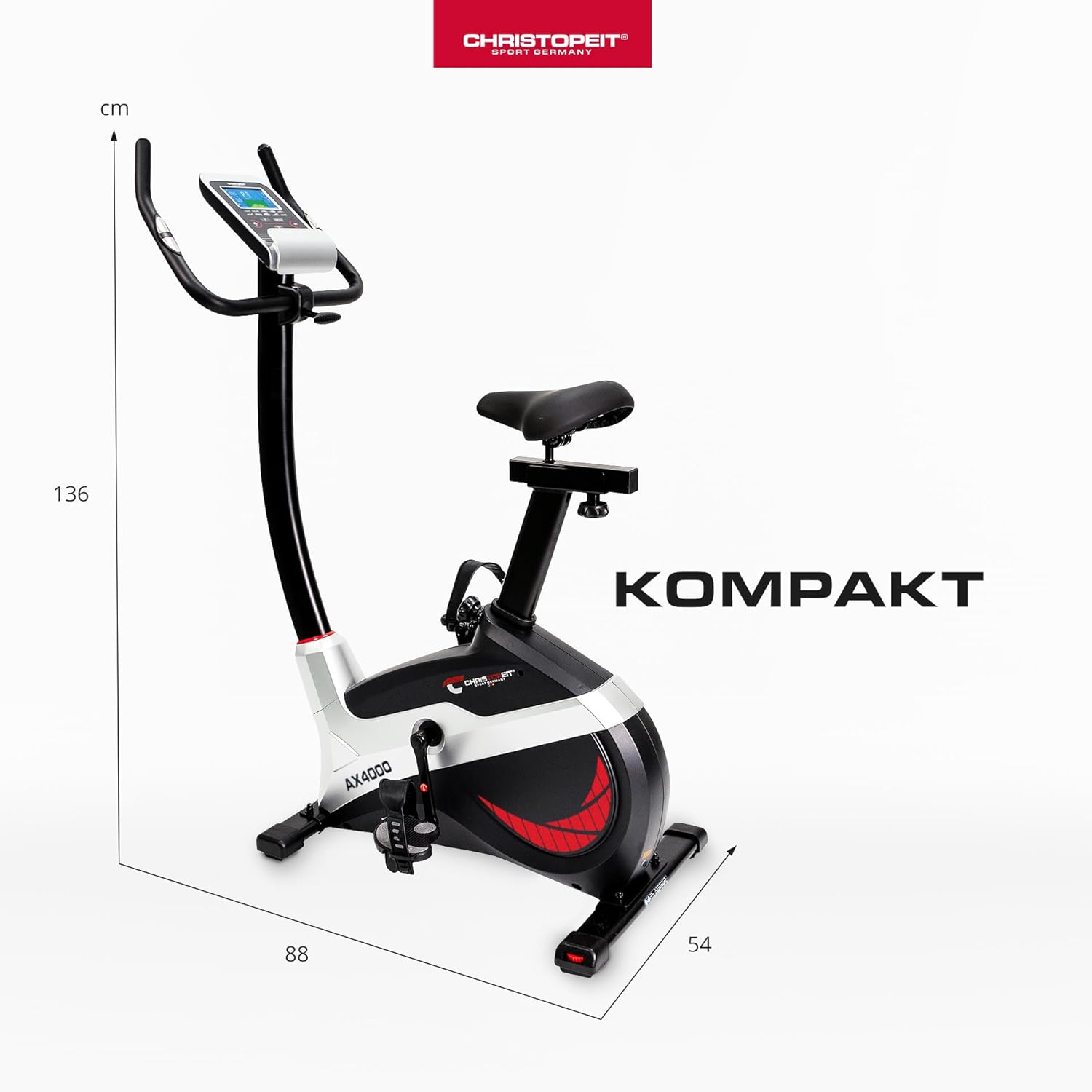
Image: A diagram illustrating the compact dimensions of the Christopeit Sport AX 4000 Ergometer Exercise Bike, with measurements of 88 cm length, 54 cm width, and 136 cm height.
9. Warranty and Support
Christopeit Sport is committed to providing quality fitness equipment. While specific warranty details are typically provided with your purchase documentation, Christopeit Sport maintains a design and development department focused on continuous improvement and customer satisfaction.
For assistance with parts, technical support, or any product-related inquiries, please contact the manufacturer, Top-Sports Gilles GmbH, or your authorized Christopeit Sport dealer. Customer support aims to provide timely responses, often within one business day.