Introduction
This manual provides essential information for the safe and efficient operation, maintenance, and troubleshooting of your MT8500W Petrol Generator. Please read it thoroughly before use and keep it for future reference. Proper understanding and adherence to these instructions will ensure optimal performance and extend the lifespan of your generator.
Important Safety Instructions
Always follow these safety guidelines to prevent injury, property damage, or damage to the generator. Failure to comply with these instructions may result in serious injury or death.
- Carbon Monoxide Hazard: Never operate the generator indoors or in enclosed spaces, including garages, sheds, or basements. Exhaust fumes contain carbon monoxide, a colorless, odorless, and deadly gas that can cause illness or death. Always operate outdoors in a well-ventilated area, far from windows, doors, and vents.
- Fire Hazard: Fuel is highly flammable and its vapors are explosive. Refuel in a well-ventilated area with the engine off and cool. Do not smoke or allow open flames near the generator. Store fuel in approved containers away from heat sources.
- Electrical Shock Hazard: Do not operate the generator in wet conditions, rain, or snow. Ensure all electrical connections are secure and properly grounded. Never touch electrical components with wet hands. Use only approved extension cords that are rated for outdoor use and the power requirements.
- Keep children and pets away from the generator during operation. The generator produces heat and can cause burns.
- Wear appropriate personal protective equipment (PPE), such as gloves and eye protection, when handling fuel or performing maintenance.
- Do not modify the generator in any way. Unauthorized modifications can be dangerous and will void the warranty.
- Always turn off the generator and allow it to cool before performing any maintenance or moving it.
Product Overview
The MT8500W is a robust petrol generator designed for reliable power supply in various applications. Familiarize yourself with its components for safe and effective operation.

Figure 1: Front view of the MT8500W petrol generator, highlighting the control panel with 230V and 380V outlets, voltmeter, circuit breaker, and engine start/stop switch.
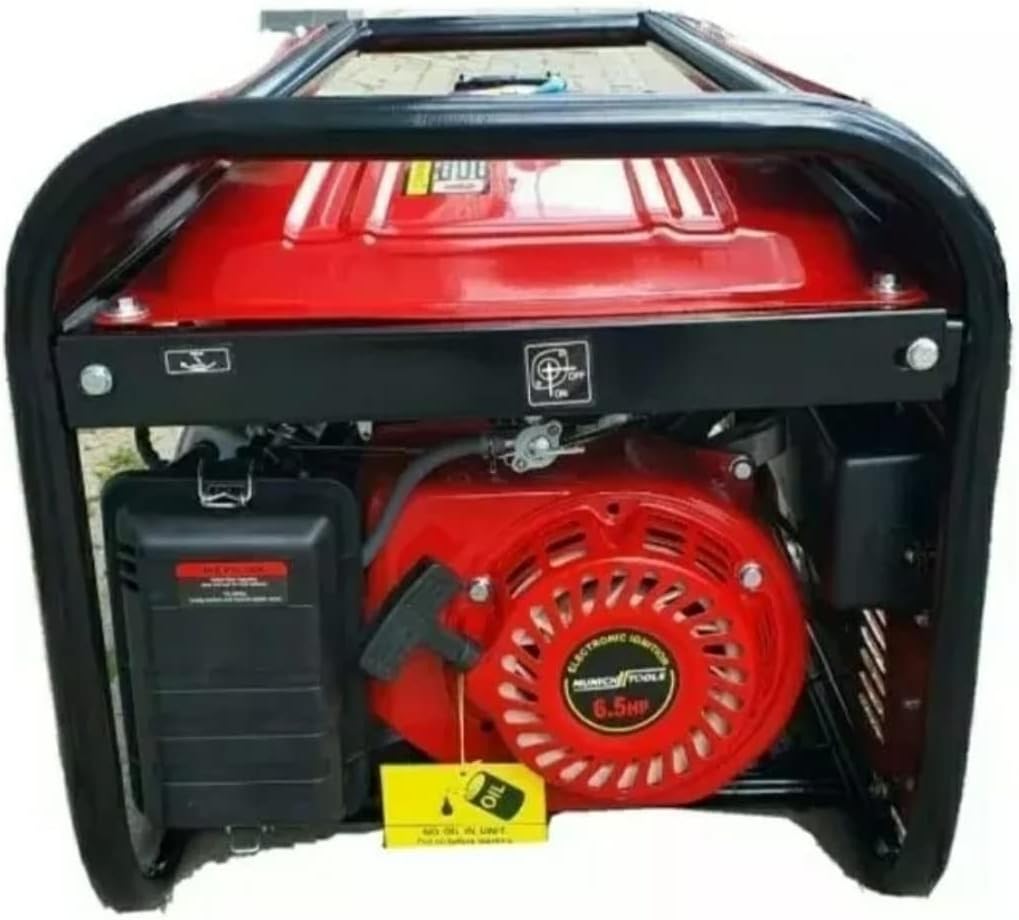
Figure 2: Side view of the MT8500W petrol generator, illustrating the air-cooled 4-stroke engine, air filter housing, and oil fill location.
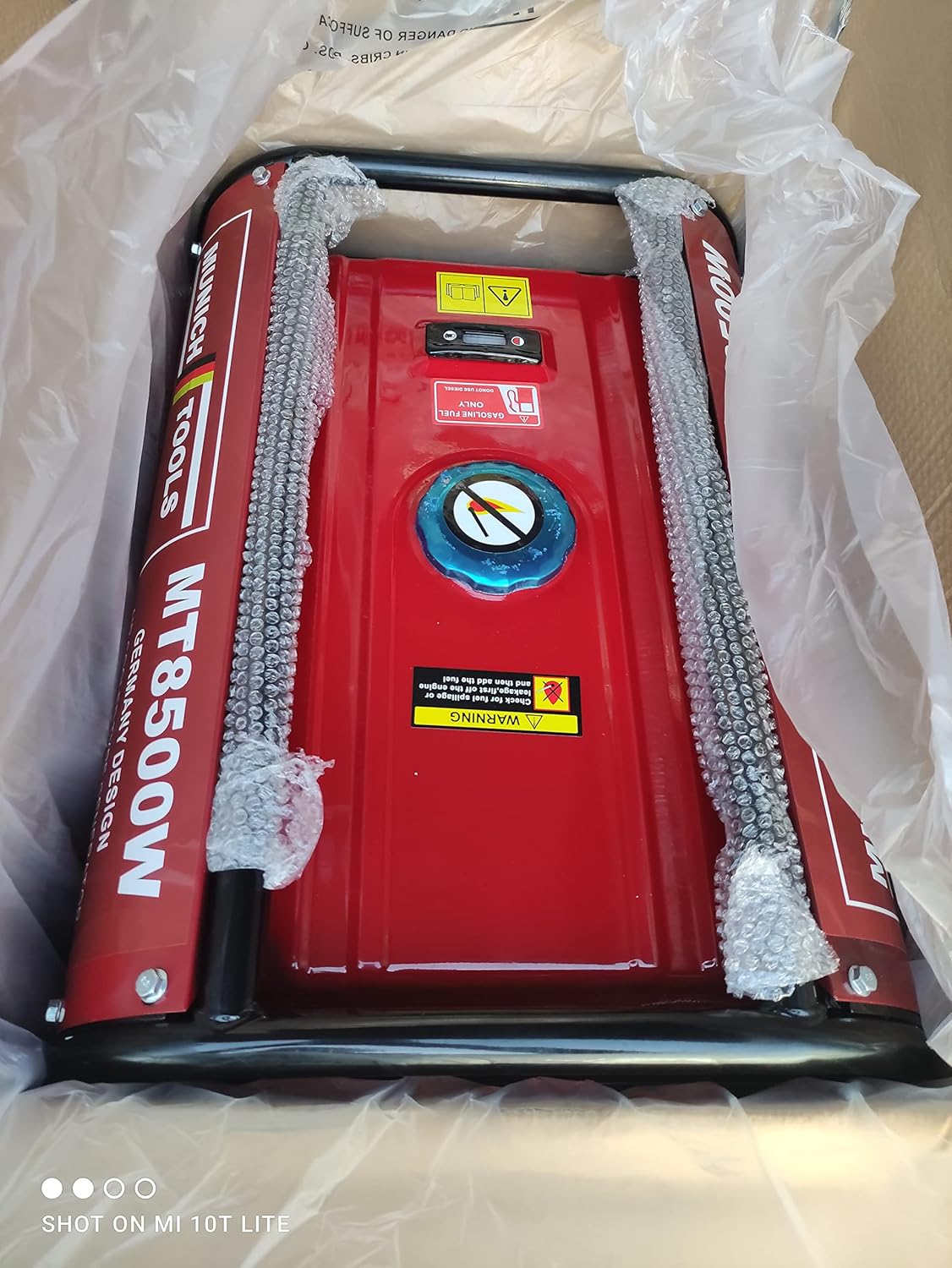
Figure 3: Top view of the MT8500W petrol generator, displaying the fuel tank, fuel cap, and integrated fuel level indicator.
Setup and Initial Preparation
Before operating your generator for the first time, follow these steps carefully:
- Unpacking: Carefully remove the generator from its packaging. Inspect for any shipping damage. Retain packaging materials for future storage or transport.
- Placement: Place the generator on a firm, level surface outdoors, in a well-ventilated area. Ensure it is at least 1 meter (3 feet) away from buildings, other equipment, and combustible materials.
- Add Engine Oil: The generator is shipped without engine oil. Before first use, fill the engine with the recommended type and amount of engine oil (refer to the engine oil specifications in the 'Technical Specifications' section). Use the oil dipstick to ensure the correct oil level. Do not overfill.
- Add Fuel: Fill the fuel tank with unleaded gasoline (95 or 98 octane). Do not use E85 or other ethanol blends not approved for small engines. Fill slowly to avoid spills and do not overfill. Ensure the fuel cap is securely tightened after filling.
- Grounding: For safety, connect a proper ground wire from the generator's grounding terminal to an appropriate earth ground. Consult local electrical codes for proper grounding procedures.
Operating Instructions
Starting the Generator
- Ensure all electrical loads are disconnected from the generator's outlets.
- Turn the fuel valve to the "ON" position.
- Move the choke lever to the "CHOKE" position (if the engine is cold). For a warm engine, the choke may not be necessary.
- Turn the engine switch to the "ON" or "START" position.
- For manual start models, pull the recoil starter handle firmly and smoothly until the engine starts. For electric start models, turn the key to "START" and hold until the engine starts.
- Once the engine starts, gradually move the choke lever to the "RUN" position as the engine warms up.
- Allow the generator to warm up for a few minutes before connecting any electrical loads.
Connecting Electrical Loads
The MT8500W features 3x 230V sockets and 1x 380V socket. Always ensure the generator is running stably before connecting appliances.
- Ensure the generator is running at a stable speed.
- Plug in your appliances one by one, starting with the largest load first.
- Do not exceed the generator's rated continuous output capacity (2800W). Overloading can damage the generator and connected appliances.
- Monitor the voltmeter to ensure stable voltage output.
Stopping the Generator
- Disconnect all electrical loads from the generator's outlets.
- Allow the generator to run for a few minutes without load to cool down.
- Turn the engine switch to the "OFF" position.
- Turn the fuel valve to the "OFF" position to prevent fuel leakage and ensure safe storage.
Maintenance
Regular maintenance ensures optimal performance, reliability, and extends the life of your generator. Always turn off the generator and allow it to cool before performing any maintenance.
Maintenance Schedule
| Item | Frequency | Action |
|---|---|---|
| Engine Oil | Every 25 hours of operation or annually | Check level, change oil |
| Air Filter | Every 50 hours of operation or annually | Clean, replace if necessary |
| Spark Plug | Every 100 hours of operation or annually | Inspect, clean, or replace |
| Fuel Filter | Annually | Inspect, replace if necessary |
| General Inspection | Before each use | Check for loose fasteners, fuel leaks, and general condition |
Storage
For long-term storage (over 30 days), follow these steps to prevent fuel degradation and engine damage:
- Drain the fuel tank and carburetor. Run the engine until it stops from lack of fuel.
- Change the engine oil.
- Remove the spark plug and pour a small amount (approx. 5-10ml) of clean engine oil into the cylinder. Pull the recoil starter a few times to distribute the oil, then reinstall the spark plug.
- Clean the exterior of the generator.
- Store the generator in a clean, dry, well-ventilated area, away from direct sunlight and extreme temperatures.
Troubleshooting
This section addresses common issues you might encounter with your MT8500W generator. For problems not listed here, or if solutions do not work, contact customer support.
Engine Does Not Start
- No Fuel: Check the fuel level in the tank. Refill if necessary.
- Old/Stale Fuel: Drain old fuel and refill with fresh, unleaded gasoline.
- Engine Switch OFF: Ensure the engine switch is in the "ON" or "START" position.
- Choke Position: Adjust the choke lever to the "CHOKE" position for a cold engine. Move to "RUN" once started.
- Spark Plug Issue: Inspect the spark plug. Clean if fouled, adjust gap, or replace if damaged.
- Low Oil Level: The generator may have a low oil shutdown feature. Check the engine oil level and add oil if it's below the recommended mark.
No Power Output
- Circuit Breaker Tripped: Check the circuit breaker on the control panel. Reset it if it has tripped.
- Overload: The generator may be overloaded. Disconnect some appliances and reset the circuit breaker. Do not exceed the maximum output capacity.
- Loose Connections: Ensure all electrical connections, including extension cords, are secure.
Technical Specifications
Detailed specifications for the MT8500W Petrol Generator:
- Model: MT8500W
- Voltage: 400 V / 50 Hz (three-phase), 230 V (single-phase)
- Engine Type: Air-cooled 4-stroke
- Engine Power: 5.2 kW / 7 HP
- Continuous Generator Output: 2800W
- Maximum Generator Output: 3.5 kW / 3.8 kVA
- Sockets: 3x 230V, 1x 380V
- Voltage Regulator: AVR (Automatic Voltage Regulation)
- Start-up: Manual (Recoil) / Key Start
- Voltmeter: Yes
- Fuel Gauge: Yes
- 12-Volt Output: Yes
- Fuel Tank Capacity: 15L
- Fuel Type: Unleaded Gasoline 95 or 98 Octane
- Materials: Stainless steel, aluminum, plastic
- Weight: Approximately 38 kg
- Packaging Dimensions: 62 x 45 x 45 cm
Warranty and Customer Support
For detailed warranty information and terms, please refer to the documentation provided at the time of purchase. Warranty coverage typically varies by region and retailer.
For technical support, spare parts, or any inquiries not covered in this manual, please contact the seller or manufacturer directly. Have your model number (MT8500W) and purchase details ready when contacting support.
Additional Resources
For more information about the MT8500W Petrol Generator or to explore related products and accessories, please visit the official product page: