Introduction
This manual provides detailed instructions for the setup, operation, and maintenance of your Heng Long 1:16 scale German Tiger King Henschel (TIGER II) Remote Control Tank. Please read this manual thoroughly before operating the tank to ensure proper function and longevity of the product.
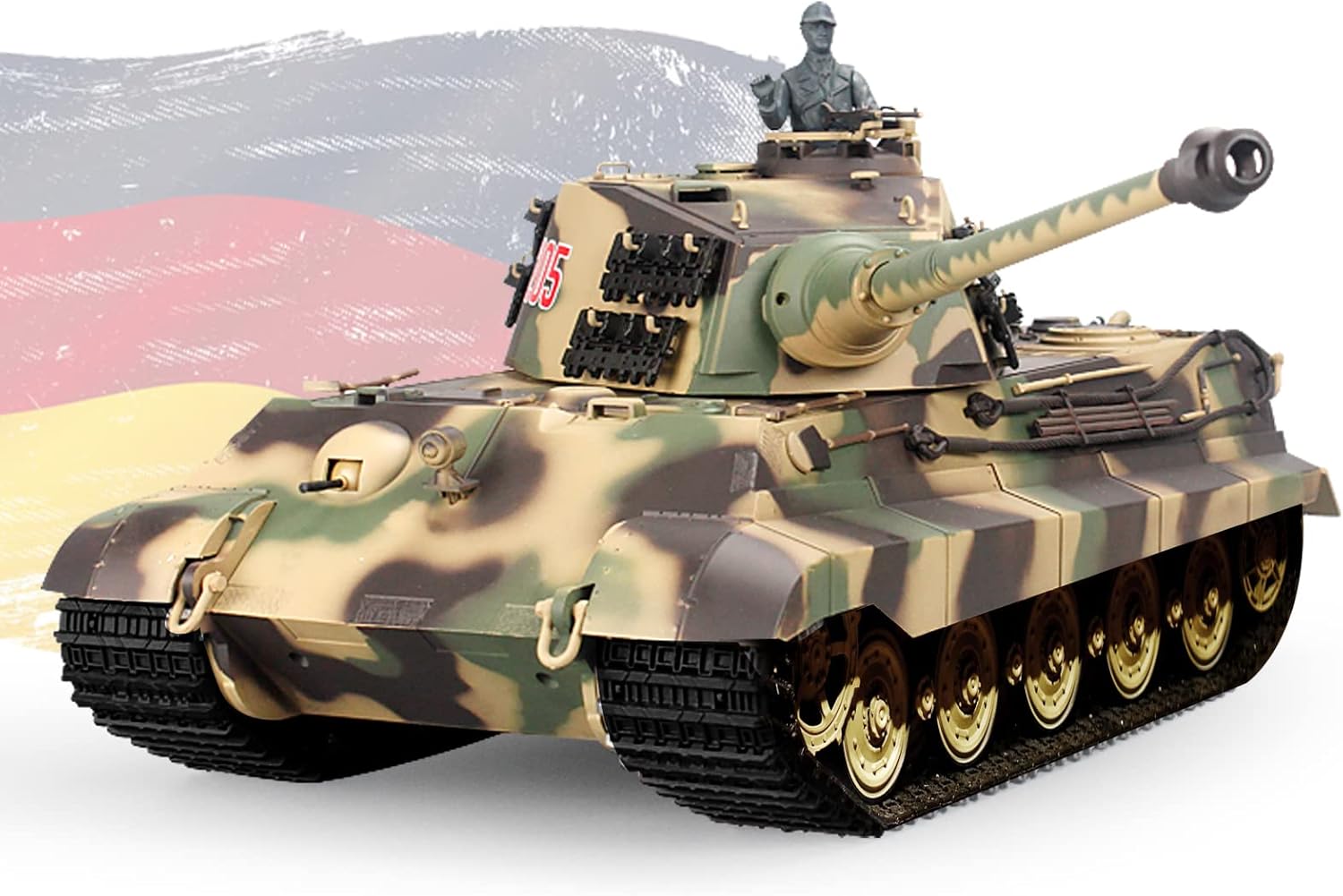
Image: The Heng Long 1:16 scale German Tiger King Henschel (TIGER II) RC Tank, showcasing its detailed camouflage paint scheme and realistic design.
Package Contents
Verify that all items listed below are included in your package:
- Tank Model (TIGER II) x1
- 2.4G Remote Control x1
- USB Charging Cable x1
- Rechargeable Battery Pack x2
- Smoky Oil x1
- Body Kits (decorative accessories) x1
- Operating Instructions x1 (this manual)
- Target Board x1

Image: An overview of the complete package contents, including the tank, remote control, batteries, charger, smoky oil, and various accessories.
Product Features
The Heng Long TIGER II RC Tank is equipped with advanced features for a realistic experience:
- Infinitely Variable Speed: Smooth control for forward and backward movement.
- Rotating Recoil Demonstration: Realistic recoil action upon firing.
- Turret Rotation: Turret rotates 320 degrees.
- Barrel Lift: Main barrel can be lifted 30 degrees.
- Sound and Action Effects: Simulated engine sounds, firing sounds, and movement actions.
- Full Scale Remote Control: Precise control over all tank functions.
- Smoke Effect: Realistic exhaust smoke generation.
- Independent Suspension: Enhances maneuverability over varied terrain.
- Realistic Commander Figure: Adds to the authentic appearance.
- Infrared Combat System: Allows for simulated battles with other compatible RC tanks.
- 2.4GHz Radio Control System: Ensures stable and interference-free operation.
- Automatic Flameout with Vibration: Tank simulates damage and stops after 6 infrared hits in combat mode.

Image: A diagram highlighting key features of the tank, including the barrel, turret, smoke generator, tracks, and roadwheels.
Setup
- Charge Batteries: Connect the rechargeable battery packs to the USB charging cable. Plug the USB cable into a compatible USB power source (e.g., computer USB port, USB wall adapter). Ensure batteries are fully charged before first use. Charging time may vary.
- Install Batteries: Open the battery compartment on the tank and the remote control. Insert the charged battery packs into the tank, ensuring correct polarity. Insert appropriate batteries (not included, typically AA) into the remote control.
- Attach Body Kits: Carefully attach any decorative body kits or accessories to the tank as per the included diagrams or your preference.
- Add Smoky Oil: Locate the smoke generator reservoir on the tank (refer to the diagram in the Product Features section). Carefully add a few drops of the provided smoky oil into the reservoir. Do not overfill.
- Install Infrared Receiver: If applicable, attach the infrared receiver to the designated spot on the tank's turret. This is often a small plug and magnet mount.

Image: Close-up views of the tank's tracks, turret hatch, and main gun, illustrating areas for component installation and detail.
Operating Instructions
- Power On: Turn on the tank's power switch, then turn on the remote control. The remote control and tank should automatically pair.
- Driving: Use the left joystick on the remote control for forward/backward movement and the right joystick for turning. The tank features infinitely variable speed control.
- Turret Control: Use the designated controls on the remote to rotate the turret 320 degrees and lift the main barrel 30 degrees.
- Firing: Press the "Cannon-shot" button for main gun firing sound and recoil action. Press the "Gun-shot" button for machine gun sound.
- Smoke Effect: Activate the smoke effect using the "Smoke On/Off" button on the remote control. Ensure smoky oil has been added to the reservoir.
- Sound Control: Adjust the tank's sound volume and switch between sound modes using the respective buttons on the remote.
- LED Lighting: Control the tank's LED lights using the "Light On/Off" button.
- Infrared Combat: Engage the infrared combat system for simulated battles. When hit by infrared rays 6 times, the tank will simulate a flameout with vibration.

Image: The RC tank demonstrating its LED lighting effect, enhancing realism during operation.

Image: The RC tank generating simulated exhaust smoke, adding to the realistic operational experience.
Remote Control Overview
Familiarize yourself with the functions of the 2.4GHz remote control:

Image: A detailed diagram of the 2.4GHz remote control, labeling its various buttons and joysticks for power, direction, turret rotation, cannon shot, gun shot, smoke, light, volume, and sound mode controls.
- Power Indicator: Lights up when the remote is on.
- Gun-shot (A): Activates machine gun sound.
- Cannon-shot (B): Activates main cannon firing sound and recoil.
- 320° Turret Rotation: Controls the horizontal movement of the turret.
- Direction Control: Left joystick for forward/backward, right joystick for turning.
- Smoke On/Off: Toggles the smoke generator.
- Light On/Off: Toggles the tank's LED lights.
- Sound Mode: Cycles through different sound profiles.
- Volume: Adjusts the sound output level.
- Power On/Off: Main power switch for the remote control.
Maintenance
- Cleaning: After use, especially outdoors, gently clean the tank with a soft, dry cloth to remove dust and debris. Avoid using water or harsh chemicals.
- Battery Care: Always fully charge batteries before storage. If storing for extended periods, charge batteries every 2-3 months to maintain their health. Disconnect batteries from the tank when not in use.
- Smoke Generator: If the smoke output decreases, ensure the reservoir has sufficient smoky oil. Clean the smoke outlet if it appears clogged.
- Track Inspection: Periodically check the tracks for any debris, damage, or loose links. Ensure they move freely.
- Storage: Store the tank and remote control in a cool, dry place away from direct sunlight and extreme temperatures.
Troubleshooting
| Problem | Possible Cause | Solution |
|---|---|---|
| Tank does not respond to remote. | Low batteries in tank or remote; tank/remote not powered on; pairing issue. | Ensure both tank and remote are powered on. Check and replace/recharge batteries. Re-pair the remote and tank according to the manual (if specific steps are provided, otherwise power cycle both). |
| Smoke effect not working. | No smoky oil; smoke outlet clogged; smoke generator malfunction. | Add smoky oil to the reservoir. Gently clean the smoke outlet. If problem persists, contact support. |
| Tank moves slowly or tracks get stuck. | Low tank battery; debris in tracks; damaged track links. | Recharge tank battery. Inspect and clear tracks of any obstructions. Check for damaged track links. |
| Turret or barrel does not move. | Obstruction; mechanical issue; control issue. | Check for any physical obstructions. Ensure remote controls are functioning. If problem persists, contact support. |
Specifications
- Model: TIGER II
- Scale: 1:16
- Radio System: 2.4GHz
- Product Dimensions: 26 x 9 x 9 inches (Length x Width x Height, including barrel)
- Item Weight: 8.83 pounds
- Manufacturer: HENG LONG
- Recommended Age: 14+ (Manufacturer's recommendation for safe and optimal use, though product listing states 6-10 years, 14+ is more appropriate for complex RC models)

Image: A diagram illustrating the key dimensions of the Heng Long TIGER II RC Tank.
Warranty and Support
For any issues, broken parts, or concerns, please contact our customer service. We are committed to providing high-quality, fast, and professional support.
To contact support via Amazon:
- Go to the product listing on Amazon.com.
- Click the 'Puzzle Time' name under the cart.
- Click the "Ask a Question" button.
Please retain your proof of purchase for warranty claims.