
1. Introduction
Thank you for choosing the Honeywell 9.8ft Motion Activated Flexible LED Warm White Strip Light. This product is designed to provide convenient, motion-activated illumination for various indoor spaces such as under cabinets, closets, stairs, and bedrooms. This manual provides essential information for the safe and efficient use of your LED strip light, including installation, operation, and maintenance instructions.

Image: Honeywell 9.8ft Motion Activated Flexible LED Warm White Strip Light providing ambient lighting in a living room.
2. Package Contents
Please verify that all components are present in your package:
- 1 x Warm White LED Light Strip (9.8 feet / 3 meters)
- 1 x Motion Sensor Module
- 1 x Roll of Adhesive Tape
- 1 x USB Power Connector
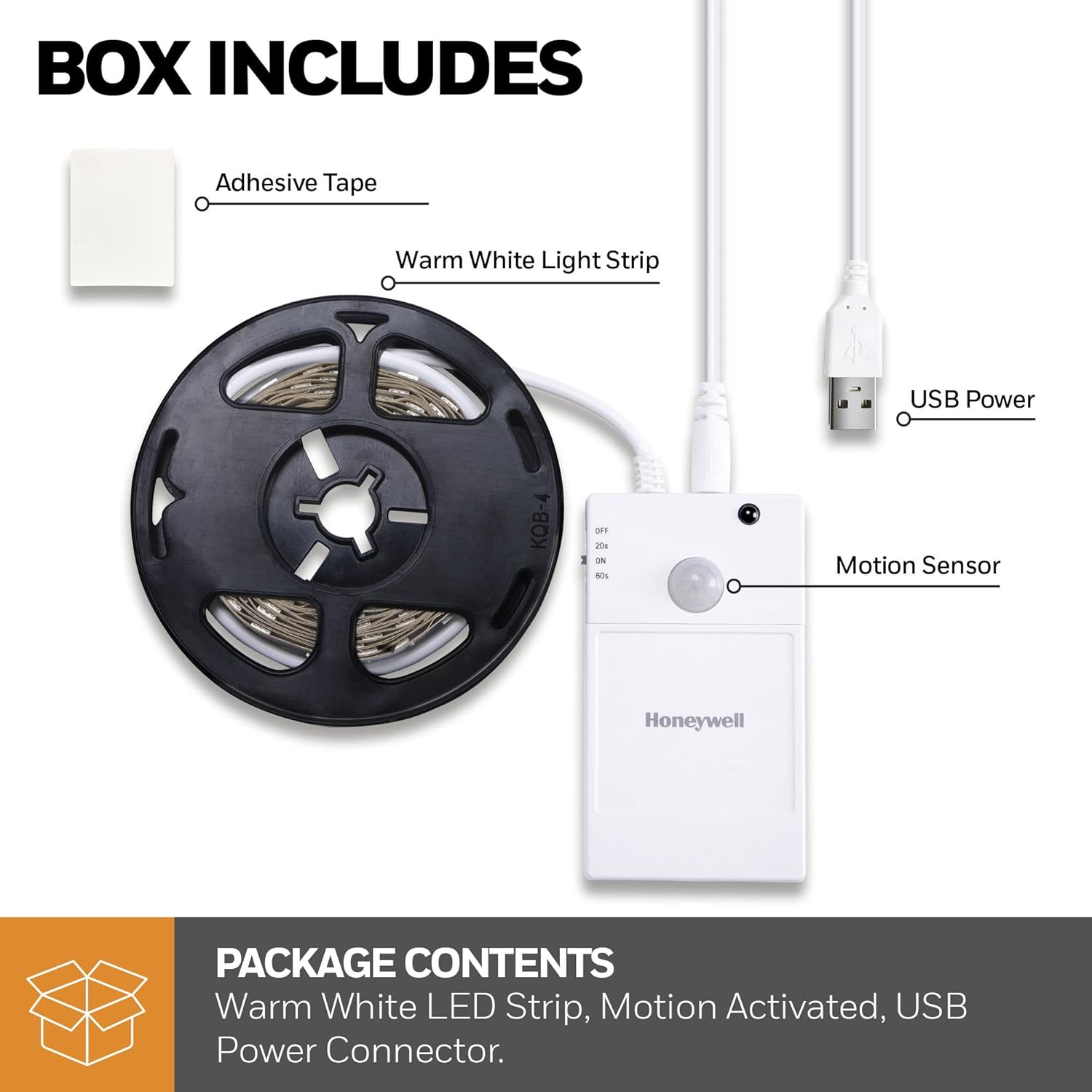
Image: All components included in the product package.
3. Safety Information
Read all instructions before installation and use. Keep this manual for future reference.
- Indoor Use Only: This product is designed for indoor use. Do not expose to water or high humidity.
- Power Source: Use only the provided USB power connector and a compatible USB power adapter (not included, or use the provided power adapter if specified in the box contents). Ensure the power source matches the product's voltage requirements (5V).
- Cutting: Only cut the LED strip at designated cut marks. Cutting elsewhere may damage the strip.
- Installation Surface: Ensure the installation surface is clean, dry, and smooth for optimal adhesive performance.
- Heat: Do not cover the LED strip or motion sensor with materials that could trap heat.
- Children: Keep out of reach of children.
4. Setup and Installation
4.1 Planning Your Installation
Before applying the strip, plan the layout. Measure the desired length and identify the best location for the motion sensor and power connection. Ensure the motion sensor has a clear line of sight to the area where motion detection is desired.
4.2 Preparing the Surface
Clean the installation surface thoroughly. Remove any dust, grease, or moisture. A clean, dry, and smooth surface is crucial for the adhesive to bond effectively.
4.3 Applying the LED Strip
- Unroll the LED strip carefully.
- Peel off a small section of the protective backing from the adhesive tape on the back of the LED strip.
- Press the exposed adhesive firmly onto your desired surface, starting from one end.
- Continue peeling the backing and pressing the strip along the path, ensuring it adheres smoothly without bubbles or wrinkles.
- If the strip is too long, locate the designated cut marks (usually indicated by a scissor icon or copper pads) and carefully cut the strip with scissors. Do not cut anywhere else.

Image: Cutting the LED strip to the desired length at a marked point.
4.4 Connecting the Motion Sensor and Power
- Connect the LED strip to the motion sensor module. Ensure the connectors are aligned correctly.
- Connect the USB power connector to the motion sensor module.
- Plug the USB power connector into a compatible USB power adapter (e.g., a phone charger, computer USB port, or wall adapter).
- Position the motion sensor module in a location where it can effectively detect movement. It can be attached using the included adhesive tape.
5. Operation
5.1 Motion Sensor Functionality
The LED strip light is equipped with a motion sensor that automatically turns the lights on when movement is detected within its range. The lights will remain on for a set duration after motion ceases.

Image: Motion sensor activating the LED strip lights on a staircase.
5.2 Mode Settings
The motion sensor module features a switch to adjust its settings. Common settings include:
- OFF: Turns the light off completely.
- ON: Keeps the light continuously on, bypassing the motion sensor.
- Motion Sensor Mode (e.g., 30s, 60s, 90s): Activates the motion sensor. The number indicates the duration the light stays on after motion is no longer detected. Refer to the markings on your specific motion sensor module for available time settings.
Adjust the switch on the motion sensor module to select your desired operating mode.
6. Maintenance
- Cleaning: Disconnect power before cleaning. Gently wipe the LED strip and motion sensor with a soft, dry cloth. Do not use abrasive cleaners or immerse in water.
- Adhesive: If the adhesive begins to lose its grip, you may reinforce it with additional double-sided tape suitable for the surface.
- Storage: If storing the product, ensure it is clean and dry. Coil the LED strip loosely to prevent damage.
7. Troubleshooting
| Problem | Possible Cause | Solution |
|---|---|---|
| Lights do not turn on. | No power connection. Motion sensor switch is OFF. Faulty connection. | Ensure USB power connector is securely plugged in and connected to a working power source. Set the motion sensor switch to an ON or motion-activated setting. Check all connections between the strip, sensor, and power. |
| Motion sensor is not detecting movement effectively. | Sensor obstructed. Incorrect sensor placement. Sensor range limitations. | Ensure the sensor lens is clear and unobstructed. Reposition the sensor for a clearer line of sight to the detection area. The sensor has a limited range; ensure movement occurs within its effective area. |
| Lights flicker or are dim. | Insufficient power. Loose connection. Damaged LED strip. | Ensure the USB power source provides adequate power (5V). Try a different USB adapter. Check all connections for looseness. If the strip is physically damaged, it may need replacement. |
| Adhesive is not sticking. | Surface is dirty, wet, or uneven. Temperature too low/high. | Clean and dry the surface thoroughly before application. Ensure it is smooth. Apply in a room temperature environment. For better adhesion, use additional strong double-sided tape. |
8. Specifications
| Brand | Honeywell |
| Model Number | B09PRTD8TC |
| Light Type | LED Strip Light |
| Light Color | Warm White |
| Length | 9.8 feet (approximately 3 meters) |
| Power Source | USB Powered (5V) |
| Control Method | Motion Sensor with ON/OFF/Timer Switch |
| Indoor/Outdoor Usage | Indoor Only |
| Material | Metal, Vinyl |
| Wattage | 5 watts |
9. Warranty and Support
For warranty information or technical support, please refer to the documentation included with your purchase or visit the official Honeywell website. Keep your proof of purchase for warranty claims.
Honeywell Customer Support: www.honeywell.com/us/en/support