
1. Introduction
Thank you for choosing the Depusheng DF204 Wireless Microphone System. This system is designed to provide high-fidelity audio transmission with stable signal reception, suitable for a variety of applications including church events, home karaoke, weddings, DJ parties, and business conferences. This manual provides detailed instructions for setting up, operating, and maintaining your wireless microphone system to ensure optimal performance and longevity.
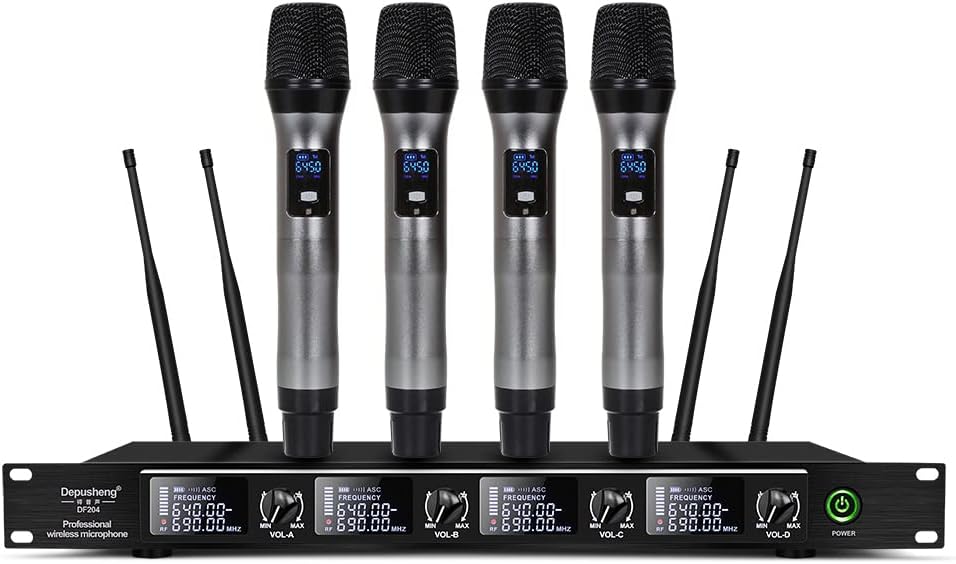
Figure 1.1: Depusheng DF204 Wireless Microphone System
This image displays the complete Depusheng DF204 Wireless Microphone System, featuring the main receiver unit with four antennas and four handheld wireless microphones. The receiver unit has individual volume controls and frequency displays for each microphone channel.
2. Product Overview
2.1 Key Features
- High-Fidelity Audio: Delivers clear, soft, and beautiful sound quality.
- Extended Range Reception: Features long-distance reception with wide signal coverage, supported by four antennas for stable signal.
- Intelligent Whistle Module: Incorporates an intelligent whistle module for effective recording and noise reduction.
- High Sensitivity & Stability: Ensures reliable performance with high sensitivity and stability.
- Versatile Application: Suitable for various scenarios including debates, large conference rooms, business discussions, and educational settings.
2.2 Components and Controls
The Depusheng DF204 system includes a receiver unit and four handheld microphones. Familiarize yourself with the main components and their controls.

Figure 2.1: Receiver Button Interface
This image illustrates the front and rear panels of the receiver. The front panel features a power switch and individual volume controls for each of the four microphone channels. The rear panel includes enhanced antennas, XLR outputs for each channel, a 6.35mm mixed output, and the power input port.

Figure 2.2: Handheld Microphone Features
This diagram highlights key features of the handheld microphone, including the battery indicator, UHF channel display, and the power on/off switch located on the microphone body.
2.3 Package Contents
Upon unboxing, ensure all the following items are present:

Figure 2.3: What's Included
The image shows all items included in the package: the main receiver unit, four handheld microphones, a power adapter, an audio connection cable, four detachable antennas, colored anti-roll rings for the microphones, and the user manual.
- 1 x Depusheng DF204 Receiver Unit
- 4 x Handheld Wireless Microphones
- 4 x Antennas
- 1 x Power Adapter
- 1 x 6.35mm Audio Cable
- 4 x Anti-roll Rings (various colors)
- User Manual
3. Setup Instructions
3.1 Receiver Placement and Connections
- Placement: Position the receiver unit on a stable, flat surface, away from large metal objects or other electronic devices that may cause interference. Ensure adequate ventilation around the unit.
- Antenna Installation: Screw the four provided antennas firmly into the antenna ports on the rear of the receiver. Ensure they are oriented vertically for optimal signal reception.
- Audio Output Connection:
- For mixed output, connect one end of the 6.35mm audio cable to the "MIX OUT" port on the receiver and the other end to the audio input of your mixer, amplifier, or powered speaker.
- For individual microphone outputs, use XLR cables (not included) to connect the "BALANCED OUT" ports (A, B, C, D) to individual channels on your mixer.
- Power Connection: Connect the power adapter to the "DC IN" port on the receiver and plug the adapter into a suitable power outlet.

Figure 3.1: Wide Compatibility and Connection Examples
This image demonstrates the wide compatibility of the Depusheng DF204 system, showing how the receiver can be connected to various audio equipment such as mixers, KTV speakers, portable speakers, DVD players, and power amplifiers.
3.2 Microphone Preparation
- Battery Installation: Unscrew the bottom part of each handheld microphone. Insert two AA batteries (not included) into each microphone, ensuring correct polarity (+/-). Screw the bottom part back on securely.
- Anti-roll Rings: Slide the colored anti-roll rings onto the microphones, just below the grille, to prevent them from rolling off flat surfaces.
4. Operating Instructions
4.1 Powering On and Initial Pairing
- Power On Receiver: Press the "POWER" button on the front panel of the receiver unit. The display screens for each channel should illuminate.
- Power On Microphones: Slide the ON/OFF switch on each handheld microphone to the "ON" position. The microphone's display will light up, showing battery status and channel frequency. The microphones should automatically pair with the receiver.
- Volume Adjustment: Adjust the individual volume knobs (VOL-A, VOL-B, VOL-C, VOL-D) on the receiver to set the desired output level for each microphone. Start with a low volume and gradually increase it to avoid sudden loud sounds.
4.2 Usage Tips
- Optimal Range: The system offers a long operating range. For best performance, maintain a clear line of sight between the microphones and the receiver. Avoid placing the receiver in enclosed spaces or behind obstacles.
- Feedback Prevention: To prevent audio feedback (howling), avoid pointing the microphone directly at speakers. Maintain a reasonable distance from speakers and adjust volume levels carefully.
- Battery Life: Monitor the battery indicator on the microphone display. Replace batteries promptly when they are low to ensure uninterrupted performance.
- Application Scenarios: This system is highly versatile.

Figure 4.2: Use Occasions
This image showcases the diverse environments where the Depusheng DF204 wireless microphone system can be effectively used, such as live concerts, bar performances, KTV rooms, and wedding ceremonies.

Figure 4.1: Operating Range
This image visually represents the effective operating range of the wireless microphone system, indicating optimal reception distances from the receiver unit.
5. Maintenance
- Cleaning: Use a soft, dry cloth to clean the receiver and microphones. Do not use liquid cleaners or abrasive materials.
- Battery Care: Remove batteries from microphones if they will not be used for an extended period to prevent leakage.
- Storage: Store the system in a cool, dry place, away from direct sunlight and extreme temperatures.
- Antenna Care: Handle antennas carefully to avoid bending or breaking.
6. Troubleshooting
If you encounter issues with your Depusheng DF204 system, refer to the following common problems and solutions:
| Problem | Possible Cause | Solution |
|---|---|---|
| No sound from microphone |
|
|
| Interference or static noise |
|
|
| Short reception range |
|
|
| Audio feedback (howling) |
|
|

Figure 6.1: Common Audio Issues
This image depicts various audio problems that the Depusheng DF204 system is designed to mitigate, such as short receiving distance, howling, murmuring, and poor reception, emphasizing the system's robust performance.
7. Specifications
| Feature | Detail |
|---|---|
| Brand | Depusheng |
| Model | DF204 |
| Connectivity Technology | Wireless (UHF) |
| Compatible Devices | Amplifier, Mixer, KTV Speakers, Pull Box Speaker, DVD |
| Color | DF204 4 handheld |
| Polar Pattern | Unidirectional |
| Hardware Platform | Karaoke machine |
| Package Dimensions | 52.29 x 32 x 13.7 cm |
| Item Weight | 3.79 Kilograms |
| Receiver Dimensions | Approx. 48cm (18.9") L x 19cm (7.5") W x 4.7cm (1.85") H |
| Microphone Dimensions | Approx. 25cm (9.84") L x 5cm (1.97") Diameter |

Figure 7.1: Receiver and Microphone Dimensions
This image provides a visual representation of the physical dimensions of both the receiver unit and the handheld microphones, including their length, width, and height/diameter, along with the total weight of the receiver.
8. Warranty and Support
Depusheng products are manufactured to high quality standards. For warranty information, technical support, or service inquiries, please refer to the contact information provided with your purchase documentation or visit the official Depusheng website. Please retain your proof of purchase for any warranty claims.
For further assistance, you may contact Depusheng customer service through their official channels. Always provide your product model (DF204) and purchase details when seeking support.