
NAVIFORCE NF9182-GREEN
NAVIFORCE NF9182-GREEN Analog-Digital Watch User Manual
Model: NF9182-GREEN | Brand: NAVIFORCE
Introduction
This user manual provides comprehensive instructions for the NAVIFORCE NF9182-GREEN Analog-Digital Watch. Please read this manual carefully before using your watch to ensure proper operation and to maximize its lifespan. Keep this manual for future reference.
Product Overview
The NAVIFORCE NF9182-GREEN is a robust analog-digital watch designed for men, featuring a durable stainless steel band and a zinc alloy case. It combines precise Japanese quartz movement for analog timekeeping with digital displays for additional functions.
Key Features:
- Analog and Digital Time Display
- Alarm Function
- Calendar Display
- Stopwatch Function
- Lap Timer
- 3ATM Daily Water Resistance (Splash/Rain Resistant)
- Hardened Mineral Glass
- Environmental Vacuum Plating
- Double Lighting (Luminous pointer and LED lighting)

Figure 1: Front view of the NAVIFORCE NF9182-GREEN watch, showcasing its green dial, analog hands, and digital displays.

Figure 2: Diagram illustrating the digital display sections for Day, Date, and Time on the watch face.
Setup
Initial Inspection:
Upon unboxing, inspect the watch for any visible damage. Ensure all buttons and the crown operate smoothly. The watch comes pre-installed with a high-quality imported Japanese movement and battery.
Adjusting the Band:
The stainless steel band is adjustable to fit various wrist sizes. If the band is too long, links can be removed by a professional watchmaker or using a watch link removal tool. Ensure the double-fold buckle is securely fastened after adjustment.

Figure 3: Image showing the watch on a wrist (model's wrist size 18cm) and a close-up of the double-fold watch buckle for secure fastening.
Operating Instructions
The NAVIFORCE NF9182-GREEN watch features multiple functions controlled by its crown and side buttons. Refer to the diagram below for button identification (specific button functions may vary slightly based on exact model revision, but general principles apply).
Setting Analog Time:
- Pull out the crown (usually located on the right side of the watch) to the first or second click position (depending on the model, one click for date, two for time).
- Rotate the crown to adjust the hour and minute hands to the desired time.
- Push the crown back in to its original position to start the analog timekeeping.
Using Digital Functions (Alarm, Calendar, Stopwatch, Lap Timer):
The digital displays and functions are typically controlled by the push-buttons located on the sides of the watch case. The specific sequence for setting each digital function (Alarm, Calendar, Stopwatch, Lap Timer) will involve pressing a 'Mode' button to cycle through functions and 'Adjust'/'Set' buttons to change values.
- Alarm: Press the mode button until "ALM" or "Alarm" appears. Use other buttons to set the alarm time and activate/deactivate it.
- Calendar: The digital display shows the current date and day. This is usually automatically set when the time is set, or can be manually adjusted in a specific mode.
- Stopwatch: Press the mode button until "STW" or "Stopwatch" appears. Use the start/stop button to begin and end timing, and a reset button to clear.
- Lap Timer: Often integrated with the stopwatch function, allowing you to record lap times without stopping the main timer.
- LED Lighting: Press the designated light button (often top-left) to illuminate the digital display for visibility in low light conditions.

Figure 4: Visual representation of key features including automatic luminous pointer and LED lighting for night visibility, and the 3ATM water resistance rating.
Maintenance
Cleaning:
Wipe the watch regularly with a soft, dry cloth to remove dust and smudges. For the stainless steel band, a slightly damp cloth can be used, followed by immediate drying. Avoid using chemical cleaners or abrasive materials.
Water Resistance (3ATM):
This watch is rated for 3ATM (30 meters) water resistance. This means it is suitable for daily use and can withstand splashes, rain, and hand washing. It is NOT suitable for showering, swimming, diving, or any prolonged water immersion. Do not operate buttons or the crown when the watch is wet.
Storage:
When not in use, store the watch in a cool, dry place away from direct sunlight, extreme temperatures, and strong magnetic fields. Consider using a watch box or pouch to protect it from scratches.
Battery Replacement:
The watch is powered by a high-quality imported Japanese movement and battery. When the battery needs replacement, it is recommended to take the watch to a qualified watch repair professional to ensure proper sealing and water resistance are maintained.
Troubleshooting
| Problem | Possible Cause | Solution |
|---|---|---|
| Analog hands not moving. | Battery depleted or crown pulled out. | Push crown back in. If still not working, replace battery by a professional. |
| Digital display is blank or dim. | Battery low or depleted. | Replace battery by a professional. |
| Water condensation inside watch. | Exposure to excessive moisture or temperature changes. | Avoid exposing watch to steam or hot water. If condensation persists, seek professional repair immediately to prevent damage. |
| Buttons are stuck or unresponsive. | Dirt/debris accumulation or internal mechanism issue. | Clean around buttons. If problem persists, seek professional repair. |
For issues not listed above, or if solutions do not resolve the problem, please contact NAVIFORCE customer support or a certified watch repair center.
Specifications
| Feature | Detail |
|---|---|
| Model Number | NF9182-GREEN |
| Case Diameter | 45.5 mm |
| Case Thickness | 17 mm |
| Band Width | 23 mm |
| Band Length (case included) | 240 mm |
| Band Material | Stainless Steel |
| Case Material | Zinc Alloy |
| Movement Type | Japanese Quartz |
| Water Resistance | 3ATM (30 meters) |
| Item Weight | 340 g |
| Product Dimensions | 9 x 9 x 9 cm |
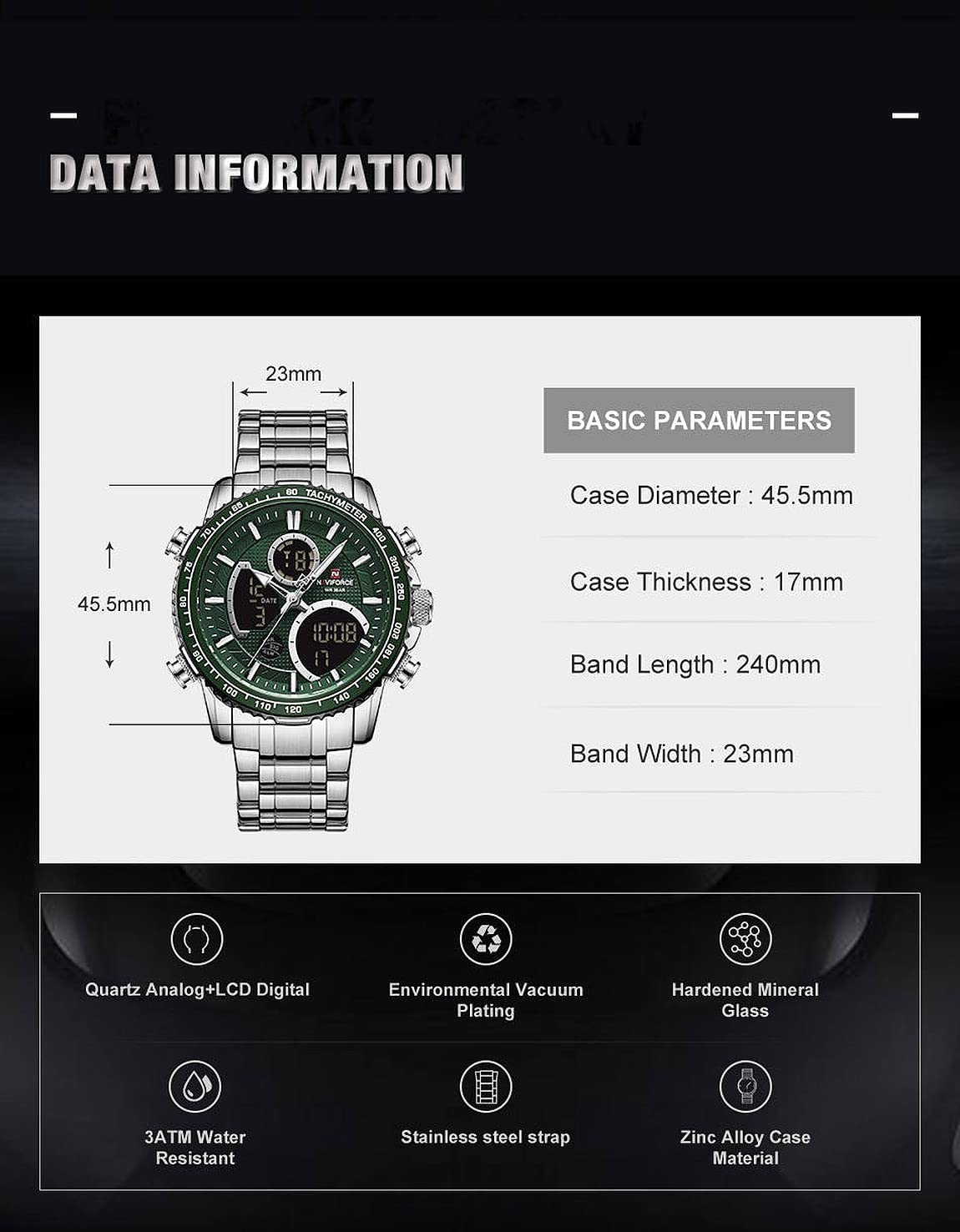
Figure 5: Diagram detailing the basic parameters and dimensions of the watch, including case diameter, case thickness, band length, and band width.
Warranty and Support
NAVIFORCE products typically come with a manufacturer's warranty covering defects in materials and workmanship. For specific warranty terms and conditions, please refer to the warranty card included with your purchase or visit the official NAVIFORCE website.
For customer support, technical assistance, or warranty claims, please contact your point of purchase or the official NAVIFORCE service center. Keep your purchase receipt as proof of purchase.
You can visit the NAVIFORCE Store for more information: NAVIFORCE Store on Amazon.in
Ask a question about this manual
Ask about setup, troubleshooting, compatibility, parts, safety, or missing instructions. Manuals+ will review the question and use this page’s manual context to help answer it.