
1. Product Overview
The ZOSI 8CH 5MP 3K Lite Surveillance Wired Security Camera System provides comprehensive monitoring solutions. This system includes an 8-channel 3K 5MP-Lite Digital Video Recorder (DVR) and four weatherproof 1080p bullet cameras, designed for both indoor and outdoor use. It features advanced AI human and vehicle detection, H.265+ video compression for efficient storage, and robust night vision capabilities.

Figure 1.1: ZOSI 8CH 5MP 3K Lite Surveillance Wired Security Camera System components.
Key Features:
- 8-Channel 3K 5MP-Lite DVR: Supports up to eight cameras, with four 1080p bullet cameras included. Expandable with additional 1080p or 5MP cameras.
- AI Human/Vehicle Detection: Utilizes artificial intelligence to accurately distinguish between human and vehicle movement, reducing false alarms.
- IP66 Weatherproof Cameras: Designed to withstand harsh weather conditions, ensuring reliable outdoor performance.
- 100ft Night Vision: Provides clear surveillance footage in low-light conditions up to 100 feet.
- H.265+ Video Compression: Advanced compression technology saves approximately 80% more storage space compared to H.264, while maintaining video quality.
- Customizable Recording Modes: Offers continuous, scheduled, motion detection-triggered, and loop recording options.
- Instant Alerts: Receive push notifications and email alerts upon detection of activity.
2. Package Contents
Verify that all items listed below are included in your package. If any items are missing or damaged, please contact ZOSI customer support.
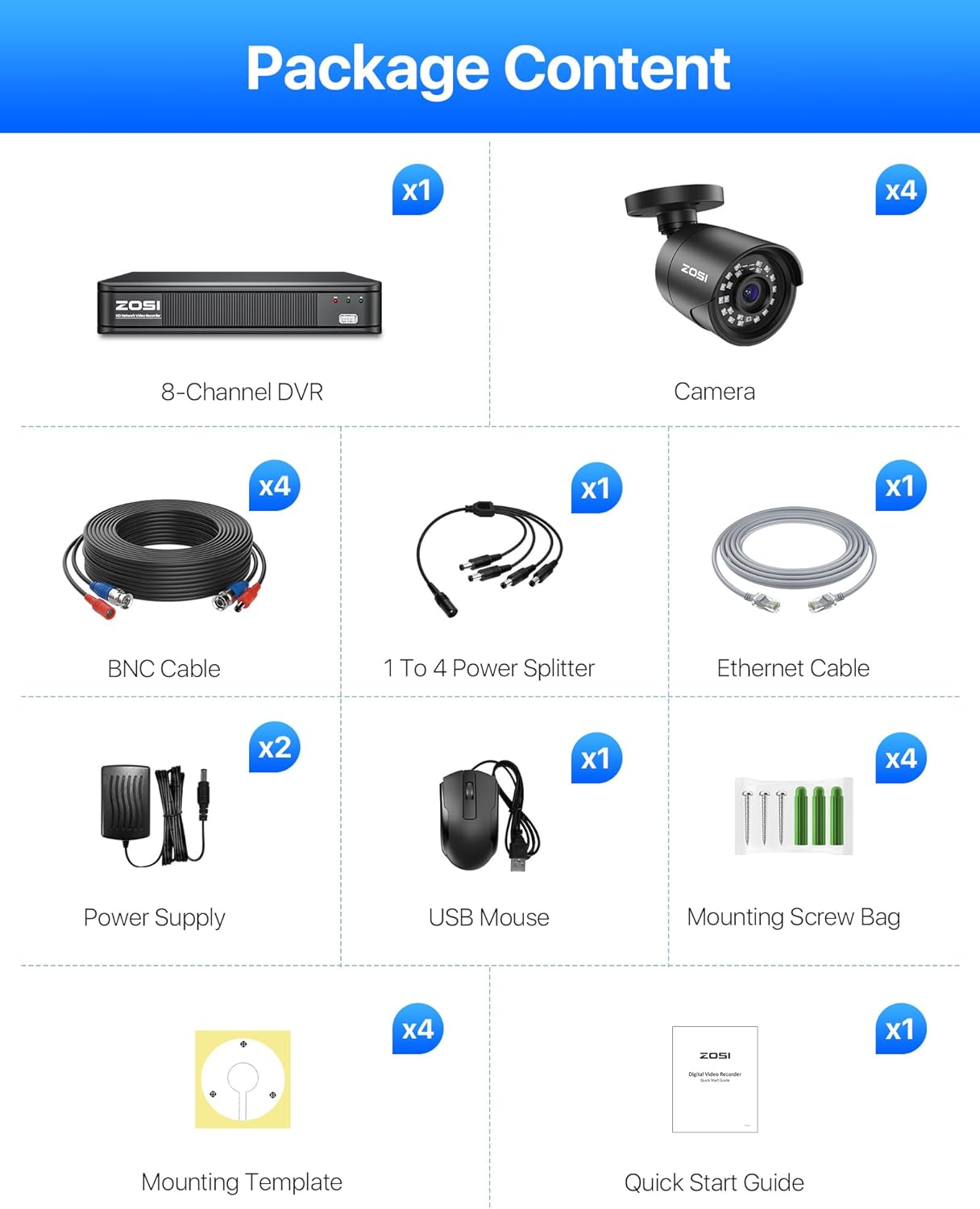
Figure 2.1: All components included in the ZOSI 8CH 5MP 3K Lite Surveillance System package.
- 1 x 8-Channel DVR
- 4 x 1080p Bullet Cameras
- 4 x BNC Cables (60ft each)
- 1 x 1 to 4 Power Splitter
- 1 x Ethernet Cable
- 2 x Power Supplies (for DVR and cameras)
- 1 x USB Mouse
- 4 x Mounting Screw Bags
- 4 x Mounting Templates
- 1 x Quick Start Guide
3. Setup Instructions
3.1. System Connection
Follow these steps to connect your surveillance system components:
- Connect Cameras: Use the provided BNC cables to connect each camera to the corresponding BNC input ports on the back of the DVR.
- Power Cameras: Connect the cameras to the power supply using the 1-to-4 power splitter. Plug the power supply into an electrical outlet.
- Connect DVR to Display: Use a VGA or HDMI cable (not included) to connect the DVR to a monitor or TV.
- Power DVR: Connect the DVR to its dedicated power supply and plug it into an electrical outlet.
- Connect USB Mouse: Plug the USB mouse into the USB port on the front or back of the DVR for navigation.
- Network Connection (Optional): For remote access, connect the DVR to your router using the Ethernet cable.
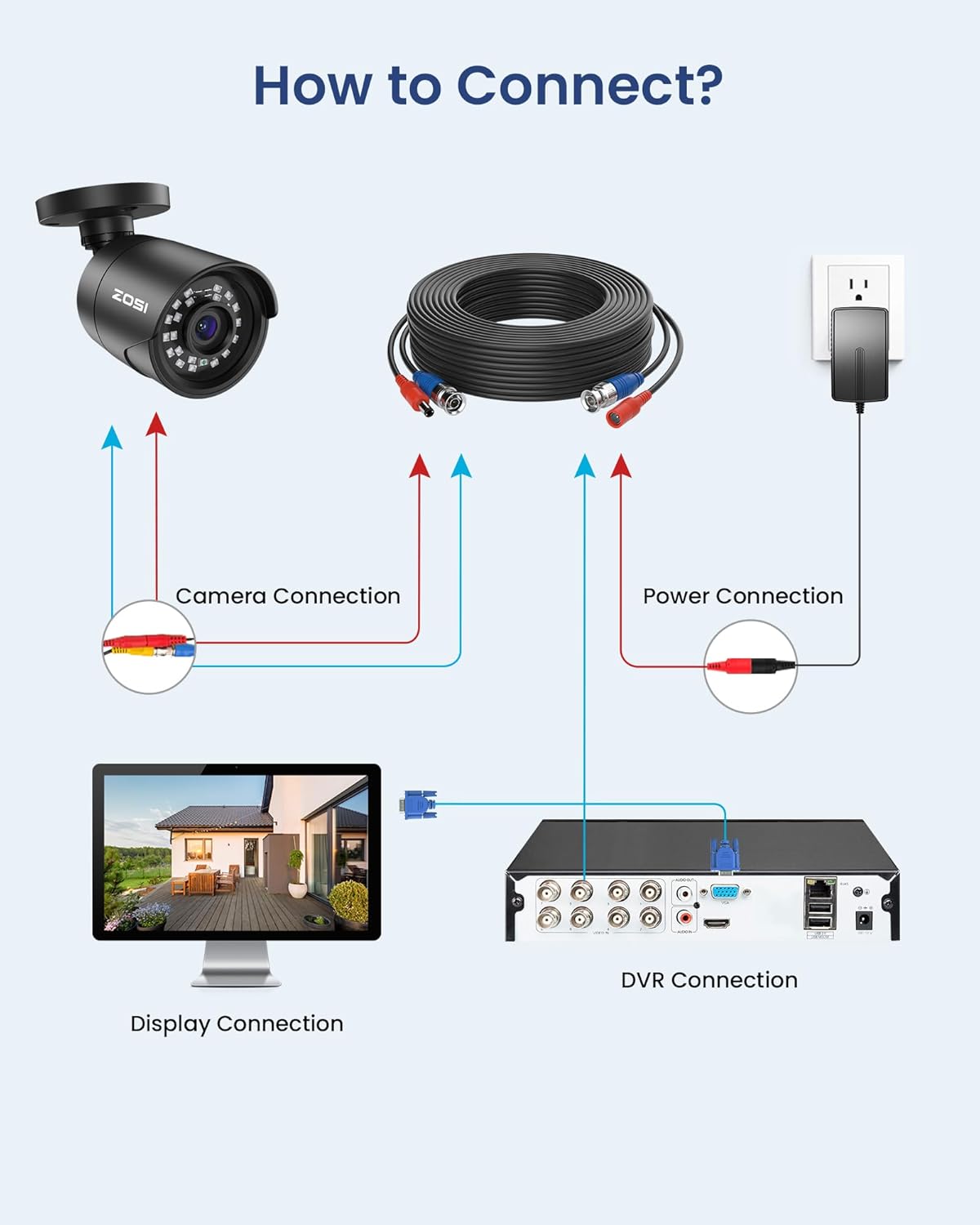
Figure 3.1: Connection diagram for the ZOSI surveillance system.
3.2. Remote Access Setup
To view your cameras remotely on a mobile device:
- Ensure System Connection: Confirm your camera system is fully connected and the DVR is linked to your network router.
- Download ZOSI Smart App: Search for "ZOSI Smart" in your mobile device's app store (available for iOS and Android) and install it.
- Add Device and View: Open the app, register an account, and follow the in-app instructions to add your DVR. You can then enjoy live view of your cameras.

Figure 3.2: Steps for setting up remote access via the ZOSI Smart App.
4. Operating Instructions
4.1. AI Human/Vehicle Detection
The system's AI detection feature distinguishes between human and vehicle movement, minimizing false alarms from animals or environmental factors. You can customize detection sensitivity and specific zones through the DVR's menu or the ZOSI Smart app.

Figure 4.1: Example of AI Human/Vehicle Detection in action.
4.2. Night Vision
The cameras are equipped with infrared (IR) LEDs, providing up to 100 feet of night vision. The system automatically switches between day and night modes based on ambient light conditions, ensuring continuous surveillance.

Figure 4.2: Day and 100ft IR Night Vision comparison.
4.3. Recording Modes
The DVR offers flexible recording options:
- Continuous Recording: Records 24/7 without interruption.
- Scheduled Recording: Set specific times for recording to occur.
- Motion Detection Recording: Records only when motion is detected, conserving storage space.
- Loop Recording: Automatically overwrites the oldest footage when the storage disk is full.
4.4. H.265+ Video Compression
The system utilizes H.265+ video compression technology. This advanced codec significantly reduces file sizes, allowing for more video footage to be stored on the same hard drive capacity compared to older H.264 systems, without compromising video quality.

Figure 4.3: H.265+ compression efficiency compared to H.264.
5. Maintenance
5.1. Weather Resistance
The ZOSI cameras feature an IP66 weatherproof rating, indicating they are protected against dust ingress and powerful water jets. This design ensures reliable operation in various outdoor environments, from extreme heat (up to 60°C / 140°F) to cold temperatures (down to -20°C / -4°F).

Figure 5.1: IP66 Weatherproof camera design.
5.2. General Care
- Cleaning: Periodically clean camera lenses with a soft, damp cloth to ensure clear image quality. Avoid abrasive cleaners.
- Cable Management: Ensure all cables are securely fastened and protected from environmental damage or tampering.
- Firmware Updates: Check the ZOSI official website or app regularly for firmware updates to ensure optimal performance and security.
6. Troubleshooting
This section addresses common issues you might encounter with your ZOSI surveillance system.
6.1. No Video Display
- Check Power: Ensure the DVR and all cameras are properly powered and their power adapters are securely plugged into working outlets.
- Cable Connections: Verify that all BNC video cables are securely connected between the cameras and the DVR. Check the VGA/HDMI cable connection between the DVR and your display.
- Display Input: Confirm your monitor or TV is set to the correct input source (e.g., HDMI1, VGA).
6.2. Remote Access Issues
- Network Connection: Ensure the DVR is connected to your router via Ethernet and has a stable internet connection. Check your router's status.
- App Status: Verify that the ZOSI Smart app is updated to the latest version. Try restarting the app or reinstalling it if issues persist.
- DVR Settings: Access the DVR's network settings to confirm it has obtained an IP address and that P2P (Peer-to-Peer) or cloud services are enabled.
6.3. Poor Image Quality
- Clean Lens: Clean the camera lens to remove any dirt, dust, or smudges.
- Cable Integrity: Inspect BNC cables for damage or loose connections, which can degrade signal quality.
- Lighting: Ensure adequate lighting in the surveillance area, especially at night.
For further assistance, please refer to the comprehensive user manual available on the ZOSI support website or contact ZOSI technical support.
7. Specifications
Detailed technical specifications for the ZOSI 8CH 5MP 3K Lite Surveillance Wired Security Camera System.

Figure 7.1: Detailed specifications of the ZOSI bullet camera.
| Feature | Specification |
|---|---|
| Model Number | 8VMA-124B4S-00-US |
| DVR Channels | 8 Channels |
| Video Capture Resolution | 1080p, 3K, 5MP (Lite) |
| Included Cameras | 4 x 1080p Bullet Cameras |
| Viewing Angle | 90 Degrees |
| Night Vision Range | 100 Feet |
| Weatherproof Rating | IP66 |
| Video Compression | H.265+ |
| Frame Rate | 30 fps |
| Power Source | Corded Electric |
| Item Dimensions (L x W x H) | 18 x 12 x 8 inches |
| Item Weight | 9.02 pounds (4.1 kg) |
| Low Light Technology | Night Color |
| Connectivity Technology | Wired |
| Compatible Devices | Cameras |
8. Warranty and Support
ZOSI provides the following support and warranty for this product:
- 1-Year Warranty: The product is guaranteed for a 1-year warranty from the date of purchase.
- Free Lifetime Technical Support: ZOSI offers free technical support for the lifetime of the product.
- 90-Day Money Back Guarantee: A 90-day money-back guarantee is provided for customer satisfaction.
For warranty claims, technical assistance, or any product-related inquiries, please visit the official ZOSI support website or contact their customer service department. Contact details can typically be found in the Quick Start Guide or on the ZOSI website.