
1. Introduction
Thank you for choosing the QPlay Rito Air Junior Tricycle. This manual provides essential information for the safe assembly, operation, and maintenance of your tricycle. Please read it thoroughly before first use and keep it for future reference. This tricycle is designed for children and features a durable alloy steel frame and air-filled tires for a comfortable ride.
2. Safety Information
WARNING: Failure to follow these safety instructions could result in serious injury.
- Always supervise children when using the tricycle.
- Ensure all parts are securely fastened before each use. Regularly check for loose screws or damaged components.
- Do not use the tricycle near stairs, hills, roads, or swimming pools.
- The maximum weight limit for this tricycle is 35 kg (77 lbs). Do not exceed this limit.
- Children should wear appropriate safety gear, including a helmet, when riding.
- This product is intended for children within the specified age range (Child).
- Do not modify the tricycle in any way. Use only original QPlay replacement parts.
- Keep hands and feet away from moving parts.
3. Package Contents
Before assembly, please ensure all components are present and undamaged. If any parts are missing or damaged, contact customer support immediately.
- Tricycle Frame (main body)
- Front Wheel Assembly
- Rear Wheels (2)
- Parent Push Handle
- Seat with Harness
- Safety Bar
- Canopy
- Footrests
- Pedals
- Hardware Pack (screws, washers, tools if included)
- User Manual
4. Setup and Assembly
Follow these steps carefully to assemble your QPlay Rito Air Junior Tricycle. It is recommended to have two adults for easier assembly.
4.1. Attaching the Rear Wheels
- Insert the rear wheel axles into the designated slots on the tricycle frame until they click into place.
- Ensure both wheels are securely attached and spin freely.
4.2. Installing the Front Wheel and Handlebar
- Slide the front wheel assembly into the front fork of the tricycle frame.
- Secure it with the provided locking mechanism or bolt.
- Attach the handlebar to the steering column, ensuring it is centered and tightened.
4.3. Attaching the Seat and Safety Bar

Image: Close-up of the QPlay Rito Air Junior Tricycle seat with harness and the detachable safety bar.
- Place the seat onto the frame and secure it according to the instructions, ensuring the harness is correctly positioned.
- Attach the safety bar in front of the seat. Ensure it clicks into place securely.
4.4. Installing the Canopy and Parent Handle

Image: View of the QPlay Rito Air Junior Tricycle's adjustable canopy and the ergonomic parent push handle.
- Mount the canopy onto the designated slots above the seat. Adjust its angle as needed.
- Insert the parent push handle into the rear of the tricycle frame until it locks. Adjust its height for comfortable pushing.
4.5. Attaching Pedals and Footrests
- Screw the pedals into the front wheel axle. Note that pedals are often left (L) and right (R) specific.
- Attach the foldable footrests to the side of the frame if your child is too young to reach the pedals.
5. Operating Instructions
The QPlay Rito Air Junior Tricycle offers multiple modes of use as your child grows.
5.1. Parent-Controlled Mode
- For younger children, use the parent push handle to steer and control the tricycle.
- Ensure the child's feet are on the footrests if they cannot reach the pedals or if the pedals are disengaged.
- The safety bar and harness should always be used in this mode to secure the child.
5.2. Child-Controlled Mode
- Once your child is old enough to pedal and steer independently, the parent handle and safety bar can be removed.
- Ensure the pedals are engaged and the child can comfortably reach them.
- Always supervise your child, even in child-controlled mode.
5.3. Canopy Adjustment
The canopy can be adjusted to provide shade or folded back when not needed. Simply push or pull the canopy to the desired position.
6. Maintenance
Regular maintenance ensures the longevity and safe operation of your tricycle.
- Cleaning: Wipe down the frame and plastic parts with a damp cloth and mild soap. Do not use abrasive cleaners.
- Tire Pressure: Check the air pressure of the tires regularly. Maintain the recommended pressure for optimal performance and safety.
- Fasteners: Periodically check all screws, bolts, and fasteners to ensure they are tight. Tighten any loose connections.
- Moving Parts: Lubricate moving parts like wheel axles and pedal mechanisms with a light, non-toxic lubricant if they become stiff.
- Storage: Store the tricycle in a dry place, away from direct sunlight and extreme temperatures, to prevent material degradation.

Image: Diagram illustrating the construction of the tricycle's wheels, featuring a rubber tire, foam filling, and aluminum wheel supports.
7. Troubleshooting
| Problem | Possible Cause | Solution |
|---|---|---|
| Tricycle pulls to one side. | Uneven tire pressure; loose wheel. | Check and adjust tire pressure. Ensure all wheels are securely fastened. |
| Pedals are stiff or not turning. | Lack of lubrication; debris in mechanism. | Clean and lubricate the pedal mechanism. Check for any obstructions. |
| Parent handle feels loose. | Locking mechanism not fully engaged. | Ensure the parent handle is fully inserted and its locking mechanism is engaged. |
| Squeaking noises during use. | Dry moving parts; loose connections. | Lubricate axles and joints. Check and tighten all fasteners. |
8. Specifications
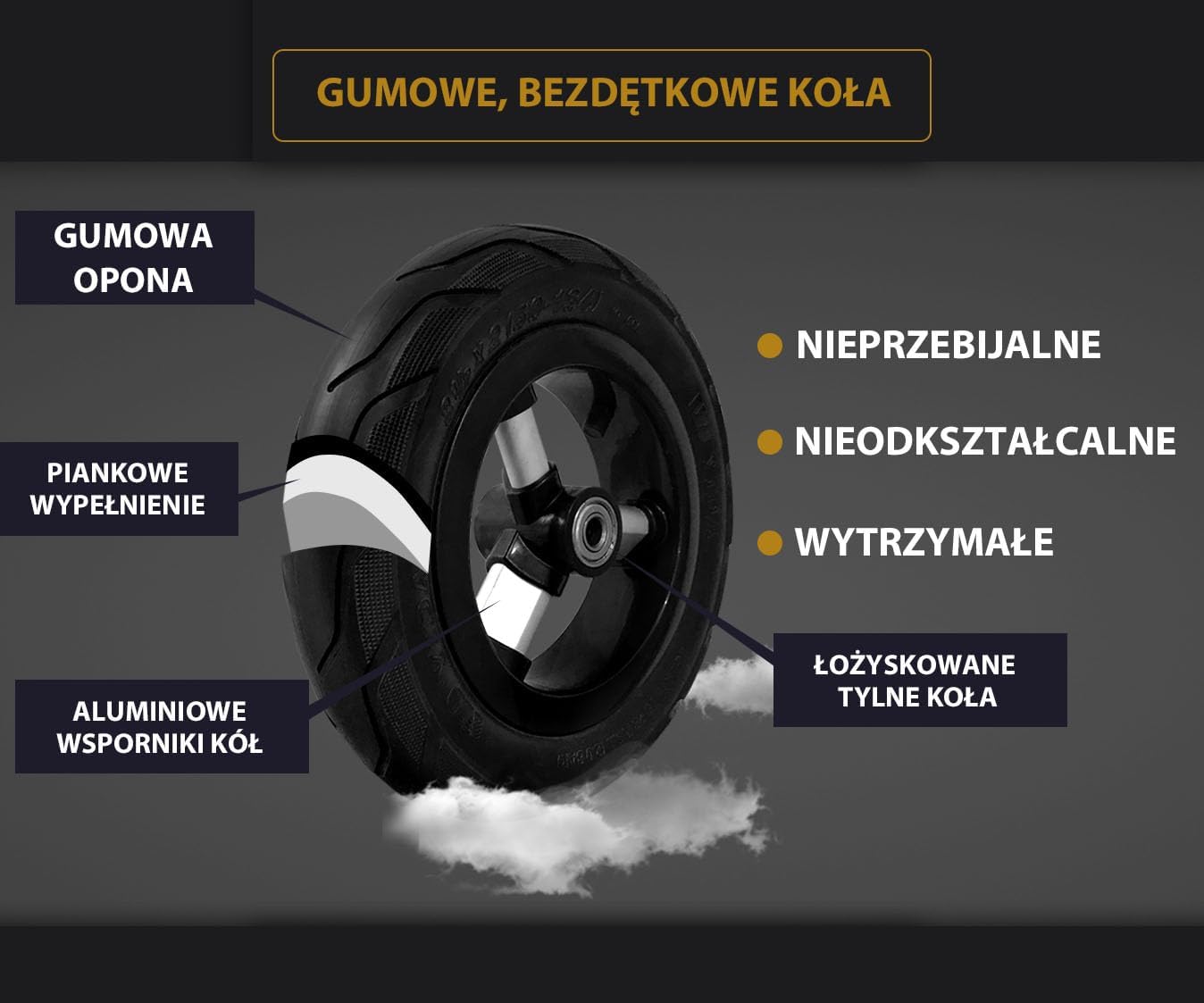
Image: Full view of the QPlay Rito Air Junior Tricycle with overall dimensions (length, width, height) indicated.
- Model: S432
- Brand: QPLAY
- Dimensions (L x W x H): 90 x 49 x 93 cm (35.4 x 19.3 x 36.6 inches)
- Item Weight: 9.2 kg (20.3 lbs)
- Material: Alloy Steel
- Maximum Weight Limit: 35 kg (77 lbs)
- Age Range: Child
- UPC: 686268624624
- ASIN: B09PM9X3T7
9. Warranty and Support
QPlay products are manufactured to high-quality standards. For specific warranty information, please refer to the warranty card included with your purchase or visit the official QPlay website. If you have any questions, require technical assistance, or need replacement parts, please contact QPlay customer support through their official channels.
Please retain your proof of purchase for warranty claims.