
Introduction
Thank you for purchasing the LEXiBOOK RC Raptor Control Dinosaur. This remote-controlled velociraptor offers realistic articulated movements, roars, and light effects for an immersive play experience. This manual provides essential information for safe setup, operation, and maintenance of your new toy.
Key Features:
- Realistic articulated movements, allowing it to walk like a real dinosaur.
- 2.4 GHz frequency remote control for optimized range and reduced interference.
- Light and sound effects, including multiple roars.
- Demonstration mode to showcase its capabilities.
- Rechargeable dinosaur battery (included) and USB charging support.
Safety Information
Please read all safety warnings before operating the product. Failure to follow these instructions may result in injury or damage to the product.
- Age Recommendation: Suitable for ages 6 years and up. Not for children under 3 years due to small parts.
- Battery Safety: Do not mix old and new batteries. Do not mix alkaline, standard (carbon-zinc), or rechargeable (nickel-cadmium) batteries. Insert batteries with correct polarity. Remove exhausted batteries promptly. Do not short-circuit battery terminals.
- Choking Hazard: Keep small parts away from young children.
- Operating Environment: Operate the dinosaur on a flat, clear surface. Avoid water, sand, or rough terrain. Do not operate near people or animals to prevent collisions.
- Supervision: Adult supervision is recommended during play.
- Cleaning: Clean the product with a soft, dry cloth. Do not immerse in water.
Package Contents
Ensure all items are present in the package:
- 1 x RC Raptor Control Dinosaur
- 1 x Fossil Design Remote Control
- 1 x Rechargeable Battery (for dinosaur)
- 1 x USB Charging Cable
Note: 2 x LR6 / AA batteries for the remote control are not included and must be purchased separately.
Setup
1. Installing Batteries
For the Remote Control:
- Locate the battery compartment on the back of the fossil-designed remote control.
- Using a screwdriver (not included), open the battery compartment cover.
- Insert 2 x LR6 / AA batteries, ensuring correct polarity (+/-).
- Close the battery compartment cover and secure it with the screw.
For the Dinosaur:
- Locate the battery compartment on the underside of the dinosaur.
- Using a screwdriver (not included), open the battery compartment cover.
- Connect the included rechargeable battery to the connector inside the compartment.
- Place the battery inside the compartment, close the cover, and secure it with the screw.
2. Charging the Dinosaur Battery
The dinosaur's rechargeable battery requires approximately 3 hours for a full charge, providing about 30 minutes of play time.
- Ensure the dinosaur is turned OFF.
- Connect the USB charging cable to the charging port on the dinosaur.
- Connect the other end of the USB cable to a USB power source (e.g., computer, USB wall adapter).
- The indicator light on the dinosaur will show charging status (refer to product for specific light behavior).
- Once fully charged, disconnect the USB cable.
3. Pairing the Remote Control and Dinosaur
The 2.4 GHz frequency ensures automatic pairing. Follow these steps:
- Turn ON the dinosaur using the power switch located on its underside.
- Turn ON the remote control using its power switch.
- The remote control and dinosaur should automatically pair. If not, turn both off and on again.
Operating Instructions
Familiarize yourself with the remote control functions:

Image: The fossil-designed remote control with various buttons for controlling the dinosaur's movements and activating features.
- Forward: Press the forward button to make the dinosaur walk forward.
- Backward: Press the backward button to make the dinosaur walk backward.
- Turn Left: Use the left turn button to steer the dinosaur left.
- Turn Right: Use the right turn button to steer the dinosaur right.
- One-Key Demo: Press the 'One Key Demo' button (often indicated by a play symbol or similar) to activate the dinosaur's automatic demonstration mode. The dinosaur will perform a sequence of movements, roars, and light effects.
- Roars and Light Effects: The dinosaur features realistic roars and light effects, particularly from its mouth, which activate during movement and demonstration mode.
Auto Sleeping Mode
To conserve battery life, the dinosaur will enter an auto sleeping mode after a period of inactivity. To reactivate it, simply press any button on the remote control or turn the dinosaur off and on again.

Image: The LEXiBOOK RC Raptor Control Dinosaur in a dynamic pose, highlighting its detailed texture and light-up mouth feature.
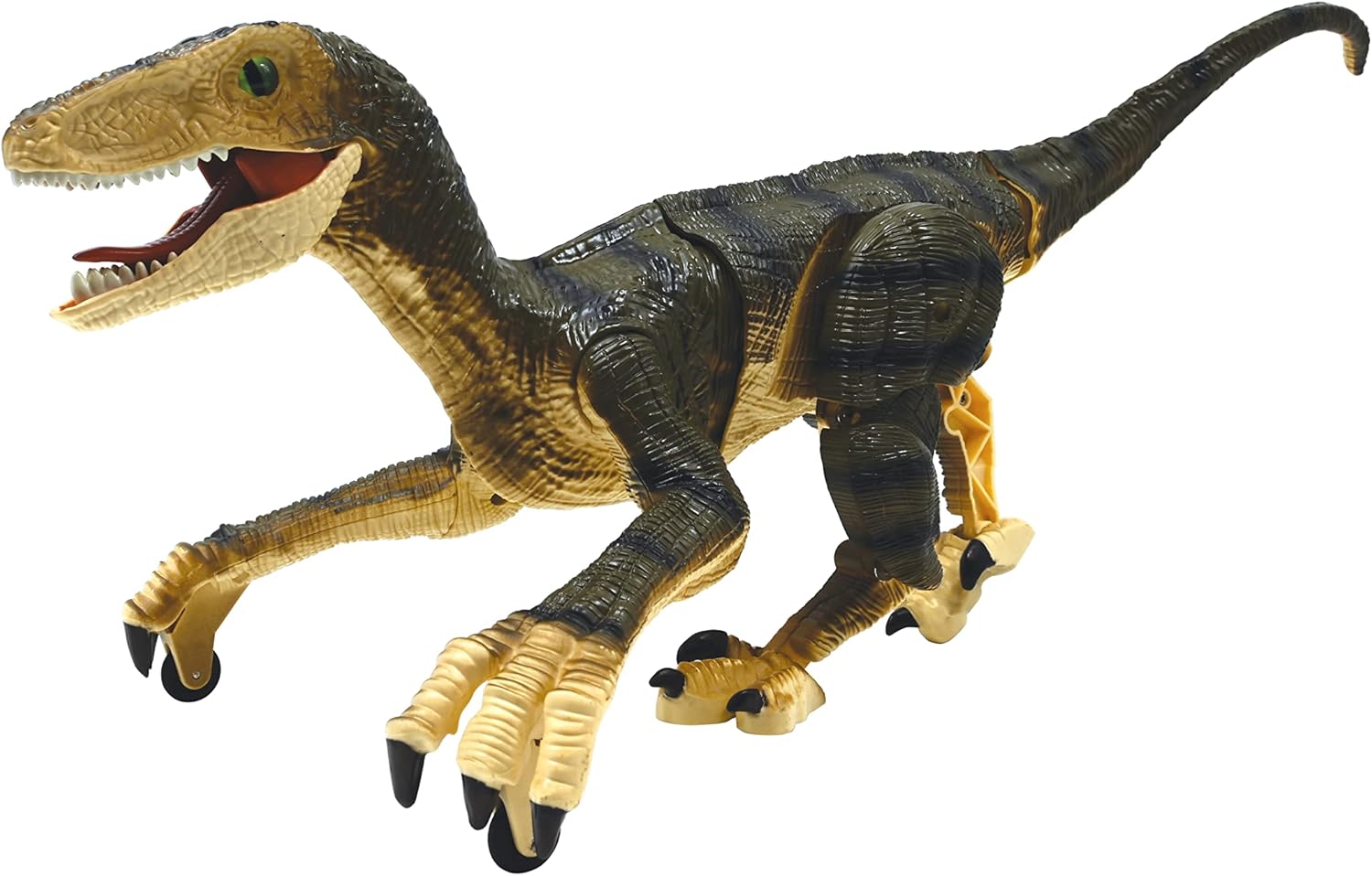
Image: A side profile of the dinosaur, illustrating its articulated joints that enable realistic walking.
Maintenance
- Cleaning: Wipe the dinosaur and remote control with a clean, dry cloth. Do not use harsh chemicals or abrasive cleaners.
- Storage: When not in use for extended periods, remove all batteries from both the dinosaur and the remote control. Store the product in a cool, dry place away from direct sunlight.
- Battery Care: Recharge the dinosaur's battery regularly, even if not in use, to maintain its lifespan.
Troubleshooting
| Problem | Possible Cause | Solution |
|---|---|---|
| Dinosaur does not move or respond. | Low battery in dinosaur or remote. Not paired. Power switch OFF. | Charge dinosaur battery. Replace remote batteries. Ensure both power switches are ON. Re-pair by turning both off and on. |
| Short play time. | Battery not fully charged. Old battery. | Ensure battery is fully charged (3 hours). Consider replacing the rechargeable battery if it's old. |
| Interference during operation. | Other 2.4 GHz devices nearby. | Move to an area with less wireless interference. |
| Dinosaur enters auto sleeping mode too quickly. | Normal operation to save battery. | Press any button on the remote to wake it up. |
Specifications
- Brand: LEXiBOOK
- Model Number: DINO01
- Toy Figure Type: Interactive Gaming Figure
- Character: Dinosaur (Velociraptor)
- Scale: 1:3
- Material: Plastic
- Item Dimensions (L x W x H): Approximately 17.64 x 7.95 x 6.69 inches
- Item Weight: 451 Grams
- Power Source: Battery
- Dinosaur Battery: 1 x Rechargeable battery (included)
- Remote Control Battery: 2 x AA batteries (not included)
- Charging Time: Approximately 3 hours
- Playing Time: Approximately 30 minutes
- Recommended Age: 6+ years
Official Product Video
Video: An official demonstration of the LEXiBOOK RC Raptor Control Dinosaur, showcasing its realistic movements, sounds, and light effects in action. This video highlights the product's features and dynamic play.
Warranty and Support
Manufacturer Warranty: This product comes with a 2-Year Limited Warranty from the manufacturer, LEXiBOOK. Please retain your proof of purchase for warranty claims.
Customer Support: For technical assistance, troubleshooting, or warranty inquiries, please visit the official LEXiBOOK website or contact their customer service department. Contact information can typically be found on the product packaging or the brand's official website.