
X7 Pro
X7 Pro Smart Watch User Manual
Model: X7 Pro | Brand: Generic
Introduction
Thank you for choosing the X7 Pro Smart Watch. This manual provides essential information for setting up, operating, and maintaining your device. The X7 Pro Smart Watch is designed to enhance your daily life with features such as Bluetooth calling, health monitoring, fitness tracking, and smart notifications. It supports both Android and iPhone devices and features a 1.78-inch IPS full touch screen.
Package Contents
Please check the box for the following items:
- X7 Pro Smart Watch (Black)
- Silicone Band (44mm)
- Wireless Charging Cable
- User Manual

Image: The X7 Pro Smart Watch in black, featuring a sleek design and a clear digital display showing the date and time.
Product Overview
Familiarize yourself with the main components of your X7 Pro Smart Watch:
- 1.78-inch IPS Full Touch Screen: For interactive navigation and display.
- Rotating Crown: Used for navigating menus, zooming, and scrolling.
- Side Button: Typically for power on/off or returning to the home screen.
- Heart Rate Monitor: Located on the back for health tracking.
- Wireless Charging Pad: On the back for convenient charging.
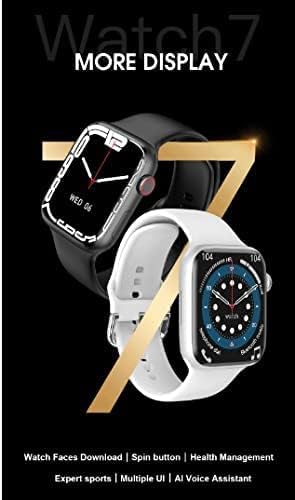
Image: A close-up of the X7 Pro Smart Watch, highlighting the rotating crown on the side, which is used for navigation.
Setup
1. Charging the Device
Before first use, fully charge your X7 Pro Smart Watch. Place the watch on the wireless charging pad. A built-in magnetic module ensures correct alignment. A full charge takes approximately 2 hours.
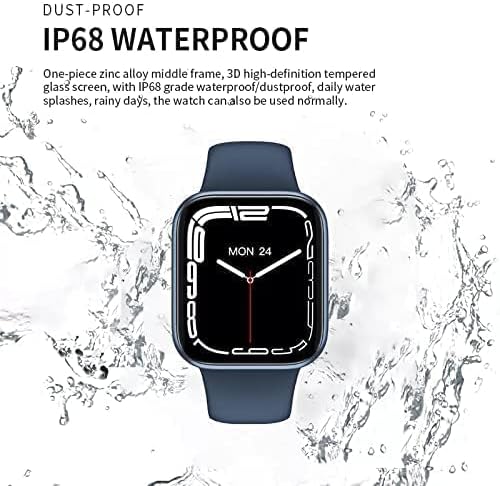
Image: The X7 Pro Smart Watch positioned on its wireless charging base, illustrating the charging process. The image also notes the 200mAh battery and 2-hour charging time.
2. Powering On/Off
- Power On: Press and hold the side button until the screen lights up.
- Power Off: Press and hold the side button, then select "Power Off" on the screen.
3. Pairing with Smartphone
- Download the Wearfit Pro application from your smartphone's app store (compatible with Android and iPhone).
- Ensure Bluetooth is enabled on your smartphone.
- Open the Wearfit Pro app and follow the on-screen instructions to search for and connect to your X7 Pro Smart Watch. The watch uses Bluetooth 5.2 for stable connectivity.
- Confirm the pairing request on both your watch and smartphone.
Operating Instructions
Basic Navigation
- Touch Screen: Swipe up, down, left, or right to navigate through menus and notifications. Tap to select items.
- Rotating Crown: Rotate to scroll through lists, zoom in/out, or change watch faces. Press to return to the home screen or confirm selections.
Bluetooth Call Function
Once paired with your smartphone, you can make and answer calls directly from your X7 Pro Smart Watch. Ensure the Bluetooth call feature is enabled in the Wearfit Pro app.
Notifications
Receive notifications for SMS, Facebook, Twitter, Line, WhatsApp, and other applications directly on your watch. Configure notification settings within the Wearfit Pro app.
Health Monitoring & Fitness Tracking
- Heart Rate Monitor: The watch continuously monitors your heart rate. View your data in real-time on the watch or in the Wearfit Pro app.
- Fitness Tracker: Track your steps, distance, calories burned, and various sports activities.
Customizing Watch Faces
The X7 Pro Smart Watch offers a variety of built-in watch faces and allows for custom watch faces. Access the "Dial Market" within the Wearfit Pro app to download more options and personalize your watch's appearance.

Image: A display showcasing various dynamic watch faces available for the X7 Pro Smart Watch, emphasizing personalization options.
PIN Lock Feature
For enhanced security, you can set a PIN lock on your watch. This feature helps keep your data safe and provides peace of mind.
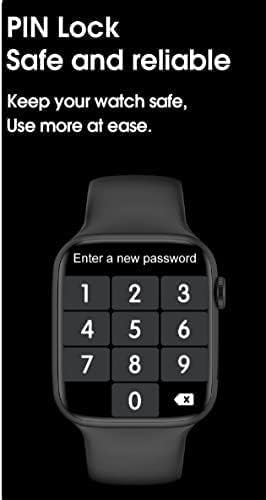
Image: The X7 Pro Smart Watch screen showing the PIN lock interface, prompting the user to enter a new password for security.
Other Features
- Share Location: Utilize location sharing features through the connected app.
- QR Code Support: For quick access to certain functions or information.
- PayPal & Alipay: Support for mobile payment functionalities.
- Wake Up Gesture: Raise your wrist to wake the screen.
- Alarm: Set alarms directly from your watch.
- Stop Watch: A built-in stopwatch for timing activities.
Maintenance
Cleaning Your Watch
Wipe the watch and strap regularly with a soft, damp cloth. Avoid using harsh chemicals or abrasive materials.
Water Resistance (IP68)
The X7 Pro Smart Watch is IP68 waterproof and dustproof. This means it can withstand daily water splashes, rain, and can be used normally in such conditions. Avoid prolonged submersion or hot water exposure.

Image: The X7 Pro Smart Watch shown with water droplets, illustrating its IP68 dustproof and waterproof capabilities, suitable for daily use and splashes.
Battery Care
To prolong battery life, avoid extreme temperatures and fully discharging the battery frequently. The 200mAh lithium polymer battery provides more than 4 days of typical use.
Troubleshooting
If you encounter issues with your X7 Pro Smart Watch, try the following common solutions:
- Watch not turning on: Ensure the watch is fully charged.
- Cannot pair with phone: Make sure Bluetooth is enabled on both devices and the Wearfit Pro app is open. Try restarting both the watch and phone.
- Notifications not appearing: Check notification permissions in the Wearfit Pro app and your phone's settings.
- Inaccurate health data: Ensure the watch is worn snugly on your wrist and the sensors are clean.
For persistent issues, refer to the Wearfit Pro app's help section or contact customer support.
Specifications
| Feature | Specification |
|---|---|
| Model Number | X7 Pro |
| Screen Size | 1.78 inches IPS Full Touch Screen |
| Bluetooth Version | 5.2 |
| Battery Capacity | 200mAh Lithium Polymer |
| Charging Method | Wireless Charging |
| Strap Material | Silicone (44MM) |
| Water Resistance | IP68 Dustproof and Waterproof |
| Operating System Compatibility | Android, iOS |
| Memory Storage Capacity | 128 MB |
| Product Dimensions | 0.43 x 0.38 x 0.13 cm; 190 g |
| Manufacturer | HW |
| First Available Date | 1 January 2022 |
Warranty and Support
For warranty information and customer support, please refer to the documentation included with your purchase or contact the retailer. Keep your purchase receipt as proof of purchase.
Related documentsX7 Pro


Ask a question about this manual
Ask about setup, troubleshooting, compatibility, parts, safety, or missing instructions. Manuals+ will review the question and use this page’s manual context to help answer it.