
Introduction
This manual provides a comprehensive, hands-on approach to Programmable Logic Controller (PLC) applications, specifically focusing on Siemens S7-300 and S7-400 PLCs using SIMATIC Manager software. It is designed to guide beginners through the practical aspects of PLC programming.

The front cover of the instruction manual, illustrating the core subject matter: Siemens PLCs and their programming environment.
Learning Objectives
Upon completing this book, readers will acquire the knowledge and skills necessary to work effectively with Siemens S7 (300/400 Series) machines. Specific objectives include:
- Identify the SIMATIC S7-300/400 PLC's components and performance characteristics.
- Install a PLC system, which includes communication and I/O wiring.
- Edit, reload, structure, and run a program using various address types.
- Document, test, and troubleshoot control systems and programs.
- Diagnose and fix common hardware issues.
- Utilize binary, timers, counters, comparators, and arithmetic operations.
- Integrate a simulator and drive system with Factory IO within the control system.
- Configure and troubleshoot Profibus DP nodes.
- Write simple programs and identify faults on S7-300/400 PLCs using the S7 software package.
This book is primarily intended for electrical and instrumentation technicians and engineers.
Getting Started with Siemens PLC Programming
To begin your journey into Siemens PLC programming, ensure you have access to the necessary software and a foundational understanding of electrical and control systems. The book guides you through the practical aspects, assuming a hands-on learning approach.
Required Software and Hardware (Conceptual)
- SIMATIC Manager Software: Essential for programming Siemens S7-300/400 PLCs. The book's instructions are based on this environment.
- Siemens S7-300/400 PLC Hardware (Optional for practice): While the book focuses on practical application, physical hardware is not strictly required for learning the concepts, as simulators are discussed.
- Factory IO (Optional): For integrating a simulator and drive system, enhancing practical understanding.
Initial Setup Steps (Conceptual)
- Familiarize yourself with the basic architecture of Siemens S7-300/400 PLCs as described in the initial chapters.
- Understand the principles of communication and I/O wiring, which are fundamental to PLC system installation.
- Prepare your development environment by installing SIMATIC Manager software, if you plan to follow along with practical exercises.
Core Programming Principles and Operations
This section outlines the fundamental programming concepts and operational procedures covered in the manual, enabling you to develop and manage PLC programs effectively.
Program Development and Execution
- Program Structure: Learn how to structure your PLC programs logically for clarity and efficiency.
- Address Types: Understand and utilize various address types within your programs.
- Editing and Reloading: Master the process of modifying and deploying programs to the PLC.
- Running Programs: Execute and monitor your PLC programs.
Key Programming Elements
- Binary Operations: Implement basic logic using binary functions.
- Timers and Counters: Utilize these essential functions for sequence control and event counting.
- Comparators: Apply comparison logic for decision-making within programs.
- Arithmetic Operations: Perform mathematical calculations within the PLC environment.
Integration with Factory IO
The manual details how to integrate a simulator and drive system using Factory IO, providing a virtual environment for testing and validating your PLC programs without physical hardware.
Maintaining Your PLC Programming Skills
Continuous learning and practice are crucial for maintaining proficiency in PLC programming. This section provides general guidance on how to keep your skills sharp.
- Regular Practice: Consistently work through programming exercises and real-world scenarios.
- Review Concepts: Periodically revisit fundamental concepts and advanced topics covered in the book.
- Stay Updated: Keep abreast of new software versions, hardware advancements, and industry best practices in PLC programming.
- Documentation: Emphasize the importance of documenting your programs for future reference and troubleshooting.
Troubleshooting Common Issues
Effective troubleshooting is a vital skill for any PLC programmer. This manual equips you with the knowledge to diagnose and resolve common problems encountered during PLC system operation and programming.
Hardware Troubleshooting
- Identify and fix common hardware issues related to SIMATIC S7-300/400 PLCs.
- Understand diagnostic indicators and error codes.
Program Troubleshooting
- Techniques for identifying faults within your S7 software package programs.
- Strategies for testing and debugging PLC programs.
Communication and Network Troubleshooting
- Guidance on configuring and troubleshooting Profibus DP nodes.
- Resolving issues related to communication and I/O wiring.
Product Specifications
| Attribute | Detail |
|---|---|
| Title | SIEMENS PLC PROGRAMMING FOR BEGINNERS: [Step-by-Step Instructions] How Can I Quickly and Easily Learn PLC Programming At Home? |
| Author | Richard G Stewart |
| Format | Paperback |
| Publisher | Independently published |
| Publication Date | December 31, 2021 |
| Language | English |
| Print Length | 250 pages |
| ISBN-13 | 979-8793591317 |
| Item Weight | 13.4 ounces |
| Dimensions | 6.14 x 0.57 x 9.21 inches |
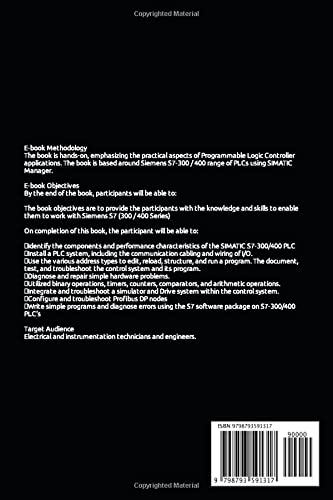
The back cover of the instruction manual, providing a concise overview of the book's methodology, objectives, and target audience, along with ISBN information.
Warranty and Support Information
As this product is an instructional book, it does not come with a traditional hardware warranty. For any questions regarding the content or to provide feedback, please refer to the publisher's contact information typically found within the book or on the publisher's website.
For general inquiries about Siemens PLC products or SIMATIC software, please visit the official Siemens Industry website or consult their technical support resources.
This manual is designed to be a self-contained learning resource. No direct product support is offered by the author beyond the content provided.


