1. Important Safety Instructions
Please read all instructions carefully before using the ECOWELL Portable Upholstery Carpet Cleaner. Failure to follow these instructions may result in electric shock, fire, or serious injury. Retain this manual for future reference.
- Always disconnect the appliance from the power supply before cleaning or performing maintenance.
- Do not immerse the appliance in water or other liquids.
- Use only cleaning solutions recommended by ECOWELL or suitable for spot cleaners.
- Keep hair, loose clothing, fingers, and all parts of the body away from openings and moving parts.
- Do not use the appliance on wet hands or while standing in water.
- Do not use the appliance to pick up flammable or combustible liquids, such as gasoline, or use in areas where they may be present.
- Do not pick up anything that is burning or smoking, such as cigarettes, matches, or hot ashes.
- Exercise extra care when cleaning on stairs.
- Do not use without tanks in place.
- If the supply cord is damaged, it must be replaced by the manufacturer or its service agent to avoid a hazard.
2. Product Overview
The ECOWELL Portable Upholstery Carpet Cleaner WDV01 is designed for efficient wet and dry deep cleaning of various surfaces including sofas, carpets, area rugs, and car interiors. It features a powerful motor and a dual water tank system for optimal performance.

Figure 2.1: ECOWELL Portable Upholstery Carpet Cleaner WDV01 main unit.
Key Features:
- Efficient Cleaning: Equipped with a 400W motor, 0.8 L/min spray flow, and 12Kpa super suction for quick stain removal.
- Wet/Dry Cleaning Function: Capable of cleaning both dry debris (biscuit crumbs, pet food, dust) and wet spills (milk, coffee, pet urine).
- Independent Dual Water Tank Design: Features a 1L clean water tank and a 0.5L sewage collection tank for uninterrupted cleaning.
- Intelligent Cleaning: Includes double switches for power and water spray, and a maximum water level warning that automatically stops the motor when the sewage tank is full.
- Extended Reach: Comes with a 4.26ft hose and a 16.4ft power cord for wider cleaning areas.
- Compact Storage: Designed for easy storage with integrated cord and hose management.
Included Accessories:
- Wet/Dry Sofa Cleaner (Main Unit)
- Stiff Brush
- T-Brush
- Detergent Tank
- Dirty Water Tank
- Power Cord
- Hose
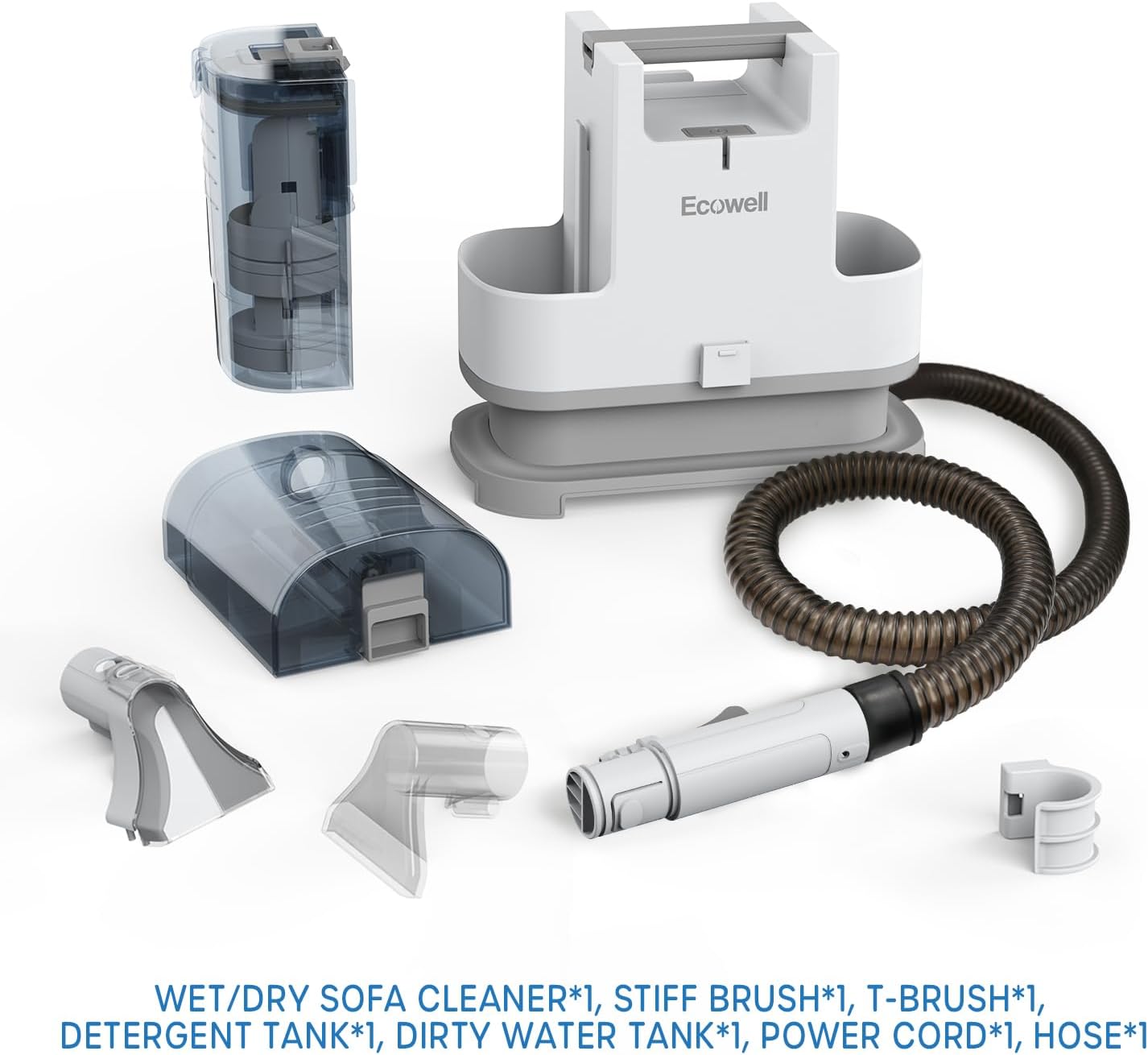
Figure 2.2: All accessories included with the ECOWELL WDV01 cleaner.
Product Components:
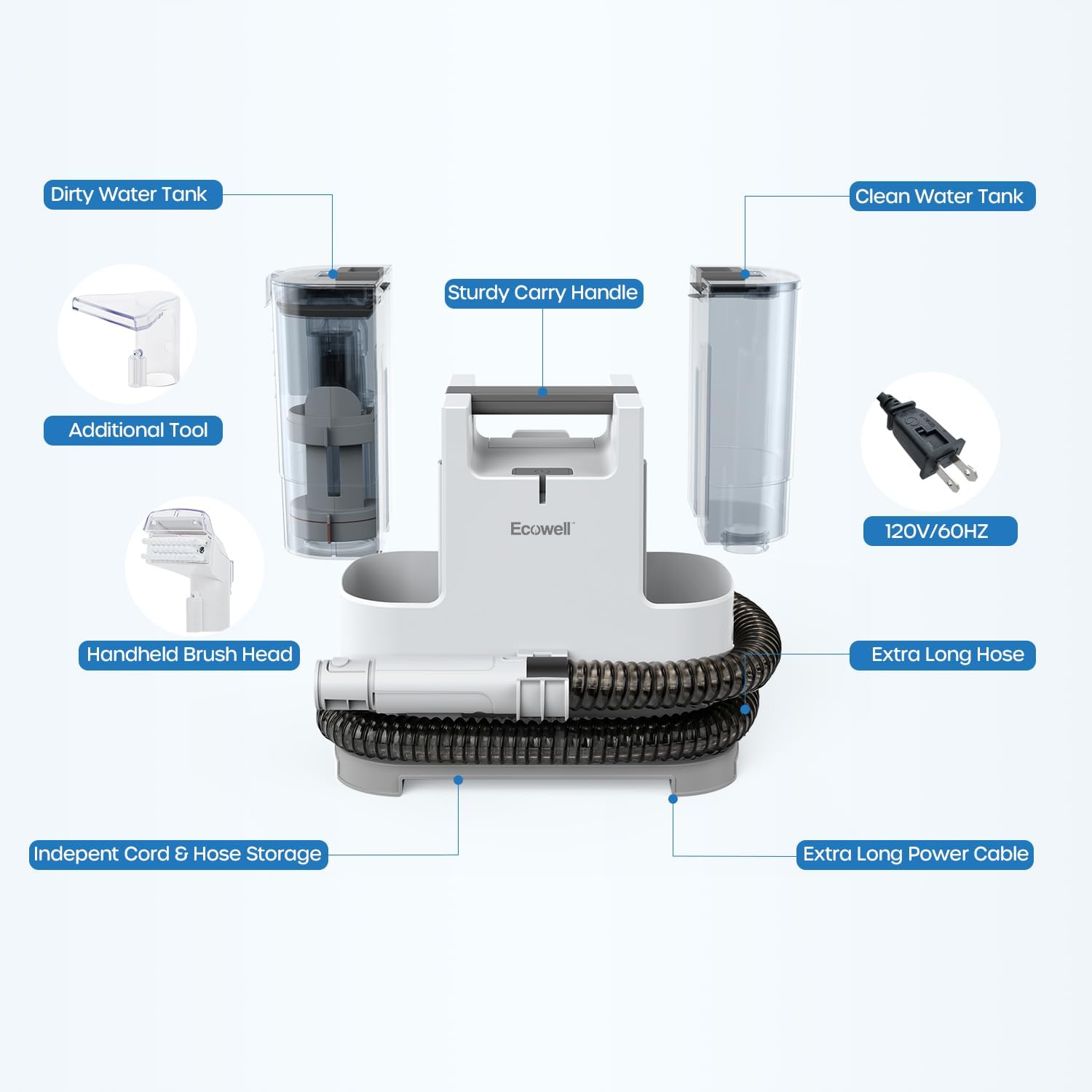
Figure 2.3: Labeled components including Dirty Water Tank, Sturdy Carry Handle, Handheld Brush Head, Independent Cord & Hose Storage, Clean Water Tank, 120V/60Hz Power Plug, Extra Long Hose, and Extra Long Power Cable.
Video 2.1: An overview of the ECOWELL Spot Sofa Carpet Cleaner Machine 400W, demonstrating its compact design and features.
3. Setup and Preparation
3.1 Unboxing and Initial Inspection
Carefully remove all components from the packaging. Inspect the cleaner and accessories for any signs of damage. Ensure all listed accessories are present.
Video 3.1: An unboxing video of the ECOWELL Spot Cleaner, showing the contents of the package.
3.2 Filling the Clean Water Tank
- Locate the Clean Water Tank on the unit.
- Lift the tank from the main unit.
- Open the fill cap and fill the tank with clean, warm water (not boiling).
- Add the appropriate amount of ECOWELL cleaning solution to the tank. Refer to the cleaning solution's instructions for dilution ratios.
- Securely close the fill cap and place the tank back onto the main unit.

Figure 3.1: Visual guide for filling the clean water tank and emptying the dirty water tank.
Video 3.2: Demonstration on how to add water to the clean water tank.
3.3 Attaching the Cleaning Tool
Select the appropriate brush head (stiff brush or T-brush) for the surface you intend to clean. Attach it securely to the end of the hose handle.
4. Operating Instructions
4.1 Powering On the Unit
- Unwind the power cord from its storage hooks.
- Plug the power cord into a suitable electrical outlet.
- Press the power switch located on the top of the main unit to turn on the cleaner.
4.2 Spot Cleaning Procedure
- Position the cleaning tool directly over the stain or area to be cleaned.
- Press the water spray switch on the hose handle to dispense cleaning solution onto the stain. Allow the solution to penetrate for a few seconds.
- Gently scrub the stained area with the brush head.
- Release the water spray switch and apply downward pressure on the cleaning tool while pulling it slowly across the stained area to suction up the dirty solution.
- Repeat steps 2-4 as necessary until the stain is removed and the dirty water being extracted appears clean.
- For dry cleaning, simply use the suction function without spraying water.
Video 4.1: A detailed guide on how to use the ECOWELL Sofa Cleaner WDV01 for effective spot removal.
5. Maintenance and Cleaning
5.1 Emptying the Dirty Water Tank
- Turn off the cleaner and unplug it from the power outlet.
- Locate the Dirty Water Tank on the unit.
- Lift the tank from the main unit.
- Open the drain cap and pour out the dirty water into a sink or drain.
- Rinse the dirty water tank thoroughly with clean water.
- Close the drain cap securely and place the tank back onto the main unit.
Video 5.1: Instructions on how to clean the dirty water tank of the ECOWELL cleaner.
5.2 Cleaning the Hose and Tools
- Remove any attached brush heads from the hose handle.
- Rinse the brush heads under running water to remove any debris.
- To clean the hose, fill the clean water tank with clean water (no solution).
- Turn on the cleaner and hold the hose handle over a sink or bucket.
- Press the water spray switch to flush clean water through the hose until it runs clear.
- Allow the hose and tools to air dry completely before storing.
5.3 Storage
Wrap the power cord around the designated storage hooks on the back of the unit. Coil the hose neatly around the base of the cleaner. Store the unit and accessories in a cool, dry place.

Figure 5.1: The ECOWELL WDV01 cleaner with its power cord and hose neatly stored for compact keeping.
6. Troubleshooting
| Problem | Possible Cause | Solution |
|---|---|---|
| No Power | Unit not plugged in; Power switch off; No power at outlet. | Ensure unit is securely plugged in; Turn power switch ON; Check outlet with another appliance. |
| No Spray | Clean water tank empty; Spray nozzle clogged; Water spray switch not pressed. | Refill clean water tank; Clean spray nozzle; Press water spray switch firmly. |
| No Suction | Dirty water tank full; Hose clogged; Suction nozzle not sealed against surface. | Empty dirty water tank (intelligent warning will stop motor); Clear hose obstruction; Ensure firm contact with surface. |
| Motor Stops Automatically | Dirty water tank reached maximum fill level. | Empty the dirty water tank. The intelligent warning system has activated. |
7. Product Specifications
| Feature | Specification |
|---|---|
| Brand | ECOWELL |
| Model Name | WDV01 |
| Item Weight | 9 Pounds |
| Product Dimensions | 8.7"D x 13.46"W x 13.94"H |
| Clean Water Tank Capacity | 1 Liters |
| Dirty Water Tank Capacity | 0.5 Liters |
| Power Source | AC/DC |
| Suction Power | 12Kpa |
| Hose Length | 4.26ft |
| Power Cord Length | 16.4ft |
| Manufacturer | Alton Industries |
| UPC | 810018926854 |
8. Warranty and Support
The ECOWELL Portable Upholstery Carpet Cleaner WDV01 comes with a 24-month limited warranty. This warranty covers defects in materials and workmanship under normal use. Please retain your proof of purchase for warranty claims.
For any questions, technical support, or warranty claims, please contact ECOWELL customer service. Contact information can typically be found on the product packaging or the official ECOWELL website.


