Replacement Remote Control

Generic Replacement Remote Control User Manual

For Yamaha RAV477, RAV501, RAV504, RX-A730, RX-V675, RX-V773

1. Product Overview

This replacement remote control is designed to function as a direct substitute for your original Yamaha remote. It comes pre-programmed with all the essential functions of the original RAV477, RAV501, RAV504, RX-A730, RX-V675, and RX-V773 remote controls, requiring no setup or pairing. Simply insert batteries, and it is ready for immediate use.

1.1 Compatible Models

This remote control is compatible with the following Yamaha models:

  • YAMAHA RAV477
  • YAMAHA RAV501
  • YAMAHA RAV504
  • YAMAHA RX-A730
  • YAMAHA RX-V675
  • YAMAHA RX-V773

2. Getting Started

2.1 Battery Installation

The remote control requires two AAA alkaline batteries (not included). Follow these steps to install them:

  1. Locate the battery compartment on the back of the remote control.
  2. Press down on the latch and slide the battery cover downwards to open it.
  3. Insert two AAA batteries, ensuring the positive (+) and negative (-) terminals align correctly with the markings inside the compartment.
  4. Slide the battery cover back into place until it clicks securely.
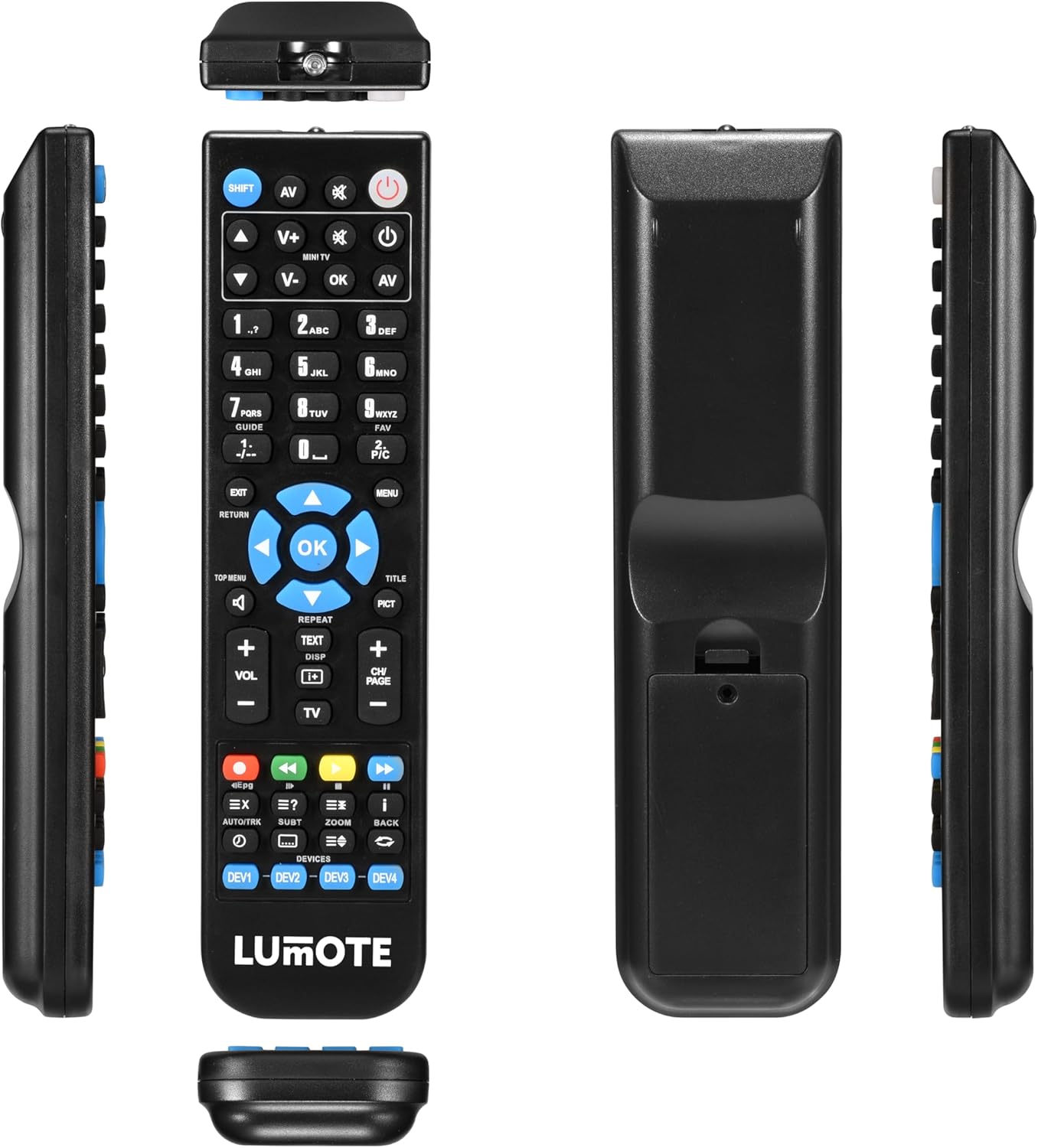
Generic Replacement Remote Control showing front, back, and side views

Image: The Generic Replacement Remote Control, displaying its front, back, and side profiles. The battery compartment is visible on the back.

3. Operating Instructions

3.1 Basic Operation

Once batteries are installed, the remote control is ready for use. Point the remote directly at your Yamaha audio/video receiver or compatible device. Ensure there are no obstructions between the remote and the device's infrared sensor.

3.2 Button Functions

The remote control features a comprehensive set of buttons designed to replicate the functionality of your original Yamaha remote. Below is a general guide to common button groups:

  • Power Button (POWER): Turns the device on or off.
  • Input Select Buttons (e.g., AV, TV, DVD): Selects the audio/video input source.
  • Volume Control (VOL + / -): Adjusts the volume level.
  • Mute Button (MUTE): Mutes or unmutes the audio.
  • Number Pad (0-9): For direct input of channel numbers or other numerical selections.
  • Navigation Buttons (UP, DOWN, LEFT, RIGHT, OK): Used to navigate menus and confirm selections.
  • Menu/Setup Buttons (MENU, SETUP, RETURN, EXIT): Accesses device menus, navigates back, or exits current screens.
  • Media Control Buttons (PLAY, PAUSE, STOP, REW, FF, SKIP): Controls playback of media (e.g., CD, DVD, USB).
  • Function Buttons (e.g., SHIFT, TOP MENU, TITLE, PICT): Specific functions related to device operation or display modes.

4. Care and Maintenance

  • Cleaning: Wipe the remote control with a soft, dry cloth. Do not use abrasive cleaners, solvents, or alcohol, as these can damage the surface.
  • Battery Replacement: Replace batteries when the remote's response becomes sluggish or stops working. Always replace both batteries at the same time with new ones of the same type.
  • Storage: If the remote control will not be used for an extended period, remove the batteries to prevent leakage and potential damage. Store in a cool, dry place away from direct sunlight.
  • Avoid Moisture: Keep the remote control away from water and high humidity.

5. Troubleshooting

If you experience issues with your remote control, please refer to the following common solutions:

  • Remote not responding:
    • Check if the batteries are inserted correctly with the correct polarity.
    • Replace the batteries with fresh AAA alkaline batteries.
    • Ensure there are no obstructions between the remote control and the device's infrared sensor.
    • Make sure you are pointing the remote directly at the device.
  • Short operating range:
    • Replace the batteries. Weak batteries can reduce the remote's effective range.
    • Ensure the remote's infrared emitter and the device's sensor are clean and unobstructed.
  • Specific functions not working:
    • Verify that the function you are trying to use is supported by your specific Yamaha model.
    • Some advanced functions might require specific settings on your Yamaha device. Refer to your Yamaha device's original manual.

6. Technical Specifications

BrandGeneric
Connectivity TechnologyInfrared
Controller TypeRemote Control
Maximum Range10 Meters
Battery DescriptionAlkaline (AAA)
Number of Items1
UPC037203302044

7. Warranty Information

This product comes with a 12-month warranty from the date of purchase. This warranty covers manufacturing defects under normal use. It does not cover damage caused by misuse, accidents, unauthorized modifications, or battery leakage. Please retain your proof of purchase for warranty claims.

8. Customer Support

If you encounter any issues not covered in this manual or require further assistance, please contact your retailer or the point of purchase for support. Provide your product model and a detailed description of the issue to facilitate a quicker resolution.

© 2023 Generic. All rights reserved.

Documents - Replacement Remote Control – Replacement Remote Control
[pdf] Datasheet
00132500 ROC1105SON Replacement Remote Control for Sony TVs Universal 1 replacement remote control televisions with all functions of the original control  2237131 farnell datasheets |||
score:20 filesize: 51.7 K page_count: 1 document date: 2017-02-21
[pdf] Document
replacement remote control mandisremotes en docs |||
score:19 filesize: 15.89 K page_count: 1 document date: 2022-03-25
Replacement Remote Control | Panasonic TV | Ready to Use Document
Replacement Remote Control Panasonic TV Ready to Use Replace a lost or broken remote control with this preprogrammed Nedis® replacement which is compatible every Panasonicdistantsionno upravlenie za televizor panasonic tvrc41pabkvikiwat userfiles productimages 105607 files distantsionno tvrc41pabk srsltid AfmBOorFhpjv8jGCj8JT8o5PC1L0TTtEeUXvnhMRrJ 1 DlDJ7yesJFl PanasonicReplace tvrc41pabkdistantsionno DlDJ7yesJFlvikiwat AfmBOoq5Bq oiPjyXv9NEI4kq v6pSLnruwi0h iupnLfNLEMcoCcnYI iupnLfNLEMcoCcnYIvikiwat AfmBOor5JUqrI4oFcwdL3ndmP3Bohc Vn557 7An9YZ2E Yc9Os8uz07 Yc9Os8uz07vikiwat AfmBOopOVX5PcwrA2XBZ jgd6qyVo64amcytGbS5QMgp09MqlGgDtkK5 jgd6qyVo64amcytGbS5QMgp09MqlGgDtkK5vikiwat AfmBOop4uebK8HeQod3 ext8uHoNjieGTvYMYwmNpihqDbrD4rI3 fFO fFOvikiwat AfmBOorIMr9mo6 0YElGcfRn5iCGhm0c7qrFkvLDqoeQn4lPU iawd7s ||| ||| Replacement Remote Control Panasonic TV Ready to Use General information Replace a lost or broken Panasonic remote control with this preprogrammed Nedis TV replacement remote control, which is compatible with every Panasonic television. Tha ||| Replacement Remote Control Panasonic TV Ready to Use General information Replace a lost or broken Panasonic remote control with this preprogrammed Nedis TV replacement remote control, which is compatible with every Panasonic television. Tha ||| Replacement Remote Control Panasonic TV Ready to Use General information Replace a lost or broken Panasonic remote control with this preprogrammed Nedis TV replacement remote control, which is compatible with every Panasonic television. Tha ||| Replacement Remote Control Panasonic TV Ready to Use General information Replace a lost or broken Panasonic remote control with this preprogrammed Nedis TV replacement remote control, which is compatible with every Panasonic television. Tha ||| Replacement Remote Control Panasonic TV Ready to Use General information Replace a lost or broken Panasonic remote control with this preprogrammed Nedis TV replacement remote control, which is compatible with every Panasonic television. Tha
score:19 filesize: 880.82 K page_count: 1 document date: 2020-10-22
[pdf] Datasheet
ROC1105PAN Replacement Remote Control 2237135 farnell datasheets
score:19 filesize: 53.3 K page_count: 1 document date: 2017-02-21
Replacement Remote Controls: Panasonic TV Replacement Remote. Ready to Use (URC1914) Document
Replacement Remote Controls Panasonic TV Ready to Use URC1914 Title Subject A replacement remote control for a joomla toobys virtumart panasonic tv ready use urc1914 detail tmpl component format |||
score:19 filesize: 147.04 K page_count: 1 document date: 2022-06-26
[pdf] User Manual Instructions
4 gene Grizli777 INSTRUCTIONS FOR REPLACING REMOTE CONTROL POWER SWITCH WITH MANUAL ON instructions for replacing remote control power switch with manual on off handwarmer pn5136 1 remove 24vdc from battery AND powersoccershop images pss Manuals |||
score:18 filesize: 1.29 M page_count: 3 document date: 2022-03-29
[pdf] Document
Replacement Remote Control OTTO replacement remote control If the LED flashes 3 times all commands have been cleared successfully 7 SIMPLE Mode This is equipped with an  aaa8c81d 2d8e 5b2e be1c 63d9fc2ededf d otto de files |||
score:18 filesize: 3.9 M page_count: 78 document date: 2023-10-24
[pdf] Datasheet
00132498 ROC1105SAM Replacement Remote Control for Samsung TVs 2237127 farnell datasheets |||
score:18 filesize: 54.86 K page_count: 1 document date: 2017-02-21

Ask a question about this manual

Ask about setup, troubleshooting, compatibility, parts, safety, or missing instructions. Manuals+ will review the question and use this page’s manual context to help answer it.