
1. Introduction
This manual provides detailed instructions for the safe and efficient operation of the Rakstore XY-SK35L CNC Buck-Boost Voltage Converter. Please read this manual thoroughly before use to ensure proper functionality and to prevent damage to the device or connected equipment.
The XY-SK35L is a versatile CNC adjustable step-up/step-down power supply module with an LCD display, capable of constant voltage (CV) and constant current (CC) output. It is suitable for various applications including solar charging, battery charging, and general power supply needs.
2. Product Overview
The XY-SK35L module features a compact design with an integrated LCD for real-time display of input/output voltage, current, power, capacity, energy, and working time. It includes various protection features for safe operation.

Figure 2.1: Top-down view of the XY-SK35L CNC Buck-Boost Voltage Converter module, showing the LCD screen, heat sink, inductors, capacitors, and terminal blocks.
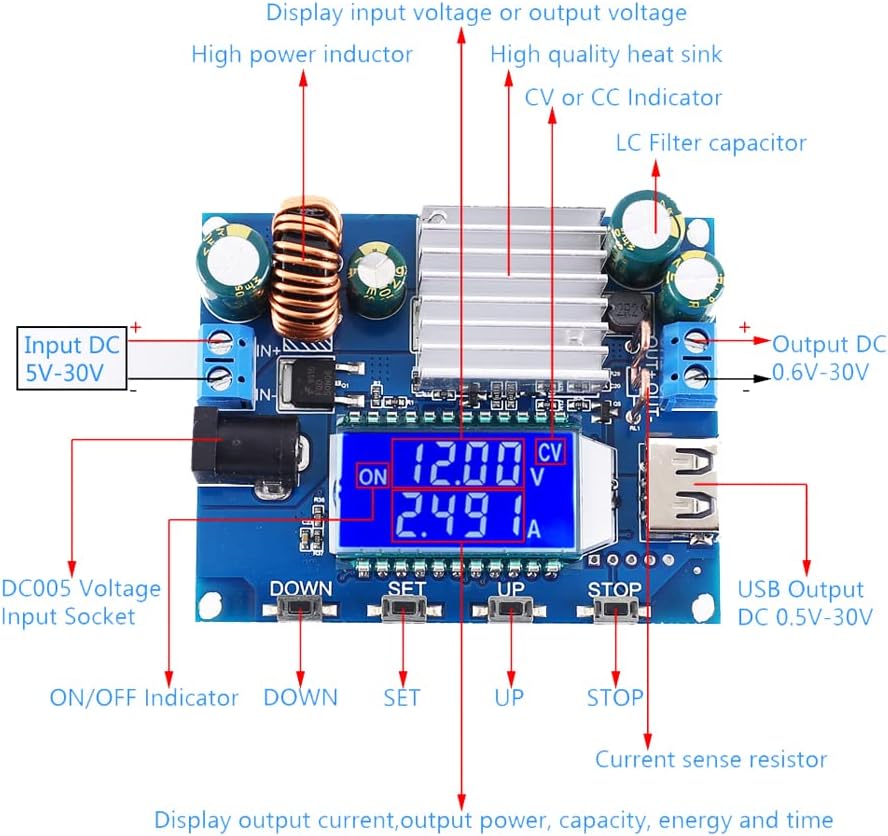
Figure 2.2: Detailed component layout and connection points of the XY-SK35L module. This diagram highlights the input/output terminals, LCD display, control buttons (DOWN, SET, UP, STOP), USB output, DC005 voltage input socket, high power inductor, high quality heat sink, CV/CC indicator, LC filter capacitor, and current sense resistor.
2.1 Key Features
- Input Voltage: DC 5V-30V
- Output Voltage: DC 0.6V-30V
- Output Current: 0-4.0A
- Output Power: 35W (natural heat dissipation), up to 50W (air cooling)
- Voltage Accuracy: ±0.5%+1 word, Resolution: 0.01V
- Current Accuracy: ±0.8%+3 words, Resolution: 0.001A
- Conversion Efficiency: Approximately 88%
- Working Frequency: 180KHz
- Protection Features: Soft start, Input reverse connection protection, Output backflow prevention, Output short-circuit protection, Temperature protection (OTP at 100℃)
- Display: LCD showing voltage, current, power, capacity, energy, and time.
2.2 Dimensions

Figure 2.3: Physical dimensions of the XY-SK35L module, measuring 72mm in length and 58mm in width.
3. Setup and Connections
Before connecting the module, ensure all power sources are disconnected. Observe proper polarity to prevent damage.
3.1 Input Power Connection
- Connect your DC input power source (5V-30V) to the IN+ and IN- screw terminals or the DC005 voltage input socket.
- Ensure the input voltage is within the specified range. For optimal performance, an input voltage higher than 7V is recommended.
- The module has input reverse connection protection, but it is always best practice to verify polarity before connecting.
3.2 Output Load Connection
- Connect your load or device to be powered to the OUT+ and OUT- screw terminals.
- For charging batteries, the module's output can be directly connected to the battery due to its backflow prevention feature.
- The module also features a USB output port (DC 0.5V-30V) for convenient connection to USB-powered devices.
4. Operating Instructions
The XY-SK35L module is controlled via three buttons: DOWN, SET, and UP, along with a STOP button for output control.
4.1 Basic Operation
- Power On: After connecting input power, the LCD will display the default normal display mode.
- Enable/Disable Output: Short press the ON/OFF button (labeled STOP on some diagrams) to enable or disable the output. When disabled, the display will show "OFF".
- Switch Display Mode: Long press the ON/OFF button (2 seconds) to switch between displaying input voltage and output voltage.
- Clear Data: Short press the ON/OFF button to clear displayed capacity, energy, and time data.
4.2 Setting Output Voltage and Current
- Adjust Output Voltage: In the default display mode, short press the UP or DOWN button to adjust the output voltage. The LCD will show the CV symbol.
- Adjust Output Constant Current (CC):
- Long press the SET button (1 second) to enter the constant current adjustment mode. The display will show the CC symbol.
- Use the UP or DOWN button to adjust the constant current value.
- Short press the SET button again to save the setting and exit.
4.3 Parameter Setting Mode
Long press the SET button (3 seconds) to enter the parameter setting mode. In this mode, you can set various protection thresholds:
- LVP (Low Voltage Protection): Set the minimum input voltage.
- OVP (Over Voltage Protection): Set the maximum output voltage.
- OCP (Over Current Protection): Set the maximum output current.
- OPP (Over Power Protection): Set the maximum output power.
- OAH (Over Ampere-Hour Protection): Set the maximum output capacity.
- OPH (Over Power-Hour Protection): Set the maximum output energy.
- Power-ON State: Configure whether the output is enabled or disabled upon power-up.
Use the UP and DOWN buttons to navigate between parameters and adjust values. Short press SET to confirm a setting and move to the next. Long press SET to exit the parameter setting mode.
4.4 Lock/Unlock Output Voltage and Constant Current
Long press the SET button (5 seconds) to lock or unlock the output voltage and constant current settings. This prevents accidental changes during operation.

Figure 4.1: Examples of the XY-SK35L LCD in various display modes, including Output Voltage/Current, Output Voltage/Power, Output Voltage/Capacity, Output Voltage/Energy, Output Voltage/Work Time, Input Voltage/Current, Enabled Output, Disabled Output, CV Display, and CC Display. This image also illustrates the button presses required to adjust output voltage and constant current values.
5. Maintenance
The XY-SK35L module requires minimal maintenance. Follow these guidelines to ensure longevity:
- Cleaning: Keep the module clean and free from dust and debris. Use a soft, dry cloth for cleaning. Do not use liquid cleaners.
- Ventilation: Ensure adequate airflow around the module, especially if operating at higher power levels, to facilitate natural heat dissipation. For sustained high power output (above 35W), active air cooling (e.g., a fan) is recommended.
- Storage: Store the module in a dry, cool environment away from direct sunlight and extreme temperatures.
- Inspection: Periodically inspect the connections for tightness and ensure no wires are frayed or damaged.
6. Troubleshooting
| Problem | Possible Cause | Solution |
|---|---|---|
| No display/No power | Input voltage too low or absent; incorrect polarity; faulty connection. | Check input voltage (must be 5V-30V). Verify input wiring polarity. Ensure connections are secure. |
| Output voltage/current is 0 or unstable | Output disabled; short circuit at output; over-current/over-power protection triggered; load issue. | Short press ON/OFF button to enable output. Check for short circuits at the output. Verify load requirements are within module limits. Check OCP/OPP settings in parameter mode. |
| Module gets hot | Operating at high power without sufficient cooling; ambient temperature too high. | Ensure adequate ventilation. If operating above 35W, consider adding a cooling fan. Reduce load if necessary. |
| Cannot adjust voltage/current | Settings are locked. | Long press SET button (5 seconds) to unlock settings. |
| Display shows protection code (e.g., LVP, OVP) | Protection threshold has been reached. | Check input/output conditions against set protection limits. Adjust input/output or protection settings as needed. |
7. Specifications
| Parameter | Value |
|---|---|
| Input Voltage | DC 5V-30V (LVP under 4.7V available) |
| Output Voltage | DC 0.6V-30V |
| Output Current | 0-4.0A |
| Output Power | 35W (natural dissipation), 50W (air cooling) |
| Voltage Accuracy | ±0.5%+1 word |
| Voltage Resolution | 0.01V |
| Current Accuracy | ±0.8%+3 words |
| Current Resolution | 0.001A |
| Conversion Efficiency | Approx. 88% |
| Working Frequency | 180KHz |
| Soft Start | Yes |
| Input Reverse Connection Protection | Yes |
| Output Backflow Prevention | Yes |
| Output Short-Circuit Protection | Yes |
| Temperature Protection (OTP) | Yes, at 100℃ |
| Dimensions | 72mm x 58mm (approx.) |
8. Warranty Information
Rakstore products are manufactured to high quality standards. For specific warranty terms and conditions, please refer to the purchase documentation or contact your retailer. This warranty typically covers defects in materials and workmanship under normal use.
The warranty does not cover damage caused by:
- Improper installation or connection.
- Misuse, abuse, or negligence.
- Unauthorized modifications or repairs.
- Operation outside the specified parameters.
- Accidental damage or natural disasters.
9. Customer Support
If you encounter any issues or have questions regarding your XY-SK35L CNC Buck-Boost Voltage Converter, please contact Rakstore customer support or your authorized dealer for assistance.
For the most up-to-date support information, please visit the official Rakstore website or the platform where the product was purchased.
When contacting support, please be prepared to provide:
- Product Model: XY-SK35L
- Date of Purchase
- Description of the issue