
TECCPO Rotary Tool Kit 1.8 amp / Cordless Rotary Tool 4V(red)
TECCPO Rotary Tool Kit User Manual
Model: Rotary Tool Kit 1.8 amp / Cordless Rotary Tool 4V(red)
Introduction
Welcome to your new TECCPO Rotary Tool Kit. This comprehensive kit includes both a corded rotary tool and a cordless 4V rotary tool, along with a wide array of accessories designed for various applications such as sanding, drilling, cutting, polishing, carving, and grinding. This manual provides essential information for the safe and efficient operation, maintenance, and troubleshooting of your rotary tools. Please read this manual thoroughly before first use and keep it for future reference.
Important Safety Instructions
Always follow basic safety precautions when using electric tools to reduce the risk of fire, electric shock, and personal injury.
- Work Area Safety: Keep your work area clean and well-lit. Cluttered or dark areas invite accidents. Do not operate power tools in explosive atmospheres, such as in the presence of flammable liquids, gases, or dust. Power tools create sparks which may ignite the dust or fumes.
- Electrical Safety: Avoid body contact with earthed or grounded surfaces such as pipes, radiators, ranges, and refrigerators. There is an increased risk of electric shock if your body is earthed or grounded. Do not expose power tools to rain or wet conditions. Water entering a power tool will increase the risk of electric shock.
- Personal Safety: Always wear appropriate personal protective equipment, including safety glasses or goggles, dust mask, non-skid safety shoes, hard hat, or hearing protection. Stay alert, watch what you are doing, and use common sense when operating a power tool. Do not use a power tool while you are tired or under the influence of drugs, alcohol, or medication.
- Tool Use and Care: Do not force the power tool. Use the correct power tool for your application. The correct power tool will do the job better and safer at the rate for which it was designed. Disconnect the plug from the power source and/or remove the battery pack from the power tool before making any adjustments, changing accessories, or storing power tools.
- Accessory Safety: Only use accessories specifically designed for rotary tools and ensure they are rated for the tool's speed. Always secure the accessory properly in the collet or chuck before operating.
- Maintenance: Maintain power tools and accessories. Check for misalignment or binding of moving parts, breakage of parts, and any other condition that may affect the power tool’s operation. If damaged, have the power tool repaired before use.
Package Contents
Your TECCPO Rotary Tool Kit includes the following items:
- TECCPO Corded Rotary Tool
- TECCPO Cordless 4V Rotary Tool (Red)
- Durable Carrying Case
- Flexible Shaft Attachment
- Table Clamp Stand
- Accessory Kit (including various grinding stones, sanding bands, cutting discs, polishing wheels, drill bits, collets, wrenches, brushes, etc.)
- USB Charging Cable (for cordless tool)

Image: The complete TECCPO Rotary Tool Kit, showcasing both the corded and cordless rotary tools, the carrying case, flexible shaft, and the extensive accessory set.
Setup
Charging the Cordless Tool
Before first use, fully charge the cordless 4V rotary tool. Connect the provided USB charging cable to the tool's charging port and plug the other end into a compatible USB power adapter (not included) or a computer USB port. The charging indicator light will show the charging status.
Attaching Accessories
To attach an accessory:
- Ensure the tool is unplugged (corded) or turned off (cordless).
- Press and hold the shaft lock button.
- Unscrew the collet nut.
- Insert the accessory shank fully into the collet.
- Tighten the collet nut securely using the provided wrench, while still holding the shaft lock button. Do not overtighten.
Flexible Shaft Setup (for Corded Tool)
The flexible shaft allows for precision work and extended reach.
- Unplug the corded rotary tool.
- Remove the collet nut and collet from the tool's spindle.
- Unscrew the nose piece from the tool.
- Insert the flexible shaft's inner drive cable into the tool's spindle.
- Thread the flexible shaft's coupling nut onto the tool's housing until secure.
- Insert the desired accessory into the flexible shaft's handpiece collet and tighten with the small wrench provided with the flexible shaft.
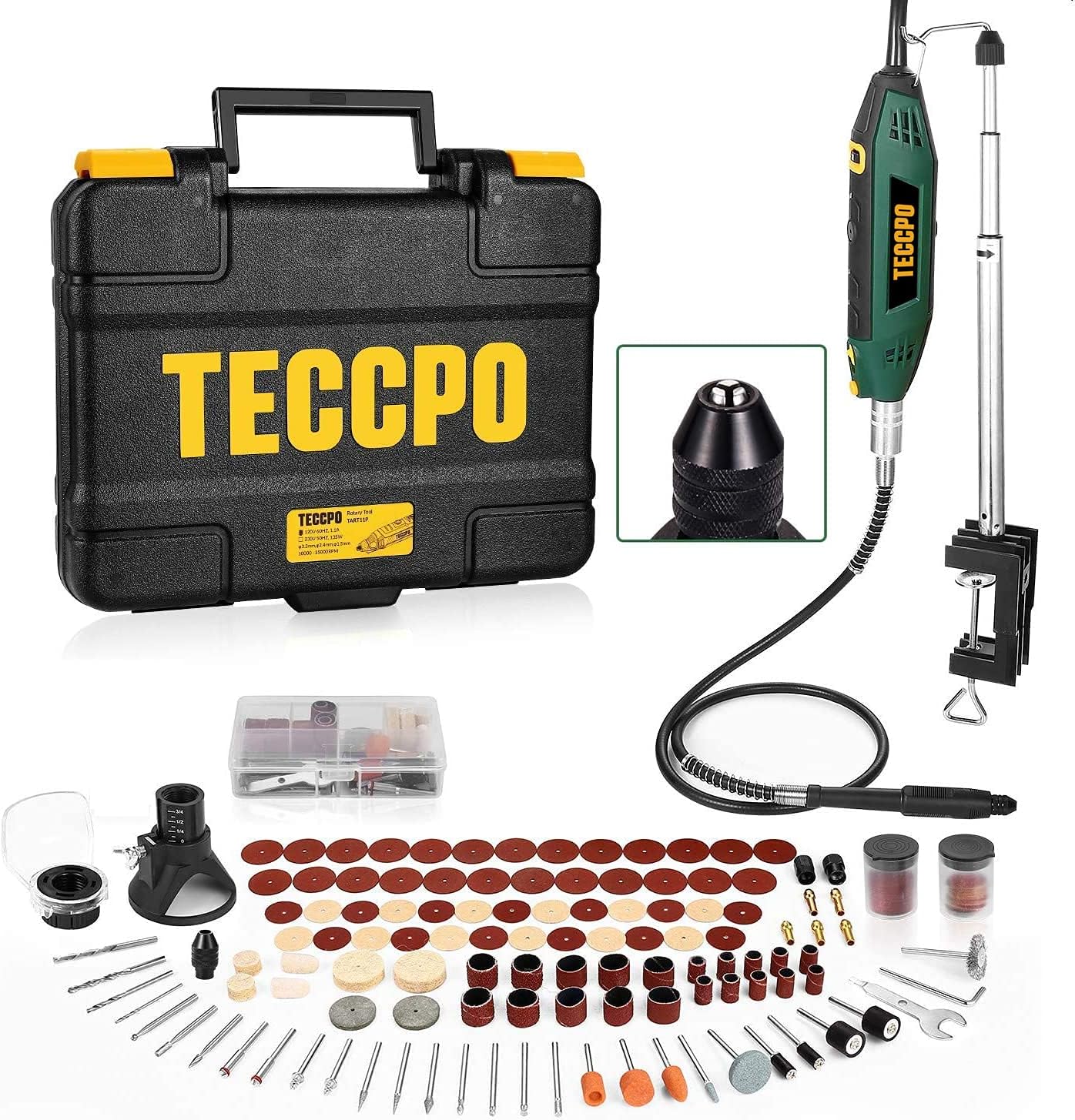
Image: A detailed view of the TECCPO Rotary Tool Kit, highlighting the corded tool, flexible shaft, and the various accessories, demonstrating the components for setup.
Operating Instructions
Powering On/Off and Speed Control
- Corded Tool: Plug the tool into a suitable power outlet. Use the ON/OFF switch to start or stop the tool. Adjust the speed dial to select the desired RPM for your application.
- Cordless Tool: Press the power button to turn the tool on. Use the speed adjustment slider or buttons (depending on model) to select the desired speed. Press the power button again to turn off.
General Operation Tips
- Always secure your workpiece firmly before beginning any operation.
- Start at a lower speed and gradually increase as needed for the material and accessory.
- Apply light, consistent pressure. Let the tool do the work. Excessive pressure can cause the tool to bog down, overheat, or damage the accessory/workpiece.
- Keep the tool moving to prevent burning or gouging the material.
Common Applications

Image: A user demonstrating cutting a metal pipe with the cordless rotary tool, highlighting its precision and power for material removal.

Image: An artisan using the corded rotary tool with the flexible shaft attachment for detailed wood carving, showcasing the tool's versatility for fine work.

Image: A user operating the cordless rotary tool on a metal surface, demonstrating its capability for grinding or cutting applications, with sparks indicating active material removal.

Image: A woman using the cordless rotary tool for intricate work on a glass terrarium, illustrating its suitability for delicate tasks like etching or polishing.

Image: A multi-panel image demonstrating the diverse applications of the TECCPO rotary tool, including sanding, carving, polishing, cutting, grinding, and drilling on different materials.
Maintenance
Regular maintenance ensures the longevity and optimal performance of your rotary tools.
- Cleaning: After each use, unplug the tool (corded) or turn it off (cordless) and use a soft brush or compressed air to remove dust and debris from the ventilation openings and around the chuck/collet area. Do not use solvents or harsh chemicals.
- Accessory Storage: Store all accessories in their designated compartments within the carrying case to prevent damage and loss.
- Battery Care (Cordless Tool): For optimal battery life, avoid fully discharging the battery frequently. Store the tool in a cool, dry place when not in use, and charge it periodically if stored for extended periods.
- Flexible Shaft Care: Periodically apply a small amount of lubricant to the inner drive cable of the flexible shaft to ensure smooth operation.
Troubleshooting
If you encounter issues with your TECCPO Rotary Tool Kit, refer to the following common problems and solutions:
| Problem | Possible Cause | Solution |
|---|---|---|
| Tool does not turn on (Corded) | No power supply; Faulty switch | Check power outlet and cord; Contact customer support if switch is faulty. |
| Tool does not turn on (Cordless) | Battery discharged; Faulty battery/tool | Charge battery fully; Contact customer support. |
| Reduced power or stalling | Excessive pressure; Dull accessory; Overheating | Reduce pressure; Replace accessory; Allow tool to cool down. |
| Excessive vibration | Accessory not properly seated; Bent accessory; Damaged tool | Re-seat accessory; Replace bent accessory; Contact customer support if tool is damaged. |
| Flexible shaft not rotating smoothly | Lack of lubrication; Kink in shaft | Lubricate inner cable; Ensure shaft is not kinked during use. |
Specifications
- Brand: TECCPO
- Cordless Tool Voltage: 4 Volts
- Power Source: Cordless-electric (for 4V tool), Corded-electric (for 1.8 amp tool)
- Color: Red (Cordless Tool)
- Special Features: Cordless, Lightweight
- ASIN: B09PDXBRCN
Warranty and Support
For information regarding warranty coverage and terms for your TECCPO Rotary Tool Kit, please refer to the warranty card included with your product packaging or visit the official TECCPO website. If you require technical assistance, replacement parts, or have any questions not covered in this manual, please contact TECCPO customer support through their official channels.
Ask a question about this manual
Ask about setup, troubleshooting, compatibility, parts, safety, or missing instructions. Manuals+ will review the question and use this page’s manual context to help answer it.