
1. Introduction
Thank you for choosing the PawHut 3L Pet Water Fountain. This manual provides essential information for the safe and efficient operation, maintenance, and troubleshooting of your new pet water fountain. Please read it thoroughly before use and keep it for future reference.
This elevated pet water fountain is designed to provide fresh, filtered water, promoting hydration and reducing strain on your pet's neck, back, and joints. It features an infrared sensor for automatic water dispensing and multiple operating modes to suit your pet's needs.

Image 1.1: A small dog drinking from the PawHut 3L Pet Water Fountain.
2. Safety Instructions
- Read all instructions carefully before operating the appliance.
- This appliance is for indoor household use only.
- Do not immerse the electrical adapter or power cord in water or other liquids.
- Always unplug the fountain before cleaning or performing maintenance.
- Ensure the power cord is placed where it cannot be tripped over or damaged by pets.
- Do not allow pets to chew on the power cord.
- Use only original PawHut replacement parts and accessories.
- Keep out of reach of children.
- If the appliance malfunctions or is damaged, discontinue use immediately and contact customer support.
3. Package Contents
Please check the package contents to ensure all items are present and in good condition:
- 1 x Pet Water Fountain Unit
- 1 x Water Pump
- 1 x Activated Carbon Filter
- 1 x Power Adapter
- 1 x User Manual
4. Product Diagram
Familiarize yourself with the components of your pet water fountain:
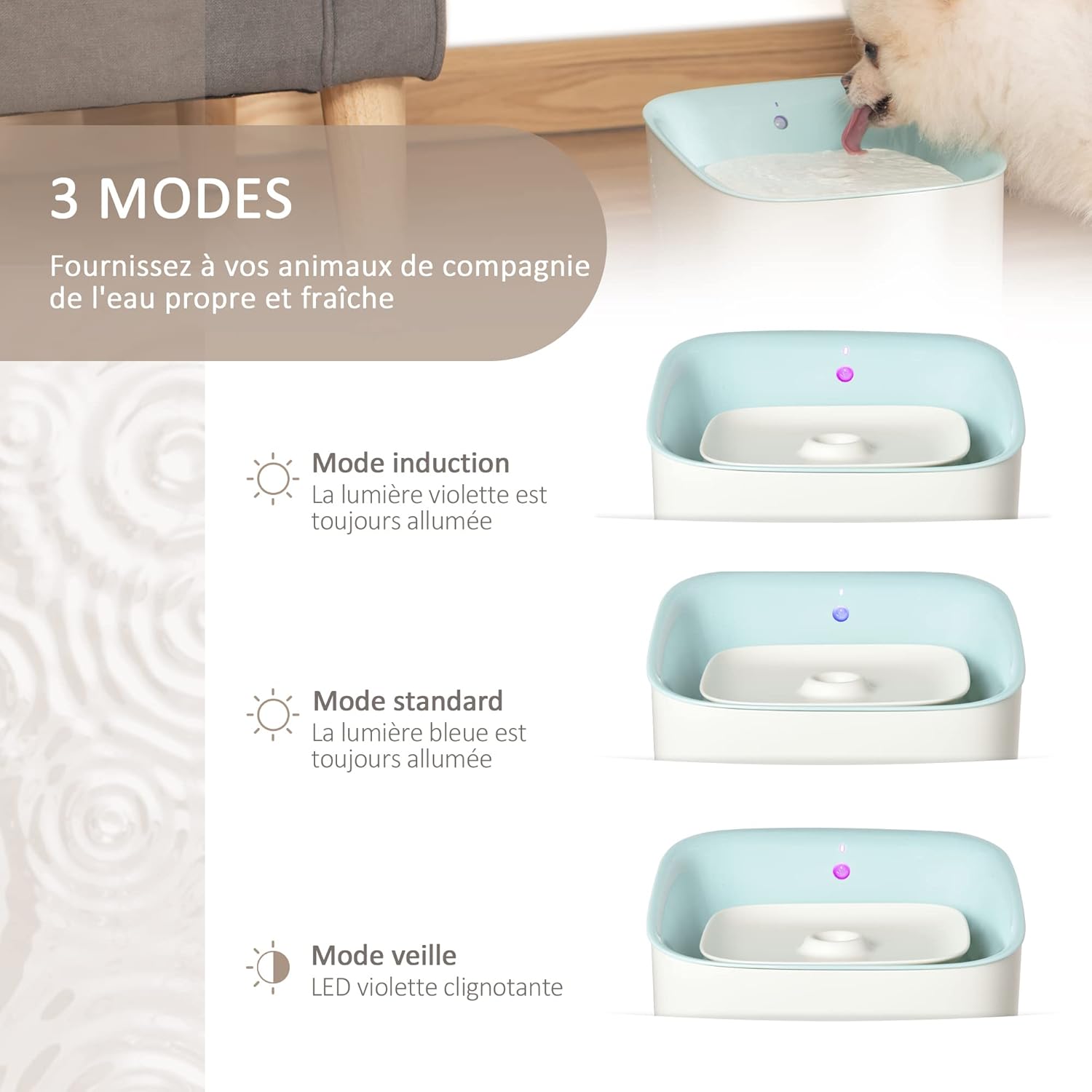
Image 4.1: Visual representation of the fountain's top panel with LED indicators for different modes.
- Water Basin: Main reservoir for water.
- Drinking Tray: Top surface where pets drink.
- Filter Slot: Location for the activated carbon filter.
- Water Pump: Circulates and filters water.
- Infrared Sensor: Detects pet presence for automatic dispensing.
- LED Indicators: Display current mode and alerts (water level, filter change).
- Power Port: Connects to the power adapter.
5. Setup
Follow these steps to set up your PawHut Pet Water Fountain:
- Unpack: Carefully remove all components from the packaging.
- Rinse: Rinse the water basin, drinking tray, and pump thoroughly with water. Do not use soap on the pump.
- Install Filter: Place the activated carbon filter into its designated slot in the drinking tray. Ensure it is seated correctly.
- Assemble Pump: Attach the water pump to the bottom of the drinking tray, ensuring the power cord is routed through the designated channel.
- Fill Water Basin: Fill the water basin with clean tap water up to the MAX fill line. Do not overfill.
- Place Drinking Tray: Carefully place the drinking tray onto the water basin, ensuring it is securely seated.
- Connect Power: Connect the power adapter to the fountain's power port and then plug it into a wall outlet.
The fountain will automatically start in its default operating mode (usually Induction Mode) or indicate its status via the LED lights.
6. Operating Modes
The PawHut Pet Water Fountain offers three operating modes, indicated by LED lights:
- Induction Mode (Purple LED always on): The infrared sensor detects your pet's presence within 1 meter and a 90° angle, automatically dispensing water. Water flow stops after a short delay when the pet leaves the detection area. This mode conserves energy and keeps water fresh.
- Standard Mode (Blue LED always on): Water flows continuously, providing a constant supply for your pets. This mode is suitable for pets who prefer a constant water source or for multiple pets.
- Sleep Mode (Flashing Purple LED): This mode is typically a low-power state or an alert state. Refer to the LED indicator section for specific meanings of flashing patterns.
To switch between modes, press the mode button located on the fountain's top panel.

Image 6.1: The infrared sensor detects pets within 1 meter and a 90-degree angle.

Image 6.2: A close-up view of the water flow from the fountain.
7. Maintenance
Regular cleaning and filter replacement are crucial for your pet's health and the longevity of the fountain.
7.1. Cleaning the Fountain
- Unplug: Disconnect the power adapter from the wall outlet.
- Disassemble: Remove the drinking tray and water pump. Empty any remaining water from the basin.
- Clean Components: Wash the water basin and drinking tray with mild soap and water. Rinse thoroughly to remove all soap residue.
- Clean Pump: Disassemble the pump (if possible, refer to pump instructions) and clean any debris or hair from the impeller. Rinse the pump thoroughly with water. Do not use soap on the pump.
- Reassemble: Reassemble the pump and fountain components.
- Refill: Refill the basin with fresh water and plug the fountain back in.
Clean the fountain at least once a week, or more frequently if you have multiple pets or if the water appears dirty.
7.2. Filter Replacement
The activated carbon filter helps purify the water and should be replaced regularly. The fountain's LED indicator may signal when a filter change is needed (flashing blue LED).

Image 7.1: A close-up of the activated carbon filter in its slot.
- Unplug: Disconnect the power adapter.
- Remove Old Filter: Lift the drinking tray and remove the old filter from its slot. Dispose of the old filter.
- Rinse New Filter: Rinse the new activated carbon filter under running water to remove any loose carbon dust.
- Install New Filter: Place the new filter into the filter slot, ensuring it fits snugly.
- Reassemble and Refill: Reassemble the fountain, refill with fresh water, and plug it back in.
Replace the filter every 2-4 weeks, or as indicated by the fountain's LED alert, to ensure optimal water quality.
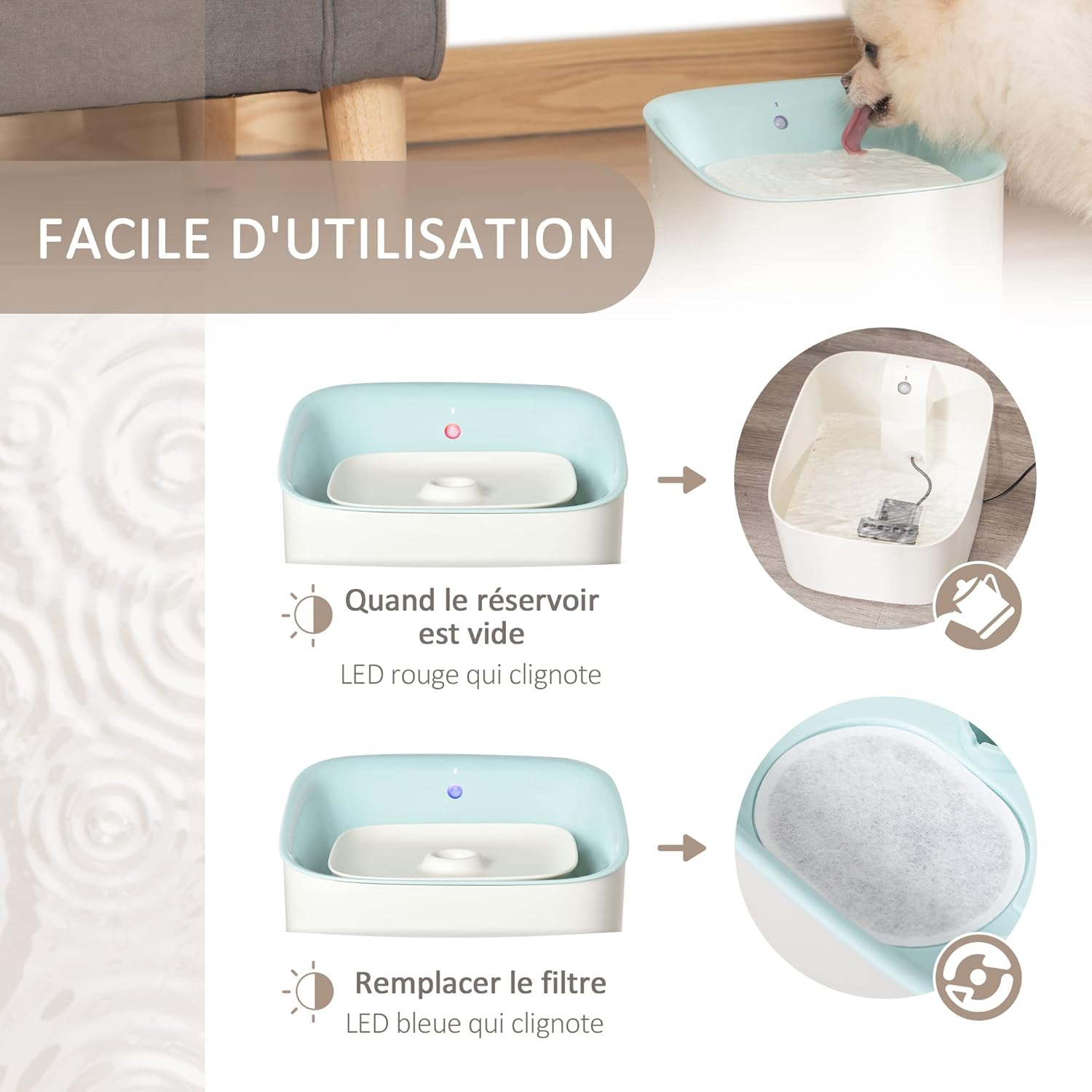
Image 7.2: LED indicators for low water (flashing red) and filter replacement (flashing blue).
8. Troubleshooting
If you encounter any issues with your PawHut Pet Water Fountain, please refer to the following common problems and solutions:
- No Water Flow:
- Check if the power adapter is securely plugged in.
- Ensure there is enough water in the basin (flashing red LED indicates low water).
- Clean the water pump and impeller for any blockages (hair, debris).
- Verify the pump is correctly assembled and seated.
- Fountain is Noisy:
- Ensure the water level is sufficient; low water can cause pump noise.
- Clean the water pump and impeller.
- Ensure the fountain is placed on a flat, stable surface.
- Water Tastes or Smells Bad:
- Replace the activated carbon filter (flashing blue LED indicates filter change).
- Clean the entire fountain thoroughly, including the pump.
- Refill with fresh water.
- Infrared Sensor Not Working:
- Ensure the sensor is clean and free from obstructions.
- Verify the fountain is in Induction Mode (purple LED).
- Check if the pet is within the detection range (1 meter, 90° angle).
If the problem persists after trying these solutions, please contact PawHut customer support.
9. Specifications
| Brand | PawHut |
| Model Number | D08-025V90BU0531 |
| Material | Acrylonitrile Butadiene Styrene (ABS) |
| Color | White |
| Capacity | 3 Liters |
| Product Dimensions (L x W x H) | 21 x 20 x 18 cm |
| Product Weight | 760 grams |
| Power Source | Electric Cable |
| Special Features | Adapter supplied, Assembly required, Large capacity, Replaceable carbon filter, Infrared sensor, 3 operating modes |

Image 9.1: Detailed dimensions of the PawHut 3L Pet Water Fountain.
10. Warranty and Support
This product comes with a standard manufacturer's warranty. For specific warranty details, please refer to the documentation included with your purchase or visit the official PawHut website. If you require technical assistance, replacement parts, or have any questions not covered in this manual, please contact PawHut customer support through their official channels.
Website: www.pawhut.com (Example link, please verify official website)