
ERGOMAKER SM205-Frame
ERGOMAKER SM205-Frame 2-Stage Single-Motor Electric Height Adjustable Standing Desk Frame User Manual
Model: SM205-Frame
Introduction
This manual provides comprehensive instructions for the assembly, operation, and maintenance of your ERGOMAKER SM205-Frame 2-Stage Single-Motor Electric Height Adjustable Standing Desk Frame. Please read this manual thoroughly before use to ensure safe and efficient operation.
Safety Information
- Ensure the desk is securely anchored to the wall when using with children.
- Do not exceed the weight limit of 154 lbs (70 kg).
- Overload and overheat protective systems are in place, but avoid exposing the desk to extreme conditions.
- Keep children and pets away from the desk during operation.
- Ensure no obstacles are in the path of the desk frame during height adjustments.
Package Contents
The package includes the ERGOMAKER SM205-Frame electric height adjustable standing desk frame. Please note that the desktop is not included and must be purchased separately or used from an existing setup.
- Desk Frame Components
- Control Handset
- Power Adapter
- Allen Wrench for Assembly
- Instruction Manual
Specifications
| Feature | Detail |
|---|---|
| Model Number | SM205-Frame |
| Height Adjustment Range | 28.7" (73cm) to 46.5" (118cm) |
| Width Adjustment Range | 37.4" (95cm) to 53" (135cm) |
| Compatible Desktop Sizes | 39.4" (100cm) to 63" (160cm) |
| Weight Capacity | 154 lbs (70 kg) |
| Lifting Speed | 0.6" (14mm) per second |
| Noise Level | <50dB |
| Motor Type | Single-motor, 2-Stage |
| Control Handset | LED display, 2 memory presets, Childproof Lock |
| Material | Heavy-duty Steel |
| Certifications | CE/UL/ROHS/EN527/PSE |
Setup and Assembly
The ERGOMAKER desk frame features an innovative quick installation design, allowing for assembly in approximately 20 minutes. An Allen Wrench is included for most assembly steps. A screwdriver or power drill will be required for attaching your desktop.
- Unpack Components: Carefully remove all parts from the packaging and verify against the parts list (not provided in this text, but implied in a full manual).
- Assemble Legs and Crossbar: Follow the visual instructions to connect the two leg columns to the crossbar using the provided Allen Wrench. Ensure all connections are secure.
- Attach Feet: Secure the foot supports to the bottom of each leg column.
- Adjust Frame Width: Adjust the width of the frame to match your desired desktop size (between 37.4" and 53"). Tighten the locking mechanisms once the desired width is achieved.
- Install Control Handset: Mount the control handset to the underside of the desktop or a convenient location on the frame.
- Attach Desktop: Place your desktop onto the assembled frame. Align the desktop and secure it to the frame using screws (not included, typically provided with desktop or user-supplied). A screwdriver or power drill is recommended for this step.
- Connect Power: Plug the power adapter into the control box and then into a wall outlet.
- Level the Desk: Use the adjustable leveling studs on the feet to ensure the desk is stable and level on your floor.

Image: The ERGOMAKER SM205-Frame components, including the white desk frame and the black digital control panel.

Image: Detail showing the integrated hooks for hanging items and the adjustable leveling studs on the desk feet for stability.
Operating Instructions
Control Panel Functions
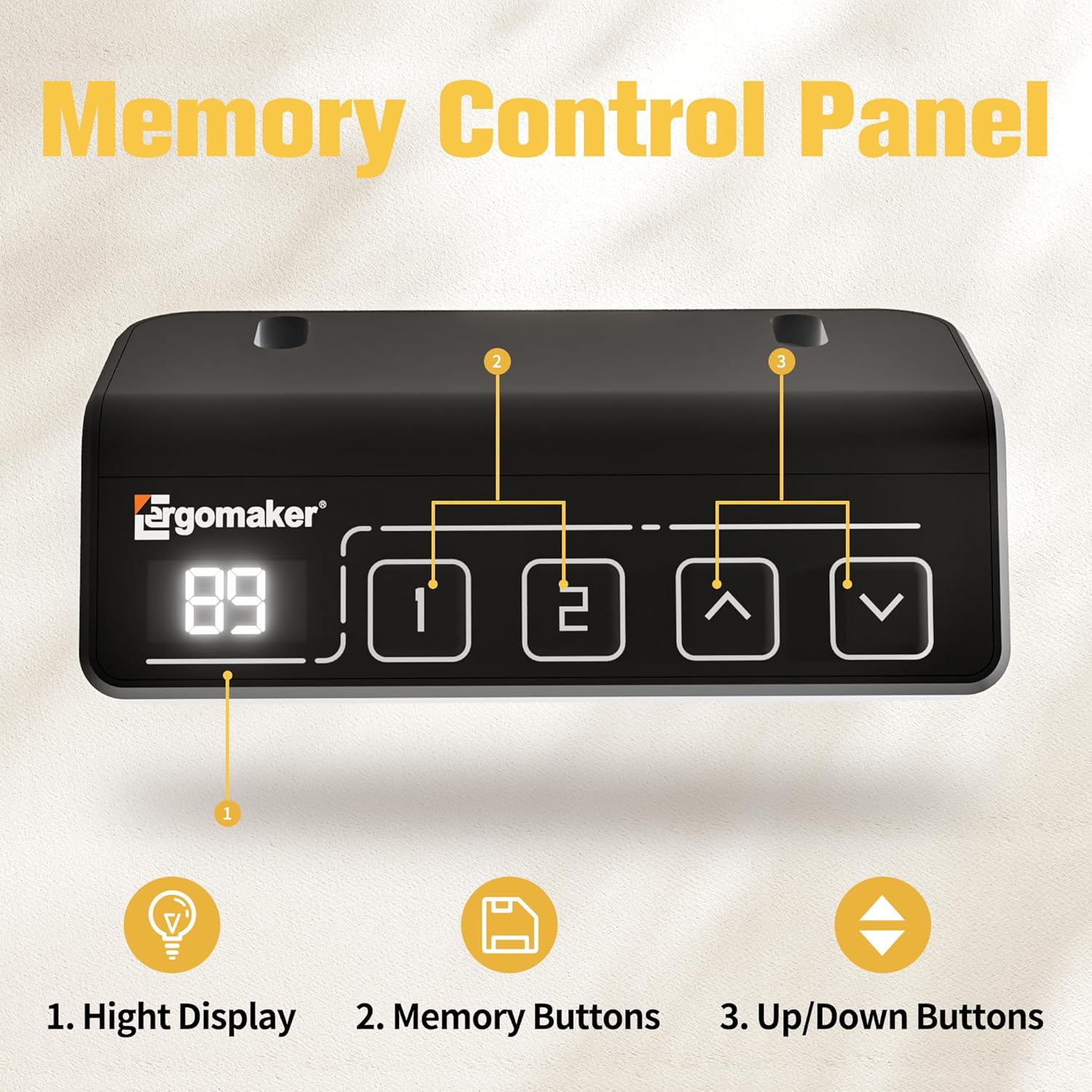
Image: Close-up of the digital control panel with LED display, memory buttons, and up/down buttons.
- Height Display: The LED screen shows the current height of the desk in centimeters or inches.
- Up/Down Buttons (^ / v): Press and hold these buttons to adjust the desk height upwards or downwards. Release the button to stop movement.
- Memory Presets (1, 2):
- To Save a Position: Adjust the desk to your desired height. Press the 'M' button (if present, or hold a number button) followed by '1' or '2'. The display will show 'S-' then the number, indicating the position is saved.
- To Recall a Position: Press the '1' or '2' button. The desk will automatically move to the saved height.
- Childproof Lock: The smart handset includes a childproof lock feature. Consult the full manual for specific activation and deactivation steps (details not provided in product description).
General Operation
- The desk moves smoothly and quietly (<50dB) with soft start/stop functions.
- Ensure the desk path is clear of obstructions during height adjustments.
- Do not place hands or objects near moving parts.

Image: A visual representation of the desk transitioning between sitting and standing heights, illustrating ergonomic benefits.
Maintenance
- Cleaning: Wipe the desk frame with a soft, damp cloth. Avoid abrasive cleaners or solvents.
- Inspection: Periodically check all screws and connections to ensure they are tight.
- Cable Management: Ensure power cables are not pinched or tangled during desk movement.
- Weight Limit: Do not exceed the maximum weight capacity of 154 lbs (70 kg) to prevent damage to the motor and frame.
Troubleshooting
If you encounter issues with your ERGOMAKER standing desk frame, please refer to the following common solutions:
- Desk Not Moving:
- Check if the power cable is securely connected to the wall outlet and the control box.
- Ensure the childproof lock is not activated.
- Reset the system by unplugging the power for 30 seconds and then plugging it back in.
- Uneven Movement:
- Verify that the desk is not overloaded beyond its 154 lbs (70 kg) capacity.
- Check that all frame connections are tight and secure.
- Ensure the adjustable leveling studs are properly set for a stable base.
- Error Codes on Display:
- Refer to the full product manual for specific error code interpretations and solutions.
- Often, a power cycle (unplugging and replugging) can resolve temporary errors.
- Unusual Noises:
- The desk operates quietly (<50dB). If loud or grinding noises occur, discontinue use and contact customer support.
If these steps do not resolve the issue, please contact ERGOMAKER customer support for assistance.
Warranty and Support
ERGOMAKER provides the following warranty coverage for your standing desk frame:
- Desk Frame: 5-year warranty
- Motor, Handset, & Power Adapter: 2-year warranty
Free technical support is available for the lifetime of the product. For warranty claims or technical assistance, please contact ERGOMAKER customer service at service@ergomaker.com.
The product has been tested for 20,000 cycles up & down and holds certifications including CE/UL/ROHS/EN527/PSE, ensuring quality and safety.
Ask a question about this manual
Ask about setup, troubleshooting, compatibility, parts, safety, or missing instructions. Manuals+ will review the question and use this page’s manual context to help answer it.