
Introduction
This manual provides essential instructions for the proper use and care of your Lorus RW649AX9 Analog-Digital Quartz Watch. Please read this manual thoroughly to ensure optimal performance and longevity of your timepiece. This watch combines traditional analog time display with modern digital functionalities, offering versatility and precision.
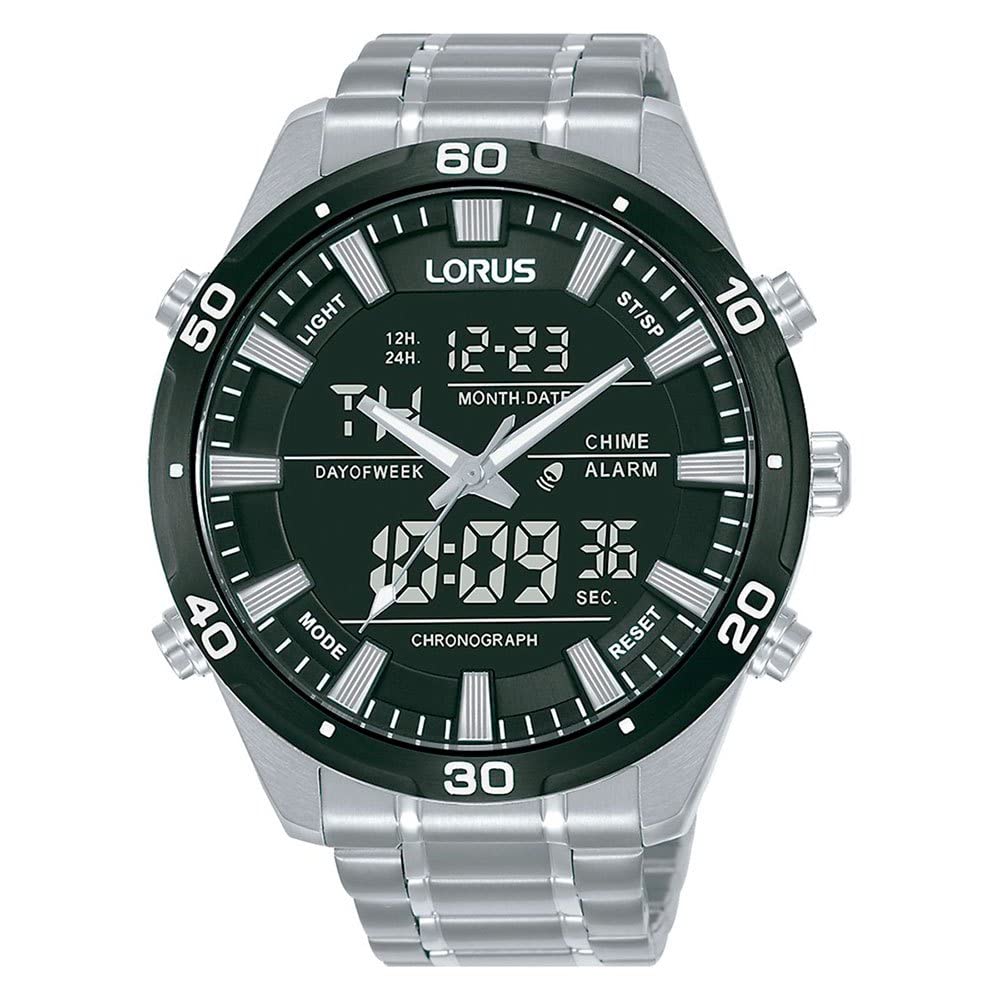
Image: Lorus RW649AX9 watch with metal bracelet, worn on a wrist.
Setup
1. Setting the Analog Time
- Pull the crown (the knob on the side of the watch) out to the first click position.
- Turn the crown to set the hour and minute hands to the desired time.
- Push the crown back into its normal position to start the watch.
2. Setting the Digital Time and Date
Your Lorus RW649AX9 watch features multiple buttons for digital function control. Typically, these are labeled A, B, C, D or similar. Refer to the markings on your specific watch model.
- Mode Button: Press this button (often labeled 'M' or 'MODE') to cycle through different digital modes: Time, Date, Alarm, Stopwatch.
- Adjust Button: In a setting mode, this button (often labeled 'A' or 'ADJUST') is used to select the item to be adjusted (e.g., hours, minutes, month, day).
- Set/Start Button: This button (often labeled 'S' or 'SET/START') is used to change the value of the selected item or to start/stop functions like the stopwatch.
General Procedure:
- Press the Mode button until the digital display shows the time setting screen (often indicated by flashing digits).
- Use the Adjust button to select the hour, minute, 12/24-hour format, year, month, or date. The selected item will typically flash.
- Use the Set/Start button to change the value of the flashing item.
- Once all settings are complete, press the Mode button again to exit the setting mode.
3. Bracelet Adjustment
The metal bracelet is designed for comfort. If adjustment is needed, it is recommended to visit a qualified jeweler or watch repair professional. They have the specialized tools and expertise to add or remove links safely without damaging the bracelet or watch.
Operating Your Watch
1. Basic Timekeeping
Your watch displays time both analogically (hands) and digitally. The digital display can be configured to show 12-hour or 24-hour format. Ensure both analog and digital times are synchronized for consistent timekeeping.
2. Digital Functions
Press the Mode button to cycle through the following functions:
- Alarm: Set a daily alarm. When the alarm time is reached, the watch will emit an audible signal.
- Chime: An hourly chime can be activated to sound a short beep at the top of every hour.
- Stopwatch (ST/SP): Use this function to measure elapsed time. Press the Start/Stop button to begin and end timing. A Reset button (often a different button) will clear the stopwatch.

Image: Close-up view of the Lorus RW649AX9 watch face, highlighting the analog hands and the digital display with function indicators.
3. Luminous Coating
The hands and markers of your watch feature a luminous coating. This material absorbs light during the day and emits it in the dark, allowing for readability in low-light conditions. The intensity and duration of the glow depend on the exposure to light.
4. Water Resistance (10 BAR / 100 Meters)
Your Lorus RW649AX9 watch is water resistant up to 10 BAR, which corresponds to 100 meters. This means it is suitable for everyday use, including accidental splashes, rain, and showering. It is also suitable for swimming and snorkeling. However, it is not recommended for scuba diving or high-impact water sports. Always ensure the crown is fully pushed in before any contact with water.
Important: Do not operate any buttons or the crown while the watch is wet or submerged, as this can compromise the water resistance.
Maintenance
1. Cleaning Your Watch
Wipe the watch case and metal bracelet regularly with a soft, dry cloth. For stubborn dirt, a slightly damp cloth with mild soap can be used, followed by a dry cloth. Avoid using harsh chemicals, solvents, or abrasive cleaners, as these can damage the watch's finish.
2. Battery Replacement
The quartz movement of your watch is powered by a battery. When the battery runs low, the watch may stop or the digital display may dim. Battery replacement should be performed by a qualified watch technician to ensure the watch's water resistance is maintained and no internal components are damaged.
3. Storage
When not wearing your watch, store it in a cool, dry place away from direct sunlight, extreme temperatures, and strong magnetic fields. These conditions can affect the watch's accuracy and lifespan.
Troubleshooting
| Problem | Possible Cause | Solution |
|---|---|---|
| Analog hands not moving | Depleted battery, crown not pushed in, internal malfunction. | Ensure crown is fully pushed in. If not, battery may need replacement by a professional. |
| Digital display is blank or dim | Depleted battery. | Battery replacement by a professional is required. |
| Incorrect time/date displayed | Settings were not correctly adjusted or accidentally changed. | Refer to the "Setting the Analog Time" and "Setting the Digital Time and Date" sections to re-adjust. |
| Water inside the watch | Crown not fully pushed in, buttons operated underwater, seal damage. | Immediately take the watch to a professional for inspection and repair to prevent further damage. |
If you encounter issues not listed here or if the suggested solutions do not resolve the problem, please contact Lorus customer support or an authorized service center.
Specifications
- Model Number: RW649AX9
- Movement: Quartz (Analog-Digital)
- Case Material: Stainless Steel with Titanium Carbide Coating (Black)
- Bracelet Material: Metal with Flat Deployant Buckle and Safety Grip
- Water Resistance: 10 BAR (100 meters)
- Dial Features: Luminous hands and markers, Digital display for time, date, alarm, stopwatch, chime.
- Case Dimensions: Approximately Ø 32.0 mm (diameter) x 8.0 mm (thickness)
- Manufacturer: Seiko
- Country of Origin: China
Warranty Information
Your Lorus watch is covered by a manufacturer's warranty against defects in materials and workmanship. The specific terms and duration of the warranty may vary by region. Please refer to the warranty card included with your purchase or visit the official Lorus website for detailed information.
The warranty typically does not cover normal wear and tear, damage caused by improper use, accidents, unauthorized repairs, or battery replacement.
Customer Support
For further assistance, service, or inquiries regarding your Lorus RW649AX9 watch, please contact Lorus customer support. You can usually find contact information, including phone numbers and email addresses, on the official Lorus website or through your authorized retailer.
When contacting support, please have your watch model number (RW649AX9) and purchase details readily available.
Official Lorus Website: www.loruswatches.com (Please note: This is a generic placeholder link. Refer to your product documentation for the correct regional website.)


