
1. Product Overview
The CCYLEZ AK-C211008 Wireless RF Remote Control Relay Module is a versatile 4-channel device designed for remote control applications. Utilizing advanced RF technology, it enables stable and reliable control of various electrical systems through walls, floors, and doors. This module is ideal for automating lighting, electric doors and windows, lifting equipment, gates, and elevators, offering high security and ease of use.

Figure 1: The AK-C211008 Relay Module and accompanying remote controls.
2. Features
- Advanced RF Technology: Signals can be transmitted reliably through walls, floors, and doors, ensuring stable control anywhere within the operational range.
- High Security: Features a high-security learning code system. If a remote control is lost, old codes can be easily deleted and new ones learned, maintaining system security.
- Easy to Use: Designed for straightforward setup, learning, relearning, and control. Offers stable and reliable performance with high reception sensitivity.
- Wide Application: Primarily used in lamps and lanterns, electric doors and windows, lifting equipment, gates, elevators, industrial control, and security systems.
- Multiple Operating Modes: Supports three distinct operating modes: Jog (Momentary), Self-Locking (Toggle), and Interlock, providing flexibility for various control needs.
- Interference Resistance: Adopts non-directional wireless encoding technology, enhancing resistance to interference and allowing independent control.
3. Specifications
| Parameter | Value |
|---|---|
| Product Type | Remote Control Relay Switch |
| Shell Material | ABS |
| Operating Frequency | 433 MHz |
| Operating Modes | Jog (Momentary), Self-Locking (Toggle), Interlock |
| Output Mode | Wiring Terminal |
| Demodulation Method | ASK |
| Control Method | Remote Control |
| Input Voltage | DC 12-36V or AC 100-240V |
| Maximum Current | ≤10A |
| Receiver Sensitivity | -105dBm |
| Working Distance | >100m (open area) |
| Remote Control Battery | 4 x CR2016 (75 mAh) Button Cells (built-in) |
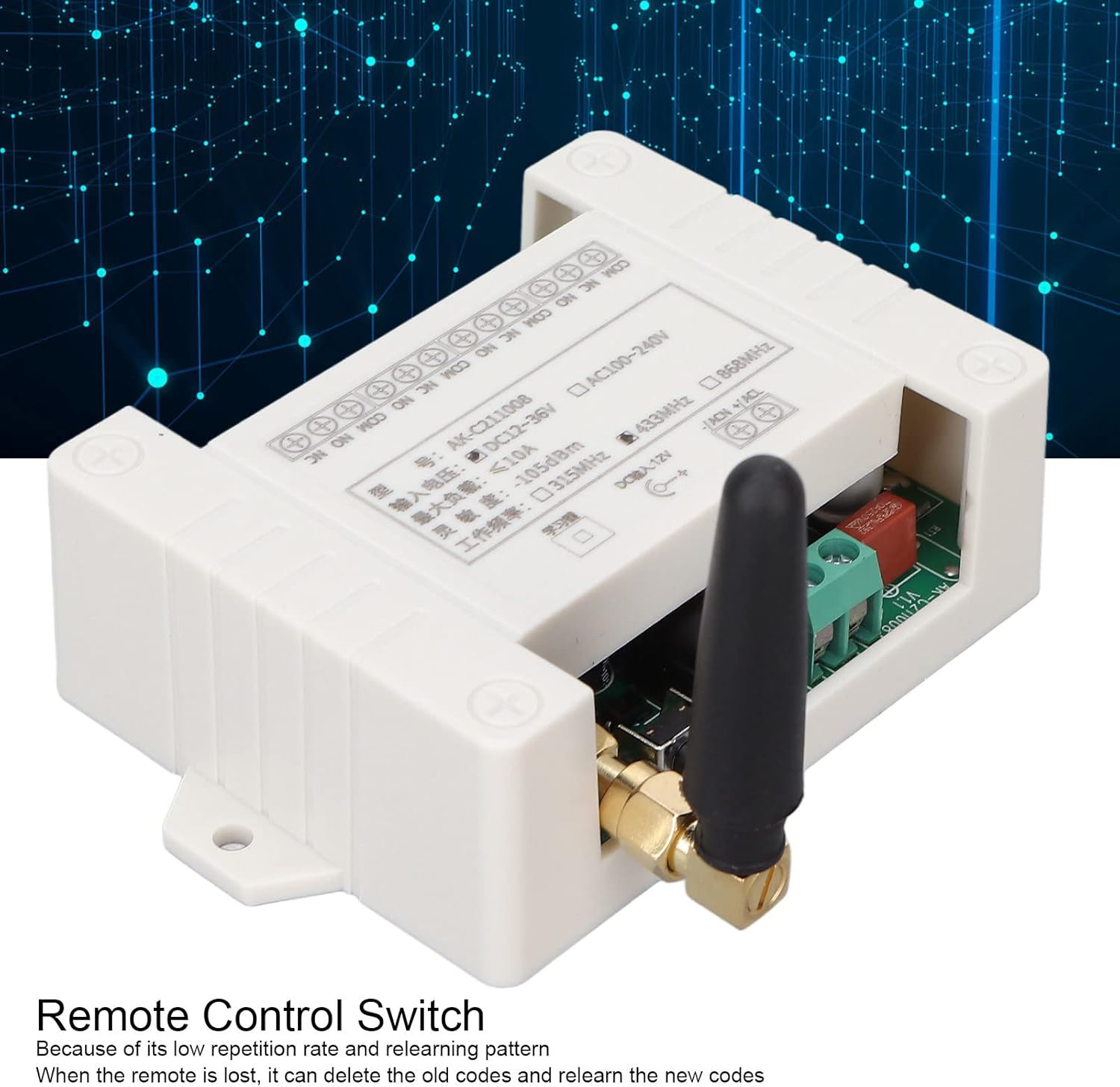
Figure 2: Detailed view of the relay module's wiring terminals and specification label.
4. Package Contents
The product package typically includes the following items:
- 1 x Wireless RF Remote Control Relay Switch Module
- 2 x Remote Controls
5. Setup
The relay module and remote controls are designed for straightforward setup. Please follow these general steps:
- Power Connection: Ensure the module is connected to a compatible power source. The module supports both DC 12-36V and AC 100-240V inputs. Refer to the wiring diagram on the module for correct polarity and terminal connections.
- Device Wiring: Wire the devices you wish to control (e.g., lights, motors) to the appropriate output terminals (NO, NC, COM) on the relay module. Ensure all connections are secure and insulated.
- Remote Control Pairing: The system uses a learning code for pairing the remote controls with the receiver. The specific learning procedure might vary slightly, but typically involves a learning button on the receiver module.

Figure 3: Internal view of the relay module, showing the circuit board. A learning button (often a small black button) is typically located on the board.
6. Operating Instructions
The AK-C211008 module supports three main operating modes. The mode is typically set during the learning/pairing process. Please refer to the specific instructions provided with your module for precise mode setting and learning procedures.
6.1. Operating Modes
- Jog (Momentary) Mode: The relay output is active only for as long as the corresponding button on the remote control is pressed. When the button is released, the relay deactivates.
- Self-Locking (Toggle) Mode: Pressing a button on the remote control once activates the corresponding relay output. Pressing the same button again deactivates the relay output.
- Interlock Mode: In this mode, only one relay output can be active at a time. Pressing button 'A' activates relay 'A' and deactivates any other active relays (B, C, D). Pressing button 'B' activates relay 'B' and deactivates A, C, D, and so on.
6.2. Learning/Pairing Procedure (General)
While specific steps may vary, a common learning procedure for these modules is as follows:
- Clear Existing Codes: To clear all previously learned remote controls, press and hold the learning button on the receiver module for approximately 8 seconds until the indicator light flashes rapidly and then turns off. This ensures a clean slate for new pairings.
- Enter Learning Mode: Briefly press the learning button on the receiver module the required number of times for your desired mode:
- Press once for Jog (Momentary) Mode.
- Press twice for Self-Locking (Toggle) Mode.
- Press three times for Interlock Mode.
- Pair Remote Control: While the indicator light is on, press the desired button on your remote control. The indicator light on the module will flash several times and then turn off, indicating successful pairing.
- Test Operation: After pairing, test the remote control to ensure the relay operates correctly in the selected mode.
7. Maintenance
- Keep the relay module and remote controls clean and dry. Avoid exposure to dust, dirt, and moisture.
- Do not expose the devices to extreme temperatures or humidity.
- If the remote control range decreases or it becomes unresponsive, replace the built-in CR2016 button cell batteries.
- Periodically check wiring connections to ensure they remain secure.
8. Troubleshooting
| Problem | Possible Cause | Solution |
|---|---|---|
| Device not responding to remote control. | No power to module; Remote control battery low/dead; Remote not paired; Incorrect wiring. | Check power supply to the module; Replace remote control batteries; Re-pair the remote control (see Section 6.2); Verify wiring connections. |
| Limited operating range. | Obstructions (thick walls, metal structures); Radio interference; Low remote control battery. | Reduce obstructions between remote and module; Avoid sources of strong radio interference; Replace remote control batteries. |
| Relay operates incorrectly (e.g., stays on/off). | Incorrect operating mode set (Jog, Self-Locking, Interlock); Faulty wiring. | Clear all codes and re-pair the remote control, ensuring the correct operating mode is selected during learning; Check and correct wiring. |
9. Warranty and Support
For warranty information, technical support, or service inquiries, please contact the seller or manufacturer directly. Keep your purchase receipt as proof of purchase.