
1. Product Overview
The Fisher-Price DJ Bouncin' Beats is an interactive musical learning toy designed to engage babies and toddlers with its unique bouncing action, colorful lights, and educational content. It features multiple play modes to support developmental milestones.

Figure 1: Fisher-Price DJ Bouncin' Beats toy in action with a child.
2. Setup
2.1 Battery Installation
- Locate the battery compartment on the underside of the toy.
- Using a Phillips head screwdriver, loosen the screw and remove the battery compartment cover.
- Insert 4 AA (LR6) alkaline batteries, ensuring correct polarity (+/-).
- Replace the cover and tighten the screw.
2.2 Power and Volume Control
On the back of the toy, locate the power switch and volume control. Slide the switch to the 'On' position. Adjust the volume to your preferred level using the volume settings.

Figure 2: Close-up view of the toy's face and Smart Stages selector switch.
3. Operating Instructions
The DJ Bouncin' Beats toy features 3 Smart Stages learning levels and multiple interactive buttons for engaging play.
3.1 Smart Stages Levels
Select a learning level using the Smart Stages switch located on the side of the toy:
- Level 1 (Explore): Introduces basic concepts through simple songs and phrases.
- Level 2 (Encourage): Expands on learning with prompts and questions.
- Level 3 (Pretend): Encourages imaginative play and role-playing.
3.2 Interactive Buttons
Press the buttons on the toy's head to activate different features:
- Music Button: Plays various songs and musical tunes.
- Learning Button (ABC/123): Teaches the alphabet, counting 1-10, colors, and opposites.
- Mic Button (Record & Remix): Press and hold to record a short phrase. The toy will then play it back with fun remix effects and bouncing action.

Figure 3: A child pressing the interactive buttons on the toy.
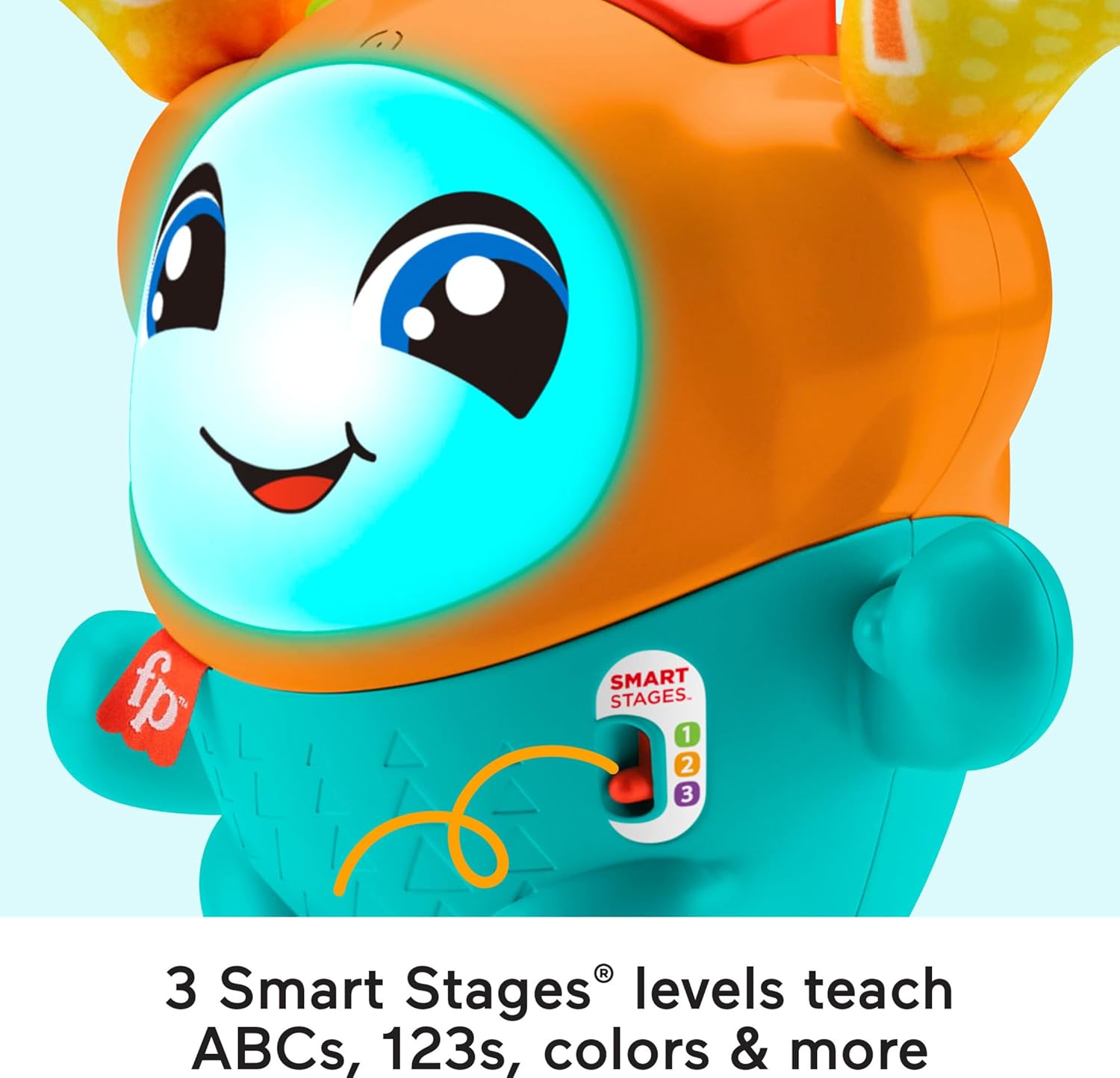
Figure 4: A child using the record and remix feature.
3.3 Bouncing Action and Lights
The toy features a motorized spring action that makes it bounce as it plays music and phrases. Its face lights up in multiple colors, adding to the engaging experience.
3.4 Demonstration Videos
Video 1: Demonstration of the toy's engaging and entertaining features, including lights and bouncing action.
Video 2: Overview of the Fisher-Price DJ Bouncin' Beats toy, highlighting its various functions and interactive elements.
Video 3: A detailed look at the toy's features, including sound, lights, and the record/remix function.
4. Maintenance
4.1 Cleaning
To clean the toy, wipe its surface with a damp cloth. Do not immerse the toy in water. Ensure the toy is completely dry before further use.
4.2 Battery Care
- Remove batteries if the toy is to be stored for an extended period.
- Do not mix old and new batteries.
- Do not mix alkaline, standard (carbon-zinc), or rechargeable (nickel-cadmium) batteries.
5. Troubleshooting
5.1 Toy Not Turning On
- Check that the power switch is in the 'On' position.
- Ensure batteries are correctly installed with proper polarity.
- Replace old or depleted batteries with new ones.
5.2 Sound or Light Issues
- Verify the volume control is not set to the lowest setting.
- If lights or sounds are intermittent, replace batteries.
6. Specifications
| Feature | Detail |
|---|---|
| Brand | Fisher-Price |
| Model Number | HFT76 |
| UPC | 194735043484 |
| Age Range | 9-36 Months |
| Material Type | Plastic |
| Item Dimensions (L x W x H) | 6.65 x 11.65 x 12.99 inches |
| Item Weight | 3.57 Pounds |
| Number of Batteries | 4 AA batteries (included) |
| Educational Objective | Color Recognition, Alphabet, Counting, Opposites |

Figure 5: Product dimensions for the DJ Bouncin' Beats toy.
7. What's in the Box
- 1 Fisher-Price DJ Bouncin' Beats Toy
8. Warranty and Support
This product comes with no stated manufacturer warranty. For any product-related inquiries or support, please refer to the contact information provided on the product packaging or the official Fisher-Price website.