
LVYUAN 4000W/8000W 24V to 230V Pure Sine Wave Power Inverter
LVYUAN Pure Sine Wave Power Inverter User Manual
Model: 4000W/8000W 24V to 230V
Brand: LVYUAN
1. Introduction
This manual provides essential information for the safe and efficient operation of your LVYUAN Pure Sine Wave Power Inverter. This device converts 24V DC battery power into 230V AC household power, allowing you to operate standard electrical appliances in your vehicle, boat, caravan, or remote locations. Please read this manual thoroughly before installation and use.
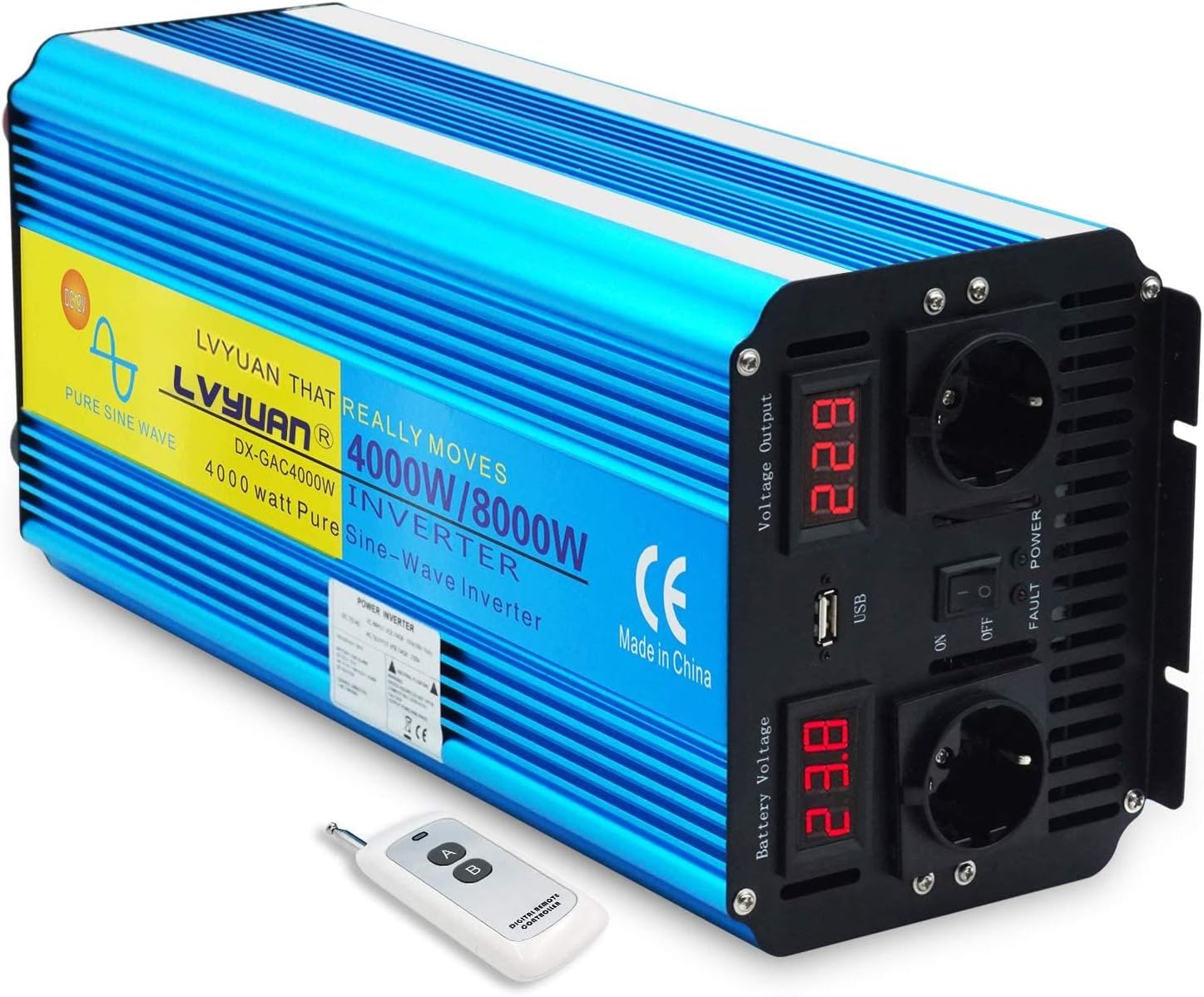
Figure 1: LVYUAN Pure Sine Wave Power Inverter and its wireless remote control.
2. Product Features
- Pure Sine Wave Output: Provides stable and clean power, suitable for sensitive electronics.
- High Power Output: 4000W continuous power with an 8000W peak power capacity for short durations.
- Dual LED Displays: Separate indicators for output voltage and battery input voltage for clear monitoring.
- Versatile Connectivity: Equipped with two 230V AC outlets and a USB port for charging smaller devices like smartphones and tablets.
- Comprehensive Protection: Built-in safeguards against overload, short circuit, overheating, reverse polarity, under-voltage, and over-voltage.
- Soft Start Function: Ensures a gradual power-up to protect connected appliances.
- Wireless Remote Control: Allows convenient power control (ON/OFF) from a distance.
- Efficient Cooling: Features dual cooling fans for optimal temperature regulation and quiet operation.

Figure 2: Key features and ports of the LVYUAN Power Inverter.
3. Package Contents
Verify that all items are present in the package:
- 1 x LVYUAN Pure Sine Wave Power Inverter
- 1 x Battery Clamp Cable (50 cm)
- 1 x Wireless Remote Control (requires 23A 12V battery, not included)
- 1 x User Manual
- Spare Fuses (quantity may vary)

Figure 3: Inverter rear view and included accessories.
4. Specifications
| Parameter | Value |
|---|---|
| Output Waveform | Pure Sine Wave |
| Rated Power | 4000 W |
| Peak Output Power | 8000 W (<10 ms) |
| Frequency | 50 Hz ± 2 Hz |
| No-Load Current Consumption | <0.8 A |
| Conversion Efficiency | 90% |
| DC Input Voltage | 24 V DC |
| AC Output Voltage | 230 V AC ± 5% |
| Under-Voltage Alarm | 22 V DC ± 0.5 V |
| Under-Voltage Shutdown | 21 V DC ± 0.5 V |
| Protection Features | Overload, Short Circuit, Overheating, Reverse Polarity, Low/Over Voltage |
| Dimensions (L x W x H) | 53 x 38.29 x 21.9 cm |
| Net Weight | 6.12 kg |
| USB Port | Yes, for charging devices |
| AC Outlets | 2 x EU Sockets |
5. Safety Information
WARNING: Failure to follow these safety instructions may result in electric shock, fire, serious injury, or death.
- Ventilation: Ensure the inverter is installed in a well-ventilated area. Do not block the cooling vents.
- Environment: Keep the inverter away from water, moisture, direct sunlight, heat sources, and flammable materials.
- Battery Connection: Always connect the inverter to a 24V DC battery system. Connecting to a different voltage (e.g., 12V or 48V) will damage the inverter.
- Polarity: Observe correct polarity when connecting to the battery. Connect the positive (+) terminal of the inverter to the positive (+) terminal of the battery, and the negative (-) terminal of the inverter to the negative (-) terminal of the battery. Reverse polarity will cause damage.
- Cables: Use the provided battery cables or cables of appropriate gauge for the power rating. Ensure connections are tight to prevent overheating.
- Grounding: The inverter should be properly grounded. Consult a qualified electrician if unsure.
- Load Capacity: Do not exceed the rated continuous power (4000W) or peak power (8000W) of the inverter. Overloading can cause damage and fire.
- Maintenance: Do not attempt to open or service the inverter yourself. Refer all servicing to qualified personnel.
- Children: Keep the inverter and its accessories out of reach of children.
6. Setup and Installation
- Choose a Location: Select a dry, cool, and well-ventilated area for the inverter. Ensure there is sufficient space around the unit for airflow, especially around the cooling fans.
- Prepare the Battery: Ensure your 24V DC battery system is fully charged and in good condition. Turn off any loads connected to the battery.
- Connect Battery Cables:
- Connect the red (positive, +) battery clamp cable to the positive (+) terminal of the inverter.
- Connect the black (negative, -) battery clamp cable to the negative (-) terminal of the inverter.
- Ensure these connections are secure and tight.
- Connect to Battery:
- Connect the other end of the red (positive, +) battery clamp cable to the positive (+) terminal of your 24V battery.
- Connect the other end of the black (negative, -) battery clamp cable to the negative (-) terminal of your 24V battery.
- Ensure these connections are also secure and tight.
- Initial Check: Once connected, the battery voltage display on the inverter should illuminate, showing the current battery voltage.
7. Operating Instructions
- Powering On:
- Locate the ON/OFF switch on the front panel of the inverter.
- Flip the switch to the "ON" position. The output voltage display should illuminate, showing the AC output voltage (approx. 230V).
- The cooling fans may briefly activate during startup.
- Connecting Appliances:
- Plug your 230V AC appliances into the AC outlets on the inverter.
- For charging smaller devices, connect them to the USB port.
- Ensure the total power consumption of all connected appliances does not exceed the inverter's rated power (4000W).
- Using the Wireless Remote Control:
- The remote control functions only when the main ON/OFF switch on the inverter is in the "OFF" position.
- Insert a 23A 12V battery into the remote control (battery not included).
- Press button "A" on the remote to turn the inverter ON.
- Press button "B" on the remote to turn the inverter OFF.
- Monitoring: Regularly check the LED displays for battery voltage and output voltage to ensure stable operation.
- Powering Off:
- Disconnect all appliances from the inverter.
- Flip the ON/OFF switch on the inverter to the "OFF" position.

Figure 4: Front panel controls and wireless remote operation.
8. Maintenance
- Cleaning: Periodically clean the exterior of the inverter with a soft, dry cloth. Do not use liquid cleaners or solvents.
- Vents: Ensure the cooling vents are free from dust and debris to maintain proper airflow. Use compressed air to clear dust if necessary.
- Connections: Regularly check all electrical connections (battery terminals, AC outlets) to ensure they are tight and free from corrosion.
- Storage: When not in use for extended periods, store the inverter in a cool, dry place, away from direct sunlight and extreme temperatures. Disconnect it from the battery.
- Fuse Replacement: If a fuse blows, replace it with a fuse of the same type and rating. Refer to the specifications for fuse details.
9. Troubleshooting
| Problem | Possible Cause | Solution |
|---|---|---|
| No power output, inverter off. | Low battery voltage, loose battery connection, blown fuse, inverter switch off. | Check battery voltage (must be >21V). Tighten battery connections. Check and replace fuses if necessary. Ensure inverter switch is ON. |
| Inverter shuts down during operation. | Overload, overheating, low battery voltage, short circuit. | Reduce connected load. Ensure proper ventilation. Recharge battery. Check for short circuits in connected appliances. |
| Output voltage is incorrect or unstable. | Poor battery connection, faulty appliance, internal fault. | Check battery connections. Test with a different appliance. If problem persists, contact support. |
| Cooling fan runs constantly or loudly. | High internal temperature due to heavy load or poor ventilation. | Reduce load. Ensure vents are clear and inverter is in a cool, well-ventilated area. |
| Remote control not working. | Inverter main switch is ON, remote battery dead/missing. | Ensure inverter main switch is OFF for remote to function. Replace 23A 12V battery in remote. |
10. Warranty and Support
For warranty information and technical support, please refer to the contact details provided with your purchase or visit the official LVYUAN website. Keep your purchase receipt as proof of purchase for any warranty claims.
Related Documents - 4000W/8000W 24V to 230V Pure Sine Wave Power Inverter
 |
LVYUAN 正弦波低周波インバーター 取扱説明書 - 電力変換ガイド LVYUAN 正弦波低周波インバーターの取扱説明書。3000Wおよび6000Wモデルに対応した設置、操作、安全、トラブルシューティングに関する詳細ガイド。 |
 |
LVYUAN Pure Sine Wave DC/AC Inverter Instruction Manual Comprehensive instruction manual for LVYUAN Pure Sine Wave DC/AC Inverters, detailing safety precautions, product features, installation, usage, protection functions, fuse replacement, troubleshooting, and warranty information. |
 |
LVYUAN SPI-6.5K-UP Hybrid Inverter User Manual This user manual provides comprehensive instructions for the LVYUAN SPI-6.5K-UP hybrid inverter, covering safety precautions, installation, operation, system configuration, parameter settings, error codes, and product specifications for solar power systems. |
 |
LVYUAN ハイブリッドインバーター HSI3500 取扱説明書 LVYUAN® ハイブリッドインバーター 3kW-24V モデル: HSI3500 の取扱説明書。安全な使用、設置方法、操作方法、およびトラブルシューティングに関する詳細情報を提供します。 |
 |
LVYUAN HS15000U ハイブリッドインバーター 取扱説明書 - 5kW 48V 太陽光発電システム LVYUAN HS15000U 5kW 48V ハイブリッドインバーターの取扱説明書。太陽光発電システム、蓄電池連携、UPS機能、安全な設置・操作方法、製品仕様などを詳しく解説。ご使用前に必ずお読みください。 |
 |
LVYUAN SPI-6.5K-UP ハイブリッドインバーター 取扱説明書 LVYUAN SPI-6.5K-UP 単相3線式 48Vモデル ハイブリッドインバーターの取扱説明書。安全な設置、操作、およびメンテナンスに関する詳細情報を提供します。 |
Ask a question about this manual
Ask about setup, troubleshooting, compatibility, parts, safety, or missing instructions. Manuals+ will review the question and use this page’s manual context to help answer it.