1. Introduction
This manual provides detailed instructions for the assembly, operation, and maintenance of your Quimoo Large Vanity Desk with LED Lighted Mirror and Power Outlet. Please read all instructions carefully before assembly and use to ensure safe and proper functioning of the product. Keep this manual for future reference.
Safety Information
- Ensure all parts are present and undamaged before assembly. Do not use if any parts are missing or broken.
- Assemble the vanity desk on a soft, clean surface to prevent scratches.
- Always use the anti-tip kit provided to secure the vanity to the wall, preventing accidental tipping and potential injury.
- Keep small parts away from children during assembly.
- Do not overload drawers or shelves.
2. Package Contents
Please verify that all the following components are included in your package. If any parts are missing or damaged, please contact customer support.
- Vanity Desk Top with Drawers
- Vanity Desk Legs (4)
- LED Lighted Mirror
- Mirror Supports/Posts (2)
- Stool (if included in your model)
- Assembly Hardware (screws, bolts, Allen wrench)
- LED Bulbs (10)
- Power Adapter for LED Lights
- Anti-Tip Kit
- Instruction Manual
3. Setup Instructions
Assembly of the Quimoo Vanity Desk is designed to be straightforward, typically taking about 30 minutes. Follow these steps carefully:
- Attach Desk Legs: Carefully place the vanity desk top upside down on a soft, protected surface. Attach the four desk legs to the designated corners using the provided screws and Allen wrench. Ensure all connections are secure.
- Assemble Mirror Supports: Attach the two mirror supports to the back of the vanity desk top using the appropriate hardware.
- Mount the Mirror: Carefully place the LED lighted mirror onto the assembled mirror supports. Secure the mirror to the supports using the provided screws. Ensure the mirror is stable and can rotate smoothly.
- Install LED Bulbs: Screw the 10 LED bulbs into the sockets around the mirror. Connect the power adapter for the LED lights.
- Install Anti-Tip Kit: For safety, secure the vanity desk to a wall using the anti-tip kit. Locate a suitable wall stud, attach one end of the strap to the back of the vanity and the other end to the wall. This prevents accidental tipping.


4. Operating Instructions
LED Lighted Mirror
The vanity desk features a mirror with 10 Hollywood-style LED bulbs. These lights provide adjustable brightness to suit various lighting needs.
- Power On/Off: Press the power button on the inline controller to turn the lights on or off.
- Adjust Brightness: Long press the power button to adjust the brightness level from dark to bright. Release the button when the desired brightness is achieved.
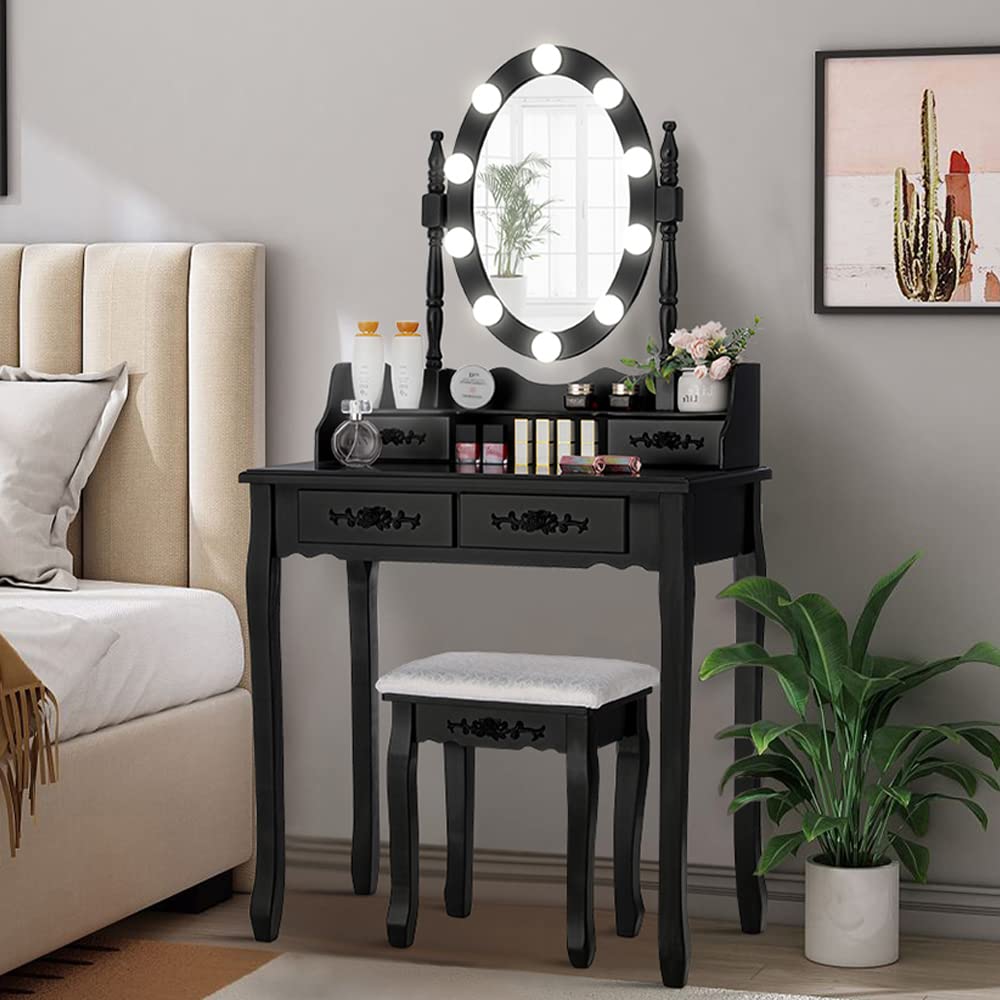
360° Rotatable Mirror
The mirror is designed to rotate 360 degrees, allowing you to adjust it to your preferred angle for makeup application or grooming.
- Gently grasp the sides of the mirror and rotate it to achieve the optimal viewing angle.
- Ensure the mirror is stable in your chosen position before use.

Storage Drawers and Shelves
The vanity desk is equipped with multiple drawers and shelves for organizing beauty supplies.
- Utilize the spacious tabletop for frequently used items.
- The smaller drawers are suitable for jewelry, hair accessories, and smaller cosmetics.
- The larger drawers can accommodate hair curlers, larger cosmetic bottles, or other personal items.
- The integrated shelf provides additional space for brushes, nail polishes, and lipsticks.

Power Outlet
The vanity desk includes a built-in power outlet for convenience.
- Plug in hair dryers, curling irons, or other electronic devices directly into the integrated power outlet.
- Ensure devices are within the vanity's power specifications to avoid overloading.
5. Maintenance
Proper care will extend the life and appearance of your vanity desk.
- Cleaning: Wipe the surface of the vanity desk with a damp cloth. Avoid harsh chemicals or abrasive cleaners that may damage the finish.
- Mirror Care: Clean the mirror with a standard glass cleaner and a soft, lint-free cloth.
- Dusting: Regularly dust all surfaces to prevent buildup.
- Spills: Immediately wipe up any spills to prevent staining or damage to the wood.
- Bulb Replacement: If an LED bulb fails, replace it with a compatible bulb of the same type and wattage.
6. Troubleshooting
- LED Lights Not Working:
- Check if the power adapter is securely plugged into both the vanity and a working wall outlet.
- Ensure all LED bulbs are screwed in tightly.
- Verify the inline power button is pressed to the 'on' position.
- If individual bulbs are out, they may need replacement.
- Vanity Feels Unstable:
- Ensure all leg screws are tightened securely.
- Confirm the anti-tip kit is properly installed and anchored to a wall stud.
- Check that the vanity is placed on a level surface.
- Drawers Stick or Don't Close Properly:
- Ensure drawers are not overloaded.
- Check for any obstructions in the drawer slides.
- Verify that the drawer slides were installed correctly during assembly.
- Mirror Rotation is Stiff:
- Check for any debris or obstructions around the mirror's pivot points.
- Ensure the mirror mounting screws are not overtightened, allowing for smooth rotation.
7. Specifications
| Feature | Detail |
|---|---|
| Brand | Quimoo |
| Frame Material | Engineered Wood |
| Product Dimensions (D x W x H) | 15.7" x 29.5" x 56.7" (75 x 40 x 144 cm) |
| Item Weight | 18 pounds (8.16 kg) |
| Number of Drawers | 7 |
| Number of Shelves | 4 |
| Number of Hooks | 7 |
| Mirror Type | 360° Rotatable with LED Lights |
| Included Components | Bulbs included |
| Color | Black |
| Product Care Instructions | Wipe with Damp Cloth |
8. Warranty and Support
Quimoo aims for 100% customer satisfaction. While specific warranty details are not provided in this manual, if you encounter any issues, have questions, or require assistance with your product, please contact the seller directly through your purchase platform.
For support, please use the "Contact Seller" option on the product page where you made your purchase. Provide your order number and a detailed description of the issue for prompt assistance.


