
SURAIELEC UBTW02T
Suraielec WiFi Pool Timer Instruction Manual
Model: UBTW02T
1. Product Overview
The Suraielec WiFi Pool Timer is a robust and intelligent solution designed for controlling high-power electrical devices such as pool filter pumps, fountains, hot water heaters, and patio lighting. This indoor/outdoor timer features individual switches for 120V/277V applications, with a heavy-duty 40A resistive capacity and 2HP total power. It offers remote control via the Tuya Smart Life App and is compatible with popular voice assistants.
Key Features:
- Dual Voltage Compatibility: Supports 120V/277V applications with individual switches (1HP each, 2HP total).
- High Power Capacity: 40A resistive rating, suitable for heavy-duty electrical appliances.
- Smart Control: Remotely manage devices via the Tuya Smart Life App, compatible with Amazon Echo/Alexa and Google Home.
- Versatile Timer Functions: Includes program, countdown, and repeat timer options for flexible scheduling.
- Weatherproof Design: Durable, insulating, and flame-retardant material with a lockable box cover for outdoor use.
- Easy Installation: Designed for straightforward setup and programming.

Figure 1.1: Suraielec WiFi Pool Timer with its protective cover open, revealing the internal components and wiring terminals.
2. Safety Information
WARNING: Risk of electric shock. All wiring and servicing must be performed by a qualified electrician. Ensure power is turned off at the main panel before installation or maintenance. If the compartment insulator is not installed properly or is missing, inform an electrician immediately.
This device is ETL Listed and conforms to UL STD.60730-1. For outdoor applications, ensure proper grounding between metallic conduit and the enclosure. Grounding type bushings and jumper wires must be installed in accordance with National Code Requirements.
- Always disconnect power before working on the device.
- Do not exceed the specified electrical ratings (40A Resistive, 2HP).
- Ensure all connections are secure and properly insulated.
- The weatherproof enclosure protects against rain, snow, and dust. Ensure the cover is securely latched for outdoor use.
- Operating temperature range: -40°F to 149°F.
3. Specifications
| Feature | Detail |
|---|---|
| Model Number | UBTW02T |
| Input Voltage | 120-240/277VAC, 60Hz (Auto Voltage Detection) |
| Contact Ratings | 40A Resistive (120-277VAC), 30A General Purpose (120-277VAC), 20A Resistive (30VDC), 1HP (120VAC), 2HP (240VAC), 20A Ballasted load (120-277VAC), 15A Tungsten (120VAC), 5A Tungsten (250VAC), 800VA Pilot Duty (120VAC), 720VA Pilot Duty (240VAC), TV-5 (120VAC) |
| Horsepower Rating | 1HP per switch, 2HP total |
| Switch Type | Individual Switches (2 channels) |
| Wi-Fi Connectivity | 2.4 GHz Wi-Fi network only (no hub required) |
| App Compatibility | Tuya Smart Life App (iOS 8.0+, Android 4.1+) |
| Voice Control | Amazon Echo/Alexa, Google Home Assistant |
| Operating Temperature | -40°F to 149°F (-40°C to 65°C) |
| Enclosure Material | Durable insulating and flame-retardant material |
| Certifications | ETL Listed, Conforms to UL STD.60730-1 |
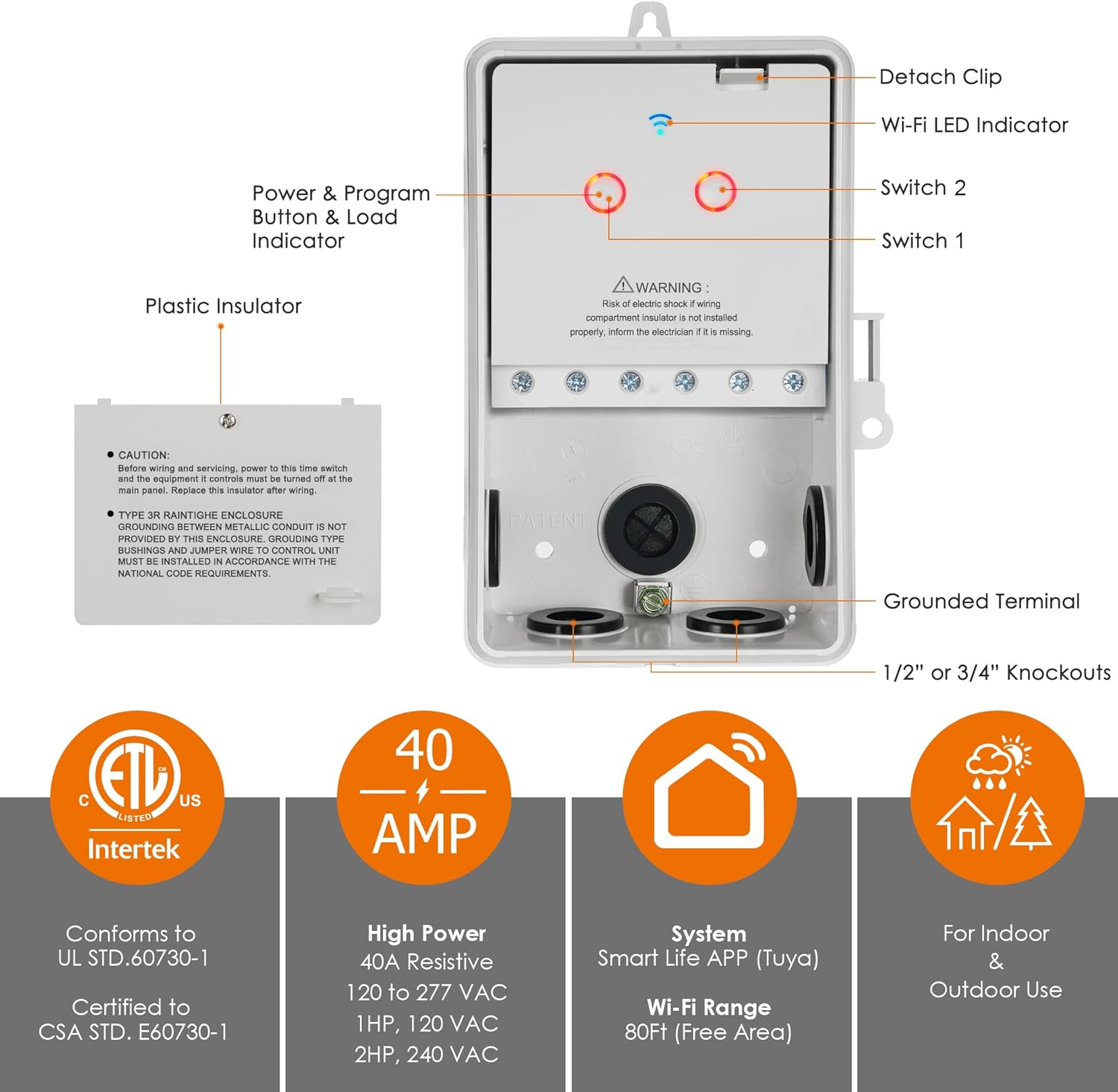
Figure 3.1: Detailed features and specifications of the Suraielec WiFi Pool Timer, including its ETL certification, 40 AMP capacity, Smart Life App compatibility, and indoor/outdoor suitability.
4. Installation
Before beginning installation, ensure all power to the circuit is disconnected at the main breaker. This device is designed for both indoor and outdoor use. For outdoor installations, ensure the weatherproof box cover is securely closed and consider the working temperature range.
4.1 Mounting the Device
The timer box can be wall-mounted using the designated mounting holes. Ensure the mounting surface is stable and can support the device securely. The enclosure is designed to be weatherproof, protecting the internal components from environmental elements.
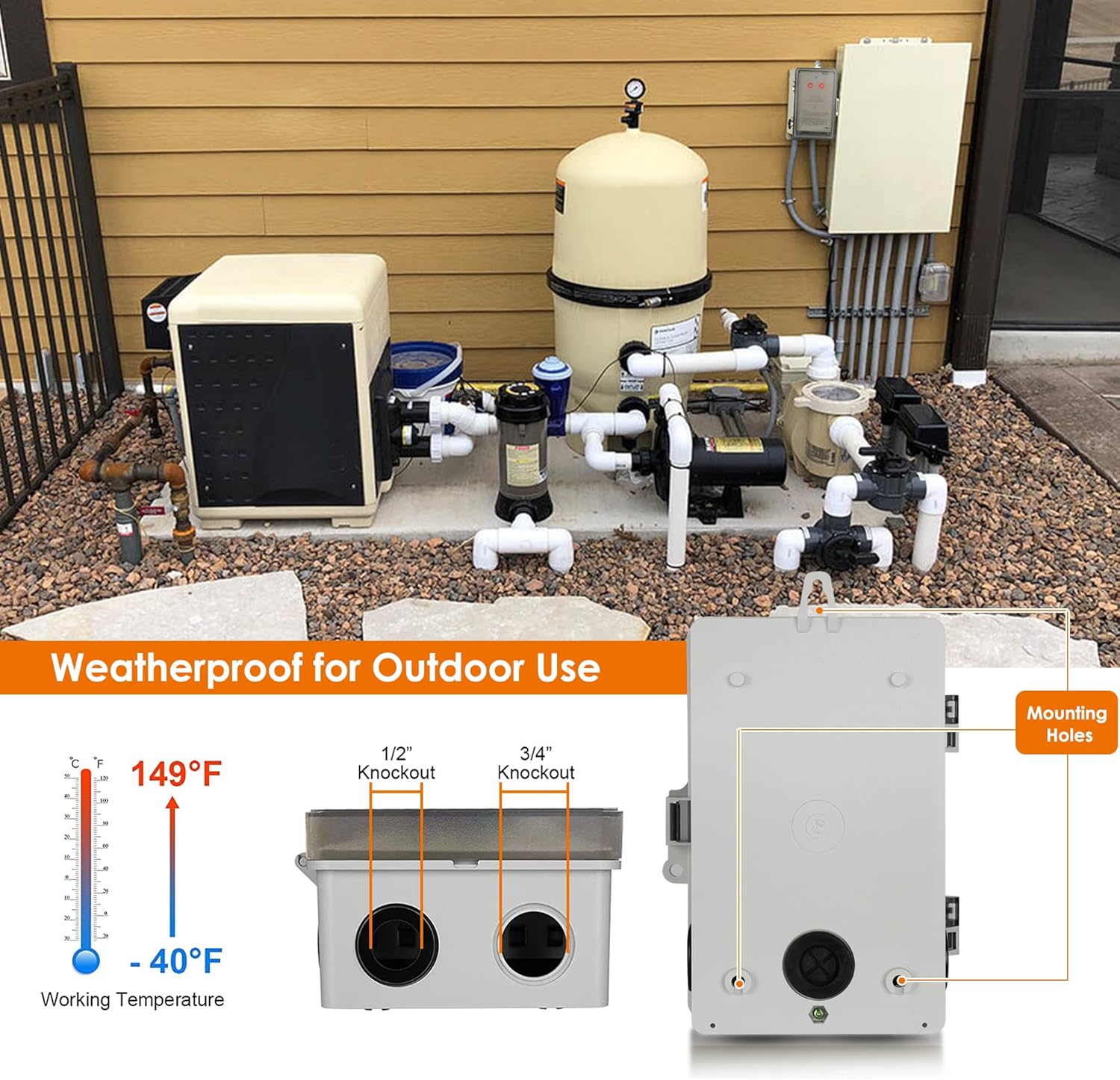
Figure 4.1: Illustration of the timer's weatherproof design, showing its working temperature range from -40°F to 149°F, knockouts for wiring, and mounting holes for secure installation.
4.2 Wiring Instructions
The Suraielec WiFi Pool Timer supports controlling one or two separate loads at 120V or 277V. The internal module is detachable for easier wiring. Refer to the wiring diagrams below for proper connection. It is highly recommended to consult a qualified electrician for wiring to ensure safety and compliance with local electrical codes.
Note on 240VAC Devices: While the timer can control 240VAC devices by utilizing both switches for the two hot legs, it is crucial that both switches are shut OFF simultaneously when turning off a 240VAC device (e.g., a hot water tank). For dedicated 240VAC devices, consider models UBTW01A or UBTW01B which are designed specifically for such applications to ensure proper and safe operation.

Figure 4.2: Wiring diagram illustrating how to control two separate 120VAC or 277VAC loads using the individual switches of the Suraielec WiFi Pool Timer. This diagram shows connections for Line (L), Neutral (N), Ground (G), and the common (COM) and normally open (NO) terminals for each switch.
Video 4.1: An official product video demonstrating the wiring process for the Suraielec 120/277V Individual Switches Pool Pump Timer. This video provides a visual guide to connecting the power and load wires to the device's terminals.
5. Setup
After successful installation and wiring, proceed with setting up the Wi-Fi connection and configuring the timer via the Smart Life App.
5.1 App Download and Wi-Fi Connection
- Download the "Tuya Smart Life" app from the App Store (iOS) or Google Play (Android).
- Register or log in to your account.
- Ensure your smartphone is connected to a 2.4 GHz Wi-Fi network. This device does not support 5 GHz Wi-Fi networks. If your router broadcasts both frequencies, you may need to temporarily disable the 5 GHz band or ensure your phone is connected to the 2.4 GHz band during setup.
- Follow the in-app instructions to add the device. This typically involves putting the timer into pairing mode (refer to the device's indicator lights and buttons for specific instructions, usually a long press on a button).
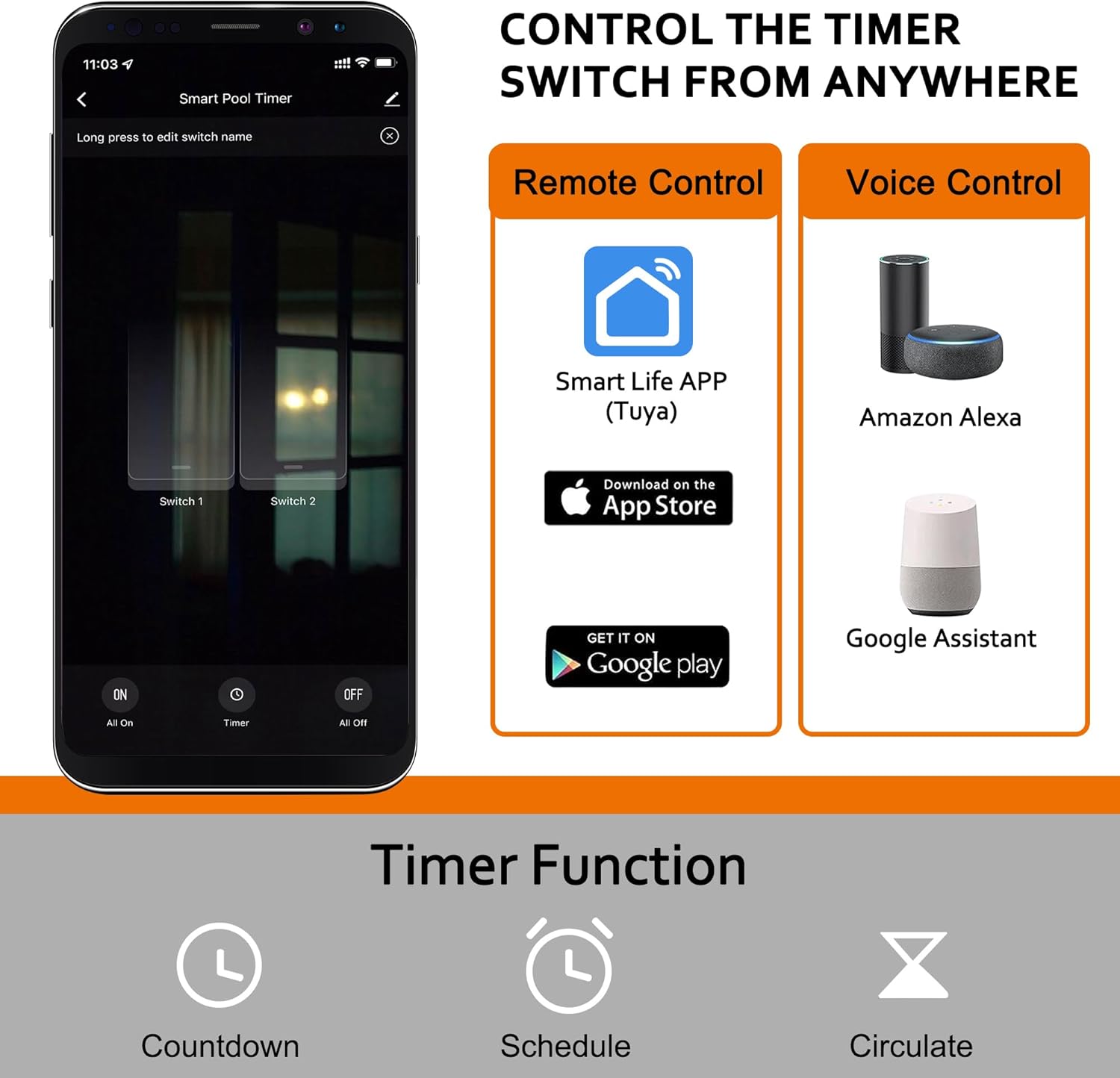
Figure 5.1: Screenshot of the Smart Life App interface, showing options for remote control, voice control compatibility with Amazon Alexa and Google Assistant, and various timer functions like countdown and scheduling.
6. Operating Instructions
The Suraielec WiFi Pool Timer offers both manual control and smart control via the app and voice assistants.
6.1 Manual Control
Each switch on the timer has a corresponding manual ON/OFF button (which also serves as a reset button with an indicator light). Press the button to toggle the connected appliance on or off manually.
6.2 App Control and Scheduling
Once connected to the Smart Life App, you can:
- Remote ON/OFF: Control your devices from anywhere with an internet connection.
- Program Timer: Set specific ON/OFF times for each day of the week.
- Countdown Timer: Set a device to turn off after a specified duration.
- Repeat Timer: Configure cycles of ON/OFF periods.
- Share Control: Share device control with family members through the app.

Figure 6.1: The timer box with its dimensions and examples of applications such as fountains, pools, and outdoor lighting. It also highlights the detachable module for easy wiring and the lockable cover for security.

Figure 6.2: The Suraielec WiFi Pool Timer shown in an outdoor setting, demonstrating its ability to control various large-load devices like pool filter pumps, water heaters, HVAC equipment, irrigation systems, and outdoor lighting.
6.3 Voice Control
Integrate the Suraielec WiFi Pool Timer with Amazon Alexa or Google Home Assistant by linking your Smart Life account in their respective apps. Once linked, you can use voice commands to turn devices on or off.
7. Maintenance
To ensure the longevity and optimal performance of your Suraielec WiFi Pool Timer, follow these maintenance guidelines:
- Regular Cleaning: Periodically wipe the exterior of the timer box with a damp cloth to remove dust and debris. Do not use abrasive cleaners or solvents.
- Inspect Wiring: Annually, or as needed, visually inspect all wiring connections for any signs of wear, corrosion, or loosening. Ensure the box cover is securely latched to maintain its weatherproof integrity.
- Environmental Protection: While designed for outdoor use, avoid direct exposure to extreme conditions if possible. Ensure proper drainage around the installation area to prevent water accumulation.
- Software Updates: Keep the Tuya Smart Life App updated to the latest version to benefit from new features and security enhancements.
8. Troubleshooting
If you encounter issues with your Suraielec WiFi Pool Timer, refer to the following common troubleshooting steps:
| Problem | Possible Cause | Solution |
|---|---|---|
| Device not connecting to Wi-Fi. | Incorrect Wi-Fi frequency (5 GHz), weak signal, incorrect password. | Ensure your router broadcasts a 2.4 GHz network and your phone is connected to it during setup. Move the timer closer to the router or use a Wi-Fi extender. Double-check the Wi-Fi password. Contact your internet provider to ensure your modem supports dual frequencies or to enable the 2.4 GHz band. |
| Appliance not turning ON/OFF as scheduled. | Incorrect schedule settings, power interruption, device offline. | Verify the schedule settings in the Smart Life App. Check the power supply to the timer. Ensure the timer is connected to Wi-Fi (check indicator light). |
| Manual ON/OFF buttons not responding. | No power to the unit, internal fault. | Check the main breaker and wiring connections. If power is present and buttons are still unresponsive, contact customer support. |
| Voice control not working. | Incorrect linking of accounts, device name not recognized. | Ensure your Smart Life account is correctly linked to Amazon Alexa or Google Home. Try renaming the device in the Smart Life App to something simpler. |
9. Warranty and Support
For product support, technical assistance, or warranty inquiries, please contact SURAIELEC customer service. Refer to the product packaging or the official SURAIELEC website for contact information.
Optional protection plans are available for this product, offering extended coverage beyond the standard manufacturer's warranty. Details on these plans can be found where the product was purchased.
Related Documents - UBTW02T
 |
Suraielec Smart Wi-Fi Box Timer Switch UBTW02T User Manual User manual for the Suraielec Smart Wi-Fi Box Timer Switch (UBTW02T). Provides detailed instructions on safety, specifications, installation, wiring, Smart Life app setup, and troubleshooting for controlling heavy-duty electrical appliances. |
 |
Suraielec 7-Day Pool Timer Owner's Manual & Programming Guide This owner's manual provides detailed instructions for setting up and programming the Suraielec 7-Day Pool Timer, also known as the Autopetfeeder. Learn how to set the current time, day, manage daylight saving time, understand timer modes (ON, AUTO, OFF), select days of the week for feeding, and program multiple ON/OFF schedules for automated pet feeding. |
 |
Suraielec 7-Day Digital Box Timer Switch T40D Manual Comprehensive manual for the Suraielec 7-Day Digital Box Timer Switch T40D, covering installation, wiring diagrams, programming, and safety instructions for residential and commercial applications. |
 |
Suraielec 7-Day Digital Box Timer Switch Installation and Operation Manual This document provides installation, wiring, and programming instructions for the Suraielec 7-Day Digital Box Timer Switch (SKU: UBTD01A). It covers safety precautions, specifications, product illustration, wiring diagrams for various applications, programming steps including setting current time, ON/OFF programs, and manual override, as well as a one-year limited warranty. |
 |
Jewenwils Outdoor Wi-Fi Pool Timer HOWT01E: Installation and User Manual Comprehensive guide for the Jewenwils Outdoor Wi-Fi Pool Timer (Model HOWT01E, PTW01, PTW03). Includes specifications, installation instructions, app setup, timer functions, and safety information. |
 |
SURAIELEC TM18R Light Sensor Stake Timer: Installation, Operation, and Specifications Comprehensive guide for the SURAIELEC TM18R Light Sensor Stake Timer, covering installation, operating instructions, features, specifications, warranty, and FCC compliance. Ideal for outdoor lighting control. |
Ask a question about this manual
Ask about setup, troubleshooting, compatibility, parts, safety, or missing instructions. Manuals+ will review the question and use this page’s manual context to help answer it.