
AUDEEKON 25LEU-1.1/20
AUDEEKON Roller Tubular Motor User Manual
Model: 25LEU-1.1/20
1. Introduction
Thank you for choosing the AUDEEKON Roller Tubular Motor. This innovative, battery-powered motor is designed to effortlessly automate your roller blinds, offering convenience and smart home integration without the need for complex wiring. With its wireless capabilities, you can control your blinds via remote, smartphone app, or voice commands through compatible smart home systems like Alexa and Google Home.
This manual provides detailed instructions for installation, operation, maintenance, and troubleshooting to ensure you get the most out of your new smart blind motor.
2. What's in the Box
Upon opening your package, please verify that all components are present and in good condition:
- Rechargeable Motor
- Remote Control
- USB Charging Cable
- Mounting Hardware (Brackets)

Figure 2.1: Package Contents. This image displays the rechargeable motor, remote control, USB charging cable, and mounting brackets included in the product package.
3. Specifications
Below are the technical specifications for the AUDEEKON Roller Tubular Motor:
| Parameter | Value |
|---|---|
| Motor Type | 1"/25mm roller blinds motor |
| Rated Torque | 0.8Nm |
| Motor Speed | 28r/min |
| Rated Power | 10W |
| Max Width (Blind) | 95" |
| Max Height (Blind) | 158" |
| Minimum Width (Blind) | 21" |
| Waterproof Grade | IP22 |
| Voltage | 5 Volts (Charging), 9 Volts (Operation) |
| Frequency | 433.92mhz |
| Product Dimensions | 17.6 x 17.6 x 5.5 inches; 1.4 Pounds |
| Battery Type | 1 Lithium Ion (included) |
Figure 3.1: Product Parameters. This image visually presents the key specifications of the motor, including dimensions and performance metrics.
4. Setup and Installation
The AUDEEKON Roller Tubular Motor is designed for easy DIY retrofit into existing roller blinds. Follow these steps for successful installation:
- Measure the Shade Tube: Ensure your roller blind's aluminum shade tube has an outer diameter (OD) of 1.5 inches (38mm). The motor is designed for 1"/25mm roller blinds motor, which fits into a 1.5"/38mm aluminum shade tube.
- Insert the Motor: Carefully slide the tubular motor into the roller blind's shade tube. Ensure it is fully seated and aligned.
- Mount the Brackets: Attach the provided mounting brackets to both sides of your window frame or wall, ensuring they are level and securely fastened. The motor's end caps will fit into these brackets.
- Program the Motor: Once the motor is installed in the tube and mounted, use the included remote control to program the motor. This typically involves setting the upper and lower limits of the blind's travel. Refer to the remote control's specific instructions for detailed programming steps.
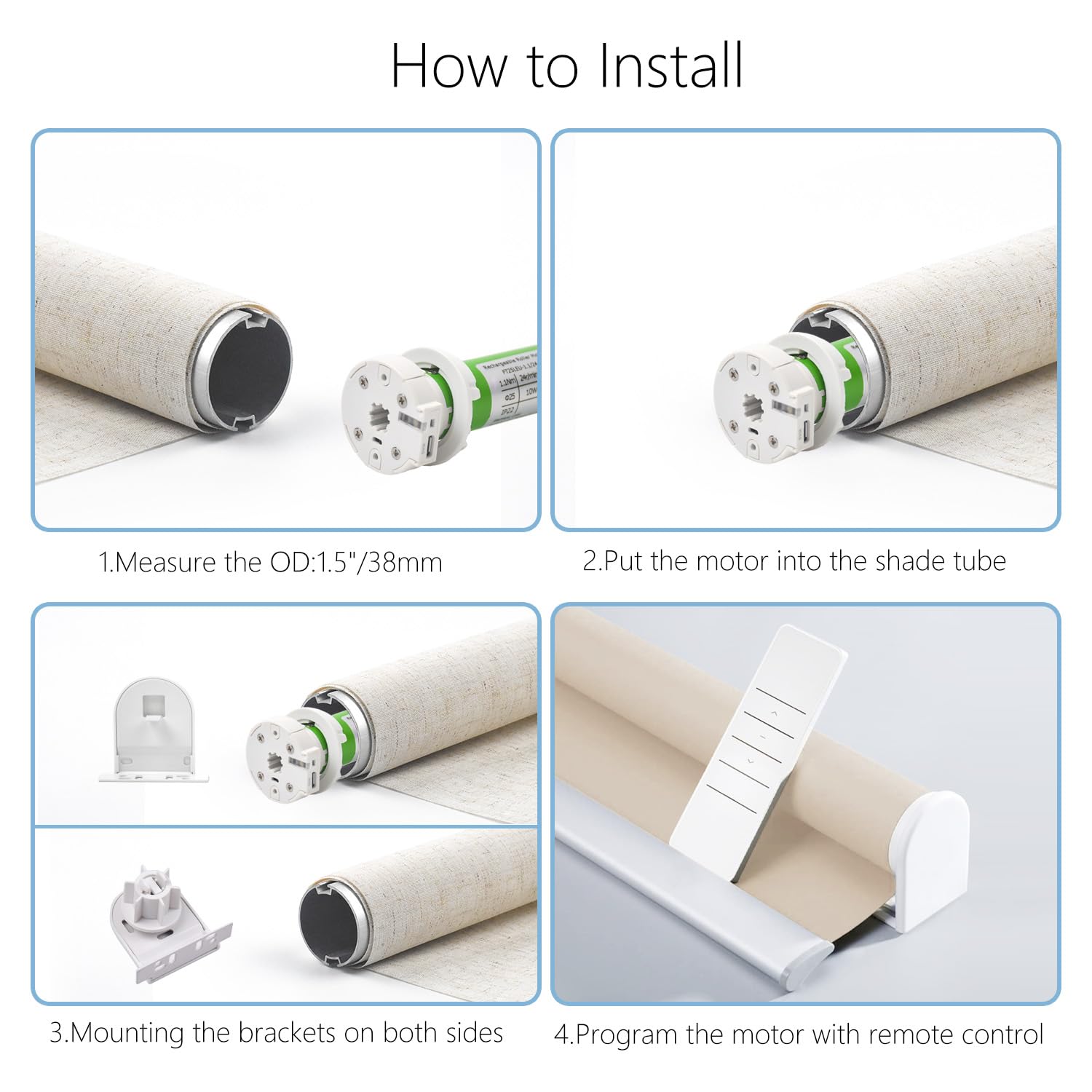
Figure 4.1: How to Install. This image illustrates the four main steps for installing the motor: measuring the tube, inserting the motor, mounting brackets, and programming.

Figure 4.2: Motor Components. This image highlights the motor's key features including the position to hold bracket, dial switch, LED light, program button, and Android USB charging port.

Figure 4.3: Retrofit Capability. This image demonstrates how easily the motor can be used to retrofit different types of manual shades in various environments.
5. Charging the Motor
The AUDEEKON motor features a built-in rechargeable battery designed for long-lasting use. A full charge can last approximately 3-6 months with average use.
5.1 Charging Methods
You can charge the motor using the following methods:
- USB Cord (Included): Connect the provided USB charging cable to the motor's charging port (refer to Figure 4.2) and a standard 5V USB power adapter (not included).
- Solar Panel (Not Included): For continuous charging, a compatible solar panel can be connected.
- Power Bank (Not Included): A portable power bank can also be used for charging.
A full charge takes approximately 6 hours. After a full charge, the motor can run approximately 600 times (up/down cycles).
5.2 Charging Indicator
Before charging, ensure the dial switch on the motor is set to the '1' position. An LED light (refer to Figure 4.2) will indicate the charging status.

Figure 5.1: How to Charge the Motor. This image illustrates the three charging options: via USB cord (included), solar panel (not included), and power bank (not included).
6. Operation and Control
The AUDEEKON Roller Tubular Motor offers multiple convenient ways to control your blinds:
6.1 Remote Control
Use the included remote control to raise, lower, and stop your blinds. The remote also allows for setting favorite positions and programming limits.

Figure 6.1: Remote Control. This image shows the dedicated remote control for operating the blinds.
6.2 App Control
For advanced control and smart home integration, download the dedicated app (bridge required). The app allows you to control your blinds from anywhere, set schedules, and manage multiple blinds.

Figure 6.2: App Control. This image demonstrates controlling the blinds via a smartphone application.
6.3 Voice Control
Integrate your motor with smart home systems like Amazon Alexa or Google Home (bridge and IFTTT required) for convenient voice control. Simply use commands like "Alexa, turn on the shades" or "OK Google, open the blinds."

Figure 6.3: Voice Control. This image shows smart speakers (Alexa and Google Home) enabling voice commands for the blinds.

Figure 6.4: Wireless Control Features. This image highlights the motor's wireless capabilities including remote, app, and voice control, along with its low noise level (≤35dB).

Figure 6.5: Multiple Control Methods. This image showcases the comprehensive control options available for the motorized blinds, including remote, voice, app, and scheduled timing.
6.4 Child and Pet Safety
The cordless design of the AUDEEKON motor eliminates hazardous cords, making your blinds safer for homes with children and pets. It offers one-touch control and intelligent safety features.

Figure 6.6: Child and Pet Safety. This image highlights the cordless design and intelligent safety features of the roller shades, making them safe for children and pets.

Figure 6.7: Child and Pet Friendly. This image reinforces the safety aspects of the product for households with children and pets, due to its cordless design and intelligent safety features.
7. Maintenance
To ensure the longevity and optimal performance of your AUDEEKON Roller Tubular Motor, follow these simple maintenance guidelines:
- Regular Charging: Charge the motor regularly, even if not fully depleted, to maintain battery health. Avoid letting the battery completely drain for extended periods.
- Keep Clean: Periodically wipe the motor and remote control with a soft, dry cloth to remove dust and debris. Do not use abrasive cleaners or immerse the motor in water.
- Avoid Obstructions: Ensure the path of the roller blind is clear of any obstructions that could impede its movement and strain the motor.
- Temperature Control: Operate the motor within recommended temperature ranges. Extreme temperatures can affect battery performance and motor lifespan.
8. Troubleshooting
If you encounter any issues with your AUDEEKON Roller Tubular Motor, please refer to the following troubleshooting tips:
8.1 Motor Not Responding
- Check Battery: Ensure the motor is sufficiently charged. Connect the USB charging cable and allow it to charge for at least 30 minutes before trying again.
- Remote Control Battery: Replace the battery in the remote control if it's not responding.
- Remote Pairing: If the remote was recently dropped or if the motor was reset, it might need to be re-paired with the motor. Refer to the remote's instructions for pairing procedures.
- Obstructions: Check if anything is physically blocking the blind's movement.
8.2 Blind Not Moving to Correct Position
- Recalibrate Limits: The upper and lower limits may need to be reset. Follow the programming instructions in your remote control manual to recalibrate the travel limits.
- Interference: Ensure there are no strong radio frequency interferences nearby that could affect the remote signal.
8.3 Motor Making Unusual Noises
- Check Installation: Ensure the motor is securely seated within the tube and the tube is properly mounted in the brackets. Loose components can cause rattling.
- Obstructions: Verify that the blind fabric or any part of the mechanism is not rubbing against the motor or tube.
8.4 App/Voice Control Issues
- Bridge Connection: Ensure your smart home bridge is powered on and connected to your home network.
- Internet Connection: Verify your internet connection is stable.
- App Updates: Make sure your control app is updated to the latest version.
- Account Linking: Confirm that your motor and smart home accounts (e.g., Alexa, Google Home) are correctly linked.
If these steps do not resolve the issue, please contact AUDEEKON customer support for further assistance.
9. Warranty and Support
For warranty information and customer support, please refer to the documentation provided with your purchase or visit the official AUDEEKON website. If you require technical assistance or have questions not covered in this manual, please contact AUDEEKON customer service directly.
Manufacturer: AUDEEKON
Ask a question about this manual
Ask about setup, troubleshooting, compatibility, parts, safety, or missing instructions. Manuals+ will review the question and use this page’s manual context to help answer it.