
GODOX QT400IIIM
GODOX QT400III Studio Strobe Flash Light User Manual
Model: QT400IIIM
1. Introduction
The GODOX QT400III Studio Strobe Flash Light is a high-performance lighting solution designed for professional photography. It features advanced capabilities such as high-speed sync, fast recycling times, and a powerful LED modeling light, making it suitable for capturing fast-moving subjects with precision and clarity. This manual provides detailed instructions for the safe and effective use of your QT400III flash unit.

Figure 1.1: GODOX QT400III Studio Strobe Flash Light with its components.
2. Key Features
- Ultra-Fast Flash Duration: Achieve flash durations up to 1/29600s (t=0.1, QT400IIIM) for freezing fast-moving subjects with exceptional detail and sharpness.
- Rapid Recycling Time: Features a fast recycling time of 0.01-0.9s, enabling continuous shooting at up to 20 images per second.
- Powerful 40W LED Modeling Light: Upgraded energy-saving LED modeling light, adjustable from 0-100%, for accurate light and shadow preview.
- Precise Power Control: Adjustable output from 1/256 to 1/1 for fine-tuning light intensity.
- Built-in 2.4G Wireless System: Full wireless control of the strobe using Godox X1, X2, or XPRO triggers, with a 50m operating range.
- Stable Color Temperature Mode: Ensures high color accuracy for consistent results.
3. Setup
3.1 Unpacking and Inspection
Carefully remove all components from the packaging. Inspect the flash unit and accessories for any signs of damage. Refer to the 'What's in the Box' section to ensure all items are present.
3.2 Mounting the Flash Unit
- Attach the QT400III flash unit to a compatible light stand using the integrated mounting bracket.
- Secure the unit by tightening the locking knob on the mounting bracket.
3.3 Power Connection
- Ensure the flash unit's power switch is in the 'OFF' position.
- Connect the provided power cord to the power input on the flash unit.
- Plug the other end of the power cord into a suitable AC power outlet.
3.4 Installing the Lamp Tube and Glass Protection Cover
- Carefully insert the lamp tube into its socket on the front of the flash unit.
- Attach the glass protection cover over the lamp tube to protect it from damage.
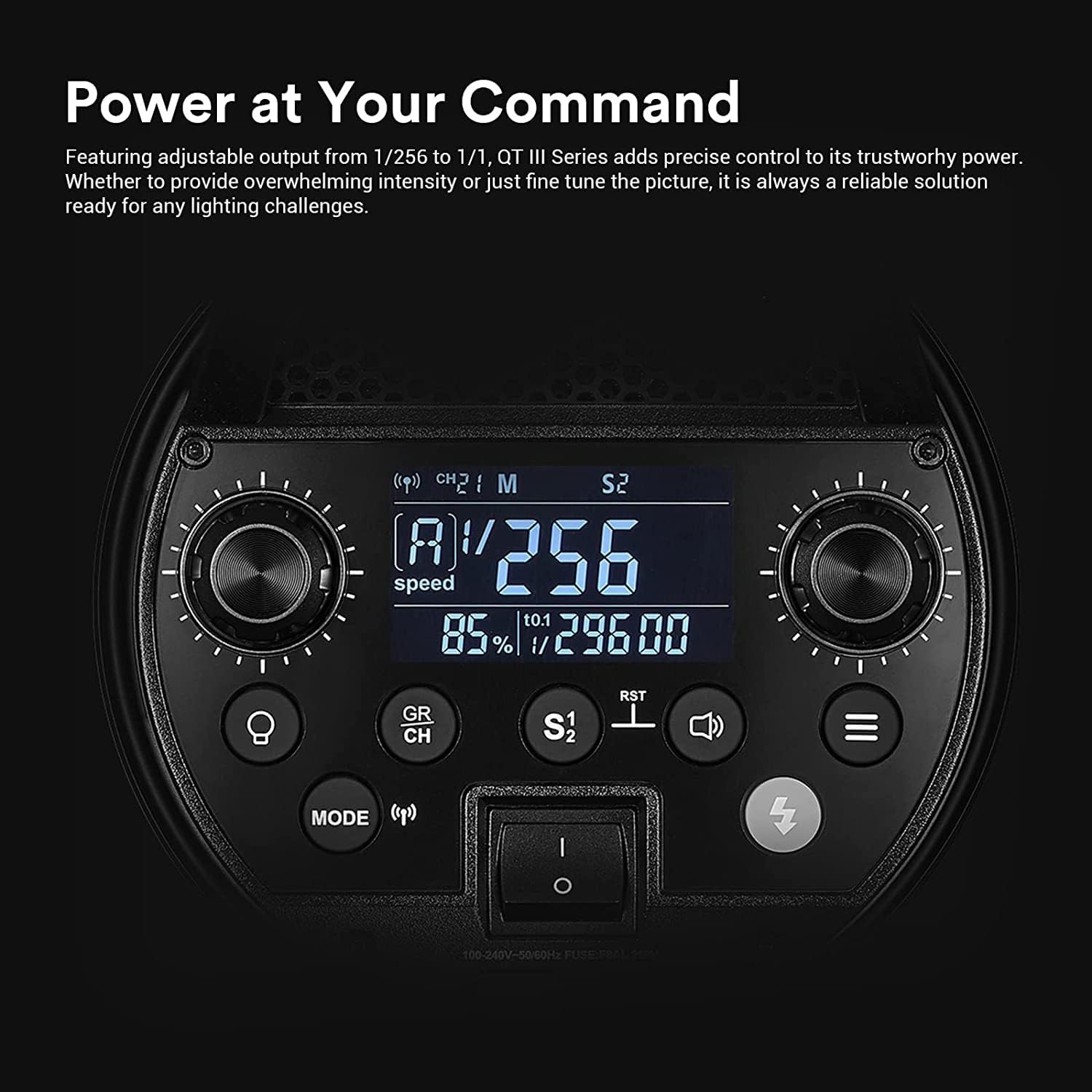
Figure 3.1: Close-up view of the modeling light and flash tube assembly.
4. Operating Instructions
4.1 Powering On/Off
Locate the power switch on the rear panel of the flash unit. Flip the switch to 'ON' to power on the unit. Flip to 'OFF' to power off.
4.2 Control Panel Overview
The LCD panel and control knobs/buttons allow for precise adjustment of flash settings. Familiarize yourself with the layout:

Figure 4.1: Detailed view of the QT400III control panel.
4.3 Adjusting Flash Output
Use the main control dial to adjust the flash output power from 1/256 to 1/1. The current setting will be displayed on the LCD screen.
4.4 Modeling Light Operation
The 40W LED modeling light can be adjusted from 0-100%. Press the modeling light button (usually indicated by a light bulb icon) to cycle through modes or adjust intensity. In PROP mode, the modeling lamp power changes proportionally with the flash power.

Figure 4.2: The 40W LED modeling light provides adjustable illumination.
4.5 Flash Modes
The QT400III supports various flash modes including Manual (M), Multi (Stroboscopic), and High-Speed Sync (HSS).
- Manual (M) Mode: Manually set the flash output power.
- Multi (Stroboscopic) Mode: Fires a series of rapid flashes within a single exposure to capture multiple movements of a subject. Adjust flash frequency and number of flashes as needed.
- High-Speed Sync (HSS) Mode: Allows the flash to synchronize with shutter speeds up to 1/8000s, enabling wider apertures in bright conditions or freezing fast action.

Figure 4.3: Example of capturing multiple movements using fast recycling time.

Figure 4.4: High-speed sync allows freezing dynamic moments like powder in motion.
4.6 Wireless Control
The integrated 2.4G wireless system allows for remote control of the flash unit. Use a compatible Godox X1, X2, or XPRO trigger (sold separately) to adjust settings, trigger the flash, and control multiple units within the Godox flash ecosystem. Ensure the flash unit and trigger are set to the same channel and group.

Figure 4.5: Wireless control setup for efficient workflow.
4.7 Compatible Light Modifiers
The QT400III features a Bowens-mount, making it compatible with a wide range of light shaping accessories such as softboxes, beauty dishes, snoots, and reflectors. These modifiers allow for versatile lighting effects to suit various photographic needs.

Figure 4.6: Examples of compatible Bowens-mount light shapers.
4.8 Operation Tutorial Video
For a visual guide on operating the GODOX QT400III, please refer to the official tutorial video below:
Video 4.1: GODOX QT400-1200IIIM Studio Strobe Flash Light Operation Tutorial. This video demonstrates the basic functions and controls of the flash unit.
5. Maintenance
- Keep the flash unit clean by wiping it with a soft, dry cloth.
- Avoid exposing the unit to extreme temperatures, humidity, or direct sunlight.
- Store the unit in a dry, dust-free environment when not in use.
- Do not attempt to disassemble or repair the unit yourself. Contact authorized service personnel for repairs.
6. Troubleshooting
| Problem | Possible Cause | Solution |
|---|---|---|
| Flash not firing | Power off; Trigger not connected/synced; Overheating protection; Low power setting. | Check power connection and switch; Ensure trigger is properly set up and synced; Allow unit to cool down; Increase flash power setting. |
| Inconsistent flash output | Unstable power supply; Incorrect settings; Interference. | Ensure stable power source; Verify flash mode and power settings; Minimize wireless interference. |
| Modeling light not working | Modeling light off; Bulb issue. | Press modeling light button to turn on; Check if bulb needs replacement (contact support if necessary). |
7. Specifications
| Feature | Detail |
|---|---|
| Model Number | QT400IIIM |
| Brand | GODOX |
| Flash Sync Speed | 1/8000s |
| Modeling Light | 40W LED, adjustable 0-100% |
| Recycling Time | 0.01-0.9s |
| Wireless System | Built-in 2.4G |
| Product Dimensions | 15.75 x 5.51 x 6.69 inches |
| Item Weight | 6.39 pounds |
| Compatible Mountings | Godox SK400II, Canon E-TTL, Canon E-TTL II, Nikon SB 5000 AF, Nikon SB-900, Nikon SB-910, Sony Alpha |
8. What's in the Box
- QT1200IIIM Light Body (Note: Model number in list may vary, but refers to the QT400IIIM unit)
- Lamp Tube
- Power Cord
- Glass Protection Cover
- Light Cover

Figure 8.1: Contents of the GODOX QT400III package.
9. Warranty and Support
GODOX products are covered by a limited warranty. For detailed warranty information, technical support, or service inquiries, please refer to the official GODOX website or contact your local distributor. Keep your purchase receipt as proof of purchase for warranty claims.
Related Documents - QT400IIIM
 |
Godox AD400 Pro All-in-One Outdoor Flash User Manual Explore the capabilities of the Godox AD400 Pro, an all-in-one outdoor flash designed for professional and enthusiast photographers. This manual details its advanced features, including TTL, HSS, 2.4G wireless control, and multiple flash modes, ensuring optimal use for various shooting scenarios. |
 |
Godox AD600B TTL All-in-One Outdoor Flash Instruction Manual Comprehensive instruction manual for the Godox AD600B TTL All-in-One Outdoor Flash, detailing its features, operation modes (TTL, Manual, Stroboscopic), wireless capabilities, battery management, protection mechanisms, technical specifications, and warranty information. |
 |
Godox AD300Pro Outdoor Flash Instruction Manual This document is the instruction manual for the Godox AD300Pro, a 300Ws TTL outdoor flash. It provides detailed information on product features, operation, settings, wireless functions, custom functions, protection mechanisms, technical specifications, firmware upgrades, and maintenance. The manual is designed for photographers seeking to understand and utilize the full capabilities of the AD300Pro for various shooting scenarios. |
 |
Godox TT685IIN TTL Camera Flash User Manual Comprehensive user manual for the Godox TT685IIN TTL Camera Flash, covering i-TTL, manual, and stroboscopic modes, wireless 2.4G radio transmission, features, specifications, and troubleshooting for Nikon cameras. |
 |
Godox AD600BM WITSTRO All-in-One Outdoor Flash User Manual Comprehensive user manual for the Godox AD600BM WITSTRO All-in-One Outdoor Flash, detailing its features, operation, wireless capabilities, and maintenance. |
 |
Godox AD200 Pro Flash Strobe User Guide Comprehensive user guide for the Godox AD200 Pro AD200Pro Flash Strobe Monolight, covering features, operation, and specifications. |
Ask a question about this manual
Ask about setup, troubleshooting, compatibility, parts, safety, or missing instructions. Manuals+ will review the question and use this page’s manual context to help answer it.