
SPUIOOY PD-JFWM-ILVA
40K Cavitation Machine User Manual
Model: PD-JFWM-ILVA
Brand: SPUIOOY
Introduction
Thank you for choosing the SPUIOOY 40K Cavitation Machine. This advanced 4-in-1 beauty device is designed for comprehensive body and facial care, offering solutions for skin tightening, wrinkle reduction, collagen stimulation, and fat reduction. With its versatile massage heads, it adapts to various skin types and body areas, making it suitable for home use, beauty salons, and spa centers. Please read this manual carefully before operation to ensure safe and effective use of the product.
Safety Information
Important Safety Precautions:
- This massage device is intended for external use only.
- Do not use on open wounds or damaged skin areas.
- Avoid using the device if you have varicose veins or circulatory problems.
- Do not use the device for more than 20 minutes at a time on a single area.
- Consult a doctor before use if you suffer from a chronic illness or skin condition.
- Keep out of reach of children.
- Do not immerse the device or its components in water.
- Ensure the power supply is stable and matches the device's requirements.
Package Contents
Please check the package contents upon unboxing to ensure all components are present and undamaged:
- Main Control Unit with LCD Touch Screen
- Quadrupolar RF Handle
- Tripolar RF Handle
- Vacuum Bipolar RF Handle
- 40KHz Ultrasonic Cavitation Handle
- Handle Holder Stand (Assembly Required)
- Power Adapter
- User Manual

Image: Overview of the 40K Cavitation Machine and its included accessories.
Setup Guide
Follow these steps to set up your 40K Cavitation Machine:
- Unpack all components from the box and place them on a stable, flat surface.
- Assemble the handle holder stand by screwing the metal rods into the designated holes on the main unit, then attach the clear acrylic holder to the top of the rods.
- Connect each treatment handle to its corresponding port on the main unit. Ensure the connections are secure. The ports are typically labeled for each handle type (e.g., RF, Cavitation, Vacuum).
- Connect the power adapter to the main unit's power input port, then plug the adapter into a suitable electrical outlet.
- Turn on the main unit using the power switch, usually located on the back or side of the device.
Video: This video demonstrates the assembly process of the 40K Cavitation Machine, including attaching the stand and connecting the various treatment handles to the main unit.
Operating Instructions
Understanding the Handles
The machine comes with four different treatment handles, each designed for specific functions:
- 40KHz Ultrasonic Cavitation Handle: This head uses 40KHz ultrasonic waves to effectively consume cell calories and promote metabolism, targeting fat cells.
- Quadrupolar RF Handle: Provides super energy for tightening, ideal for larger body areas like arms, legs, thighs, hips, and abdomen.
- Tripolar RF Handle: Designed for facial skin, it effectively stimulates skin cells, promotes rapid collagen synthesis, and improves skin elasticity, reducing wrinkles and fine lines.
- Vacuum Bipolar RF Handle: Combines vacuum suction with bipolar RF to strengthen muscles, improve relaxation, and address obesity, particularly effective for body contouring.

Image: Visual guide to the different treatment handles and their primary uses.
Application Areas
The machine is versatile and can be used on various parts of the body and face:
- Face: For firming skin, improving elasticity, reducing wrinkles, and lifting.
- Eye Area: To relieve eye fatigue, reduce dark circles, eye bags, and edema.
- Neck: To reduce sagging, roughness, and dullness of the neck skin.
- Arms: For skin tightening and consuming excess fat.
- Back: To promote metabolism and improve back muscle mass.
- Hips: To make hips bright and elastic, creating a perfect hip shape.
- Legs: To remove thigh fat and burn fat cells.

Image: Recommended application areas for the beauty machine.
Step-by-Step Usage
The power, mode, and time settings can be adjusted on the color touch screen. It is generally recommended to use the device for 15-20 minutes per session, 2-3 times per week.
- Clean the Skin: Before starting any treatment, ensure the skin area to be treated is clean and dry.
- Apply Massage Oil/Gel: Apply a suitable amount of conductive massage oil or gel to the treatment area. This helps the handle glide smoothly and enhances conductivity.
- Quadrupolar RF (Body): Use the Quadrupolar RF handle on body areas for about 10 minutes to help soften fat cells.
- 40KHz Cavitation (Body): Switch to the 40KHz Cavitation handle and treat body areas for approximately 20 minutes to dissolve fat cells.
- Vacuum RF (Body): Use the Vacuum RF handle on body areas for about 15 minutes to help expel dissolved fat cells and contour the body.
- Tripolar RF (Face): For facial treatment, use the Tripolar RF handle for about 20 minutes to tighten skin and reduce wrinkles.

Image: Step-by-step guide for applying the different treatment modes.
Maintenance
Proper maintenance ensures the longevity and optimal performance of your device:
- Cleaning: After each use, wipe the treatment handles and the main unit with a soft, damp cloth. Do not use abrasive cleaners or immerse any part of the device in water.
- Storage: Store the device and its accessories in a cool, dry place, away from direct sunlight and extreme temperatures.
- Handle Care: Handle the probes with care. Avoid dropping them or subjecting them to strong impacts.
- Power Cord: Always unplug the device by grasping the plug, not the cord. Inspect the power cord regularly for any damage.
Troubleshooting
If you encounter any issues with your device, please refer to the following common problems and solutions:
| Problem | Possible Cause | Solution |
|---|---|---|
| Device does not power on. | Power cord not properly connected; Power outlet malfunction; Device fault. | Check power cord connection; Try a different outlet; Contact customer support. |
| No sensation or weak effect during treatment. | Insufficient conductive gel; Incorrect intensity setting; Handle not making full contact with skin. | Apply more conductive gel; Increase intensity setting gradually; Ensure full contact of handle with skin. |
| Screen is unresponsive. | Temporary software glitch; Power issue. | Restart the device; Ensure stable power supply. If issue persists, contact support. |
| Unusual noise from the device. | Internal component issue. | Turn off the device immediately and contact customer support. Do not attempt to repair. |
Specifications
| Feature | Detail |
|---|---|
| Brand | SPUIOOY |
| Model Number | PD-JFWM-ILVA |
| Power Source | Corded Electric |
| Color | White |
| Special Feature | Heat |
| Massager Form | Massage Wand (referring to handles) |
| Specific Uses | General Relaxation and Muscle Relief, Skin Tightening, Fat Reduction |
| Wireless | No |
| Package Dimensions | 38.29 x 37.6 x 19.7 cm |
| Package Weight | 4.59 kilograms |
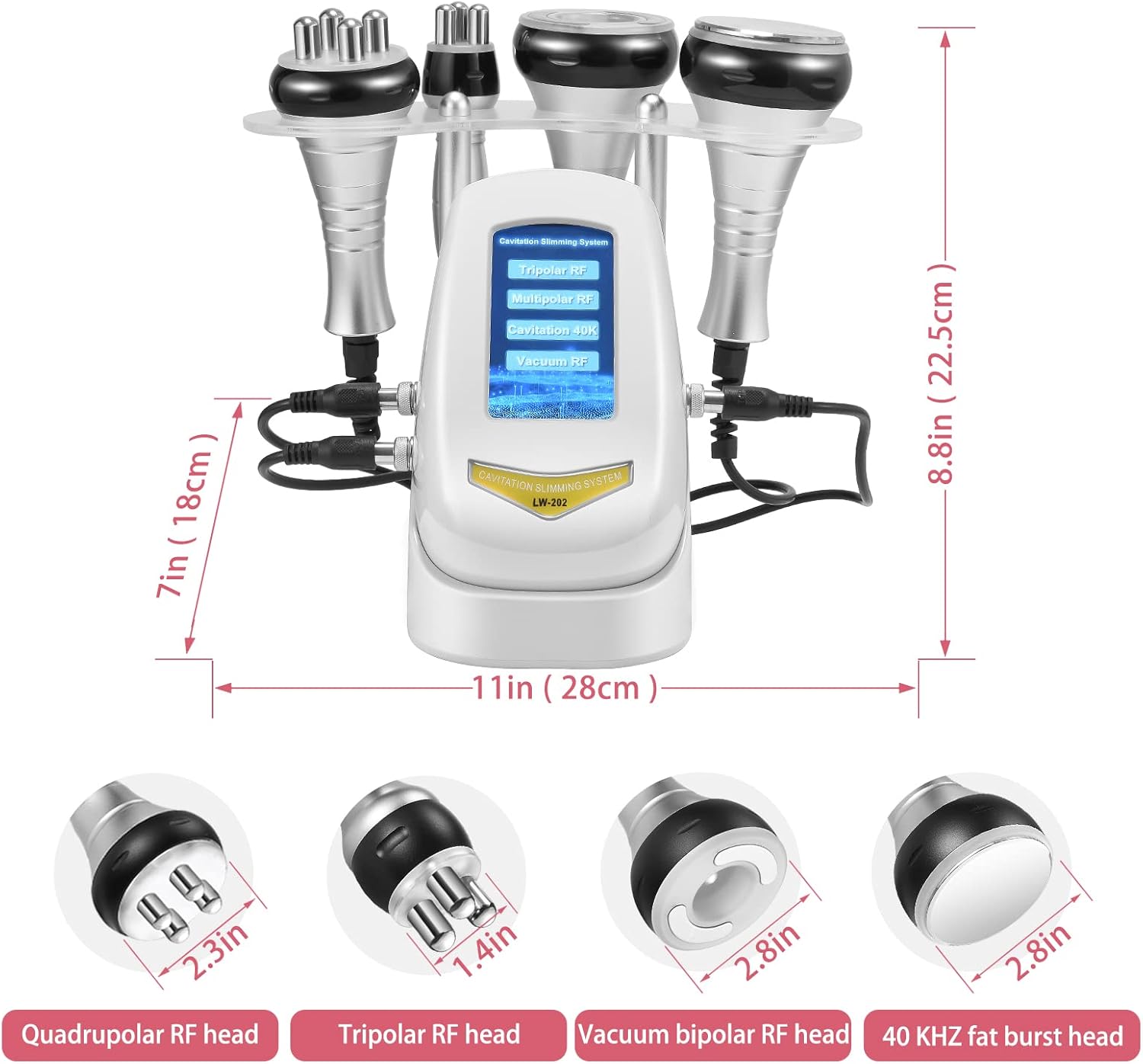
Image: Dimensions of the main unit and treatment heads.
Warranty and Support
Your SPUIOOY 40K Cavitation Machine comes with a standard manufacturer's warranty. Please refer to the warranty card included in your package for specific terms and conditions. For technical support, troubleshooting assistance, or warranty claims, please contact our customer service team through the retailer where you purchased the product or visit the official SPUIOOY website for contact information.
We are committed to providing high-quality products and excellent customer service. Your satisfaction is our priority.
Related Documents - PD-JFWM-ILVA
 |
Favero Assioma DUO-Shi Pedal Body Installation Guide A concise guide for installing the Favero Assioma DUO-Shi power meter sensor axle into Shimano pedal bodies. Covers necessary tools, disassembly, and assembly steps for compatibility with Shimano PD-R8000, PD-R7000, PD-6800, PD-R550, and PD-R540 pedal bodies. |
 |
Eaton Molded Case Circuit Breakers: Power Defense, Series G, and Series C Explore Eaton's comprehensive range of Molded Case Circuit Breakers, including the Power Defense, Series G, and Series C lines. This catalog details product specifications, applications, and ordering information for advanced electrical protection solutions. |
 |
Porodo PD-LSBSC Smart Body Scale User Manual Comprehensive guide to the Porodo PD-LSBSC Smart Body Scale, detailing its features, Bluetooth connectivity, AiLink app integration, and analysis of 18 body health metrics for a healthier lifestyle. |
 |
MOTIF PD-1/PD-L1 Panel: Auto Lung Cancer Kit - Akoya Biosciences Technical data sheet for the MOTIF PD-1/PD-L1 Panel: Auto Lung Cancer Kit from Akoya Biosciences. This kit enables automated multiplex IHC detection of six protein biomarkers on lung cancer FFPE sections, optimized for the Leica BOND™ RX system. |
 |
Lutron Caséta Smart Dimmer Switch for ELV+ Bulbs (PD-5NE-WH): User Manual & Specifications Comprehensive user manual and specification submittal for the Lutron Caséta Smart Dimmer Switch (PD-5NE-WH), detailing features, specifications, operation, mounting, dimensions, wiring diagrams, and color finishes for ELV+ bulbs. |
 |
Lutron Caséta Wireless Advanced Installation Guide: Dimmers, Switches & Controls Comprehensive installation guide for Lutron Caséta Wireless smart lighting systems, covering dimmers (PD-6WCL, PD-10NXD, PD-5NE), switches (PD-5WS-DV, PD-5ANS, PD-6ANS), fan controls (PD-FSQN), and motion sensors (PD-OSENS, PD-VSENS). Learn about 3-way and multi-location installations, advanced features, and troubleshooting. |